Best Computer for ChatGPT in 2026
Published April 25, 2026. Updated May 8, 2026.
Summary: don’t overspend, if you are an intermediate to lightly advanced CODEX/ChatGPT user I would start with the MacBook Air M5 for CODEX and ChatGPT, especially at ~$949 on sale See current price. It is silent, the 18-hour battery is real-world good, and Atlas, voice mode, and the desktop app all feel native on it. The $599 Neo surprised me most as an ultra budget option 🙂 If you want the fast version of Mac vs Windows vs budget, the table below gets you there in about ten seconds.
What’s new in CODEX/ChatGPT for 2026: ChatGPT in 2026 is more than a browser tab. The desktop app, voice mode, Codex, Atlas, and a few Mac-only extras changed what matters in a machine, even though the model itself still runs in the cloud. There are some great Windows and Linux options out there as well.
I only recommend products I own, have tested, or would buy myself. Prices shift constantly. Verify before purchasing. I plan to update this bi-weekly.
Jump to: Editor’s Choice | What It Needs | Laptops | Desktops | Codex CLI | Dedicated Box? | Local AI | Peripherals | Ergonomics | What I’d Buy
Just tell me what to buy:
Best overall: MacBook Air M5Cheapest: MacBook NeoNeed Windows: ThinkPad 32GBBest desk: Mac mini M4
Editor’s Choice: Best Computer for ChatGPT
Short on time? Here are my picks. Reasoning for each is below.
| Category | Pick | Key Specs | Why I Recommend It | Check Price |
|---|---|---|---|---|
| Best Laptop | MacBook Air M5 | M5, 16GB, 512GB SSD, fanless, 18-hour battery | The default answer for most people. Currently $150 off on Amazon. Runs the ChatGPT desktop app, Atlas, voice mode, and Work with Apps beautifully. Silent, all-day battery. | Check Price on Amazon |
| Best Budget Mac | MacBook Neo | A18 Pro, 8GB, 256GB SSD, fanless, $599 | Cheapest Mac laptop Apple has ever made. I have one and Atlas runs well on it. Voice mode sounds clean. Not a toy. A legitimate $599 ChatGPT machine. | Check Price on Amazon |
| Best Windows Laptop | ThinkPad (32GB+) | Modern T-series, 32GB RAM minimum, NVMe SSD | Best keyboard in the business. The ChatGPT desktop app runs native on Windows. You lose Atlas for now, but everything else is on parity. | Check Price on Amazon |
| Best Budget Desktop | Mac mini M4 | M4, 16GB, 256GB SSD, 5×5 inches, $599 | Tiny, quiet, cheap. If you already own a monitor, keyboard, and mouse, this is one of the cheapest serious ChatGPT setups you can buy. | Check Price on Amazon |
| Best Mac Desktop | Mac mini M4 Pro | M4 Pro, 24GB, 512GB SSD, Thunderbolt 5 | More headroom for Atlas with 30+ tabs, the desktop app, Codex CLI, and a normal browser all running at once. ~$1,279 on Amazon. | Check Price on Amazon |
| Best Windows Desktop | GEEKOM A9 Max | Ryzen AI 9 HX 370, 32GB DDR5, 2TB SSD, 80 TOPS NPU | Copilot+ certified mini PC at $999 on Amazon. Handles the ChatGPT desktop app, Codex CLI, and heavy browser work without breaking a sweat. Solid Windows answer to the Mac mini M4 Pro. | Check Price on Amazon |
| Best Budget Windows Desktop | Beelink SER8 | Ryzen 7 8845HS, 32GB DDR5, 1TB SSD | Desktop-class Windows for ChatGPT under $700, often under $600 with a coupon. Quiet, reliable, dual 4K output. The best budget Windows ChatGPT box I have used. | Check Price on Amazon |
What ChatGPT Actually Needs From Your Hardware
Most people want the easiest ChatGPT machine that is fast and feels good in every way. Mac wins that right now because of both fast hardware and tightly integrated software. Windows does have compelling options, but you have to choose your computer more carefully. For either OS: RAM and a good display matter more than raw CPU hype, and it is still possible to buy well without overspending.
You probably do NOT need to overspend. A $3,000 AI workstation does not make ChatGPT smarter, and the right ~$1,000 machine can do almost any task. The model runs in the cloud either way. You just need a system that never stands in your way.
If you are a Windows person, buy the right Windows computer. You are not missing ChatGPT itself. You are giving up a few Mac-only extras and that is OK.
With a 2026 computer the usual mistake is not buying a weak CPU. It is buying too little RAM. 16GB is the floor in 2026 (unless you are REALLY trying to save, in which case the MacBook Neo does a LOT with 8GB).
You have your own ChatGPT workflow. The details change, but the goal does not: hardware and software that stay out of your way, with no crashes, FAST response time, no super loud fans, long battery life, good input devices, and a great display.
| RAM | Good For |
|---|---|
| 8GB | Desktop app + light browsing + voice mode (MacBook Neo only, Apple’s compression earns it) |
| 16GB | Safe default. What most people should buy. |
| 32GB | Comfortable with Atlas, Codex CLI, work apps, and a normal browser all open. |
| 64GB+ | Only if you want to run local models alongside. |
The other things that matter, in priority order:
- A reliable internet connection. Every token goes over the wire. I target 100Mbps+ down with low latency, but ChatGPT works fine on much less. I run Starlink from rural Missouri and it handles voice mode, Atlas agent mode, and Codex CLI simultaneously. If you want the off-grid setup, a Starlink kit plus a portable power station keeps you working anywhere.
- Screen real estate. ChatGPT on one side, your work on the other. A second monitor is the single highest-ROI upgrade you can make. The ASUS ProArt PA278QV at ~$219 is the one I use every single day and I love it.
- Atlas, today. The ChatGPT-integrated browser launched in October 2025 and is still macOS only. Windows, iOS, and Android are on the roadmap with no public date. That fact pushes the picks below toward Mac. On a paid plan Atlas can also run agent mode for multi-step tasks; OpenAI’s own CISO has publicly said prompt injection may never be fully solved on agentic browsers, so keep agent mode scoped to low-stakes tasks for now.
- The desktop app. Option+Space on Mac, Alt+Space on Windows, ChatGPT opens from any app. Screen sharing, drag-and-drop uploads, voice mode, and on Mac a beta called Work with Apps that lets ChatGPT read VS Code, Xcode, Terminal, iTerm2, and TextEdit and propose diff edits on open files. None of that exists in the browser version.
- A good microphone. Advanced Voice Mode is a different way to use ChatGPT, and the built-in mic on most cheap Windows laptops is the weak link. Mac built-in arrays are respectable. A $50 to $100 USB condenser turns voice mode into a different product. More on this below.
- Fast storage. NVMe is ideal. A fast SATA SSD works in a pinch. I would not use a spinning drive in 2026 outside of bulk backups.
What does not matter much: raw CPU marketing numbers, a discrete GPU, or headline NPU TOPS claims. The AI runs in the cloud. Your hardware is a client, not a supercomputer.
Best Laptops for ChatGPT
Best Overall: MacBook Air M5
If you are looking for the best laptop for ChatGPT, this is it. The M5 MacBook Air launched in March 2026 and is already seeing $150 discounts on Amazon, bringing the 13-inch base model (16GB/512GB) to $949. The 24GB/1TB configuration sits at about $1,349. Those are record-low prices for a machine that just launched. My read is that the $599 MacBook Neo is putting pressure on the rest of the Air lineup and buyers are benefiting.
A few reasons this wins for ChatGPT specifically:
- Atlas runs here. If you want the ChatGPT-integrated browser, you need macOS today. Mac is the only platform where you get the full 2026 ChatGPT stack.
- Work with Apps works here. Reading VS Code and applying diff edits from the desktop app is a Mac-only beta right now. For anyone who codes, that is a real productivity upgrade.
- Silent under load. The Air is fanless. Long voice-mode conversations where you forget the laptop is there actually work.
- Battery. 18 hours of real-world use. Voice mode is surprisingly light on the battery because the audio processing is tiny compared to what the model is doing in the cloud.
Why not the MacBook Pro? Because it is overkill for most ChatGPT scenarios. The Pro makes sense if you are running local models alongside ChatGPT or doing heavy Docker and video work. For everyone else, the Air at $949 to $1,349 is the better buy.
For most readers, the 16GB base config at $949 handles the desktop app, Atlas with a dozen tabs, Codex CLI, and a second browser without strain. Where you will feel the 16GB ceiling: Atlas with 30+ tabs, heavy agent mode use, or local image generation downloads piling up. If that is your workflow, pay the extra $400 for the 24GB/1TB at $1,349. It eliminates the “do I need to close something?” tax.
For a comparison across Apple’s full chip lineup, see my Apple CPU comparison: M1 through M5 Max.
Buy this if: You want the easiest recommendation. You want Atlas and Work with Apps. You want a machine that stays out of your way.
Skip this if: You want the absolute cheapest Mac (see the Neo below). You need Windows or Linux. You run local LLMs (you want 64GB+).
See current MacBook Air M5 pricing on Amazon | 24GB/1TB configuration
Best Budget: MacBook Neo ($599)
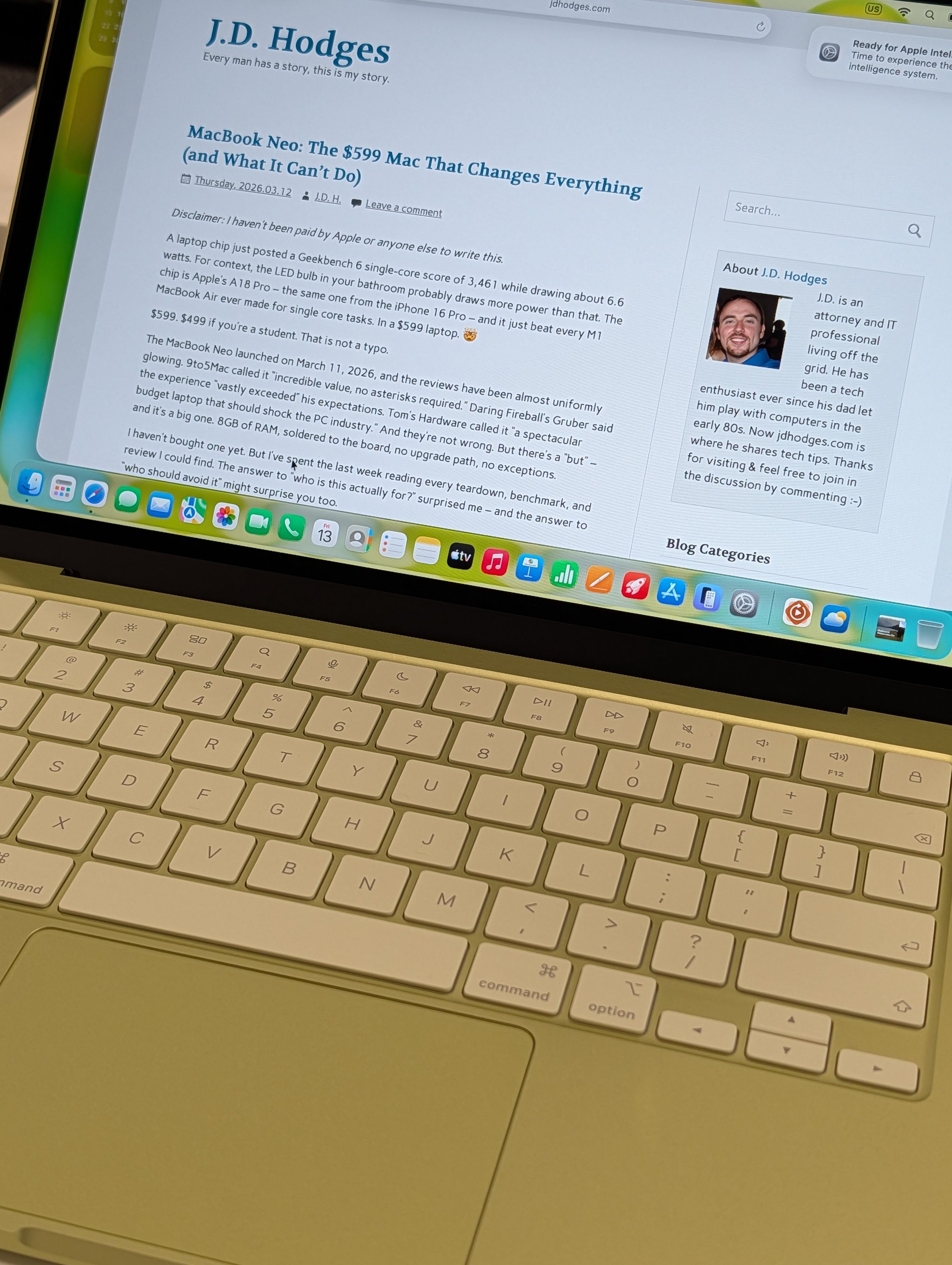
I bought the cheapest Mac laptop Apple has ever made (full review here) and I use it a lot more than I expected. I tested it hard on Claude Code, and the ChatGPT story lands in the same place: it works much better than the price tag suggests.
The Neo runs an A18 Pro chip (the same one from the iPhone 16 Pro) in a fanless aluminum chassis with a 13-inch Liquid Retina display and 16 hours of battery. In Geekbench 6 single-core it beats the M1 MacBook Air by 47% and lands within striking distance of the M4.
For ChatGPT specifically:
- The desktop app runs great. The app itself is lightweight. The heavy lifting is all on OpenAI’s side.
- Atlas works. Tab counts above 10 to 15 start to hit the 8GB ceiling, but single-task browsing with a couple of reference tabs is smooth.
- Voice mode sounds clean. The Neo’s microphone array is better than every Windows laptop I own under $1,500.
- Where 8GB bites. Running the desktop app, Atlas, Safari, and Codex CLI at once pushes memory pressure into the yellow zone. If that is your daily workflow, step up to the Air.
The $699 model adds Touch ID and doubles storage to 512GB. Worth the bump if you plan to keep many generated images and videos locally.
Buy this if: Price matters most. Your ChatGPT work is mostly one task at a time. You want a legitimately capable Mac for $599.
Skip this if: You keep 20+ Atlas tabs open, run Codex CLI in the background, or multitask heavily. The 8GB RAM ceiling is soldered with no upgrade path.
If the Neo price is why you are still reading, these are the follow-ups that matter: the full review, the benchmark numbers, the comparison vs. Windows alternatives, and the tap-to-click fix that makes the trackpad much better.
Check MacBook Neo availability on Amazon
Best Windows Laptop: ThinkPad (32GB+)
Not everyone wants a Mac, and not everyone should.
If your workflow depends on Windows-specific tools, if you prefer Linux, or if you just like the ThinkPad ecosystem, a modern ThinkPad with 32GB of RAM and fast NVMe storage is the safest Windows recommendation I can make. The keyboard is still the best in the laptop business. The docks are mature. The Linux support is good. These machines are built to be used hard.
Two things to know going in:
- Atlas is not available on Windows yet. If Atlas is a must-have, you need a Mac today.
- The ChatGPT desktop app runs native on Windows. Alt+Space global shortcut, screen sharing, voice mode, screenshot uploads, conversation sync. The Work with Apps file-reading beta is the main Mac-only hole.
My current Windows daily driver is a ThinkPad T14 Gen 4 with a Ryzen 7 PRO 7840U and 32GB of LPDDR5X. It handles the ChatGPT desktop app, a browser with 20+ tabs, a terminal, and Codex CLI without breaking a sweat. I have been using ThinkPads for almost 30 years, back to the X220 and X230 era, and Lenovo has continued the philosophy that made the originals great work tools.
For current options: the T14s Gen 6 and T14 Gen 6 are both excellent with 32GB configs available on Amazon in the $1,100 to $1,500 range. Lenovo announced the T14s Gen 7 at MWC 2026 (lightest T-series ever at 2.45 lbs, up to 64GB LPDDR5X) but it is not widely available at retail yet. If you also want 96GB of RAM for local AI, see the P14s Gen 6 in the Local AI section.
Buy this if: You need Windows or Linux. You value what I think is the best laptop keyboard in the industry. You already have ThinkPad docks or accessories.
Skip this if: You have no strong OS preference and would rather have better battery life, a better display, and a better trackpad. The MacBook Air is still the easier recommendation for most people, especially if you want Atlas.
See current ThinkPad T14s configurations on Amazon
Best Desktops for ChatGPT
Mac mini M4 and M4 Pro
Budget Mac Desktop: Mac mini M4 ($599)
If you already own a decent monitor, keyboard, and mouse, the base Mac mini M4 is one of the cheapest serious desk setups on this list. $599 gets you 16GB of unified memory and a 256GB SSD. The machine is 5×5 inches, pulls about 30W under normal load, runs completely silent, and drives up to three external displays. For a desk-bound ChatGPT workflow (Atlas, the desktop app, Codex CLI, a normal browser) it is hard to beat.
Check Mac mini M4 pricing on Amazon
Best Mac Desktop: Mac mini M4 Pro (~$1,279 on Amazon)
If your desk is your primary workspace, the M4 Pro is the better long-term investment. 24GB of unified memory, Thunderbolt 5, meaningfully faster CPU and GPU than the base M4. The extra 8GB makes a real difference when Atlas has 30+ tabs, Codex CLI is running, ChatGPT is generating images in the background, and a separate browser is open for research, all at once.
Buy this if: Your desk is your primary workspace. You live in Atlas with many tabs. You want Thunderbolt 5 for future peripherals.
Skip this if: Your ChatGPT use is lighter (the base M4 is fine). You mostly work on a laptop.
Check Mac mini M4 Pro pricing on Amazon
Timing (April 2026): Low stock on some Mac mini configurations plus leaks pointing to WWDC in June suggest an M5 Mac mini is likely this year. If you can wait until June, wait. If you need a Mac mini now, the M4 and M4 Pro are both safe buys, and Apple’s resale values mean you will not lose much if you upgrade later.
Windows mini PCs: GEEKOM A9 Max and Beelink SER8
Mini PCs have eaten the traditional Windows desktop tower over the last two years. You can get desktop-class performance for ChatGPT in a box the size of a hardcover book, quiet enough to sit on your desk, for less than $1,000. Unless you are gaming or doing local image generation, there is no reason to buy a full tower in 2026.
Best Windows Desktop: GEEKOM A9 Max (~$999 on Amazon)
The GEEKOM A9 Max pairs the AMD Ryzen AI 9 HX 370 (12 cores, Radeon 890M integrated graphics, 80 TOPS NPU) with 32GB of DDR5 (not LPDDR, so it is upgradable to 128GB later) and a 1TB to 2TB PCIe 4.0 SSD in a small all-metal chassis. It is Copilot+ certified, which matters for the Windows-native AI features (Recall, live captions, Cocreator) that layer on top of ChatGPT.
For a pure ChatGPT workflow, the NPU is a bonus, not a requirement. ChatGPT runs in the cloud and does not use your local NPU. But the NPU pulls its weight on Windows-native features alongside ChatGPT, and it keeps the door open if you care about Microsoft’s next round of local AI features.
The 32GB/2TB configuration at $999 is the sweet spot on Amazon. If you want more RAM later, the DDR5 SODIMMs are user-replaceable, unlike most competitors which solder their memory down.
Buy this if: You want a serious Windows desk without a tower. You value Copilot+ Windows AI features alongside ChatGPT. You want upgradable RAM later.
Skip this if: You want the absolute cheapest desk setup (see the Beelink below). You want to game at 4K (get a tower with a discrete GPU instead).
Check GEEKOM A9 Max pricing on Amazon
Best Budget Windows Desktop: Beelink SER8 (~$549 to $700)
The Beelink SER8 uses the Ryzen 7 8845HS (8 cores, Radeon 780M graphics, a modest NPU), ships with 32GB of DDR5 and a 1TB NVMe SSD, and regularly drops to $549 on Amazon with a coupon. For pure ChatGPT work it runs the desktop app, a browser with many tabs, Codex CLI, and a terminal comfortably. Quiet under normal load, louder under sustained stress. The 780M graphics drive dual 4K displays without issue.
If your budget is tight and you just need a desktop that runs ChatGPT well, stop here. The A9 Max is nicer, but the SER8 gets you 80% of the way there for half the money.
Buy this if: Budget matters. You want desktop performance without spending $1,000+. You already have a monitor and peripherals.
Skip this if: You want Copilot+ certification (need a 40+ TOPS NPU). You plan to run local models alongside (see the AI Max 395 section).
Check Beelink SER8 pricing on Amazon
Want a Traditional Windows Tower?
If you specifically want a tower (gaming, discrete GPU for image generation, extra drives), a mid-tower with a Ryzen 7 or Core Ultra 7, 32GB of DDR5, a 1TB NVMe, and an RTX 4060 or 5060 handles every ChatGPT workflow plus modern gaming at 1080p with good settings. For pure ChatGPT use, the mini PCs above win on noise, power draw, desk space, and price. For the serious local-AI path, see the RTX 5090 notes below.
If You Also Use Voice, Codex, or Local Models
Most readers will be set after the laptop and desktop sections above. This is for the ones who want one of the harder workflows: heavy voice mode, Codex CLI on the daily, or running local models alongside ChatGPT.
Voice Mode: Why the Microphone Matters
If you use ChatGPT Advanced Voice Mode daily, a real microphone is the single highest-ROI small upgrade you can make. The built-in mic on most cheap Windows laptops is the weak link. Mac built-in arrays are respectable, not great. A USB condenser in the $50 to $100 range turns voice mode into a different product. If you already have a gaming headset with a decent boom mic, that works too. Search USB condenser mics on Amazon.
Codex CLI: What It Asks of Your Machine
I pair Codex CLI with Claude Code every day and this comes up a lot.
Codex CLI is open source, written in Rust, and runs in your terminal. The CLI itself is free to install. Access to the model is not “bring your own API key and pay per token.” As of 2026, Codex is included in ChatGPT Free (limited), Plus, Pro, Business, Edu, and Enterprise. On April 2, 2026 the pricing model moved to token-metered for paid plans. Plus users get $5 in free API credits when they first sign in to the CLI with ChatGPT, and Pro users get $50. You can still sign in with a raw API key if you want usage-based billing against your OpenAI developer account, but most people route through their existing ChatGPT subscription and never look at the API tab.
For the full setup and caveats, see my three Codex posts: how to use GPT-5.5 today via your existing Codex subscription, Codex CLI vs Claude Code MCP speeds, and my head-to-head Claude vs ChatGPT vs Gemini coding test results.
The hardware implication is the same as Claude Code: your CPU, RAM, and SSD do the local file I/O while the model reasoning happens in the cloud. 32GB of RAM is comfortable for serious dev work alongside ChatGPT. An NVMe SSD is not optional. For the full dev-machine rules, see my Best Computer for Claude Code guide.
Local AI and Dedicated Boxes
ChatGPT itself does not require exotic hardware. But if you also want to run open-weight models locally (gpt-oss, Llama, Qwen, Mistral), that is a different purchase. Memory capacity and GPU capability start to matter a lot more, and price climbs fast. If you only use ChatGPT in the cloud, the picks above already have you covered.
| Category | Pick | Key Specs | Why I Recommend It | Check Price |
|---|---|---|---|---|
| Best Portable Local AI | ThinkPad P14s Gen 6 | Ryzen AI 9 HX PRO 370, 96GB DDR5, 14″, 3 lbs | 96GB of RAM in a 3-pound laptop. I run 70B parameter models on this. Nothing else at this price comes close. | Check Price on Amazon |
| Best Desktop Local AI | AI Max 395 Mini PC | Ryzen AI Max+ 395, up to 128GB unified, 96GB assignable VRAM | Small, quiet desktops that can run 70B+ models on your desk. Multiple vendors shipping from ~$2,000. | Search on Amazon |
| Best for CUDA / GPU AI | RTX 5090 Desktop | RTX 5090 32GB GDDR7, $1,999+ GPU alone | For local image generation, CUDA, and NVIDIA-specific inference. Overkill for cloud ChatGPT. | See RTX 5090 Desktops |
For the full breakdown of the Beelink, Framework, GMKtec, and Minisforum AI Max 395 options with current pricing, see my Claude Code workstation guide and the deep dive on the AI Max 395 unified memory architecture. For the GPU path, see my RTX 5090 AI BOX paired with a Framework Desktop setup.
If you want a dedicated always-on ChatGPT box for remote access, isolation, or always-on jobs, the cleanest setup is VS Code Remote SSH over Tailscale to a small machine like the Minisforum MS-01. A Mac mini works just as well if you prefer macOS.
What I Would Buy Today
I have been into computer hardware since the late 80s when I was a kid, and a good reliable computer can be a true life changer. We are truly in a golden age of hardware right now. Though we have lost a lot of ports along the way, we have gained a TON of computing power. The trick now is not chasing power. It is buying the right amount.
If I were starting from scratch as a heavy ChatGPT user with my own money:
- One laptop for everything: MacBook Air M5 (24GB/1TB) at ~$1,349. Atlas, desktop app, Work with Apps, voice mode. Done.
- Cheapest Mac that still works: MacBook Neo at $599, plus a $219 ProArt PA278QV as a second monitor.
- Windows laptop: ThinkPad T14s with 32GB in the $1,100 to $1,500 range.
- Mac desk on a budget: Mac mini M4 ($599) plus two ProArt monitors ($450 total). Under $1,100 for a serious workstation.
- Mac desk with headroom: Mac mini M4 Pro (~$1,279) plus a ProArt PA278CV ($260, one cable for video and power).
- Windows desk on a budget: Beelink SER8 (~$549 with a coupon) plus two ProArt monitors. Under $1,000 for a full setup.
- Windows desk with headroom: GEEKOM A9 Max (~$999) plus a ProArt PA278CV ($260).
- Remote thin client: MacBook Neo ($599) as the portable machine + Mac mini M4 Pro ($1,279) at home, connected via VS Code Remote SSH over Tailscale.
- First peripheral upgrade: A second monitor. It pays for itself in the first week.
- Second peripheral upgrade (voice mode users): A real USB microphone.
What I Would NOT Buy for ChatGPT
- A gaming tower with an RTX 5090. Overkill if ChatGPT is your only AI use. The model runs in the cloud. Save the $3,000 for a great monitor, a great chair, and a real microphone.
- A MacBook Pro unless you specifically want the nano-texture display, more cores for local models, or are doing serious video work or heavy Docker. The Air does ChatGPT just as well.
- A refurbished older Intel Mac. Atlas and most modern Mac AI features need Apple Silicon. The Neo at $599 is a better cheap-Mac path than a $400 Intel deal.
I also use Claude Code every day alongside ChatGPT and Codex. The same hardware handles both. For the Claude Code sister guide, see Best Computer for Claude Code. I plan to update this guide monthly as prices shift and new hardware ships. Drop a comment if I missed your setup!
The best computer for ChatGPT in 2026 is the one that runs the desktop app, Atlas, and a browser full of reference tabs without making you wait. For most people: buy the MacBook Air M5. If money is tight: buy the MacBook Neo. On Windows, a ThinkPad with 32GB for laptop and a GEEKOM A9 Max or Beelink SER8 for desk are both real answers. Then spend whatever you saved on a second monitor, a decent USB microphone, and a chair you actually like sitting in. Those upgrades change how the machine feels more than any spec bump on the box itself. 💪
Some links in this post are affiliate links. If you purchase through them, I may earn a small commission at no additional cost to you. I only recommend products I own, have tested, or would personally use. Prices are approximate as of late April 2026 and will vary. OpenAI product features and availability change frequently.
Accurate at time of writing. Something off? Drop a comment.
This post was drafted with assistance from AI tools (Claude Code and Codex GPT-5.5), reviewed and edited by me.