Category Archives: Ask J.D.

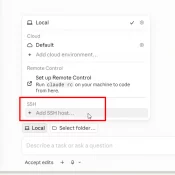
How to Set Up a SSH Connection in Claude Code Desktop

Summary: Claude Code’s desktop app can SSH into a remote machine and run sessions there against your repo, MCP servers, and ~/.claude config. Setup is a four-field dialog, assuming ssh user@host (where user is your username and host is the hostname or IP) already works from your terminal. The non-obvious caveat: session history is siloed. The desktop app, the CLI on the remote, and the VS Code extension (if you use it) on the remote each keep separate session lists.

Is the BCBS Settlement Payment Email Legit? (May 2026)

Q. I just got an email from distribution@bcbssettlement.com telling me I have a virtual Visa prepaid card waiting from the Blue Cross Blue Shield Subscribers Settlement. Is this real, or is it a phishing scam? A. If is is from that email and matches the info below it is real. These have been going out recently (May 20, 2026) and redemption can be very quick, no issues. Here’s how: to check before clicking, what the redemption flow looks like, and what

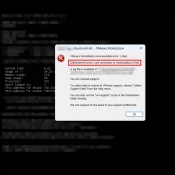
How to Fix the VMware Workstation “mksSandbox” Crash (ISBRendererComm Error)

Have you ever been working in a VM, everything’s fine, then dialog pops up like this: VMware Workstation unrecoverable error: (mks) ISBRendererComm: Lost connection to mksSandbox (3796) After that your VM is crashed and is powered off. Whatever you were in the middle of, gone with it. You start it back up, it runs for a bit, then it might crash again. 😢 Very not cool! This happened to me on a Framework Desktop system with AMD CPU, Ubuntu 24.04

Codex CLI feature protip /statusline

TL;DR: There are a few ways to check your ChatGPT Codex usage, including: the web analytics page (covered in yesterday’s post) and the Codex CLI’s own status line, which can put live 5-hour and weekly percentages right at the bottom of your terminal session. The CLI method is easy to miss if you don’t have it enabled, thankfully it is super easy and configurable with the slash command /statusline. Codex CLI’s /statusline menu. Toggle the items you want, then press

How to Check Your Codex Usage on ChatGPT (Plus and Pro)

TL;DR: ChatGPT’s Codex has its own usage analytics page at https://chatgpt.com/codex/cloud/settings/analytics, separate from the main ChatGPT settings. You need to be logged into your ChatGPT account first. The page splits your Codex usage into three meters: a 5-hour rolling limit, a weekly limit, and pay-as-you-go credits. Here is an example screenshot: Where EXACTLY Do I Find My Codex Usage on ChatGPT? You have to be logged into your ChatGPT account first. Then paste this URL into your browser: https://chatgpt.com/codex/cloud/settings/analytics Two

MacBook Neo GPU Compared: A18 Pro vs Snapdragon X2, Radeon, Arc, and RTX 5060

The MacBook Neo is Apple’s $599 fanless entry Mac, built around the binned 5-core-GPU variant of the A18 Pro. I covered its CPU, thermal behavior, silicon economics, and 8 GB RAM tradeoff in the main MacBook Neo benchmarks article. This post is the GPU companion to that piece, and it exists for a specific reason. Why this post exists This post puts the MacBook Neo’s A18 Pro 5-core GPU against Snapdragon X1 and X2, AMD Radeon iGPUs, Intel Arc, and

Codex /goal feature (TESTED)

Summary: Codex’s new /goal mode lets you hand it a long-running task and walk away. From there it loops plan → act → test → review until your stop condition is met, or your weekly quota taps out. Currently it takes a two-line config edit to enable, then prefix your prompt with /goal. This is very much in line with what the reddit crowd does with a lot of their homebrew scripts and it opens some fun possibilities! Worth turning

“Unable to Load Usage Limits” on claude.ai? Use /usage in Claude Code

TL;DR: I went to claude.ai/settings/usage this morning to check my Claude Max (5x) plan limits and got a red error box: “Unable to load usage limits. Please try again later.” Anthropic’s status page banner read All Systems Operational, but Settings > Usage was still erroring for me at 7:44 AM Central. The workaround that did work: run /usage inside Claude Code. The session and weekly meters loaded immediately. claude.ai/settings/usage on the morning of April 30, 2026. The Plan usage limits

« Older Entries