Every Apple CPU Compared: M1 Through M6 (All Variants)
Summary: this page is meant to list every Apple Silicon chip from the M1 through the M6 and M5 Ultra. Along with verified specs, some buying advice and lastly a dedicated section on which chips can run what size local AI models (LLMs). Originally inspired by the popular r/mac comparison table, expanded with official Apple sources, and all binned variants, etc. I will try to keep it updated!
Intro: The M5 Max delivers an estimated 33 to 41 TFLOPS of FP16 compute in a laptop, depending on whether you count just the GPU ALUs or include Apple’s new per-core Neural Accelerators, and the new M5 Ultra roughly doubles that in the Mac Studio! Six years ago, the M1 delivered 5.2 TFLOPS. Likewise, top-end memory bandwidth has grown from 800 GB/s (M1 Ultra) to 1.2 TB/s. And aside from a couple of early exceptions (Apple quoted 2.6 TFLOPS for the M1 GPU in 2020), Apple still does not publish official TFLOPS numbers for its chips. 😢
So, lets try to make our own list! See below for all the details! 💪
(this is still a work in progress so if you see anything I missed or any mistakes, please let me know.)
Last updated: September 28, 2026
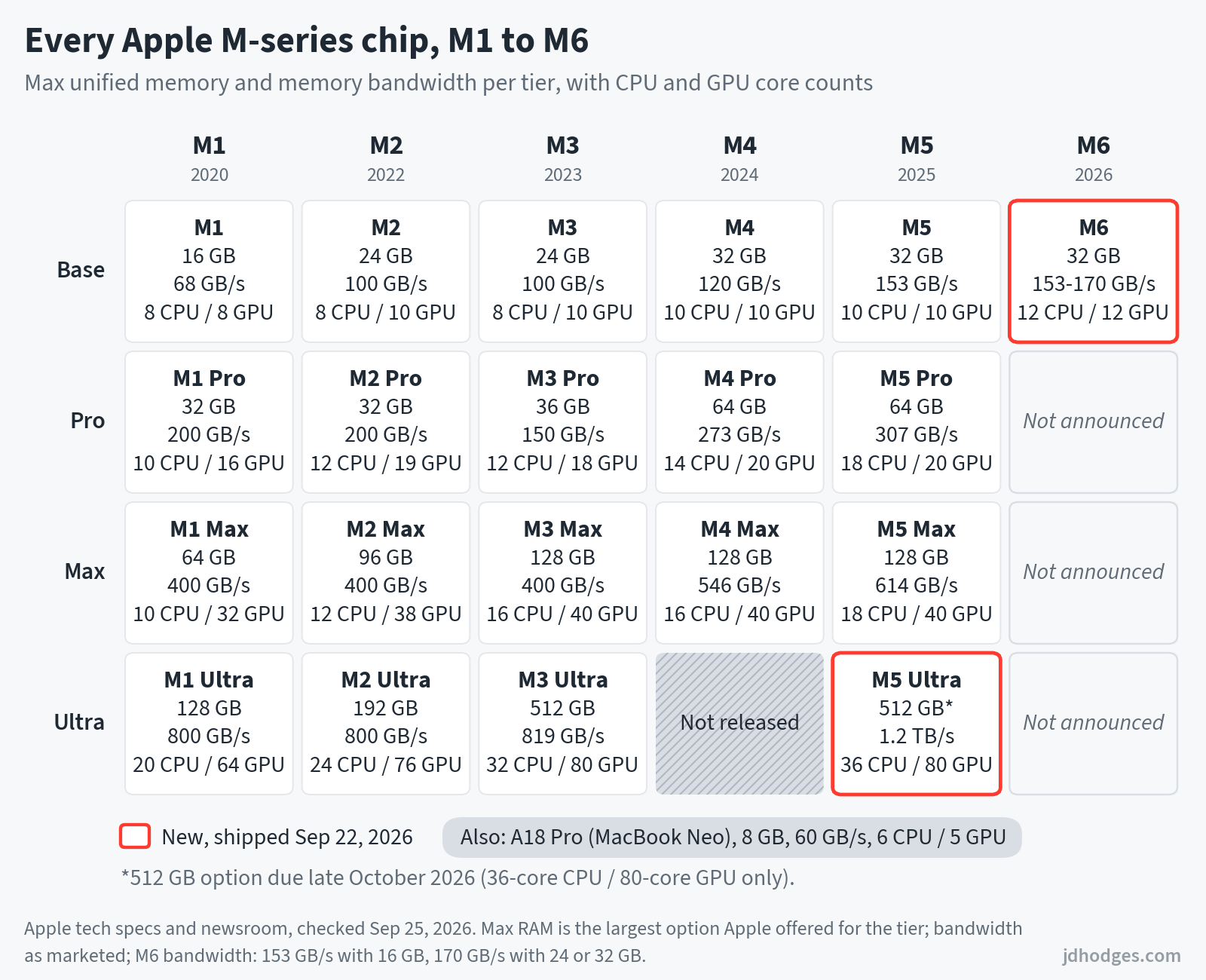
The Master Comparison Table
This table covers the maximum configuration of each chip tier. Binned (lower-spec) variants are documented in the generation-specific sections below. I use Apple’s marketed bandwidth numbers here. FP16 TFLOPS are estimated as 2x FP32 unless independently verified; all estimated values are marked with “~”. The “+NA” column shows estimated total FP16 including the dedicated Neural Accelerators in M5 and M6 GPUs (M1-M4 show “–” since they lack them; the M6 values are scaling estimates explained below the table). In the Neural Engine column, “n/p” means Apple has not published a TOPS figure. CPU core breakdown shows Performance + Efficiency for M1-M4, Super + Efficiency for base M5, Super + Performance for M5 Pro/Max/Ultra, and Super + Performance + Efficiency for M6.
| SoC | CPU Cores | GPU Cores | Process | Neural Engine | Max RAM | Bandwidth | ~FP16 TFLOPS | ~FP16+NA | TB | Year |
|---|---|---|---|---|---|---|---|---|---|---|
| A18 Pro (Neo) | 6 (2P+4E) | 5 | 3nm (N3E) | 16-core / 35 TOPS | 8 GB | 60 GB/s | ~3.2 | — | None | 2026 |
| M1 | 8 (4P+4E) | 8 | 5nm (N5) | 16-core / 11 TOPS | 16 GB | 68 GB/s | ~5.2 | — | TB3 | 2020 |
| M1 Pro | 10 (8P+2E) | 16 | 5nm | 16-core / 11 TOPS | 32 GB | 200 GB/s | ~10.4 | — | TB4 | 2021 |
| M1 Max | 10 (8P+2E) | 32 | 5nm | 16-core / 11 TOPS | 64 GB | 400 GB/s | ~20.8 | — | TB4 | 2021 |
| M1 Ultra | 20 (16P+4E) | 64 | 5nm | 32-core / 22 TOPS | 128 GB | 800 GB/s | ~42.0 | — | TB4 | 2022 |
| M2 | 8 (4P+4E) | 10 | 5nm (N5P) | 16-core / 15.8 TOPS | 24 GB | 100 GB/s | ~7.2 | — | TB3* | 2022 |
| M2 Pro | 12 (8P+4E) | 19 | 5nm (N5P) | 16-core / 15.8 TOPS | 32 GB | 200 GB/s | ~13.7 | — | TB4 | 2023 |
| M2 Max | 12 (8P+4E) | 38 | 5nm (N5P) | 16-core / 15.8 TOPS | 96 GB | 400 GB/s | ~27.2 | — | TB4 | 2023 |
| M2 Ultra | 24 (16P+8E) | 76 | 5nm (N5P) | 32-core / 31.6 TOPS | 192 GB | 800 GB/s | ~54.4 | — | TB4 | 2023 |
| M3 | 8 (4P+4E) | 10 | 3nm (N3B) | 16-core / 18 TOPS | 24 GB | 100 GB/s | ~7.1 | — | TB3* | 2023 |
| M3 Pro | 12 (6P+6E) | 18 | 3nm (N3B) | 16-core / 18 TOPS | 36 GB | 150 GB/s | ~12.8 | — | TB4 | 2023 |
| M3 Max | 16 (12P+4E) | 40 | 3nm (N3B) | 16-core / 18 TOPS | 128 GB | 400 GB/s | ~28.4 | — | TB4 | 2023 |
| M3 Ultra | 32 (24P+8E) | 80 | 3nm (N3B) | 32-core / 36 TOPS | 512 GB | 819 GB/s | ~56.8 | — | TB5 | 2025 |
| M4 | 10 (4P+6E) | 10 | 3nm (N3E) | 16-core / 38 TOPS | 32 GB | 120 GB/s | ~8.6 | — | TB4 | 2024 |
| M4 Pro | 14 (10P+4E) | 20 | 3nm (N3E) | 16-core / 38 TOPS | 64 GB | 273 GB/s | ~17.2 | — | TB5 | 2024 |
| M4 Max | 16 (12P+4E) | 40 | 3nm (N3E) | 16-core / 38 TOPS | 128 GB | 546 GB/s | ~34.4 | — | TB5 | 2024 |
| M5 | 10 (4S+6E) | 10 | 3nm (N3P) | 16-core / n/p | 32 GB | 153 GB/s | ~8.4 | ~10.2 | TB4 | 2025 |
| M5 Pro | 18 (6S+12P) | 20 | 3nm (N3P) | 16-core / n/p | 64 GB | 307 GB/s | ~16.6 | ~20.4 | TB5 | 2026 |
| M5 Max | 18 (6S+12P) | 40 | 3nm (N3P) | 16-core / n/p | 128 GB | 614 GB/s | ~33.2 | ~41.0 | TB5 | 2026 |
| M5 Ultra | 36 (12S+24P) | 80 | 3nm (N3P) | 32-core / n/p | 512 GB | 1.2 TB/s | ~66.4 | ~82.0 | TB5 | 2026 |
| M6 | 12 (2S+4P+6E) | 12 | 2nm (N2) | Dual 16-core / n/p | 32 GB | 153-170 GB/s | ~11 | ~13 | TB4 | 2026 |
* M2 and M3 base chips use TB3/USB4 on laptops but TB4 on Mac mini. FP16 TFLOPS estimated as 2x FP32 from Flopper.io and CPU-Monkey calculations; anchor points verified via Wikipedia ALU counts (M1 8-GPU: 2.6 FP32, M2 Ultra 76-GPU: 27.2 FP32). M5 Ultra and M6 were announced August 25, 2026 and shipped September 22, 2026. The M5 Ultra’s TFLOPS figures are scaling estimates (2x M5 Max). The M6’s figures are scaling estimates, because Apple publishes neither TFLOPS nor its GPU clock. Its ~11 GPU figure scales the M5’s ~8.4 by about a third, the M6’s median lead over an M5 MacBook Pro across six GPU tests in Notebookcheck’s review (31 to 39 percent). Its ~13 +NA figure applies Apple’s “nearly 30 percent” peak AI-compute claim to the M5’s ~10.2. Neural Engine “n/p”: Apple has not published TOPS since the M4 (38 TOPS). M5 Ultra RAM tiers: 96/256/512 GB; Apple lists the 512 GB option as coming in late October 2026. Process names such as N3P and N2 follow industry reporting; Apple itself only states the nanometer class. M6 bandwidth: 153 GB/s with 16 GB RAM, 170 GB/s with 24-32 GB.
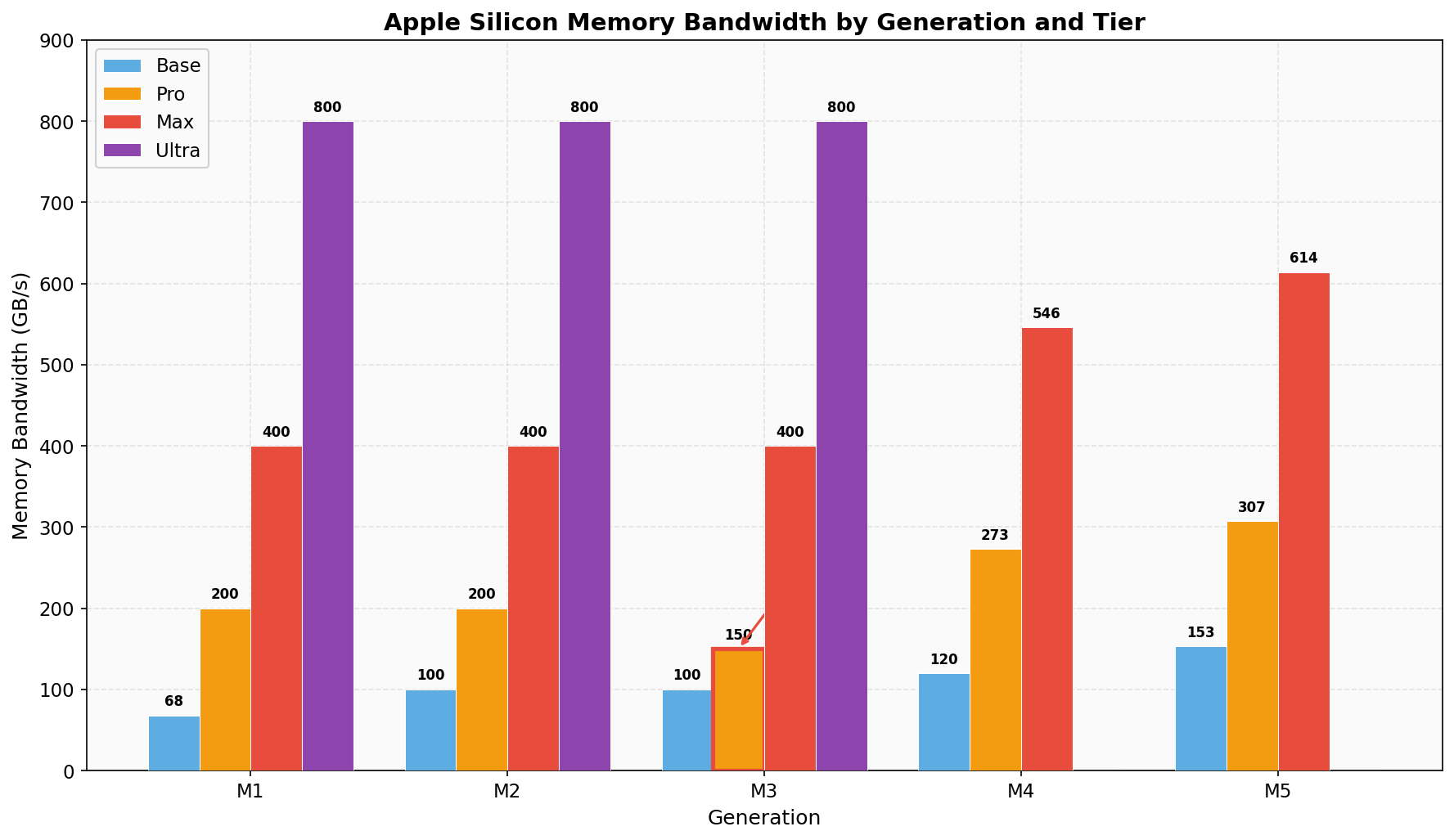
Red indicates a regression from M2 Pro to M3 Pro.
Apple does not officially publish TFLOPS for its current chips (the M1’s 2.6 TFLOPS in 2020 was a rare exception). Sources: Apple Newsroom, Wikipedia, Flopper.io, CPU-Monkey.
+NA column (M5 and newer): M5 and M6 GPUs include dedicated per-core Neural Accelerators that handle FP16 matrix operations separately from the standard GPU ALUs. The “+NA” values estimate total FP16 compute (GPU ALU + Neural Accelerators). M1 through M4 GPUs do not have separate Neural Accelerators, so only GPU ALU FP16 applies; the M6 +NA value is a scaling estimate (see the M6 note above). +NA estimates from community sources; not independently verified by Apple.
Want a version you can copy and paste into an email, Reddit, Discord, or your notes? Here it is:
+------------------+-----------+--------+--------+--------+-----------+---------+------+------+
|    EVERY APPLE M-CHIP COMPARED  (M1-M6)         jdhodges.com                                |
+------------------+-----------+--------+--------+--------+-----------+---------+------+------+
| SoC              | Max CPU/  |Est.GPU |  +NA   | Max RAM| Memory    | Neural  | Node | Year |
|                  | GPU Cores |FP16 TF | FP16 TF| Config | Bandwidth | Engine  |      |      |
+------------------+-----------+--------+--------+--------+-----------+---------+------+------+
| A18 Pro (Neo)    |  6C /  5C |  ~3.2  |   --   |   8 GB |   60 GB/s | 35 TOPS | 3nmE | 2026*|
+------------------+-----------+--------+--------+--------+-----------+---------+------+------+
| M1               |  8C /  8C |  ~5.2  |   --   |  16 GB |   68 GB/s | 11 TOPS | 5nm  | 2020 |
| M1 Pro           | 10C / 16C | ~10.4  |   --   |  32 GB |  200 GB/s | 11 TOPS | 5nm  | 2021 |
| M1 Max           | 10C / 32C | ~20.8  |   --   |  64 GB |  400 GB/s | 11 TOPS | 5nm  | 2021 |
| M1 Ultra         | 20C / 64C | ~42.0  |   --   | 128 GB |  800 GB/s | 22 TOPS | 5nm  | 2022 |
+------------------+-----------+--------+--------+--------+-----------+---------+------+------+
| M2               |  8C / 10C |  ~7.2  |   --   |  24 GB |  100 GB/s |15.8TOPS | 5nm+ | 2022 |
| M2 Pro           | 12C / 19C | ~13.7  |   --   |  32 GB |  200 GB/s |15.8TOPS | 5nm+ | 2023 |
| M2 Max           | 12C / 38C | ~27.2  |   --   |  96 GB |  400 GB/s |15.8TOPS | 5nm+ | 2023 |
| M2 Ultra         | 24C / 76C | ~54.4  |   --   | 192 GB |  800 GB/s |31.6TOPS | 5nm+ | 2023 |
+------------------+-----------+--------+--------+--------+-----------+---------+------+------+
| M3               |  8C / 10C |  ~7.1  |   --   |  24 GB |  100 GB/s | 18 TOPS | 3nm  | 2023 |
| M3 Pro           | 12C / 18C | ~12.8  |   --   |  36 GB |  150 GB/s | 18 TOPS | 3nm  | 2023 |
| M3 Max           | 16C / 40C | ~28.4  |   --   | 128 GB |  400 GB/s | 18 TOPS | 3nm  | 2023 |
| M3 Ultra         | 32C / 80C | ~56.8  |   --   | 512 GB |  819 GB/s | 36 TOPS | 3nm  | 2025 |
+------------------+-----------+--------+--------+--------+-----------+---------+------+------+
| M4               | 10C / 10C |  ~8.6  |   --   |  32 GB |  120 GB/s | 38 TOPS | 3nmE | 2024 |
| M4 Pro           | 14C / 20C | ~17.2  |   --   |  64 GB |  273 GB/s | 38 TOPS | 3nmE | 2024 |
| M4 Max           | 16C / 40C | ~34.4  |   --   | 128 GB |  546 GB/s | 38 TOPS | 3nmE | 2024 |
+------------------+-----------+--------+--------+--------+-----------+---------+------+------+
| M5               | 10C / 10C |  ~8.4  | ~10.2+ |  32 GB |  153 GB/s |   n/p   | 3nmP | 2025 |
| M5 Pro           | 18C / 20C | ~16.6  | ~20.4+ |  64 GB |  307 GB/s |   n/p   | 3nmP | 2026 |
| M5 Max           | 18C / 40C | ~33.2  | ~41.0+ | 128 GB |  614 GB/s |   n/p   | 3nmP | 2026 |
| M5 Ultra         | 36C / 80C | ~66.4  | ~82.0+ | 512 GB |  1.2 TB/s |   n/p   | 3nmP | 2026 |
+------------------+-----------+--------+--------+--------+-----------+---------+------+------+
| M6               | 12C / 12C |  ~11   |  ~13+  |  32 GB |  170 GB/s |   n/p   | 2nm  | 2026 |
+------------------+-----------+--------+--------+--------+-----------+---------+------+------+
  GPU FP16 est. (2x FP32). +NA = GPU ALU + Neural Accelerators (M5/M6).
  M6 est.: FP16 scaled from benchmarks, +NA from Apple's AI claim. n/p = TOPS unpublished.
  * A18 Pro year: 2026 in the MacBook Neo (the chip debuted in the 2024 iPhone 16 Pro).
  Sources: Apple Newsroom, Flopper.io, CPU-Monkey, Geekbench Browser, Notebookcheck.
  Full post & methodology: jdhodges.com  Updated 2026-09
Not sure which chip fits your work? Jump to the buying guide 👇 for picks by workload.
Notable absences: There is no M4 Ultra. Apple skipped it entirely, and the Ultra tier finally returned with the M5 Ultra in August 2026. There is no M6 Pro or M6 Max yet, and there may not be one: Bloomberg reports that Apple plans to skip them and move on to M7 chips (via MacRumors), but that is a report, not an Apple announcement. The M6 generation starts with the base chip in the Mac mini. Apple has not published Neural Engine TOPS for the M5 or M6 families; their GPUs include per-core “Neural Accelerators” that complicate direct comparison.
Key trends to notice: Bandwidth climbs steeply with each tier (Base to Pro to Max to Ultra) though not by a fixed ratio. The M3 Pro’s 150 GB/s is a 25% regression from the M2 Pro’s 200 GB/s; Apple narrowed the memory bus and never acknowledged it publicly. The M4 and M5 generations recover and then some, topping out at 1.2 TB/s on the M5 Ultra. Neural Engine TOPS more than tripled from M1 (11) to M4 (38), reflecting Apple’s AI pivot.
M1 Family (2020-2022): The Revolution
The M1 was the chip that ended the Intel era. When Apple shipped it in November 2020, the industry’s reaction was roughly: “Wait, a tablet chip is beating our best laptop processors?” And it was, comfortably, while using a fraction of the power.
The M1 family spans four tiers: base M1, M1 Pro, M1 Max, and M1 Ultra (two M1 Max dies fused via UltraFusion). All use TSMC’s 5nm process. The base M1 used LPDDR4X memory, while Pro and above jumped to LPDDR5.
Binned variants: The M1 7-core GPU shipped in the base MacBook Air and base iMac — one disabled GPU core, minimal real-world difference. The M1 Pro 8-core CPU (6P+2E) shipped in the base 14-inch MacBook Pro with two fewer performance cores. The M1 Max 24-core GPU and M1 Ultra 48-core GPU are similarly binned versions of the 32-core and 64-core respectively.
| Variant | CPU | GPU | Max RAM | Bandwidth | GB6 SC/MC |
|---|---|---|---|---|---|
| M1 (7-GPU) | 8 (4P+4E) | 7 | 16 GB | 68 GB/s | 2388 / 8598 |
| M1 (8-GPU) | 8 (4P+4E) | 8 | 16 GB | 68 GB/s | 2388 / 8598 |
| M1 Pro (8C/14G) | 8 (6P+2E) | 14 | 32 GB | 200 GB/s | 2416 / 10799 |
| M1 Pro (10C/16G) | 10 (8P+2E) | 16 | 32 GB | 200 GB/s | 2420 / 12738 |
| M1 Max (24G) | 10 (8P+2E) | 24 | 64 GB | 400 GB/s | 2440 / 12924 |
| M1 Max (32G) | 10 (8P+2E) | 32 | 64 GB | 400 GB/s | 2440 / 12924 |
| M1 Ultra (48G) | 20 (16P+4E) | 48 | 128 GB | 800 GB/s | 2406 / 18860 |
| M1 Ultra (64G) | 20 (16P+4E) | 64 | 128 GB | 800 GB/s | 2406 / 18860 |
Products: MacBook Air (2020), MacBook Pro 13″ (2020), Mac mini (2020), iMac 24″ (2021), MacBook Pro 14″/16″ (2021), Mac Studio (2022). All discontinued. The M1 MacBook Air remains one of the best value laptops ever made if you can find one under $600.
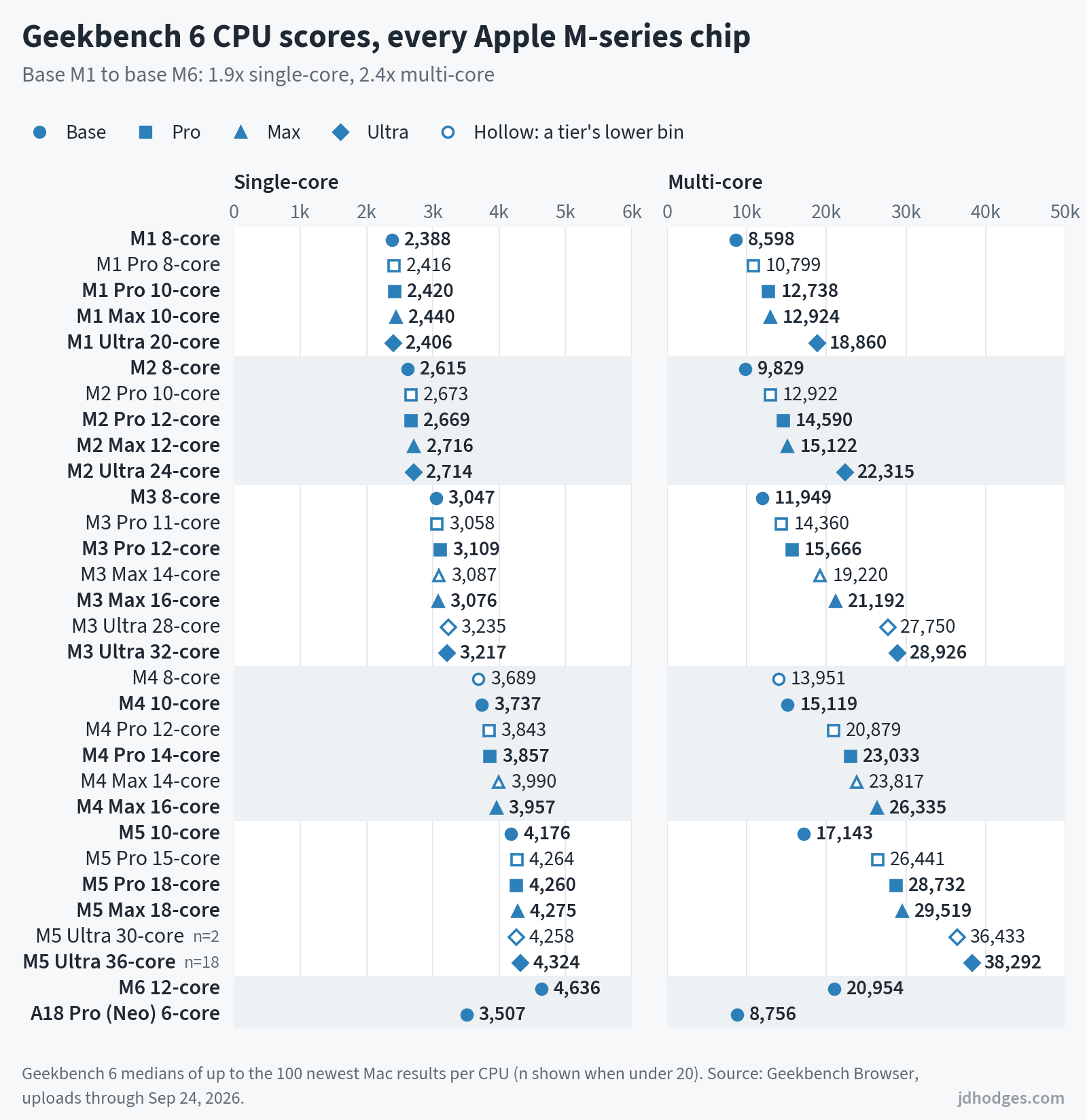
Source: Apple M1 Newsroom, M1 Pro/Max Newsroom, M1 Ultra Newsroom. Geekbench 6 scores in every generation table are medians of up to the 100 newest Mac results per CPU configuration on Geekbench Browser (uploads through September 24, 2026), with back-to-back repeat runs counted once.
M2 Family (2022-2023): The Refinement
The M2 was an evolution: same 5nm process (TSMC N5P, an enhanced version), modest CPU gains, better GPU. Perhaps most notably: the Pro and Max variants jumped from 2 efficiency cores to 4. That meant the M2 Pro and M2 Max had notably better multithreaded performance scaling.
The M2 also brought the memory ceiling up: 24 GB for the base chip (vs 16 GB on M1), 96 GB for the Max (vs 64 GB), and 192 GB for the Ultra (vs 128 GB).
Gotcha: the M2 256 GB storage problem. The base M2 MacBook Air and 13-inch MacBook Pro with 256 GB storage used a single NAND chip instead of two. This halved the SSD read/write speed compared to the 512 GB models (and compared to the M1). Apple fixed this with the M3. If you are buying a refurbished M2 Mac, get the 512 GB model.
Gotcha: Thunderbolt varies by product. The base M2 chip uses Thunderbolt 3 on laptops (MacBook Air, MacBook Pro 13″) but Thunderbolt 4 on the Mac mini. Same chip, different controller implementation.
| Variant | CPU | GPU | Max RAM | Bandwidth | GB6 SC/MC |
|---|---|---|---|---|---|
| M2 (8-GPU) | 8 (4P+4E) | 8 | 24 GB | 100 GB/s | 2615 / 9829 |
| M2 (10-GPU) | 8 (4P+4E) | 10 | 24 GB | 100 GB/s | 2615 / 9829 |
| M2 Pro (10C/16G) | 10 (6P+4E) | 16 | 32 GB | 200 GB/s | 2673 / 12922 |
| M2 Pro (12C/19G) | 12 (8P+4E) | 19 | 32 GB | 200 GB/s | 2669 / 14590 |
| M2 Max (30G) | 12 (8P+4E) | 30 | 64 GB | 400 GB/s | 2716 / 15122 |
| M2 Max (38G) | 12 (8P+4E) | 38 | 96 GB | 400 GB/s | 2716 / 15122 |
| M2 Ultra (60G) | 24 (16P+8E) | 60 | 192 GB | 800 GB/s | 2714 / 22315 |
| M2 Ultra (76G) | 24 (16P+8E) | 76 | 192 GB | 800 GB/s | 2714 / 22315 |
Products: MacBook Air 13″/15″ (2022-2023), MacBook Pro 13″ (2022), Mac mini (2023), MacBook Pro 14″/16″ (2023), Mac Studio (2023), Mac Pro (2023). The M2 Ultra ended up as the Mac Pro’s final chip: Apple discontinued the Mac Pro in March 2026 without a successor and now positions the Mac Studio as its flagship desktop.
Source: Apple M2 Newsroom, M2 Pro/Max Newsroom, M2 Ultra Newsroom
M3 Family (2023-2025): The Move to 3nm (and a slight regression)
The M3 was Apple’s first 3nm chip (TSMC N3B), bringing hardware ray tracing, dynamic caching, and mesh shading to the GPU. Single-threaded CPU performance jumped roughly 30% over M1. All good. 💪
But the M3 Pro has a problem that Apple would prefer you not notice. 👇
The M3 Pro bandwidth regression. Apple narrowed the M3 Pro’s memory bus from 256-bit (M1/M2 Pro) to 192-bit. This dropped bandwidth from 200 GB/s to 150 GB/s. That is a 25% cut. For memory-intensive tasks (large compiles, video editing timelines, running local AI models), the M3 Pro can bottleneck where the M2 Pro did not. If you are shopping refurbished and choosing between an M2 Pro and M3 Pro, this is the number that matters most.
The M3 Max also has a bandwidth split: the binned 14-core CPU / 30-GPU variant drops to 300 GB/s. The full 16-core / 40-GPU variant keeps 400 GB/s.
M3 Ultra: yes, it shipped. It shipped in March 2025 in the Mac Studio, with up to 512 GB of unified memory and Thunderbolt 5 (TB5 itself debuted earlier, on the M4 Pro and M4 Max in October 2024). The M3 Ultra held the 512 GB crown until Apple dropped that option in March 2026, and the M5 Ultra Mac Studio replaced it in August 2026.
| Variant | CPU | GPU | Max RAM | Bandwidth | GB6 SC/MC |
|---|---|---|---|---|---|
| M3 (8-GPU) | 8 (4P+4E) | 8 | 24 GB | 100 GB/s | 3047 / 11949 |
| M3 (10-GPU) | 8 (4P+4E) | 10 | 24 GB | 100 GB/s | 3047 / 11949 |
| M3 Pro (11C/14G) | 11 (5P+6E) | 14 | 36 GB | 150 GB/s | 3058 / 14360 |
| M3 Pro (12C/18G) | 12 (6P+6E) | 18 | 36 GB | 150 GB/s | 3109 / 15666 |
| M3 Max (14C/30G) | 14 (10P+4E) | 30 | 96 GB | 300 GB/s | 3087 / 19220 |
| M3 Max (16C/40G) | 16 (12P+4E) | 40 | 128 GB | 400 GB/s | 3076 / 21192 |
| M3 Ultra (28C/60G) | 28 (20P+8E) | 60 | 256 GB | 819 GB/s | 3235 / 27750 |
| M3 Ultra (32C/80G) | 32 (24P+8E) | 80 | 512 GB | 819 GB/s | 3217 / 28926 |
Source: Apple M3/Pro/Max Newsroom, M3 Ultra Newsroom
M4 Family (2024-2025): The AI Move
The M4 is where Apple got serious about on-device AI. The Neural Engine jumped from 18 TOPS (M3) to 38 TOPS (M4), more than doubling throughput. The base M4 also finally shipped with a minimum of 16 GB RAM in Macs.
TSMC’s second-generation 3nm (N3E) process brought modest efficiency gains. The M4 was also the first Apple SoC to use the ARMv9 instruction set. Thunderbolt 5 arrives on M4 Pro and M4 Max (120 Gbps). There is no M4 Ultra.
| Variant | CPU | GPU | Max RAM | Bandwidth | NE TOPS | GB6 SC/MC |
|---|---|---|---|---|---|---|
| M4 (8C/8G) | 8 (4P+4E) | 8 | 24 GB | 120 GB/s | 38 | 3689 / 13951 |
| M4 (10C/10G) | 10 (4P+6E) | 10 | 32 GB | 120 GB/s | 38 | 3737 / 15119 |
| M4 Pro (12C/16G) | 12 (8P+4E) | 16 | 64 GB | 273 GB/s | 38 | 3843 / 20879 |
| M4 Pro (14C/20G) | 14 (10P+4E) | 20 | 64 GB | 273 GB/s | 38 | 3857 / 23033 |
| M4 Max (14C/32G) | 14 (10P+4E) | 32 | 36 GB | 410 GB/s | 38 | 3990 / 23817 |
| M4 Max (16C/40G) | 16 (12P+4E) | 40 | 128 GB | 546 GB/s | 38 | 3957 / 26335 |
Source: Apple M4 Newsroom, M4 Pro/Max Newsroom, MacBook Pro 2024 Tech Specs
M5 Family (2025-2026): Fusion and New Core Names
The M5 brings two architectural changes worth understanding. First, Apple renamed its CPU cores: what used to be “performance cores” are now “super cores,” and a new tier called “performance cores” sits between super and efficiency. The base M5 has super + efficiency cores; the M5 Pro and M5 Max have super + performance cores (no efficiency cores).
Second, the M5 Pro and M5 Max use “Fusion Architecture”: two third-generation 3nm dies bonded together. This gives the Pro and Max tiers 18 CPU cores, up from 14 (M4 Pro) and 16 (M4 Max). Memory jumps to LPDDR5X-9600. The M5 Max 40-core GPU hits 614 GB/s bandwidth. Apple has not published Neural Engine TOPS for the M5 family. Additionally, M5 GPU cores include dedicated “Neural Accelerators” that handle FP16 matrix operations independently of the standard GPU ALUs. This means M5 raw GPU ALU FP16 compute appears flat or slightly lower than M4 (~8.4 vs ~8.6 TFLOPS for the base chips), but total FP16 throughput including the Neural Accelerators is significantly higher (~10.2 TFLOPS for the base M5). See the +NA column in the master table above.
M5 Ultra (August 2026): the promised Ultra arrived on August 25, 2026 in the new Mac Studio, which shipped September 22. It doubles the M5 Max silicon: up to 36 CPU cores (12 super + 24 performance) and an 80-core GPU, Apple’s most powerful GPU to date, plus a 32-core Neural Engine and up to 512 GB of unified memory at 1.2 TB/s. The 512 GB option, 36-core model only, is due in late October. A binned 30-core CPU / 64-core GPU variant starts at $5,499 with 96 GB. Apple claims up to 4.3x the peak AI compute of the M3 Ultra; that multiple measures Neural Accelerator matrix throughput, a different yardstick than the ~82 vs ~57 FP16 TFLOPS estimates in the table. Early Geekbench 6 results put the 36-core version at 4,324 single-core and 38,292 multi-core. Those are the medians of 18 results from 256 GB machines (back-to-back repeat runs counted once), most uploaded before launch day. Both variants are in the table below.
| Variant | CPU | GPU | Max RAM | Bandwidth | GB6 SC/MC |
|---|---|---|---|---|---|
| M5 (10C/8G) | 10 (4S+6E) | 8 | 16 GB | 153 GB/s | 4144 / 16855 |
| M5 (10C/10G) | 10 (4S+6E) | 10 | 32 GB | 153 GB/s | 4176 / 17143 |
| M5 Pro (15C/16G) | 15 (5S+10P) | 16 | 64 GB | 307 GB/s | 4264 / 26441 |
| M5 Pro (18C/20G) | 18 (6S+12P) | 20 | 64 GB | 307 GB/s | 4260 / 28732 |
| M5 Max (18C/32G) | 18 (6S+12P) | 32 | 36 GB | 460 GB/s | 4275 / 29519 |
| M5 Max (18C/40G) | 18 (6S+12P) | 40 | 128 GB | 614 GB/s | 4275 / 29519 |
| M5 Ultra (30C/64G) | 30 (10S+20P) | 64 | 256 GB | 1.2 TB/s | 4258 / 36433 (2 results) |
| M5 Ultra (36C/80G) | 36 (12S+24P) | 80 | 512 GB* | 1.2 TB/s | 4324 / 38292 |
Products: MacBook Pro 14″ (M5, 2025), MacBook Pro 14″/16″ (M5 Pro/Max, 2026), MacBook Air 13″/15″ (2026), Mac mini (M5 Pro, 2026), Mac Studio (M5 Max/Ultra, 2026).
Source: Apple M5 Newsroom, M5 Pro/Max Newsroom, Mac Studio M5 Max/Ultra Newsroom. *M5 Ultra RAM tiers are 96, 256, or 512 GB; the 512 GB option needs the 36-core CPU / 80-core GPU, and Apple lists it as coming in late October 2026. The Ultra’s Geekbench 6 figures are medians of the results on Geekbench Browser through September 23, 2026. That’s 18 results for the 36-core (back-to-back repeat runs counted once) and only 2 for the 30-core. The Ultra’s multi-core lead over the M5 Max also looks smaller in Geekbench 6 (about 1.3x) than in Geekbench 7 (about 1.5x). The 10C/8G row is the 13-inch MacBook Air alone, the only Mac sold with that configuration (Geekbench can’t tell its two GPU versions apart, so both count). The 10C/10G row pools the 13- and 15-inch MacBook Air and the 14-inch MacBook Pro. The 13-inch Air scores about 3% lower single-core and 5% lower multi-core than the 14-inch MacBook Pro (4,144 / 16,855 vs 4,269 / 17,813).
M6 Family (2026): The 2nm Era Begins
The M6 arrived on August 25, 2026 in the new Mac mini ($899, shipped September 22), making it Apple’s first 2-nanometer chip. Apple doesn’t name the foundry, but TrendForce reports the M6 is built on TSMC’s 2nm process. Two things stand out. First, the base M6 uses all three of Apple’s core tiers at once: 12 CPU cores arranged as 2 super + 4 performance + 6 efficiency, where the base M5 offered only super + efficiency cores. Second, it pairs a 12-core GPU (with per-core Neural Accelerators, like M5) with a dual 16-core Neural Engine, another first. Apple claims 40% faster CPU, 2x faster graphics, and 4x faster AI performance than the M4 generation mini it replaces. RAM runs 16 to 32 GB; bandwidth is 153 GB/s on the 16 GB config and 170 GB/s with 24 or 32 GB. Ports are Thunderbolt 4, not TB5.
There is no M6 Pro or M6 Max yet: the new mini pairs the base M6 with an M5 Pro option ($1,699) for the higher tier, and an M6 MacBook Pro is rumored for late 2026. Bloomberg also reports that Apple plans to skip the M6 Pro and M6 Max entirely; Apple hasn’t confirmed that, so I’m treating it as an unconfirmed report for now. As with the M5 family, Apple has not published Neural Engine TOPS.
In Geekbench 6, the M6 mini scores 4,636 single-core and 20,954 multi-core. Those are the medians of 71 results on Geekbench Browser through September 24 (back-to-back repeat runs counted once). Heads up if you’re comparing with news coverage: Geekbench 7 launched in July 2026 and is now the Geekbench Browser default. On that newer test, the M6 lands around 4,000 to 4,100 single-core and 22,200 to 22,800 multi-core. That’s a different scale, so don’t compare those numbers with the Geekbench 6 figures on this page.
| Variant | CPU | GPU | Max RAM | Bandwidth | GB6 SC/MC |
|---|---|---|---|---|---|
| M6 (12C/12G) | 12 (2S+4P+6E) | 12 | 32 GB | 153-170 GB/s | 4636 / 20954 |
Products: Mac mini (2026).
Source: Mac mini M6/M5 Pro Newsroom, TrendForce: M6 is Apple’s first 2nm chip
The A18 Pro: MacBook Neo’s Phone Chip in a Laptop
The MacBook Neo deserves its own section because it does not fit neatly into the M-chip hierarchy. It uses the A18 Pro, the same chip from the iPhone 16 Pro, but with a binned 5-core GPU (the iPhone gets 6 cores).
In raw single-threaded CPU performance, the A18 Pro beats both the M1 and M2 (Geekbench 6 single-core: 3507 vs M1’s 2388 and M2’s 2615). But it only has 6 CPU cores total (2P+4E), so multithreaded performance is closer to M1 territory (GB6 multi: 8756 vs M1’s 8598). The real story is the memory: 8 GB, 60 GB/s bandwidth, no Thunderbolt. This is an iPhone-class memory subsystem in a laptop. For $599.
Source: MacBook Neo Newsroom, MacBook Neo Tech Specs
Which Chip Can Run Your AI Models?
This is increasingly the reason technical users buy Macs. Apple Silicon’s unified memory lets the GPU use the same RAM as the CPU for model inference (macOS reserves part of it), making Macs surprisingly capable local AI machines.
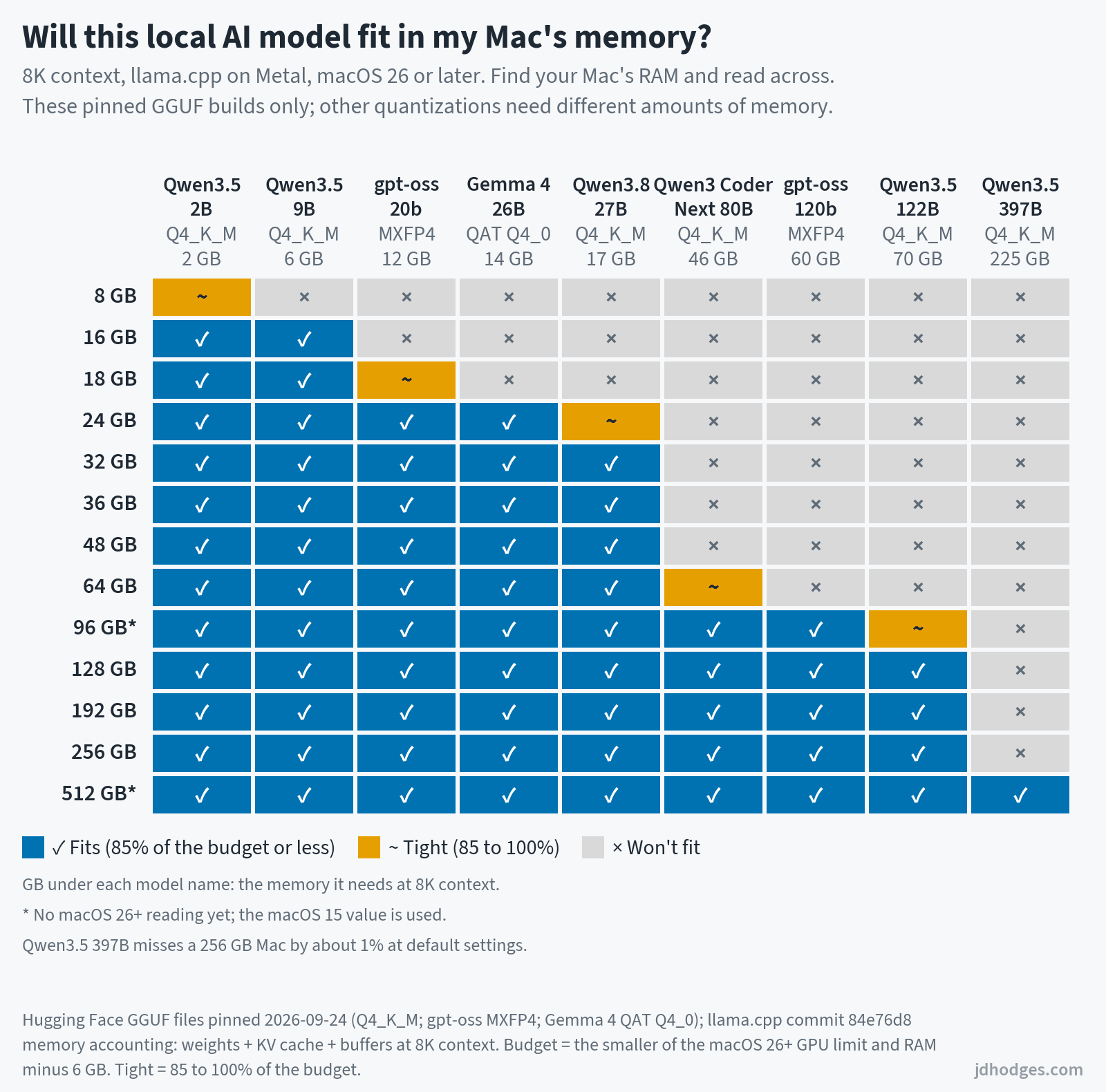
These charts do the actual memory math for nine popular models: the model file itself, the conversation’s working memory (the KV cache) and the app’s buffers, against the share of RAM that macOS lets the GPU use. They are modeled for the exact files named in the chart, in llama.cpp with default settings; other apps, settings and quantizations can need more or less memory. The second chart shows what a long, 128K-token conversation costs.
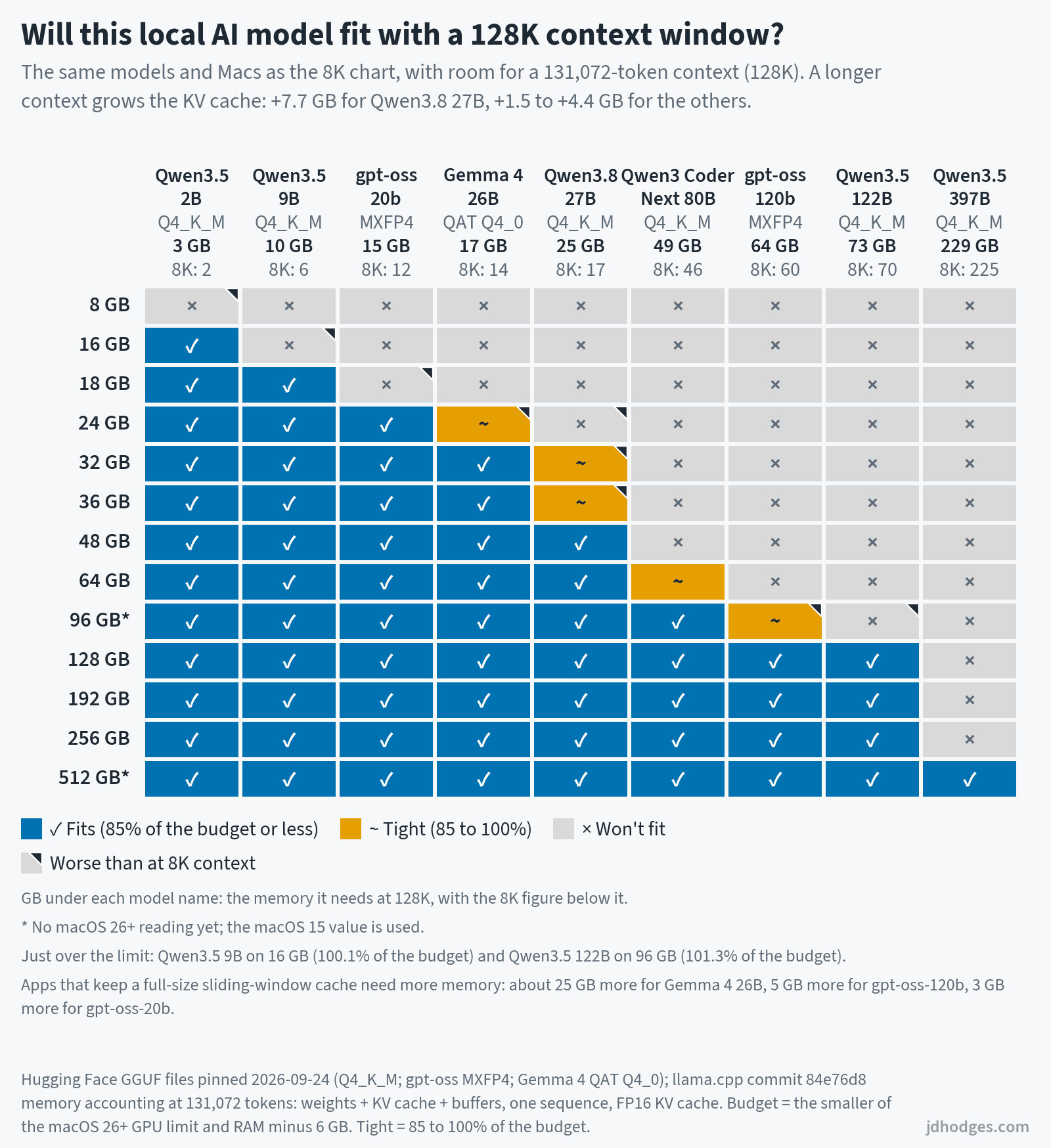
| Mac RAM | Fits at 8K context | Fits at 128K context | Chip families with this maximum RAM |
|---|---|---|---|
| 8 GB | Only Qwen3.5 2B, tightly | None of the nine | A18 Pro |
| 16 GB | Up to Qwen3.5 9B | Up to Qwen3.5 2B; Qwen3.5 9B just over | M1 |
| 18 GB | Up to Qwen3.5 9B (gpt-oss-20b tightly) | Up to Qwen3.5 9B | (none) |
| 24 GB | Up to Gemma 4 26B (Qwen3.8 27B tightly) | Up to gpt-oss-20b (Gemma 4 26B tightly) | M2, M3 |
| 32 GB | Up to Qwen3.8 27B | Up to Gemma 4 26B (Qwen3.8 27B tightly) | M1 Pro, M2 Pro, M4, M5, M6 |
| 36 GB | Up to Qwen3.8 27B | Up to Gemma 4 26B (Qwen3.8 27B tightly) | M3 Pro |
| 48 GB | Up to Qwen3.8 27B | Up to Qwen3.8 27B | (none) |
| 64 GB | Up to Qwen3.8 27B (Qwen3-Coder-Next 80B tightly) | Up to Qwen3.8 27B (Qwen3-Coder-Next 80B tightly) | M1 Max, M4 Pro, M5 Pro |
| 96 GB* | Up to gpt-oss-120b (Qwen3.5 122B tightly) | Up to Qwen3-Coder-Next 80B (gpt-oss-120b tightly); Qwen3.5 122B just over | M2 Max |
| 128 GB | Up to Qwen3.5 122B | Up to Qwen3.5 122B | M1 Ultra, M3 Max, M4 Max, M5 Max |
| 192 GB | Up to Qwen3.5 122B | Up to Qwen3.5 122B | M2 Ultra |
| 256 GB | Up to Qwen3.5 122B; Qwen3.5 397B just over | Up to Qwen3.5 122B | (none) |
| 512 GB* | All nine | All nine | M3 Ultra, M5 Ultra |
Same math and the same nine model files as the charts, in llama.cpp with one conversation. The nine models are ordered by memory requirement, so a Mac that fits one also fits every model listed before it in the charts. *96 GB and 512 GB use the older macOS 15 memory limit (no macOS 26 reading yet).
Capacity first, then bandwidth: RAM decides whether a model loads at all. Once it fits, memory bandwidth sets a ceiling on how fast it can generate text, since every new token has to read the model’s active weights. So the M3 Pro’s 150 GB/s (the M2 Pro had 200 GB/s) is worth a look if local AI is your main use, even though the M3 Pro offers more RAM (36 vs 32 GB). That is a spec comparison, not a speed test I have run.
Buying Guide: Which Chip Do You Actually Need?
| Category | Pick | Key Specs | Why this pick | Check Price |
|---|---|---|---|---|
| Web, Email, Light Office | Renewed MacBook Air M3 (16 GB) | M3, 16 GB, 256 GB or 512 GB | Plenty for browsing, email, and office work. Renewed 16 GB M3 Airs run about $950 to $1,050 on Amazon, roughly $190 to $290 under a new M5 Air, so check both. Whatever you pick, skip 8 GB configs in 2026; RAM can’t be upgraded later. | Check Price on Amazon |
| Home Desk on a Budget | Mac mini M6 (16 GB / 256 GB) | 12-core CPU (2 super, 4 performance, 6 efficiency), 12-core GPU, 16 GB, 256 GB | The cheapest way into the M6 generation; Apple says its CPU is 40% faster than the M4 mini’s. It’s $879.99 at Amazon ($899 at Apple). Bring your own monitor, keyboard, and mouse. | Check Price on Amazon |
| Students | MacBook Air M5 13-inch (16 GB / 512 GB) | M5, 16 GB, 512 GB, fanless, up to 18 hours of video streaming | Handles coursework that involves coding or creative tools, with no fan noise. The 13-inch M5 Air starts at $1,299 at Apple after the June price increase; Amazon had this model at about $1,240 on September 24. | Check Price on Amazon |
| Software Developers | MacBook Pro 14-inch M5 Pro | 15 or 18 cores, 24 to 64 GB, 307 GB/s | The workhorse. Get 48 to 64 GB if you run Docker, an IDE, and databases at once. From $2,499 at Apple ($2,349 on Amazon for 24 GB / 1 TB). At a desk? The Mac mini M5 Pro is the same chip from $1,699 at Apple (Amazon didn’t list it when I checked). For AI coding, see my best laptop for Claude Code and Claude Code workstation guides. | Check Price on Amazon |
| Creative Professionals | MacBook Pro M5 Max (or a used M1/M2 Max Mac Studio) | 18 cores, 32 or 40 GPU cores, 460 to 614 GB/s | Bandwidth matters for video editing. M5 Pro is the floor if buying new; step up to M5 Max for long timelines (from $4,099 at Apple, about $3,500 on Amazon). A used M1 Max or M2 Max Studio (400 GB/s) still beats a new M5 Pro (307 GB/s) on bandwidth; newer chips add much faster single-core speed and AV1 decode. | Check Price on Amazon |
| Local AI / LLM Inference | MacBook Pro M5 Max, 40-core GPU, 128 GB (or a Mac Studio at a desk) | 128 GB at 614 GB/s; Mac Studio M5 Ultra up to 512 GB at 1.2 TB/s | Memory decides which models fit; bandwidth is a big factor in speed (which chip runs which model size). These run about $6,700 to $8,000 on Amazon. At a desk, the Mac Studio M5 Max starts at $2,499 with 36 GB and costs $5,099 at Apple with 128 GB. The M5 Ultra starts at $5,499 at Apple and is not listed on Amazon yet. When I checked, Apple quoted mid-to-late November delivery for the base model and 15 to 17 weeks for the 36-core. | Check Price on Amazon |
| “I Want the Best Laptop” | MacBook Pro 16-inch M5 Max, 40-core GPU, 128 GB | 18 cores, 614 GB/s, Thunderbolt 5, Wi-Fi 7 | The ceiling for Apple laptops. Apple starts the 16-inch M5 Max at $4,399 ($4,999 with the 40-core GPU); the 128 GB / 2 TB configuration is about $7,000 on Amazon. | Check Price on Amazon |
⭐prices change quickly (checked September 24, 2026), so always check for latest prices and deals⭐
Apple specific things to know and watch out for
RAM Pricing. Apple has always charged a premium for memory upgrades, and none of their current machines can be upgraded after purchase. The global DRAM shortage that began in late 2025 has pushed memory component costs up over 50%, but Apple’s long-term supply agreements and buying power have kept their upgrade pricing relatively stable compared to the broader market (though as of late 2026, Apple did raise prices appreciably).
The Base Models Sometime Have Anemic RAM size. Apple shipped 8 GB base MacBooks from 2020 through 2023. If buying used M1/M2/M3, check the RAM. For many situations an 8 GB M3 Air is worse than a 16 GB M1 Air IMHO.
The M3 Pro Bandwidth Regression. 150 GB/s is 25% slower than the M2 Pro’s 200 GB/s. Apple never acknowledged it. If buying a 2023 MacBook Pro, the M3 Max is better if bandwidth matters.
Thunderbolt Confusion. Base chips: TB3/4 (varies by Mac). M1-M3 Pro/Max: TB4. M3 Ultra, M4+ Pro/Max: TB5 (120 Gbps vs 40 Gbps).
M2 256 GB SSD Speed. Single NAND chip halved SSD speed vs 512 GB. Fixed with M3. Avoid the 256 GB M2 when buying used.
Power Consumption. Apple does not publish TDP or power draw for any M-series chip. Third-party measurements from sites like Notebookcheck suggest peak package power ranges from roughly 10W (base M1/M2 at idle) to 75W or more (M4 Max/M5 Max under sustained GPU load), but numbers vary significantly by workload, cooling solution, and measurement methodology.
M Series Generational Gains: Summary Charts
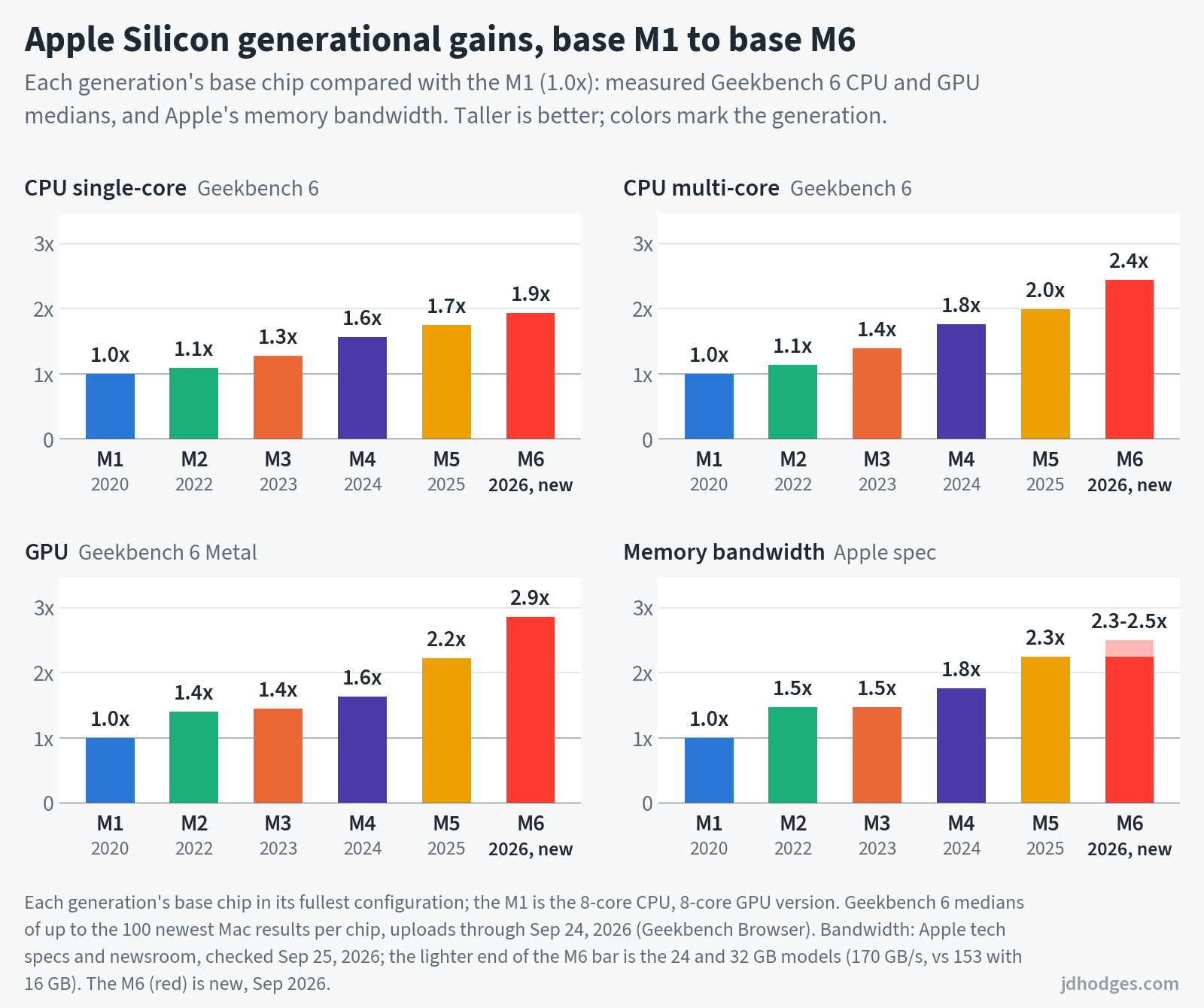
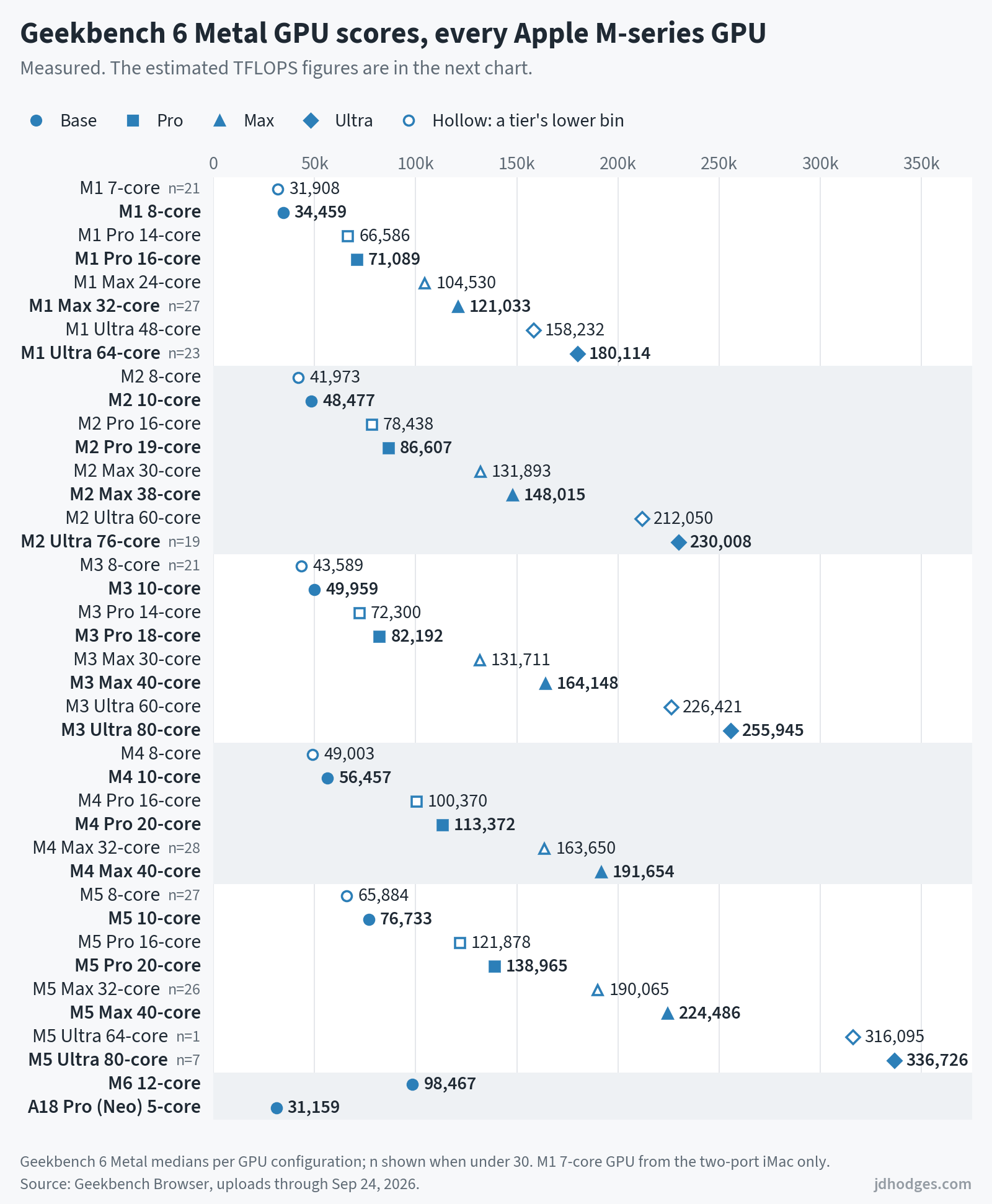
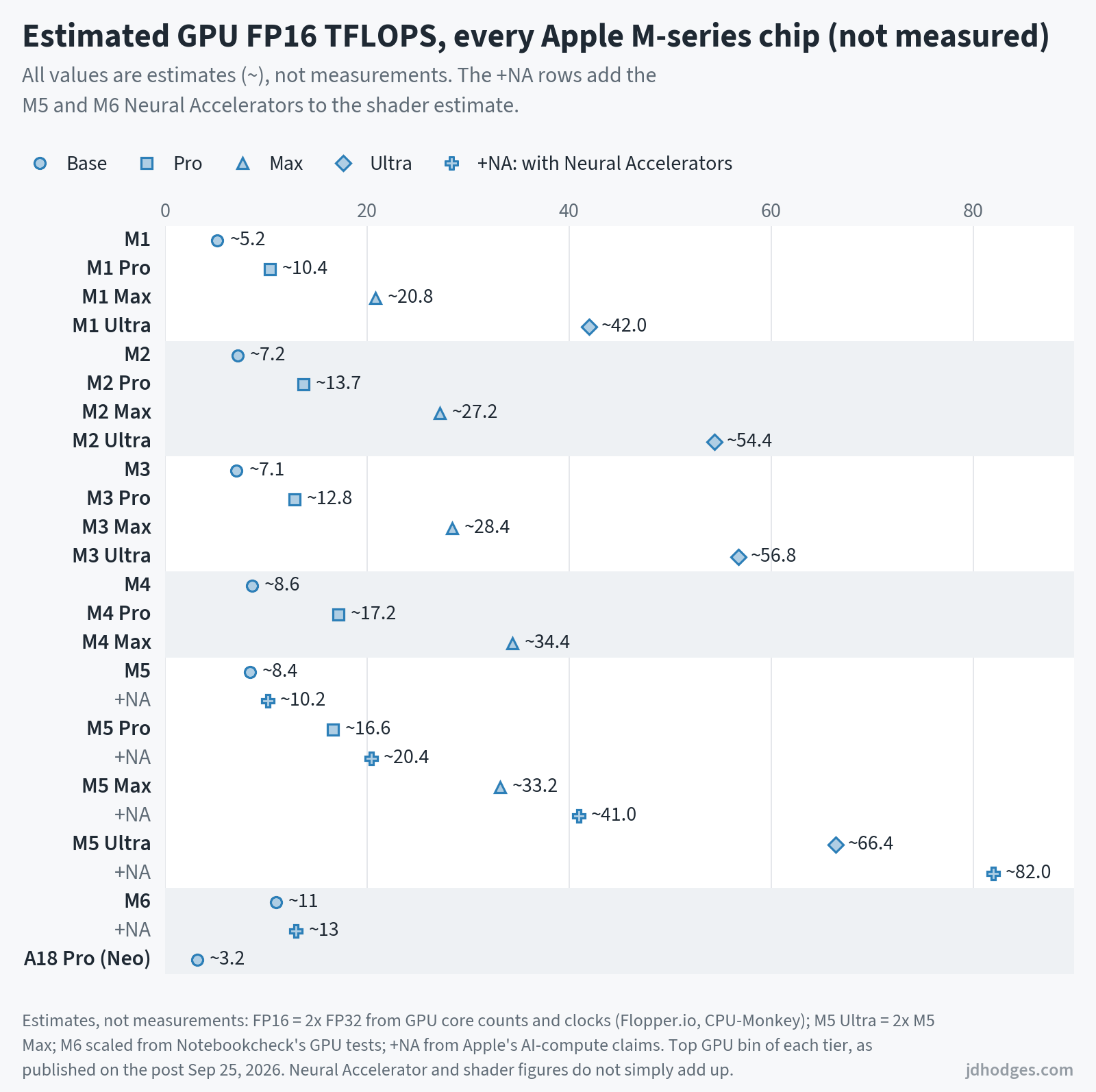
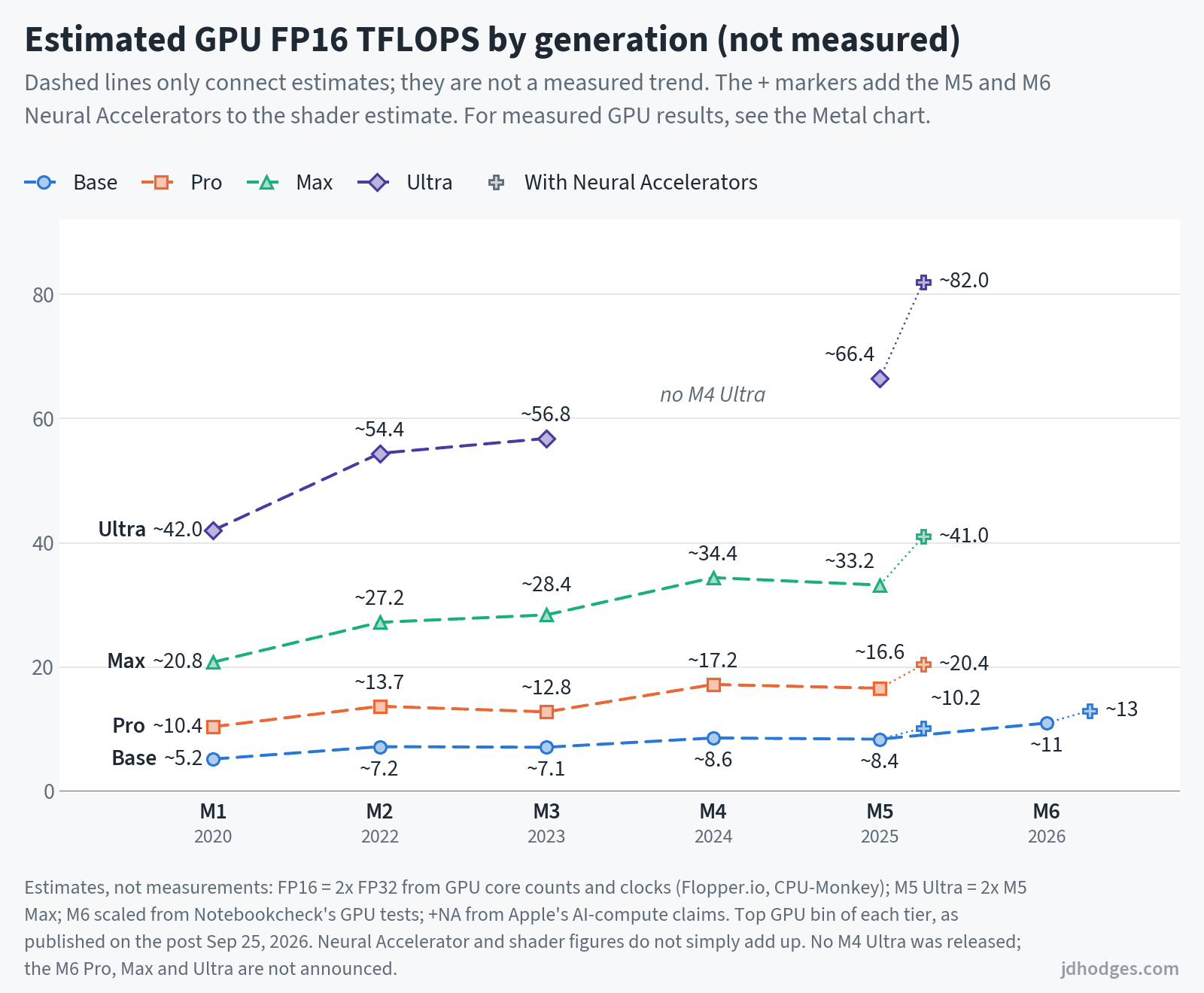
Apple makes outstanding chips but buries half the useful technical info in footnotes, tech spec PDFs, and marketing language that almost never includes a TFLOPS number. The above charts 👆 are meant to make the information a little more easily readable and findable.
The short version: if buying new in 2026, the M5 and M6 families are great CPUs. The new M6 Mac mini at $899 is the entry point. The leftover M4 minis still listed on Amazon cost more than the $879.99 M6 when I checked on September 24, so skip those. The M5 Pro is a workhorse and the M5 Max is the ceiling for laptops. Lastly, once Apple’s 512 GB option arrives in late October, the M5 Ultra Mac Studio will be the only new Mac with 512 GB of unified memory, at a full 1.2 TB/s.
If buying refurbished, watch for the M3 Pro bandwidth regression and the M2 256 GB SSD problem.
I will update this guide when new chips are announced. Next expected updates: more M5 Ultra Geekbench results, then the M6 MacBook Pro rumored for late 2026 (Bloomberg reports Apple plans to skip an M6 Pro and M6 Max and move to M7 chips in 2027, though Apple hasn’t confirmed it).
Sources and Further Reading
- Apple M1 Newsroom
- M1 Pro/Max Newsroom
- M1 Ultra Newsroom
- Apple M2 Newsroom
- M2 Pro/Max Newsroom
- M2 Ultra Newsroom
- M3/Pro/Max Newsroom
- M3 Ultra Newsroom
- Apple M4 Newsroom
- M4 Pro/Max Newsroom
- Apple M5 Newsroom
- M5 Pro/Max Newsroom
- Mac Studio M5 Max/Ultra Newsroom (Aug 2026)
- Mac mini M6/M5 Pro Newsroom (Aug 2026)
- MacBook Neo Newsroom
- Wikipedia: Apple M1, M2, M3, M4, M5
- Flopper.io: GPU specs, CPU-Monkey, Geekbench Browser
Please Note: If you purchase a product from Amazon via a link on my site I may benefit from the sale, though it does not cost you anything extra. Thanks again for visiting my site and have a GREAT day!
Phenomenal analysis. Clearly presented with actionable information.
Thanks Jeff, I’m glad you found the analysis helpful! 👍👍
I appreciate your feedback!
Have a great day,
-J.D.
Thank you for this analysis!
Very useful.
Thanks Eric, glad it was useful! That’s exactly why I put it together. 👍 Hope you have a GREAT weekend!
-J.D.
Thanks very much for this very informative post. I’m new to the M series Mac stuff, as I only heard of it a couple of months ago, just in time for everyone to start demanding higher prices for their used gear. 😉
Can you clarify why you’re saying “Creative Professionals” need M4/M5 pro/Max? The only comment there is “bandwidth matters, but assuming by “creative professionals” you mean mainly video editing, and by “bandwidth” you mean memory bandwidth, is the Mac Studio M1 or M2 Max really going to feel incapable vs. the M4 and M5 generations? And given the choice between a Mac Mini M4 Pro and an M1 or M2 Studio Max, wouldn’t both of the latter still be better than the Mini?
BJ, fair pushback on my wording, and you clearly did your homework! That row is really aimed at buying new, and I need to make that clearer b/c there are a lot of M series CPUs out there that are FULLY capable of handling most creative workflows.
Specifically, you’re right that a Mac Studio with an M1 Max or M2 Max is still a very capable video editing machine. Both have 400 GB/s of memory bandwidth, which actually beats a brand new M4 Pro (273 GB/s) or M5 Pro (307 GB/s). For timeline playback and scrubbing with ProRes or H.264/HEVC footage, I’d expect an M1 or M2 Max Studio to feel great today.
Where the newer generations excel: single core speed (roughly 1.6x to 1.8x by Geekbench 6, which affects UI snappiness in some apps), newer media engines (AV1 decode arrived with the M3 generation), and export times. Depending on how you purchase, you may get longer warranty/support new etc. as opposed to buying older or used.
On the Mac mini M4 Pro vs. a used M1/M2 Max Studio: for GPU heavy grading and sustained playback I’d lean Studio, for general responsiveness, AV1 support, and warranty I’d lean mini. It really depends on your codecs and workflow 🤔
And yes, used Apple Silicon prices have been climbing. It’s one of the oddest economic times in my lifetime, and the GPU/memory prices in the tech industry are just crazy at the moment. Hopefully things will settle down and normalcy will return 🙏
Good luck and feel free to comment with your final decision!!
-J.D.
An absolute gem, thank you so much for all the data you gathered! Made my choice so much easier ❤️
Thank you! Comments like this are why I keep the table updated. Glad it made the choice easier. 🙂
-J.D.
Wow, absolutely wonderful, thorough, actual and -as far as I can determine- independent analysis.
Helps me a lot in choosing the next model.
I am a ‘home-office’ user only, no heavy graphics or local AI.
Then again: I renew computers at very low frequency (currently still running an iMac 27″ late 2012), so I want to prepare for the long term, minimum 5 years, preferably 10. With AI-developments going as fast as they currently go, I want to be prepared.
Would you then recommend the new M6 (I’m thinking 16GB memory, 512GB SSD) or a used “Mac Mini M4 Pro – 24GB memory with 512GB SSD” which is offered here (The Netherlands) on our e-bay equivalent?
Thanks in advance for your reply!
Best,
Mark
Thank you for the kind words, Mark!! It is GREATLY appreciated.👍
Also, way to go on making your computing power last, that is a VERY long run for you last system. 💪
As for your excellent question, it is hard to say 100% without knowing your exact workload… BUT, I would probably say the Mac Mini M4 Pro with 24GB memory and 512GB SSD. The specific reasons are that recent Mac CPUs are pretty overpowered (in a good way) and any modern Mac silicon system is going to be a HUGE increase (many multiples) over what you are used to… and with RAM, 24GB gives a nice future proofing vs 16GB (16GB is likely decently close to your existing 2012 system spec).
Summary: +I think the M4 Pro w/24GB memory is a real sweet spot in bang for your buck. -M6 is great, but I feel 16GB would eventually be a real limitation if you hold onto your systems for a long time. I hope this helps!
Please keep me posted on what you decide and how you like your eventual new system!
Best regards,
-J.D.