MacBook Neo Review: A18 Pro CPU, 8GB Reality, and the Thermal Wall
Disclosure: This post contains affiliate links. I have not been paid by Apple or anyone else to write this.
The Short Verdict
The MacBook Neo is the fastest single-core laptop you can buy for $599 or even lower at $499 educational pricing! It also drops to phone-class performance after about 60 seconds of sustained CPU load. Both of those things are true at the same time, and thankfully even (Apple) phone class performance is still quite speedy.
I ran 30 benchmarks across three thermal conditions on my own unit over a 12-hour testing window. Cold, with the chassis held at ambient temperature using a USB desk fan, the Neo posted a Geekbench 6.6.0 single-core score of 3,569 (3-run average, 7-point variance), matching published A18 Pro numbers and beating every M1 MacBook Air ever made. After five minutes of all-core stress, that same chip scored 476. An 87% single-core reduction, on the same machine, running the same test.
The MacBook Neo’s real limitation is not 8GB. It is time under sustained CPU load. Sixty seconds of it, specifically. After that, the fanless chassis hits a thermal wall and the chip starts rationing performance. For most people, that won’t matter much and thankfully even at that heat saturated full load point it still works ok and does not crash. Pretty impressive!
MacBook Neo CPU Performance: Cold, Contended, Soaked
I tested the Neo’s A18 Pro under three conditions that represent the actual range of thermal states a fanless laptop experiences.
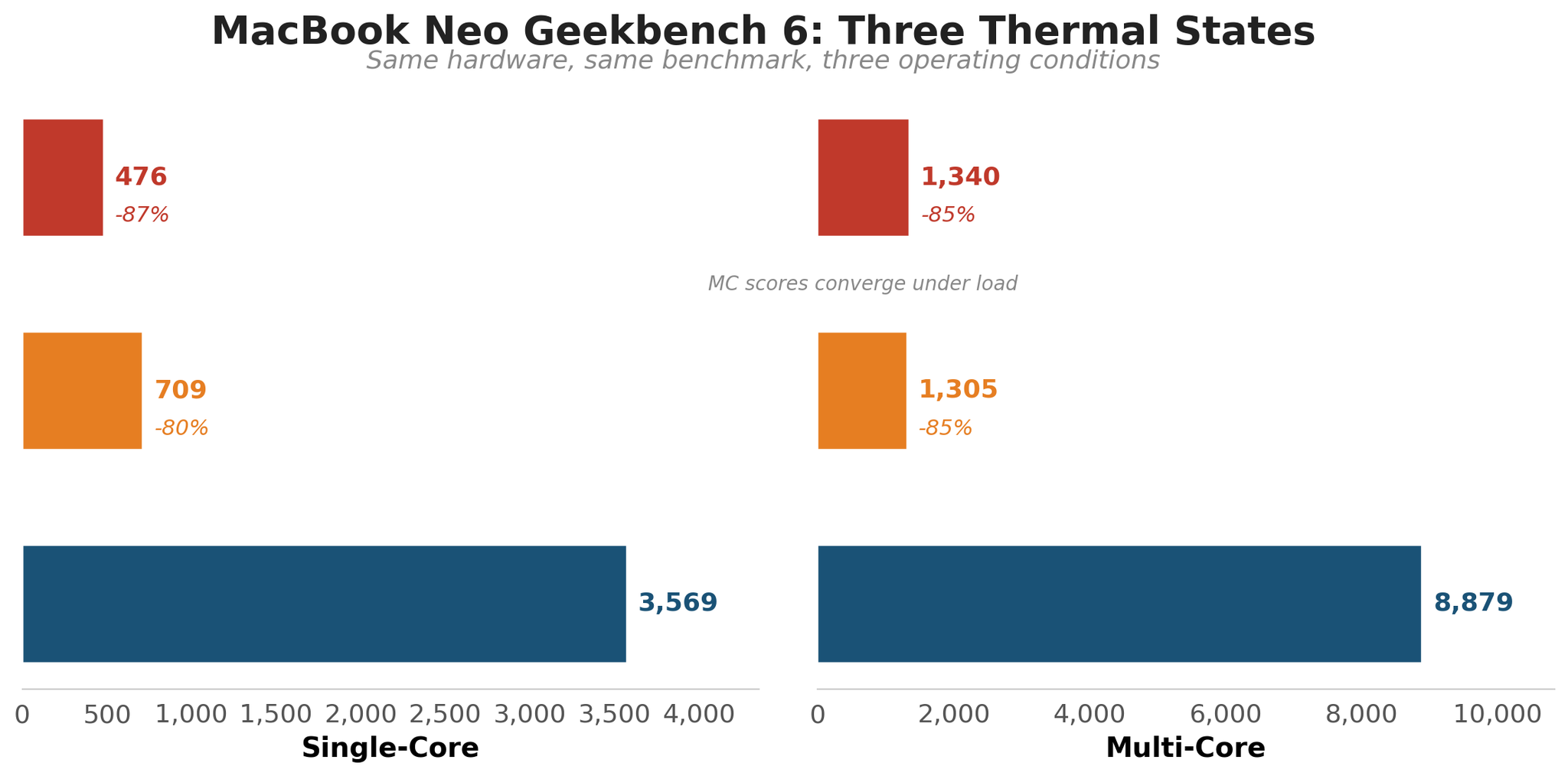
| Condition | Single-Core | Multi-Core | SC vs Cold Start |
|---|---|---|---|
| Thermal soak (5 min all-core stress) | 476 | 1,340 | -87% |
| Dev workload (Claude Code active) | 709 | 1,305 | -80% |
| Cold start (fan-assisted, 3-run avg) | 3,569 | 8,879 | Baseline |
The cold start scores are pristine: three consecutive runs varied by just 7 points on single-core (3,564 / 3,571 / 3,571). That 3,569 average matches every published A18 Pro benchmark. The chip is genuinely this fast when it has thermal headroom. (Run 1, Run 2, Run 3)
The post-soak result (SC 476, full result) is the thermal floor. After five minutes at full load, the A18 Pro has nothing left to give until the chassis cools down. One detail that surprised me: multi-core scores under contention (1,305) and after thermal soak (1,340) are essentially identical. The chip has one sustained performance floor, and both conditions find it.
For the complete benchmark comparison against every major competitor, full methodology, and test-by-test data, see our MacBook Neo benchmark deep-dive.
The Thermal Wall: What Happens After 60 Seconds
To quantify the throttling, I ran a 5-minute all-core stress test and logged CPU utilization every 15 seconds.
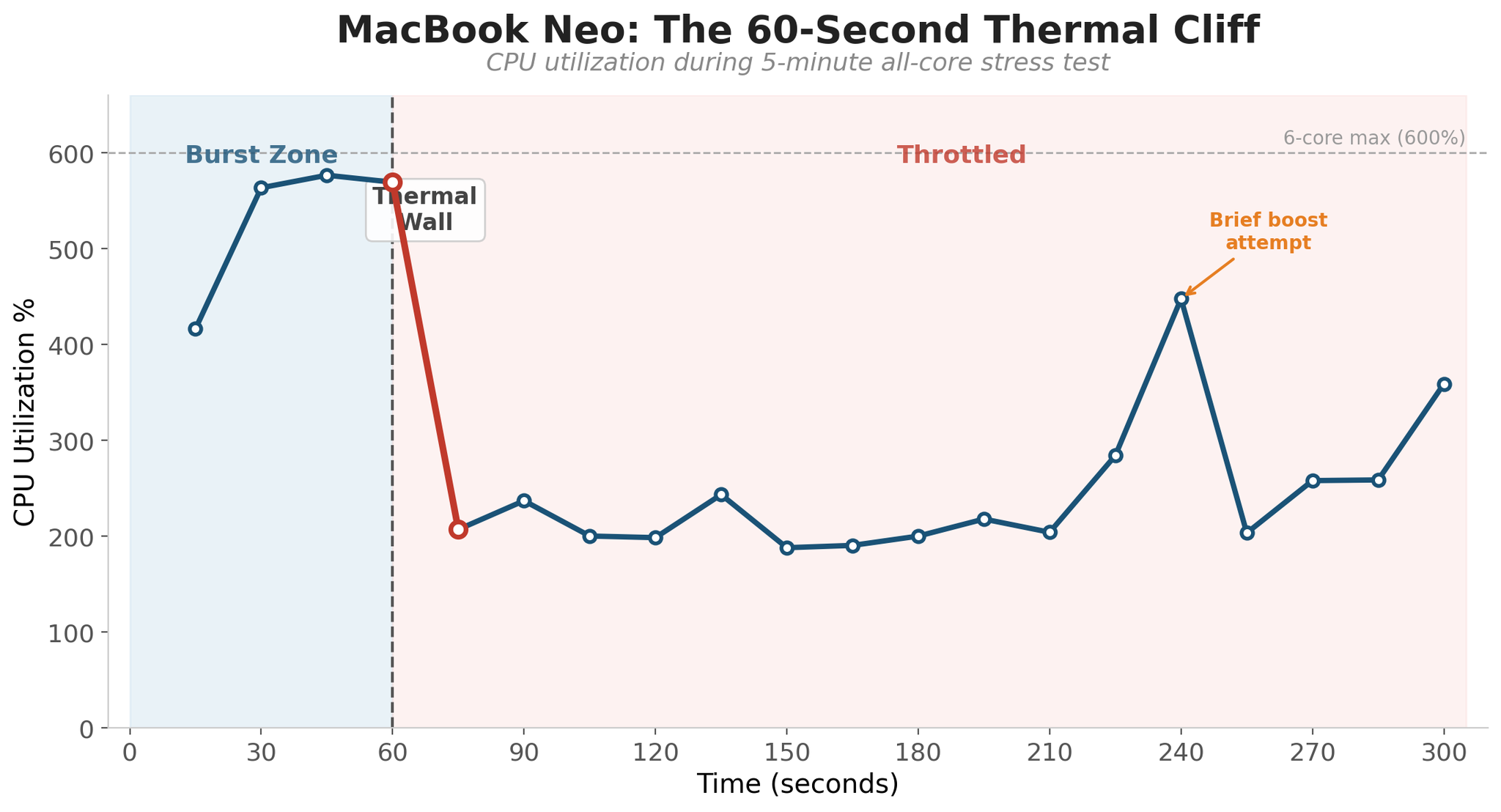
For the first 60 seconds, the A18 Pro runs wide open: all six cores near maximum, CPU utilization around 570%. Then the thermal wall hits. Between T+60 and T+75, utilization crashes from 570% down to 207%. That is a 64% drop in 15 seconds. For the remaining four minutes, the chip bounces erratically between 188% and 360%, never recovering its burst performance.
The native C benchmark corroborates this precisely. A prime sieve that took 18.8 milliseconds when cold took 124.2 milliseconds after the thermal soak: 6.6 times slower. A 512×512 matrix multiply dropped from 15.93 GFLOPS to 3.85 GFLOPS. These are not abstract percentages. That is the difference between “instant” and “noticeable pause” for any computation-heavy operation.
There is one interesting moment at T+240 where the SoC briefly attempts a boost back to 448%, then immediately throttles back down. The silicon wants to run fast. The chassis will not let it.
MacBook Neo Teardown: Inside the Thermal Design
Technetbook found the same wall independently: the A18 Pro hits 105°C at the die and drops its clock from 3.3 GHz to approximately 2.3 GHz. The modding community has confirmed that cooling is the sole constraint. TweakTown measured 18% higher Geekbench scores with liquid cooling. Hackaday documented doubled gaming frame rates with a water cooling mod. A Peltier cooler mod dropped die temps from 105°C to 74°C and eliminated throttling entirely.
And here is the part that still surprises me: during peak thermal stress, I measured the hottest spot on the case surface at 97.6°F (36.4°C) with an infrared thermometer. Barely above body temperature. The chip is internally at 105°C and shedding 87% of its single-core performance while the aluminum chassis feels perfectly comfortable in your lap.
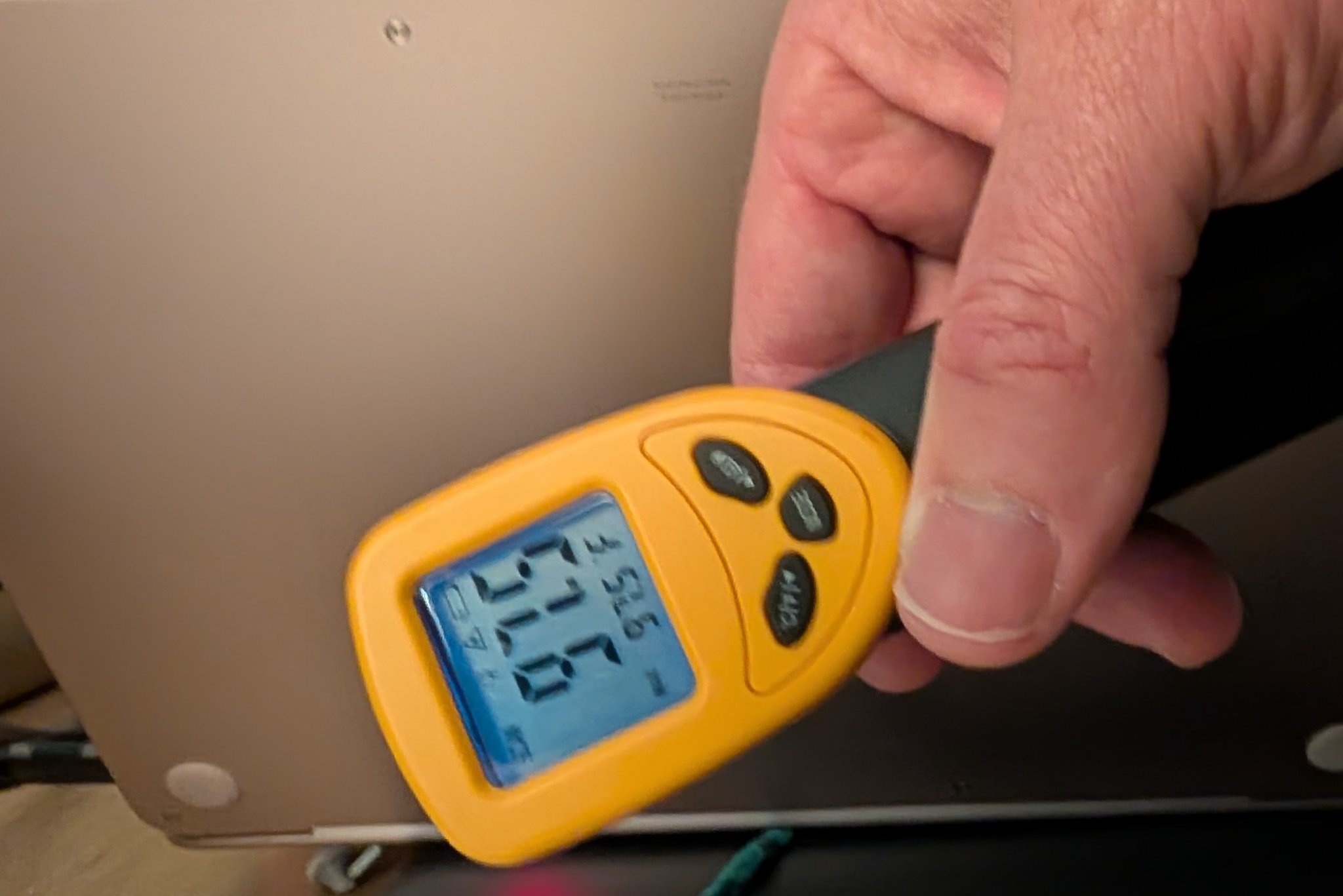
Apple made a deliberate engineering choice. The MacBook Neo’s fanless aluminum chassis is a heat spreader, not a heat dissipater. It absorbs thermal energy and distributes it across the surface rather than venting it. That keeps the exterior at laptop-safe temperatures. The cost is paid entirely in clock speed.
Why the Neo Feels Like a Modern BeBox
After running 30 benchmarks, encoding video, stress-testing the CPU, and pushing the memory subsystem to its limit, I kept coming back to the same reaction: this system somehow still feels responsive. No matter what I threw at it in normal use, the UI stayed responsive. Apps still launched. Scrolling was pretty smooth. Remote access via VNC stayed responsive as well. Even while Claude Code was churning through a massive context window in the background, Safari and the Finder felt snappy. That is pretty astounding for the cheapest MacBook ever!
I have felt this exact sensation before, over 25 years ago, on a very different machine.
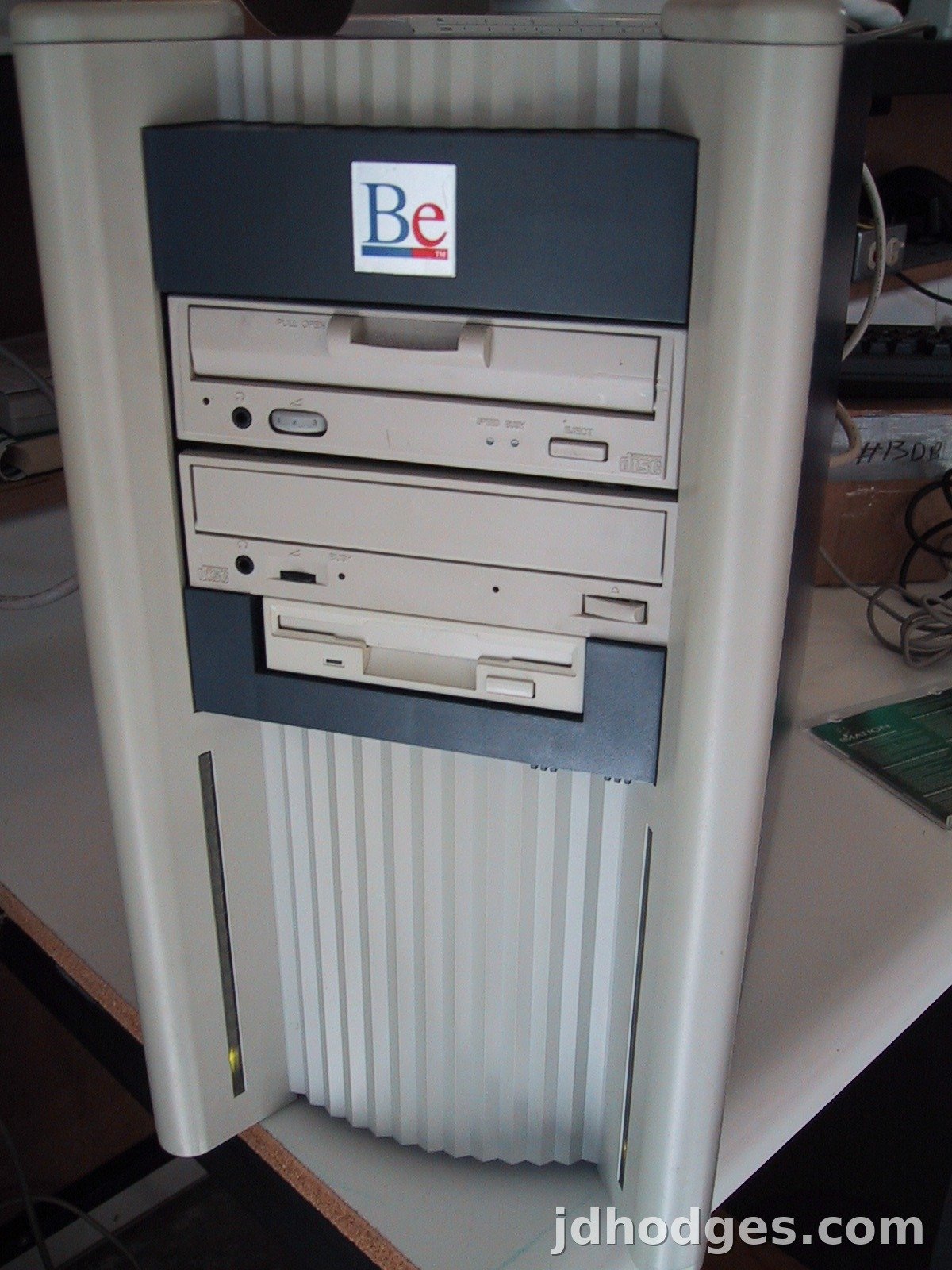
In 1995, Jean-Louis Gassée (Apple’s former president of product) shipped the BeBox: a dual-processor PowerPC workstation running BeOS. It was legendary for one thing above all else: it never stuttered. You could encode video, play audio, and drag windows around simultaneously, and the system remained perfectly fluid. I remember opening about 12 video windows and playing MP3s and copying files and it JUST KEPT GOING! For that point in time, that was unheard of. BeOS achieved this through pervasive multithreading and real-time scheduling that prioritized interactive responsiveness above all else. The blinkenlights on the front panel showing per-CPU load became iconic.
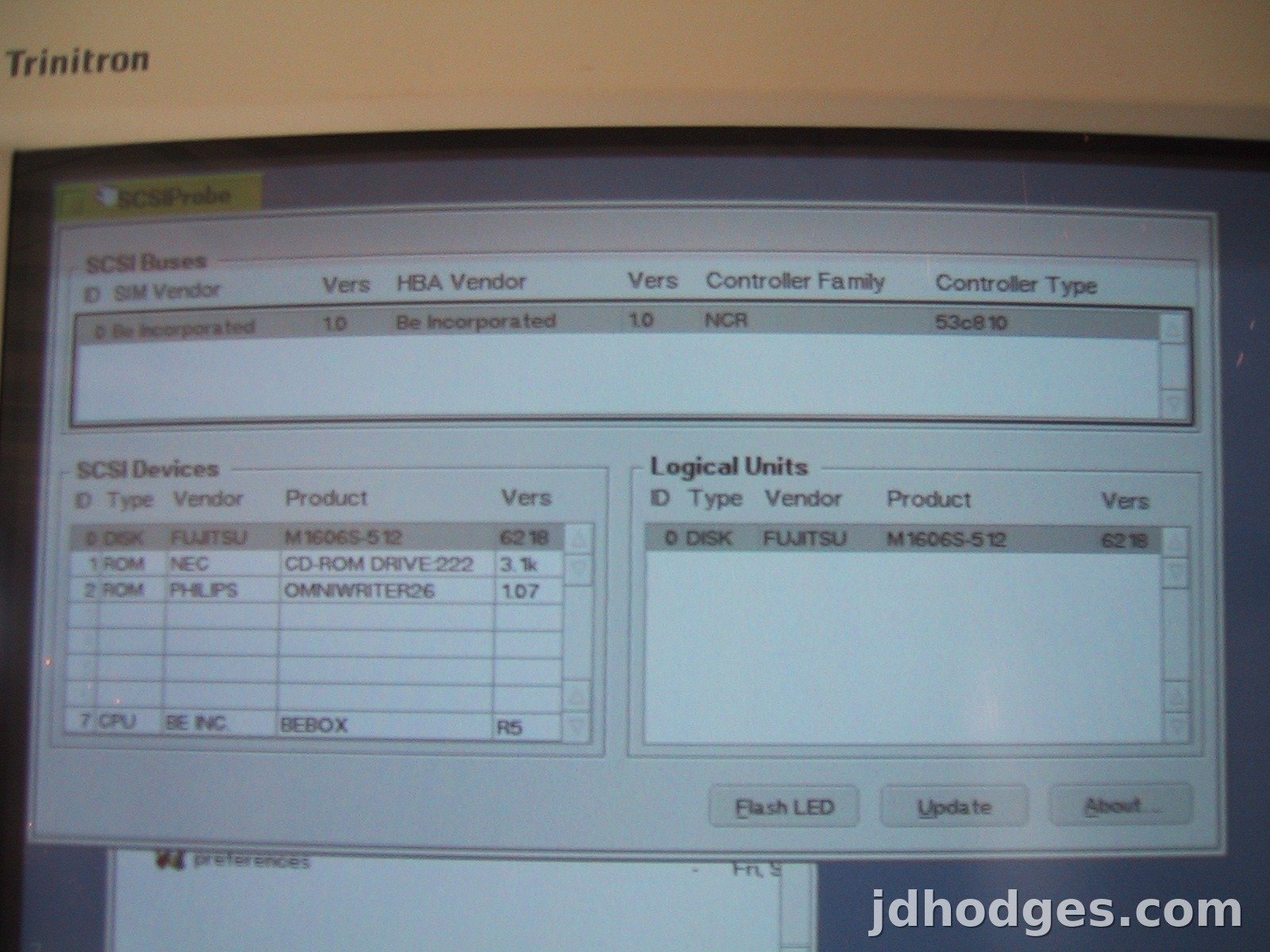
Now fast forward 25-30 years and we have an ultra-portable system (also ARM-based!) that can do that with a TINY phone CPU and 8GB RAM, plus some good OS optimization on the part of Apple. I had a fun time going down memory lane and digging up those photos taken decades ago. It doesn’t seem that long ago. 😅
The MacBook Neo achieves the same result through a completely different mechanism. Where BeOS used scheduling brilliance to make modest hardware feel fast, the Neo uses raw per-core speed. The A18 Pro’s single-core performance is so far ahead of what any interactive task requires that the system has massive headroom for responsiveness, even when background processes are consuming resources. A web page render, an app launch, a file operation: these are all burst tasks that complete in milliseconds on this chip. The user never waits.
The parallel runs deeper than the user experience. Gassée left Apple in 1990, built the BeBox, and by late 1996 Apple was seriously considering acquiring BeOS. They chose NeXT instead, bringing Steve Jobs back. Now, 30 years later, Apple ships a $599 laptop that embodies the same philosophy Gassée was chasing: a machine where perceived responsiveness is the primary engineering goal, achieved through tight coupling of hardware and software that no commodity PC can replicate.
Same lesson. Different era. The BeBox proved that a great scheduler could make modest hardware feel limitless. The Neo proves that extreme single-core speed, paired with an operating system that controls every layer of the stack, achieves the same magic at scale.
8GB: Better Than Expected, Still a Ceiling
I was prepared for the 8GB to be a problem. It was not, but only because macOS on Apple Silicon manages memory quite efficiently.
During the benchmark battery, I ran a dedicated memory pressure test that attempted to consume the full 8GB. The result: zero swap-outs. macOS compressed inactive pages in RAM fast enough that the system never needed to page to the SSD. The memory pressure gauge in Activity Monitor climbed but never turned red. The system remained responsive throughout.
Three things make 8GB work on Apple Silicon in ways it would not on a commodity PC:
- Unified memory architecture. The CPU, GPU, and Neural Engine share the same 8GB pool with zero-copy access. On a Windows machine with 8GB, the GPU carves out its own reservation. On the Neo, a texture the GPU just rendered is immediately available to the CPU at full bandwidth with no copy step.
- Hardware-accelerated compression. macOS has compressed inactive memory pages since Mavericks (2013), but Apple Silicon’s hardware acceleration makes it fast enough that compressed memory performs closer to uncompressed RAM than to SSD swap.
- Fast swap backstop. When macOS does swap, the Neo’s NVMe SSD (1,510 MB/s sequential read in my fio tests) makes the latency penalty measured in microseconds, not the milliseconds you would feel on a spinning disk or even a slower SSD.
Every reviewer who says 8GB is less than ideal is correct. 16GB would be better, and the machine will age faster than a 16GB equivalent. But the story everyone misses is that macOS on Apple Silicon manages 8GB more effectively than most operating systems manage 16GB on commodity hardware. The spec sheet number is not the whole story when one company controls the chip, the memory controller, the OS kernel, the swap subsystem, and the SSD controller. That is vertical integration earning its keep.
Where 8GB does hit a wall: Docker containers, local LLM inference, virtual machines, and pathological tab hoarding. If those describe your workflow, the Neo is not for you regardless of how clever Apple’s memory management is. But for the target buyer (a student, a knowledge worker, someone upgrading from a 5-year-old laptop), 8GB on this machine is genuinely not the limitation that the spec sheet suggests.
And here is the data point that reframes the 8GB debate for sustained CPU work: on this machine, heat is often the first ceiling before memory is. The thermal wall at 60 seconds constrains sustained performance well before 8GB becomes the bottleneck. For CPU-bound workloads, you run out of thermal headroom before you run out of RAM.
GPU, Media Engine, and Storage
The A18 Pro’s GPU posted a Geekbench 6 Metal score of 31,275. That is competitive with the M1 Pro and positions the Neo well for light GPU workloads: photo editing, casual gaming, video playback.
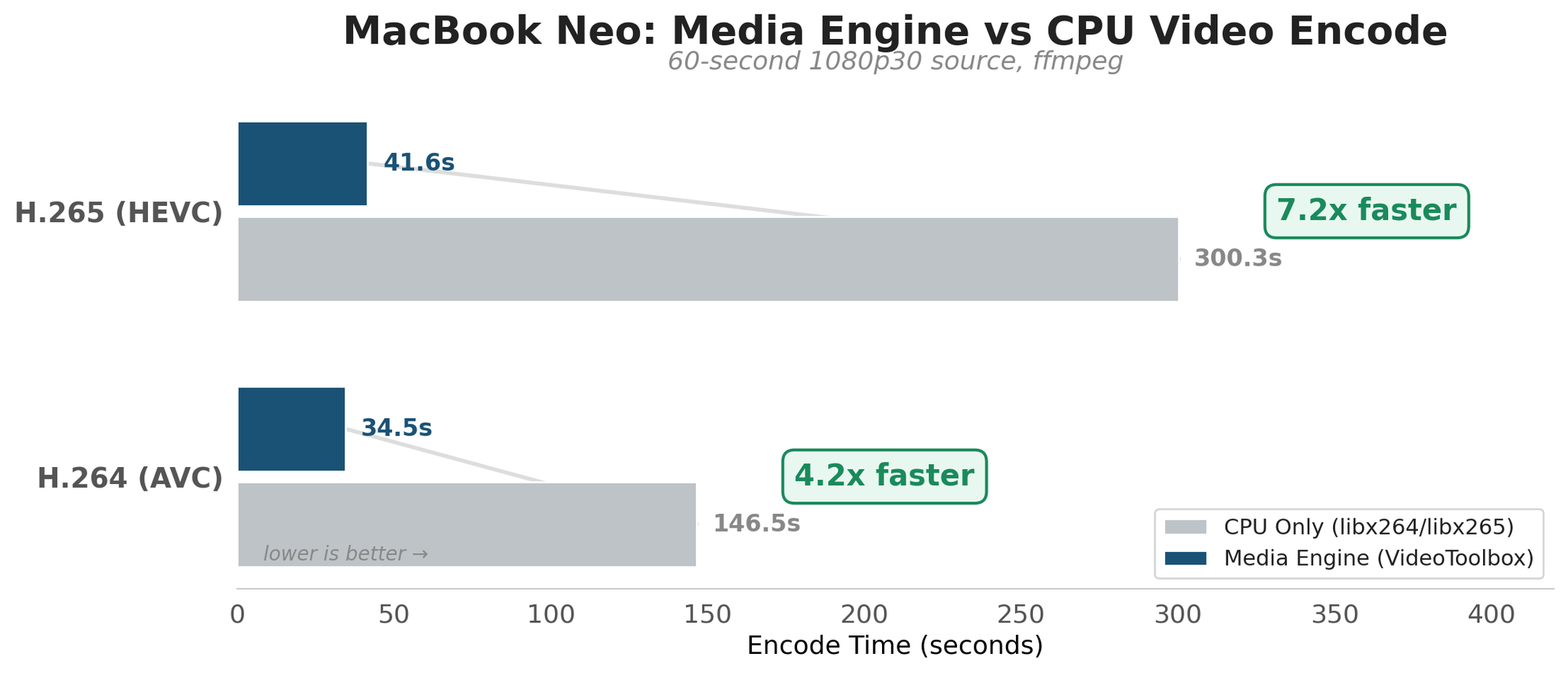
The real GPU story is the media engine. Apple’s hardware video encoder transforms the encode experience on this machine.
| Codec | CPU Only | Media Engine | Speedup |
|---|---|---|---|
| H.265 (HEVC) | 300.3s | 41.6s | 7.2x faster |
| H.264 (AVC) | 146.5s | 34.5s | 4.2x faster |
The H.265 hardware encode is 7.2 times faster than software encoding on the same chip. That is the difference between waiting five minutes and waiting 42 seconds for a 60-second 1080p clip. And because the media engine is a dedicated silicon block, it does not generate the same thermal load as CPU encoding. You can hardware-encode video without triggering the thermal wall.
Storage is adequate but not exceptional. The APPLE SSD AP0256Z posted 1,510 MB/s sequential reads and 913 MB/s sequential writes in fio testing. Random 4K performance: 8,041 read IOPS, 5,149 write IOPS. This is NVMe-class but noticeably slower than M-series Mac SSDs, which regularly exceed 3,000 MB/s sequential. For the $599 price, it is fine. For pro workloads involving large file transfers, it is a noticeable step down.
Additional benchmark results:
- OpenSSL AES-256-GCM: 142 GB/s (hardware-accelerated, very fast)
- 7zip: 2,458 MIPS total rating
- Python multiprocessing: 3.84x speedup on 6 cores (64% efficiency)
- sysbench memory: 12.6/13.4 GB/s read/write (6 threads)
Living With It: Display, Keyboard, and Battery
Benchmarks tell you what a machine can do. They do not tell you what it feels like to use for eight hours. A few notes from daily use:
The 13-inch Liquid Retina display (2408 x 1506, 500 nits, sRGB) is sharp and bright enough for indoor use. It is not the OLED panel you get on the Zenbook A14 (at a higher price), and it does not cover P3 wide color. For photo editing or design work where color accuracy matters, the M4 Air’s display is worth the upgrade. For everything else, this screen is perfectly good.
The keyboard and trackpad are full-size MacBook quality. If you have used any MacBook in the last three years, you know exactly what to expect. I’m not SUPER fond of the trackpad personally, but it does get the job done and most people seem to really like it.
Battery life is where the A18 Pro’s phone heritage pays off. Apple rates the Neo at 18 hours of video playback. In mixed real-world use (web browsing, writing, occasional terminal work, Wi-Fi on, brightness at 60%), I consistently got through a full workday without reaching for the charger. The chip’s aggressive thermal throttling has a silver lining: by capping sustained power draw, it extends battery life in exactly the scenarios where you are working for long stretches.
Who Should Buy It, Who Shouldn’t
Buy It If
- You are a student. At $499 with education pricing, it is quite a good deal IMHO (especially considering the fit and finish). The single-core speed makes every interactive task feel instant, the battery lasts all day, and 8GB is sufficient for note-taking, web research, and light coding.
- You are upgrading from a laptop older than 3 years. The Neo will feel like a generational leap regardless of what you are coming from.
- Your work is bursty. Web development, writing, office productivity, photo editing, light video editing with hardware encode. If your tasks complete in under a minute, you get the full 3,569 single-core experience.
- You want a Mac and $$499-599 is your budget (depending on if you are education discount eligible or not). It is a genuinely good option that can handle WAY more than I expected and still stay usable and non-crashy.
Skip It If
- You run LOTS of sustained workloads. Long compiles, ML training, software video encoding, heavy simulation. After 60 seconds you are getting throttled performance that a $400 Windows laptop can match and the Window laptop probably fives you more RAM.
- You need more than 8GB! Docker, local LLMs, multiple IDEs, 50+ browser tabs. The memory ceiling is real and not upgradeable.
- You need external display support beyond one screen. The Neo supports one external display. If you need dual external monitors, the M4 Air starts at $999.
- You want to game. The Neo is not very performant in games, there are better options out there.
- You are a professional developer using AI coding tools. The irony: Claude Code running in the background can drop Geekbench single-core by ~80%. The machine becomes a different computer when running the exact tools that power modern development workflows. (for hobby or testing purposes, I would have no hesitation choosing a Neo for lightweight Claude Code sessions if it fits all your other criteria, its just going to make the rest of the Neo experience suffer a bit with that extra RAM and CPU load)
Final Verdict
The MacBook Neo is a $599 laptop that performs like a $1,500 machine for 60 seconds at a time. That sounds like a criticism. It is not. Most computing tasks are 60-second tasks. A page load, a file open, an app launch, a photo edit, a document save. The Neo completes all of these faster than any laptop in its price class, and most laptops at twice the price.
The thermal wall is real, documented, and quantified in this review. But it is the wrong framing for the target buyer. Nobody buying a $599 laptop for school or general productivity is sustaining all-core workloads for five minutes. They are opening apps, switching tabs, and writing papers. For that usage pattern, the Neo’s burst performance is not a compromise. It is the entire point.
Twenty-five years ago, a machine called the BeBox proved that clever engineering could make modest hardware feel limitless. The MacBook Neo proves the same thing with a different toolkit: extreme single-core speed, unified memory, hardware media acceleration, and an operating system that controls every transistor in the stack. In daily use, it feels like a machine that costs three times what it does.
Cold, the MacBook Neo is quite impressive. After about 60 seconds of sustained CPU load, the cooling policy becomes the product story. Know which side of that line your work falls on, and the decision makes itself. 👍👎
More MacBook Neo Coverage
- MacBook Neo Benchmarks: A18 Pro Deep Dive: Comprehensive benchmark analysis with thermal cliff timeline, SSD performance, and wafer economics.
- Can MacBook Neo Run Claude Code?: First-party resource usage data, the 80% Geekbench drop, and what throttled performance actually feels like in practice.
- MacBook Neo vs. Best Laptops 2026: How the Neo stacks up against Windows alternatives in every price tier.
- MacBook Neo GPU vs Competitors: A18 Pro vs Snapdragon X2, Radeon, Arc, and RTX 5060
The MacBook Neo is a great budget pick, but it is not the only option. See my full guide to the best computers for Claude Code in 2026 for the MacBook Air M5, ThinkPad P14s Gen 6, Framework Desktop, and more.
Test Configuration: MacBook Neo (Mac17,5), Apple A18 Pro, 8GB unified memory, 256GB SSD, macOS Tahoe 26.3.2. All benchmarks run April 7-8, 2026. Geekbench 6.6.0. Full benchmark data: MacBook Neo Benchmark Analysis. Comparison with Windows alternatives: MacBook Neo vs. Windows Laptops.