So in updating my MacBook Neo review with some additional stress testing and thermal testing, I came across some interesting results that begged the question: “Can it run Claude?” If you’re a gamer, that probably triggers the old “Can it run Crysis?” reflex. For those who don’t remember (or weren’t there), Crysis was the 2007 PC game that became the de facto hardware torture test. If your rig could run Crysis, it could run anything. It was a rite of passage.
Now, you might be thinking: Claude is just claude.ai, and all the heavy lifting happens in data centers. And you’d be right, mostly. But Claude Code, the CLI tool that developers use to write and refactor code with Claude, is a different story. Heavy local Claude Code usage in conjunction with tools like Codex on decent-sized projects can use up a fair bit of CPU, RAM, and disk (SSD) space. Especially when you’re running multiple concurrent agents, which can result in near-continuous load on the local machine. The cloud does the thinking, but your laptop does the plumbing.
So with that as the segue: can Apple’s cheapest laptop ever, the $599 MacBook Neo, actually handle Claude Code as a daily driver? I decided to find out. With Claude Code itself. (Yes, the AI coding tool benchmarked the machine it was running on. We’ll get to that irony. 😅)
Apple A18 Pro (2 performance + 4 efficiency cores, no SMT)
RAM
8 GB LPDDR5x (soldered, no upgrade path)
Storage
256 GB Apple SSD (NVMe)
macOS
26.3.2 (Build 25D2140)
Claude Code
v2.1.92 (Opus 4.6, 1M context)
Claude Desktop
v1.1062.0
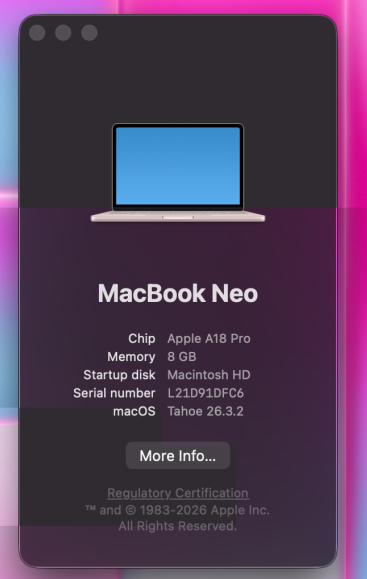
The test subject: MacBook Neo (Mac17,5) with the A18 Pro and 8 GB of RAM.
One thing worth noting: I ran these benchmarks using Claude Code itself, running on the MacBook Neo over SSH from my main workstation. Claude Code orchestrated the test scripts, collected the data, and even helped analyze it. That’s either elegant or absurd depending on your perspective. Maybe both.
Claude Code RAM Usage on an 8 GB MacBook Neo
The first question most people ask about running any serious dev tool on an 8 GB machine: does it even fit in memory?
Here’s what Claude Code actually uses when running with Claude Desktop, measured by RSS (resident set size, the actual physical memory each process occupies):
Process
RSS (MB)
Renderer (main UI)
255
Claude Code Agent
234
Claude Desktop (main)
171
GPU Process
72
Other renderers (2)
~136
Utilities (network, audio, etc.)
~126
Total (13 processes)
994 MB
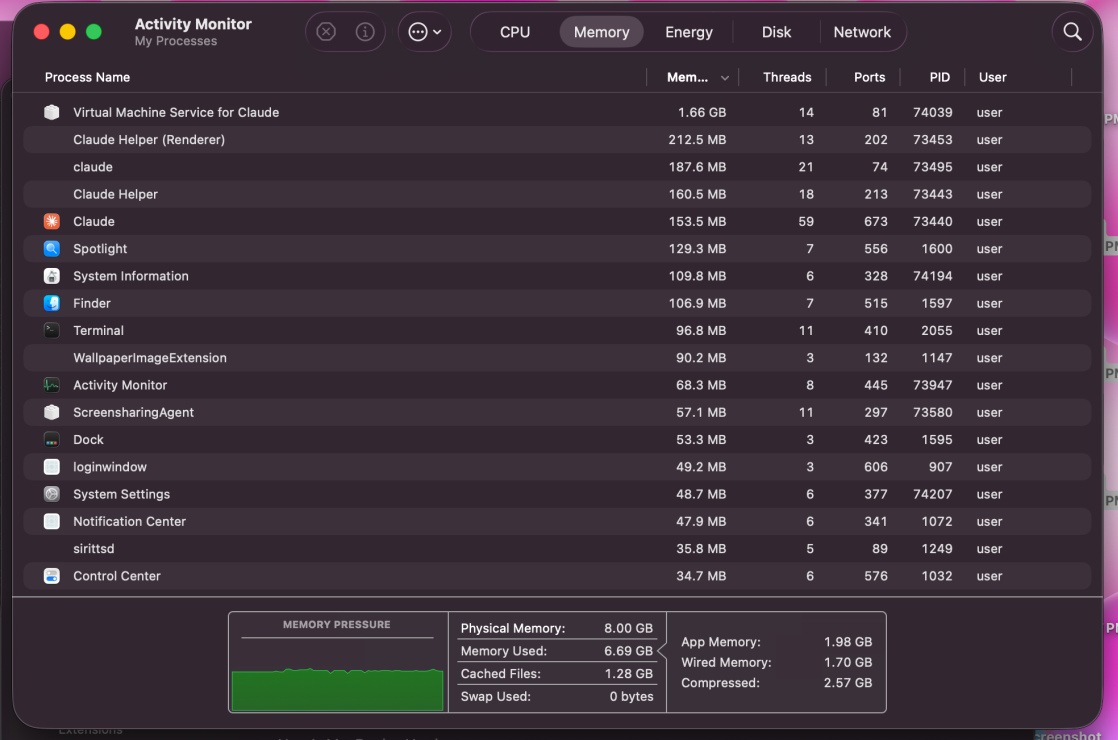
Activity Monitor’s Memory tab with Claude Code running. Note the memory pressure gauge and the 2.6x compression ratio keeping swap at zero.
So Claude Code plus Claude Desktop together consume about 1 GB of RAM across 13 processes. That’s 12.4% of the Neo’s entire 8 GB. On paper, that sounds tight. In practice, macOS is doing heavy lifting behind the scenes: the memory compressor was running at a 2.6x ratio, squeezing 4,909 MB of data into 1,893 MB of physical memory. And the key number: zero swap. Not a single swapout during our entire testing session.
On the disk side, Claude’s total footprint is about 12.6 GB: 623 MB for the app itself, ~12 GB of support data (models, caches, session history), and 13 MB of configuration files. On a 256 GB drive, that’s roughly 5% of your storage just for Claude. Not trivial, but manageable.
Note
With Claude Code running, about 2 GB of free + inactive memory remained. That’s enough for a browser with a handful of tabs, but don’t expect to run Docker, Xcode, and Claude simultaneously on this machine. The 8 GB ceiling is real.
Is It Snappy? Operational Performance
Raw memory usage only tells half the story. The more practical question: does Claude Code actually feel fast on this machine?
Operation
Time
CLI process spawn
52 ms
Grep across 50 files
53 ms
Find 50 Python files
43 ms
Cat 50 files
85 ms
Git status (50-file repo)
65 ms
Git diff HEAD
130 ms
Git log
70 ms
5 parallel agent tasks
195 ms
Short answer: yes, it’s snappy. Every single operation came in under 200 milliseconds. CLI process spawn is essentially instant at 52 ms (that’s the `claude` binary launching, not the full Desktop app). File operations, git commands, even spawning 5 parallel agent-style tasks all complete before you’d notice any delay. For the kind of work Claude Code does (reading files, running git commands, searching codebases), the A18 Pro handles it without breaking a sweat.
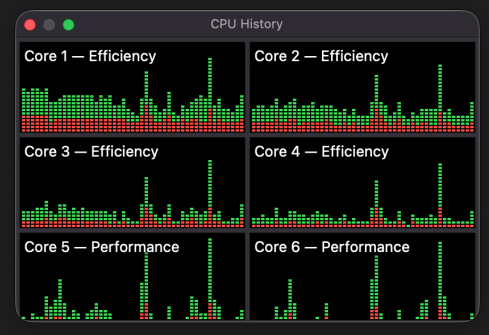
CPU History during a Claude Code session. The two performance cores (top) do the heavy lifting while the four efficiency cores mostly idle.
But here’s where it gets interesting. Those numbers above are for Claude Code’s own operations. What happens to the rest of the system while Claude is running?
The Chicken-and-Egg Problem
This is the part that surprised me. We ran Geekbench 6 under three conditions to see how much Claude Code’s presence affected the MacBook Neo’s overall performance:
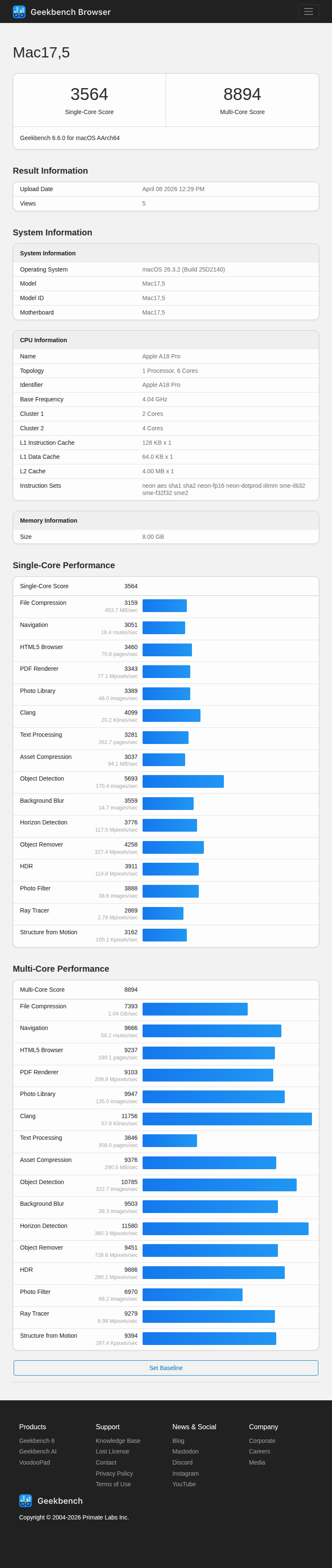
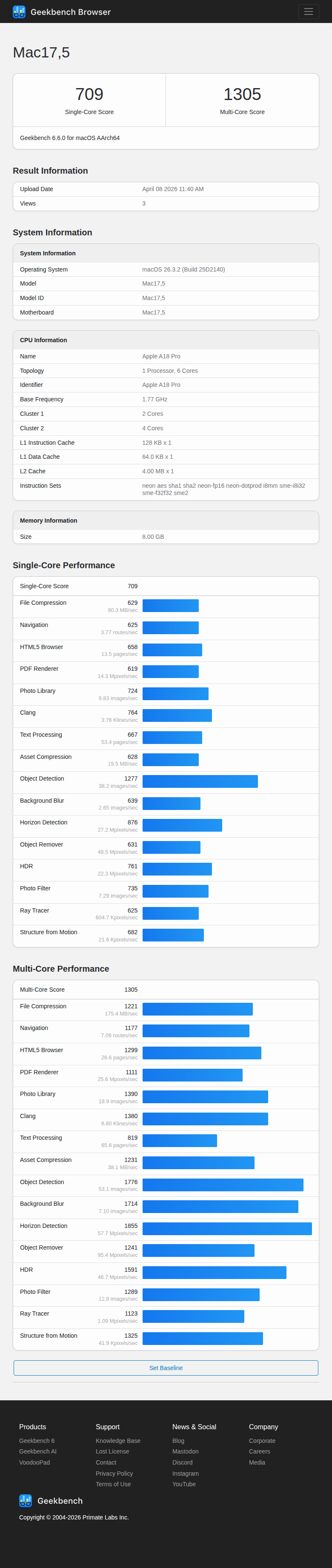
Pristine cold: SC 3,564, MC 8,894. This is what the A18 Pro can do with nothing else running.Live Claude session: SC 709, MC 1,305. An 80% single-core drop from the combined developer workload.
In our live Claude workflow test, the MacBook Neo’s Geekbench 6 single-core score fell by about 80%, from 3,569 to 709. Multi-core dropped 85%, from 8,879 to 1,305.
To be clear about what was running during this test: Claude Desktop’s renderer (~87% CPU), the Claude Code agent (~28% CPU), WindowServer (~35% CPU), and active VNC screen sharing were all consuming cycles on a fanless chip that then thermally throttled. This is a whole-session result, not the isolated overhead of the Claude Code CLI alone. On this hardware, a real AI-assisted coding session can erase most of the machine’s CPU headroom.
That’s the chicken-and-egg problem: the AI coding tool we used to benchmark this machine can barely run alongside its own benchmarks.
What 709 / 1,305 Actually Feels Like
Those Geekbench numbers might just be abstract scores to most people. So let me put them in context. When the MacBook Neo throttles under Claude Code’s load, it benchmarks roughly like these processors:
So during a live Claude session, the MacBook Neo stops benchmarking like Apple Silicon and starts landing in older hardware territory. With the full Claude workflow running, you’re in 2012 Ivy Bridge desktop / 2013 Haswell ultrabook range, with some newer Pentium-class chips also falling in the same band. After a sustained thermal soak, you drop into early-2010s laptop or modern ultra-budget mini-PC performance.
Our native C benchmarks confirmed the pattern. A prime sieve that takes 18.8 ms cold takes 39-41 ms with Claude active, and 124.2 ms after thermal saturation. GFLOPS drop from 15.9 to 7-12 to 3.85 across the same three conditions.
Now, here’s the important nuance, and what I think makes this story interesting rather than damning: Claude Code itself still feels fast even at these reduced system scores. All those sub-100ms file and git operations from the previous section? Those were measured with Claude Code running. Most of what Claude Code does is bursty, I/O-heavy, and partly network-bound (waiting for API responses). It doesn’t need sustained CPU throughput. The synthetic benchmarks paint a much worse picture than the actual workflow experience.
The 60-Second Thermal Cliff
Where the MacBook Neo really struggles is sustained load. In our 5-minute all-core stress test, the CPU hit 577% utilization for the first 60 seconds, then crashed to 207% and stayed there. That’s a 6.6x performance drop, and it happened like flipping a switch.
This matters for Claude Code because multi-agent sessions (where Claude spawns several subagents to work in parallel) can produce sustained CPU load. A single agent doing typical read-search-edit work? Fine. Five agents running tests, grepping codebases, and processing files simultaneously? You’ll hit the thermal cliff within a minute, and everything slows down.
I covered the full thermal analysis with charts and timeline data in my MacBook Neo Benchmarks Deep Dive if you want the full picture.
The Verdict: Can MacBook Neo Run Claude Code?
Yes. But let me be specific about what “yes” means here.
For single-session Claude Code work (one conversation, reading files, writing code, running git commands), the MacBook Neo is genuinely capable. Startup is instant, operations are snappy, memory stays under control with zero swap, and the workflow feels responsive. If you’re a student, a hobbyist, or someone getting started with AI-assisted development, the $599 Neo ($499 with education pricing) is a surprisingly solid entry point.
For power-user workflows (multiple concurrent agents, large project builds, sustained test suites alongside Claude), you’ll hit the thermal ceiling. The fanless A18 Pro simply can’t dissipate enough heat to maintain performance under continuous load. When that happens, you’re running on what amounts to 2012-era desktop hardware until things cool down.
The 8 GB of RAM is the real constraint, though. Claude Code and Claude Desktop together consume about 1 GB, and macOS needs its share. That leaves you with maybe 2 GB of breathing room. It works, but there’s no margin. Don’t expect to run a local LLM, Docker containers, and Claude Code on this machine simultaneously.
Tip
If the MacBook Neo fits your budget and use case, consider the $699 model with 512 GB storage. Claude’s 12.6 GB disk footprint is much easier to absorb on a larger drive, and you’ll have more room for project files and git repos.
Is this the ideal Claude Code machine? No. But at $599, it’s the cheapest Mac that can run it, and “cheapest Mac that can run Claude Code” is a surprisingly practical category. Not everyone needs (or can afford) a dedicated workstation. Sometimes you just need a machine that works, and the MacBook Neo does work. Just don’t push it too hard for too long.
If you’re curious about what a purpose-built Claude Code setup looks like at the other end of the spectrum, I wrote about that too: The Ultimate Claude Code Workstation.
Building a Claude Code Workstation?
If you’re looking for more headroom than the MacBook Neo can offer, check out my guide to building the ultimate Claude Code workstation with the hardware I actually use for heavy multi-agent workflows.
Methodology note: Because this story examines Neo’s performance under AI-assisted coding, we used Claude Code as part of the live workload on the machine under test. VNC screen sharing was also active during the benchmarked sessions. Claude Code assisted with launching benchmark commands, recording system-state observations, and organizing notes. All benchmark results, CPU comparisons, and final editorial conclusions were verified by a human before publication.