Category Archives: Internet tips

Who Reads This Blog? Traffic Breakdown by OS

Who’s reading this blog, and what are they running? I pulled month of site visitor stats to find out. The Breakdown Here’s the operating system split across all visitors over the last month or so: Operating System Users Share Windows 12,292 53.6% iOS 3,846 16.8% macOS 3,732 16.3% Android 1,919 8.4% Linux 420 1.8% Chrome OS 53 0.2% Other / Unknown 677 2.9% Total: 22,939 users over 90 days. Windows Still Dominates, But Apple is a Third of the Audience
Is Temu’s $1,000 Reward Claimed Screen Legit? What You Get

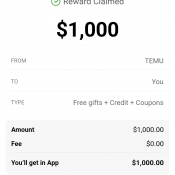
Temu’s “Reward Claimed” screen looks like a huge win. It says $1,000 in big bold text, and a red button urging you to “Get all in App.” I looked at the exact wording on the reward screen and Temu’s own reward rules to figure out what you really get, what strings are attached, and whether it’s worth tapping that button. 👈 Here’s the screenshot a reader sent me. It says “Reward Claimed” and “You’ll get in App: $1,000.00.” So the

How do I keep emoji colors when printing them from Google Docs/Drive? [SOLVED]

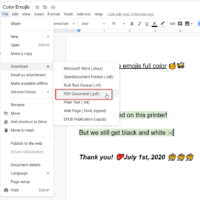
It is well documented that printing from Google Docs (Google’s online Word equivalent) will result in black and white emojis. This happens despite the face that the emoji appear in full color on your screen before printing. Likewise, adjusting printer settings does not make any difference. Thankfully, here is a workaround so you can print color emojis in Google Docs! Save the Google Drive document as a PDF before printing Print the resulting PDF with full color emojis Voila, you

Latest iTunes direct download offline installer links

If the Apple iTunes download page is not working, you can use the links below. The downloads are directly from apple.com You can check the URLs to make sure that you are downloading iTunes 12.9 from an official source [apple.com] Download iTunes 12.9 offline installer for Windows 64-bit [EXE 257.5 MB] Download iTunes 12.9 offline installer for Windows 32-bit [EXE 195.4 MB] Download iTunes 12.9 offline installer for MacOS [DMG 273 MB] Download iTunes from Windows Store (Requires Windows 10 Version

How to set FireFox homepage and disable top sites/recommended/highlights [SOLVED]

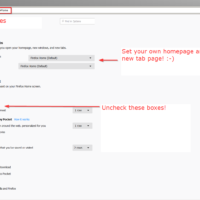
Question: Help! How do I disable the “Top Sites” “Recommended by Pocket” and “Highlights” when I start Firefox? Also, how do I set my OWN homepage? Thank you. Answer: In the Firefox address bar, type about:preferences and press Enter. That takes you to preferences. Now you can: Set your preferred Homepage for new windows Set your preferred page for new tabs Disable Top Sites by unchecking (under the “Firefox Home Content”  heading) Disable Recommended by Pocket Disable Highlights I hope

How to cancel business registration on GoDaddy

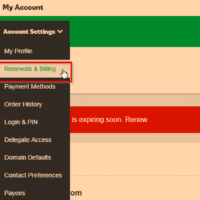
To Cancel Business Registration: Login to your GoDaddy account. Go to My Account Account Settings Renewal & Billing Check the box next to the Business Registration account that you want to cancel, and then click Cancel Item. Confirm. Screenshots of the process: Further explanation: I had a client that was getting billed $4.99 for Business Registration and they were not using the service (it had never even been set up). They asked me to help them cancel it and I did

Fastest Web Hosting

Wow, finding a quality post on “fastest web hosting” is exponentially harder today than a few years ago. In the past you could generally find a rather lengthy blog entry showcasing a nice comparison between top hosts. Today you find pages of search results tailored to sell you hosting and generate affiliate revenue for the site owner. 🙁 Thankfully, there are some rather in-depth comparisons and tests available out there. After perusing a good number of resources, I eventually settled on

« Older Entries