Tag Archives: openai

Codex CLI feature protip /statusline
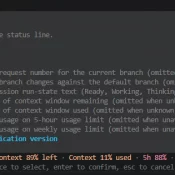
TL;DR: There are a few ways to check your ChatGPT Codex usage, including: the web analytics page (covered in yesterday’s post) and the Codex CLI’s own status line, which can put live 5-hour and weekly percentages right at the bottom of your terminal session. The CLI method is easy to miss if you don’t have it enabled, thankfully it is super easy and configurable with the slash command /statusline. Codex CLI’s /statusline menu. Toggle the items you want, then press
How to Check Your Codex Usage on ChatGPT (Plus and Pro)

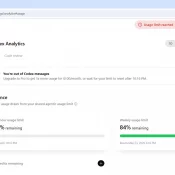
TL;DR: ChatGPT’s Codex has its own usage analytics page at https://chatgpt.com/codex/cloud/settings/analytics, separate from the main ChatGPT settings. You need to be logged into your ChatGPT account first. The page splits your Codex usage into three meters: a 5-hour rolling limit, a weekly limit, and pay-as-you-go credits. Here is an example screenshot: Where EXACTLY Do I Find My Codex Usage on ChatGPT? You have to be logged into your ChatGPT account first. Then paste this URL into your browser: https://chatgpt.com/codex/cloud/settings/analytics Two

Codex /goal feature (TESTED)

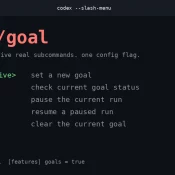
Summary: Codex’s new /goal mode lets you hand it a long-running task and walk away. From there it loops plan → act → test → review until your stop condition is met, or your weekly quota taps out. Currently it takes a two-line config edit to enable, then prefix your prompt with /goal. This is very much in line with what the reddit crowd does with a lot of their homebrew scripts and it opens some fun possibilities! Worth turning

Best Computer for ChatGPT in 2026

Published April 25, 2026. Updated May 8, 2026. Summary: don’t overspend, if you are an intermediate to lightly advanced CODEX/ChatGPT user I would start with the MacBook Air M5 for CODEX and ChatGPT, especially at ~$949 on sale See current price. It is silent, the 18-hour battery is real-world good, and Atlas, voice mode, and the desktop app all feel native on it. The $599 Neo surprised me most as an ultra budget option 🙂 If you want the fast

How to Use GPT-5.5 Today at the CLI (Via Your Existing Codex Subscription)

Update 2026-04-26 Small 4/26 update before you run the commands below: Codex CLI 0.125.0 added GPT-5.5 to codex exec -m gpt-5.5 and the Codex MCP server. (For MCP, restart Claude Code after upgrading so the running server picks up the new binary.) The relay is no longer the only path to 5.5 from your terminal. The OpenAI public API still hasn’t shipped 5.5 as of today. I’m still keeping the relay for fast one-off pipes and as a backup connection

Claude AI Usage Limits: What Changed and How to Make Them Last

TL;DR: Claude’s usage limits feel tighter in March 2026 because they are. The short version: Anthropic has more demand than GPU capacity right now. Millions of new users arrived as word got around about how good Claude is and especially after the OpenAI Pentagon boycott, the off-peak 2x promotion ends March 28, and multiple Max subscribers report usage meters jumping from under 50% to 100% on single prompts. Below: what the limits actually are, why they’re worse right now, and

How do I clean my coffee maker? [AI Answered]

NOTE: this is an AI generated answer, using OpenAI GPT-2. Here is the question prompt and the resulting answer: Q: How do I clean my coffee maker? A. There are numerous cleaning methods to choose from. 1.) Pour some water into the coffee maker and submerge the lid. Do not wash the glass. 2.) Dip the coffee maker upside down in water for 10 seconds and then rinse. 3.) Put the lid back on and let the coffee maker sit