S200E/Q200E 2nd antenna for upgraded WiFi, Bluetooth, WiDi
The ASUS S200E and Q200E are lovely laptops, but unfortunately they lack Bluetooth and they do not support Intel’s WiDi 🙁
Fortunately, all is not lost! With a bit of perseverance and a few dollars (approx $40USD) you can get better WiFi performance, good bluetooth support, and even WiDi on your S200E or Q200E. 🙂
Here is how:
With those three items under your belt, the upgrade is surprisingly easy (click the link for more photos, but here are some of the most relevant ones)
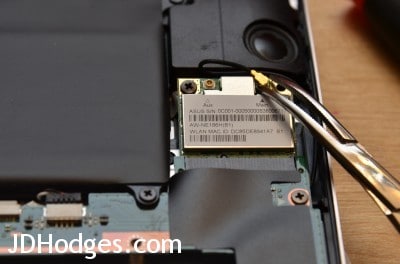
S200E/Q200E: If replacing wifi card, very carefully remove the single wifi antenna connector
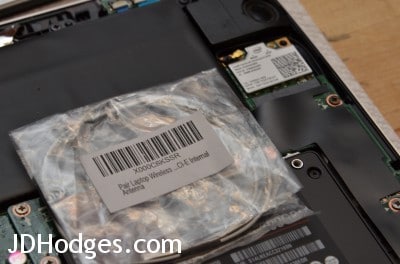
Adding additional wifi/bluetooth antenna for use with upgraded Intel wifi card
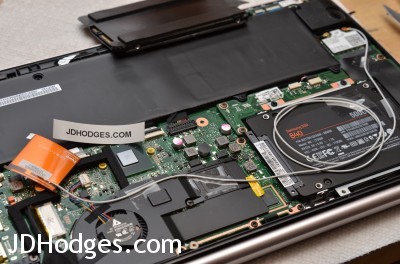
Routing for the new wifi antenna
The upgraded results are excellent:
- WiFi connections up to 300Mbs (I generally get about 220Mbs with the Intel 6235, before the upgrade I believe I was around 100Mbs)
- Bluetooth works well (I have used it with Parrot Zik headphones and a variety of bluetooth speakers with no problems)
- WiDi works well once you configure the drivers correctly
- Overall 5 star rating since the Intel 6235 mini pci-e half length card words perfectly in the ASUS laptops!
Please let me know if you have any questions and enjoy your nice S200E or Q200E!
PS this is even a nice upgrade for the ASUS VivioBook X202E as it adds WiDi capabilities (though the X202E already has bluetooth…)
- asus q200e bluetooth (35)
- does asus q200e have bluetooth (23)
- asus s200e bluetooth (19)
- s200e bluetooth (13)
- asus q200e widi (11)
- asus s200e widi (10)
- q200e bluetooth (9)
- http://www.jdhodges.com/blog/adding-second-antenna-intel-6235-bluetooth-wifi/ (5)
- x202e how many antennas (5)
- asus q200e wifi card (4)
Thanks for the write-up. I’ve got it recognizing BT, the wifi signal is very strong, but I can’t seem to get WIDI to work. Can you tell me what drivers you’re using, as well as any software downloaded to enable it? BTW, I have a tyco dual antenna (comes spliced in the middle,) with the original antenna on main and the secondary antenna (white) on aux.
Thanks in advance.
Hi Winston,
Thank you for your comment. Great job on the Wi-Fi/Bluetooth upgrade! As for WiDi, have you made sure to install the latest Intel HD 4000 drivers? In addition to that suggestion, if you haven’t already read it, there are some very good instructions in this forum thread.
Please let me know if that does not help you Winston and I will try to put together more specifics on what I am using.
Best regards,
-JD
JD I ran across your blog on the Q200E, and I am interested in upgrading the wifi card do you have any recomendations for AC card or is N the best that will work for this machine as the article is old?
Thanks,
Scott
Scott, if you want the least hassle I would still lean toward the Intel 6235. If you want 802.11ac, the 7260 can work, but it was less predictable on these older ASUS models.
I see what you did, seems very simple. But for the second antenna, how are we supposed to run the cord? It is so long, but does it matter, the instructions seem vague for that. I plan on upgrading to an SSD, but then i saw this and decided why not.
Hi Bryan,
Thank you for your good question. I just wrapped the excess cable in a loop and then secured it on top of the SSD with tape to keep it in place.
You can see what it looks like in this photo. Please note however that I did move the antenna down a bit so that the battery did not obstruct its signal, otherwise everything is as shown in the photo.
Good luck on your upgrades Bryan and enjoy your nice laptop! 🙂
Best regards,
-JD
Hi do you need thee second antenna if all you want is WIDI?
Sorry for the late reply, Vinnie. If you want reliable WiDi support with the 6235 setup, I would still add the second antenna. You might get partial results with one, but the upgrade in the post assumes the extra antenna for the best odds.
I was able to install an SSD thanks to you, Thank you!!! now im going to install the Bluetooth and wifi upgrade, but I cant find the specific driver. I have the q200e model. can you guide me in the right direction?
I was just curious my wife has no use for bluetooth or WiDi and I am installing a hybrid drive in hers because she doesn’t want to buy an SSD but I figure since I’m in there putting a better antenna would be a benefit for her just for stronger signal. My question is with the stock WiFi card is there any reason I couldn’t just install your recommended antenna to the aux port or bypass that factory one altogether and plug this antenna in place of the existing main port?
Hi Daniel,
Thank you for your comment and I apologize it took me so long to respond.
Congratulations on the hybrid drive upgrade, I think your wife will like the added speed and she’s right the cost is hard to beat! 🙂
My recommendation would be to leave the original antenna installed as is and add the ‘extra’ antenna to the AUX port. The reason why I would not bypass (disconnect) the factory antenna is that it is likely routed to a slightly better position than will be possible with the new extra antenna. i would still add the extra antenna to the aux port though, because two antennas IS a good idea because antenna diversity or MIMO (depending on your wifi card) will then be available to you. 🙂
Please let me know how everything goes Daniel and great job fixing up your wife’s nice laptop!
-JD
Hi JD,
Many thanks,
I’ve finally solved issues with my S200e / WiDi configuration.
Really helpfull instructions 🙂
keep posting 🙂
Giuseppe
Hi Giuseppe,
Thank you for your kind comment, I am very happy that my page was helpful to you 🙂
Enjoy your awesomely upgraded laptop and have a great week!
-JD
Hi JD,
Thank you for your great help for upgrades on Asus s200e. I am going to upgrade my ssd and WiFi card with extra antenna.can you please help me to chose best ssd from (SanDisk256gb,Samsung250gb or crucial240gb) and where can I get cheapest Intel 6235 mini pci-e half length card and WiFi antenna cable in UK.and if you have any video on this upgrades that will be very helpful and if not can you please please upload one for us on you tube or any free accessible website so we can learn lot from you.and if you thinking to upload one please send us link.
Thank you
JD Champ
Sorry for the late reply, JD. Of those SSD brands, I would lean Samsung or Crucial first, mainly because I had better luck with them over time. I do not have a good UK source list, and I never made a video for this upgrade, sorry.
hello, i was able to do the wifi and bluetooth upgrade because of your guide, thank you very much. ive been searching for the proper bluetooth driver to make the bluetooth work properly but i have yet to find it, do you know where i can get it? or do u have a link? i have the asus q200e. when i connect my bluetooth headphones, the music cuts in and out. and i have a message that pops up on the notification icon that tells me i should update the driver. but it doesnt do it.
Sorry for the late reply, Antony. I would remove any old Bluetooth software first, then install the Intel Wi-Fi and Bluetooth drivers fresh for the new card. If audio is cutting in and out, also double-check the second antenna connection, because weak Bluetooth range can look like a driver problem.
Just bought a refurbed S200E and found your posts about upgrading the SSD and WiFi. Is there any reason why this same WiFi upgrade path wouldn’t work for a newer card like the 7260 (with 802.11ac and BT 4)?
Hi PMD,
Thank you for your comment. The 7260 should work great in the S200E 🙂
Enjoy your nice laptop and let me know if you decide to go ahead with the upgrade!
PS do you have an AC router?
Yes, I went ahead with the upgrade and I have an AC supporting router with beam-forming.
I installed with an SSD upgrade at the same time and the HW side of things went off without a hitch. My S200e came installed with an Atheros wifi/BT card with two antennae already installed, so I ended up not needing the extra antennae I purchased from Amazon.
Windows 8.1 loaded up the 7260 N drivers even though it identified the card as 7260 AC. I had to download and install the Intel driver package from Intel’s site to get AC working correctly.
Hi
Great little blog.
I just wondered if people had found the 7260 worked in an Asus S200E. I was thinking of getting one on Ebay but there was a rather strangely worded Note? We have a couple of S200E’s and some have BT and other’s not. Anyone know the serialnumber or versions that have BT and those that don’t?
“Description
Intel Wireless-N 7260 (7260HMW BN) abgn Wi-Fi + Bluetooth 4.0
Product Requirements:
Available Half size Mini PCI Express slot
Model: 7260HMW BN
PN:0Y74H6
Note 1:The card doesn’t Competible With HP Lenovo Laptop Directly,you need brush BIOS(Other Laptops works perfectly).Windows 7/8 System can’t compatible With the card.
Note 2: Warm note:The Bluetooth function of this card is not compatible with Samsung and ASUS Laptop, or you need to shield part of the pin,please note before buying.
Package include:
1x 7260HMW BN Card”
Macw, the 7260 did work for some readers, but it was definitely fussier than the 6235, especially for Bluetooth. If you want the safest upgrade for an S200E or Q200E, I would still pick the 6235.
Excellent guide! I installed the 6235 in my q200e. Wifi and Bluetooth were working great, but after a day or two, the Bluetooth stopped working properly. My computer still detects and pairs with Bluetooth devices, but will not connect. In addition, My Bluetooth settings will not allow me to disconnect from devices (messages says could not disconnect). I tried updating drivers, not sure what else to try. Any idea what could be causing this issue?
Thanks,
Richard
I meant to say it could not remove paired devices.
Richard
Sorry for the late reply, Richard. If Bluetooth pairs but will not connect, I would remove the device, uninstall the Bluetooth stack, and reinstall the Intel Bluetooth driver from scratch. It can also happen if the added antenna is loose or the Bluetooth radio is getting very weak signal.
Hi, great tips.
I think the Q200E shipped with Windows 8.0.
Does anyone reading this thread know if upgrading to Win8.1 will all the system to use Mira-cast screen mirroring ?
Thanks in advance
Sorry for the late reply, Carlos. Windows 8.1 was generally a better bet for Miracast and WiDi than stock Windows 8, but you still need the compatible Intel wireless card and drivers. The stock card in these machines was the real blocker, which is why I used the 6235 plus the second antenna.
Hello,
With regard to the routing and position of the BT antenna:
1. Does the last photo above show the final position of the BT antenna?
2. Was the excess antenna cable left coiled above the HDD/SSD?
All the best,
Ed
Sorry for the late reply, Ed. Yes, that last photo is basically the final antenna position I used. I tucked the excess cable neatly so it stayed flat and did not get pinched by the drive or the case.
will the 7260 work in the Q200E as well?
Sorry for the late reply, Mark. The 7260 can work in the Q200E for some people, but it was a little less predictable than the 6235 in my experience. If you want the safest upgrade, I would still choose the 6235.
Sorry This is the one I am referring to 7260NGW Intel® Dual Band Wireless-AC 7260 802.11ac, Dual Band, 2×2 Wi-Fi + Bluetooth 4.0
Sorry for the late reply, Mark. The 7260 did work for some people, but the 6235 was the safer recommendation when I wrote the post. If you want the least hassle, I would still lean 6235.
The end of the antenna has a conductor on it normally mounted behind the LCD, if I am not mistaken. What did you do about this on the added antenna? Don’t want to short out the MS so am thinking of wrapping the end fully with tape. Any thoughts?
Thanks for your blog.
Rob
Sorry for the late reply, Rob. I would definitely keep the added antenna end insulated and secured so it cannot rub or short against the board. A bit of non-conductive tape is a reasonable way to keep it in place.
I’m still waiting for my 7260 mini-PCIe card to arrive, but I just upgraded the 500GB HD in my s200e to SSD. At first I tried a clean install. I find that the audio would not work after a system restart. I also find that the multi-touch feature doesn’t work. I thought it was the Samsung SSD I was using being incompatible with the drivers. So I tried it in a Crucial SSD. Same result. So I thought it may be the drivers I was using. So I cloned the original 500GB HD using Acronis. Same results on the SSD. Have anyone else experienced this issue? But I found that a cold reboot of the system allows the audio to work. But microphone and multi-touch touchpad still not working. If anyone else has experience this issue and found a solution, please post the fix. Thank you.
Sorry for the late reply, Mossman. That sounds more like a driver issue than an SSD compatibility issue, especially since a cold reboot changes the behavior. I would reinstall the ASUS touchpad, audio, and ATK drivers rather than blame the Samsung or Crucial drive.
Thank you for your instruction. I was able to upgrade my s200e to the 7260 AC Intel card. The speed on this thing is outrageous now.
However, I’m having difficulty getting the Bluetooth portion to work properly. After installing the latest driver from Intel website, I keep getting the exclamation mark on the Intel Wireless Bluetooth in Device Manager. I also tried a really old driver I found from a Dell website. Although, it doesn’t give me the exclamation mark, the Bluetooth option is not available on the taskbar nor PC and devices. Would you happen to know which driver would work best for the 7260 AC Intel card? I’ve even tried the taping up pin 51 on the 7260. Any help you can provide is greatly appreciated. Thank you.
Sorry for the late reply, Augie. The 7260 was a bit fussier on these ASUS machines, especially on Bluetooth, which is part of why I originally recommended the 6235. Error 43 usually points to a driver or hardware compatibility problem, so if you want the least hassle I would still lean back toward the 6235.
Hey I am about 2 years late to the x202e vivobook Party but I am trying to get a ultamite-n 6300 adapter to work in my zippy little x202e. I added 2 antennas, and I have installed theost up to date driver, and I can see all of the networks available but I fail to connect. I did manage to connect to a 5ghz network by pushing the button on the router rather than typing in a password on my laptop- though stoll fail to connect to networks that have no encryption. Any thoughts?
Hi Keegan,
Congrats on completing the hardware upgrade!
Thanks for all the background info, that is very helpful. It is definitely a good sign that you can see all the networks, and very interesting about the pushbutton (probably WPS) connection working. Thankfully the connection issue is likely just related to a software settings/driver problem. Could I ask a few questions:
What OS are you using?
What driver version? (I recommend the latest Intel drivers directly from Intel)
Did you have any issues like this prior to the upgrade?
Gracias!
-J.D.
SO i had an x202e with a pentium processor, a cracked screen- a capacitor melted off the motherboard, and I purchased a motherboard with an i3-3217u to replace it for cheap, got the samsung evo ssd, and a new digitizer-
Right now I am responding to you on that unit, after swapping the old atheros card back in- no problems, connects right up.
I have the latest drivers from the intel site- 15.something something- I checked with intel’s live chat service to be sure.
I am on windows 8.1
Everything else is working perfectly. I am wondering if it is something to do with the other two drivers that show up when I look into the device- One is an ASUS driver (netwfw01.dat), and the other is a windows compatibility driver (vwifibus.sys).
Where can I find the drivers for the Intel 6235 mini pci-e half length card? I can’t seem to find any that work correctly.
Hi Jeremy,
Thank you for your comment. Have you tried these drivers?
https://downloadcenter.intel.com/product/66890/Intel-Centrino-Advanced-N-6235
They are the latest versions of the ones that I used. Please keep me posted on how they work!
Best regards,
-J.D.
soo regarding the Asus q200e , can you fit any intel antenna card?
because i would upgrade to the dual band card bc i have a dual band router 5.5ghz (max speed)
“http://www.amazon.com/Intel-7260-HMWG-Wireless-AC-7260-Bluetooth/dp/B00DMCVKMU/ref=sr_1_2?s=electronics&ie=UTF8&qid=1432968654&sr=1-2&keywords=Intel+Network+7260”
and i was thinking a 500GB SSD wich i will do later on, i really wish i could of upgraded ram .-.)
Hi Scott,
Thank you for your comment. The card you selected will fit!
Intel Network 7260.HMWG. I have used that particular card on a number of laptops and I highly recommend it.
*Not all Intel cards will fit, as some have older connectors and some have newer connectors.
Please let me know if you have any other questions!
Best regards,
-J.D.
PS I too wish the RAM was upgradeable, that is one of the few drawbacks of today’s ultrabook style laptops 🙁
thanks!!! quick question , ive never had a SSD before , and i want to know what kinda experience do you get , like reliable? fast? because I plan on using a SSD in my Main Computer Rig , I was planning to do (2) 500gb’s in RAID 1 or 0 for my main Programming/editing programs, and im just on the edge of should i really go to an ssd , my father tells me it really isn’t worth it but im not really sure hes all that right. i wanna make sure Going for a SSD is a good choice and not a bad 1 and waste of money.
Hi Scott,
Thank you for your great question!
First, good work on researching and putting some thought into storage for your computer. It is fun to really learn about computer hardware and customize your machine to your exact specs, all the while being conscious of the most “bang for your buck”.
With all that being said, for me a SSD is the single best upgrade that I know of. The speeds are an order of magnitude greater than the fastest HDD. Your computer will boot faster and shut down faster. If you suspend, that is faster too. Not to mention application loading times, and if you program then you will likely appreciate faster project loading times and compiling (this may be a bit CPU limited though). Overall a SSD is just an amazing upgrade and it removes one of the last mechanical/moving-part from a PC (except for fans which often still remain).
I purchased the first generation of 80GB Intel SSDs many years ago at a relatively insane price and I absolutely loved it, since then I have basically upgraded every machine I have to SSD. It can make a slow (CPU) machine like a nettop feel fast, and it can make a fast PC (desktop etc.) feel blazing fast. 😉
As for the RAID setup, I would recommend (2) in RAID1 for data security or just a single larger 1TB drive. RAID0 striping for SSDs is a bit overkill IMHO as you will likely saturate the SATA connection and not realize any substantial performance gains, while increasing your chance for data loss/failure.
Please let me know what you decide and if you have any questions! I would also be happy to make specific SSD brand/model recommendations if so desired 🙂
Best regards,
-J.D.
PS I do not mean to contradict your dad, especially for use scenarios where you need a ton of space and speed is not an issue (movies, huge data, NAS applications) then HDDs are still king and cannot be beat (yet) from a dollar per GB/TB standpoint.. In your instance though, with it being your main PC and you being a programmer, I highly recommend a SSD.
So I just upgraded my X202E with the 7260 card. Unfortunately it am currently only capable of copying files to and from the pc at a rate of ~10 megabytes/s. This is sort of a bummer, as I was hoping to hit the 20-30 megabytes/s ballpark.
My router is the ASUS RT-AC68U, and the laptop is about 15 feet away from the router, obstructed only by one wall. The only other AC-device on the router, is another laptop (ASUS G751 – also with the 7260).
I realized when doing the upgrade, that my model has two wifi-antennas. I presume that this is the better option, compared to routing an antenna myself as you have done in this post?
Any suggestions? I do move quite a lot of big files to and from the pc, so all performance improvements would be very much appreciated. To be more specific, I especially move a lot of files between the two laptops. From my understanding the router should have a maximum theoretic bandwith of 1300 megabits/s on the AC, and while I know this is not a realistic goal, I would still think my performance could be improved substantially.
Hi Bjarke,
Thank you for your comment. I am sorry to hear about the slow speeds 🙁
Hopefully we can figure out what the issue is!
A couple questions:
#1 what link speed are you getting on the X202E?*
#2 what link speed are you getting on the ASUS G751?
#3 do you have any other device(s) you can copy from/to?**
*to see the link speed, you will want to check wifi connection properties and look for the “Speed” listing under “Connection”, in Windows 10 this would be Start -> Search -> View Network Connections -> WiFi (double click that adapter)
*if you are copying to another wifi device, that can significantly reduce speeds… if you are copying to a wired ethernet device at full speed, then that would be an ideal test.
So, in an ideal situation you have:
(A) Your x202E connecting at 860Mbps+
(B) A Gigabit Ethernet device (such as a NAS, PC or G751) connected to the router at 1000Mbps
And then I would expect 30 MB/s at least or considerably more…
On the other hand, if it is wireless to wireless (like the X202E to G751) and one of the devices is getting a low link speed then 10 MB/s could be about right. Can you test with one of those devices (preferably the G751) connected via Ethernet and see what transfer speeds you get? There are some software/driver adjustments that may improve the situation but first I would really like to see that and the link speeds, then we can diagnose where the bottleneck is 🙂
Best regards,
-J.D.
Hi J.D
Thank you so much for your quick response! It really triggered me to do some proper testing! 🙂
Since I am feeling at bit under the weather, I figured that I might as well do a bit of testing today.
I had an old ITX-pc lying around, that has a gigabit ethernet port, so I connected this to router.
My link speeds on both the G751 and the X200E varied in link speed between 500 and 700 mbit. My router reports the signal to both devices as “strong”. It’s stable at strong, never reaching it’s maximum “rating” of “very strong” on either device.
Here are my results:
https://dl.dropboxusercontent.com/u/4743925/results.jpg
All the tests are done sequentially.
So clearly my bottleneck is at the G751 and not the X200E. This was actually quite a surprise for me, especially since there are no obstructions between the G751 and the router. The distance between the two is a bit greater though, at about 8 meters (about 24 feet) compared to the 15 feet between the X200S and the router.
So I guess I have to turn my attention to the G751. I think it’s curious how the laptop is reporting a link speed of 700 mbits while only having a throughput in the 120 mbit range. Just for the heck of it, I tried to position my trustly little FIT-PC2 near the G751, and it maxes out it’s 72 mbit n-connection at about 7 MB/s. This makes me think, that something can be done by tinkering the right settings in the G751! 🙂
Hi Bjarke,
Thanks for the great update! That is VERY good news that the X200E WiFi is running at a reasonable speed 🙂
Awesome troubleshooting on your part! That is one of my fav things about having some old hardware around (like your ITX-PC) because it can really come in handy when troubleshooting or working on projects 🙂
Please keep me posted on your G751 issue, that is quite odd about the link speed vs. transfer rate issue. You could also check the QoS settings on drivers/router and maybe even disable IPv6 (and just use IPv4). My suggestions are a bit random, but with WiFi and SAMBA networking sometimes random is what it takes 😉
Have a great week Bjarke and I look forward to hearing from your again!
Best regards,
-J.D.
hi.
i`m trying to install widi in my asus S200e
i have bought Intel 6235 cardal and WiFi antenna cable and installed Intel 6235 drivers,
but it says “your processor is not capable of running intel widi technology”
my processor is intel pentium cpu 987 1,5ghz
see here: http://francisco-vasconcelos.pt/images/outros/widi%20not%20work%20s200e.png
Sorry for the late reply, Francisco. If Intel WiDi says your processor is not capable, the Pentium 987 is probably the limiting factor, not just the wireless card. In that case the 6235 upgrade can still help Wi-Fi and Bluetooth, but not necessarily WiDi.
Hi JD,
How did you get Intel WiDi to work with the upgrade? Which intel driver did you use?
My S200E is running the stock Win 8-64bit.
Thanks!
Danny
Sorry for the late reply, Danny. The key was the Intel 6235 plus the extra antenna and the proper Intel wireless drivers. I do not still have the exact driver version handy, but the hardware upgrade itself was the big change compared with the stock setup.
interesting and thnks for all your hard work. Confused as lots of different cards on Amazon ., can you be a bit more specific -also running s200e under win 10, is that a problem?
Sorry for the late reply, Colin. The safest path is still the half-size mini PCIe Intel 6235, because that is the card I actually recommended in the post. Windows 10 can work, but I would not buy a random Amazon listing without confirming the form factor first.
hi, great . can you be more specific about card -intel 6235 as amazon show a few different cards under this listing. As not quite sure what you mean about additional antenna, do they not come with one. Finally will I have problems with Win 10 drivers etc
Sorry for the late reply, Colin. You want the half-size mini PCIe Intel 6235 card, not an M.2 card, and the extra internal antenna is a separate part that you buy on its own. Windows 10 itself is not the main problem, the bigger issue is getting the right card and antenna in place.
I have a S200E. If I do the Intel 6235 card upgrade and the antenna upgrade will I be able to connect a blue tooth keyboard and mouse?
Hi Rich,
Thank you for your comment. Yes, you should be good to go with bluetooth on the 6235 + S200E. Keyboard and mouse should be no problem 🙂
Best regards,
-J.D.
I got a ASUS q200e and i hate that the wifi it so slow..Do you know if i can use Dell DW1560 Broadcom BCM94352Z based M.2 NGFF WiFi ac+ BT4.0 or AzureWave Broadcom BCM94352HMB for my laptop i want to make my laptop to a hackintosh laptop.
Sorry for the late reply, Joel. The DW1560 is an M.2 card, so it is not the same form factor as the half-size mini PCIe slot used in the Q200E. The BCM94352HMB is closer physically, but Hackintosh-specific compatibility is outside what I tested here.
I got a ASUS q200e and i hate that the wifi it so slow..Do you know if i can use Dell DW1560 Broadcom BCM94352Z based M.2 NGFF WiFi ac+ BT4.0 or AzureWave Broadcom BCM94352HMB for my laptop i want to make my laptop to a hackintosh laptop.
Sorry for the late reply, Joel. The DW1560 is an M.2 card, so it is not the same form factor as the half-size mini PCIe slot used in the Q200E. The BCM94352HMB is closer physically, but Hackintosh-specific compatibility is outside what I tested here.
I am having an issue with getting Bluetooth to work after upgrade to a 7260 card. Same problem with the 6235 card too. The Bluetooth module is not recognized in device manager. Error 43. I am assuming there is an issue with turning the Bluetooth on, but I can’t figure out what needs to be turned on. I am running Windows 10. Is there a “hard” switch somewhere. I have tried everything -installed every possible driver from Intel, updated all drivers in general for USB, as recommended, but nothing
Sorry for the late reply, Martin. I do not know of a separate hard Bluetooth switch on this model. If both the 7260 and 6235 throw Error 43, I would suspect seating, driver conflict, or card compatibility before looking for a hidden switch.
Hello,
I was looking for this mod all over the Internet.
I upgraded my HP laptop with an Intel 7260AC (supports up to 867Mbit/s) however on this laptop I only have a an awful single wifi cable (previous card was a 1×1 module) and the signal it gets it’s just awful, my 5y old laptop and 4y smartphone get better speed… this HP even on the new card won’t go over 80Mbit/s even a few meters away from the 300 Mbit/s router. I can’t even get the full 150Mbit/s which is ridiculous.
I want to upgrade the antenna while adding a secondary one.
Do you think these have some think of gain or they’re all the same? I found two for $3.70 total for NGFF modules.
Anyway replacing the old antenna seems difficult since it seems to be inside the display… very risky.
Thanks!
Sorry for the late reply, Sandro. The gain differences between tiny internal antennas usually are not dramatic, and adding a second antenna is often more important than chasing a fancy one. Replacing the lid antenna can be risky, so if your current one is buried in the display I would be cautious.
Hi, i would like to ask if the antenna will work fine if i put it like you did in the bottom part of the laptop, instead of putting it in the standard position in the top part of the laptop, above the lcd screen and vertically
What are the differences?
Hi Dimitrisz123!
Thank you for your great question.
Reception seemed fine when I installed the 2nd antenna in the bottom portion of the laptop. Having two antennas, one in a different orientation/location can sometimes be helpful. However, in my opinion, the main objective should be to keep the antenna clear of metal obstructions blocking its signal. As such, if you have a way to mount the 2nd antenna in the display that would be preferable as most of the display is made of plastic… rather than the PCB and electrical components that would block the signal with the antenna in the bottom of the laptop.
Best regards,
-J.D.
Hi J.D.,
I know this is an old blog, but I hope you are still viewing it. I have an ASUS Q200E, and I want to upgrade to get dual band wifi. I don’t care much about bluetooth, but it would be fine to get a card that has that feature.
You said that Intel 7260 is a good choice. How about Atheros AR9462? That one is cheap ($11.99) on Amazon right now, and it seems to have capabilities similar to 7260, i.e. dual band and bluetooth. Is there a reason not to go with the cheaper one?
Also, I’m a little confused about the antenna(e). I haven’t opened it up yet, but I think this Q200E has only one antenna. Will that be good enough to get dual band, i.e. do I only need an extra one if I want to use bluetooth?
And I can only see your new, long antenna hooked up in the picture. Am I just missing the other hookup? If I only use the existing antenna to get dual band (assuming you say that’s okay from the prior paragraph), does it matter which port (1 or 2) I connect it to?
Thanks so much for your blog…it’s still useful many years later!
Sandy, the cheaper Atheros card may work, but the Intel 6235 and 7260 were the parts people had the most experience with on these ASUS machines. One antenna is usually enough to get dual-band Wi-Fi going, but the second antenna is still the better choice for stronger performance and Bluetooth, and if you only use one lead I would start with the main connector.
Mad props for this. I own the same laptop and bought the Intel 6235 card as a result of your post. Super easy upgrade and the computer feels much snappier already when relying on network data. (webpage loading etc)
What surprised me the most was that I didn’t have to do anything else – the computer recognized the card immediately on reboot, a new “Bluetooth” logo appeared in the taskbar, and wireless immediately fired up looking for networks.
Hi CJ,
Thank you for your kind comment, I am very happy that my page was helpful to you 😀
Have a great day and weekend!
-JD
I have the same Asus laptop and been having frequent wifi disconnections. I plan to replace it with an Intel wifi card. Pardon the question but why do we have to install an additional wifi antenna and not just use the existing one that you disconnected. I have replaced wifi cards in my other laptops in the past and it was just a simple case of disconnecting the old card and replacing with a new one. Thank you by the way for the great tutorial.
Dear Joey,
Sorry that this reply is so late! You are very welcome, I am glad that the tutorial helped you find a solution. Thank you for commenting.
Have a great day!!
-J.D.
Hello,
Thanks for this info. I had a problem when I went to swap my wireless card on my Asus x202e. I accidentally pulled the wire off the metal prong and couldn’t get it back on! I tried soldering the wire to the new card but the signal is terrible! Do you know where I can get a replacement prong to reattach the wire properly?
Thanks for any help.
Chris, the clean fix is replacing the antenna lead or pigtail, not soldering the wire to the card. I would look for a replacement internal Wi-Fi antenna assembly for the X202E, S200E, or Q200E family, or salvage one from a donor machine.
I have an Asus S200E with I3-3217 CPU.
I installed Win 10, upgraded to SSD, and replaced the fan to a better one.
After reading this thread, I’m thinking about upgrading my ‘Qualcomm Atheros AR9485WB-EG’ to a new wireless card.
I hope it will improve the speed and enable connection to Bluetooth devices.
Should I by the intel 6235, or intel 7260, or is there anything better that will be compatible with my Asus?
Motti, if you want the safest upgrade I would still choose the 6235. If you want AC and are willing to tinker more, the 7260 is the next card I would consider, but the 6235 was the easier recommendation.
Hi, I tried to change WLAN card according to your tips. I have i installed N6235 card, but my laptop doesn’t see such device. Is there any way to fix it?
Maciej, if the laptop does not see the 6235 at all, I would first suspect that the card is not seated correctly, is the wrong form factor, or is defective. I would reseat it carefully and, if possible, test the old card again to confirm the slot itself is fine.