The History of ThinkPad: From IBM’s Bento Box to Lenovo’s Portable Workstations
Note: this post is published but still in progress. Spot something missing or amiss? Comment at the end 👍.
This is a long article. If you just want three paragraphs, this is it:
Why ThinkPad Still Matters
I have used ThinkPads since February 2001. The brand has been part of my education and work computer setup for a quarter century.
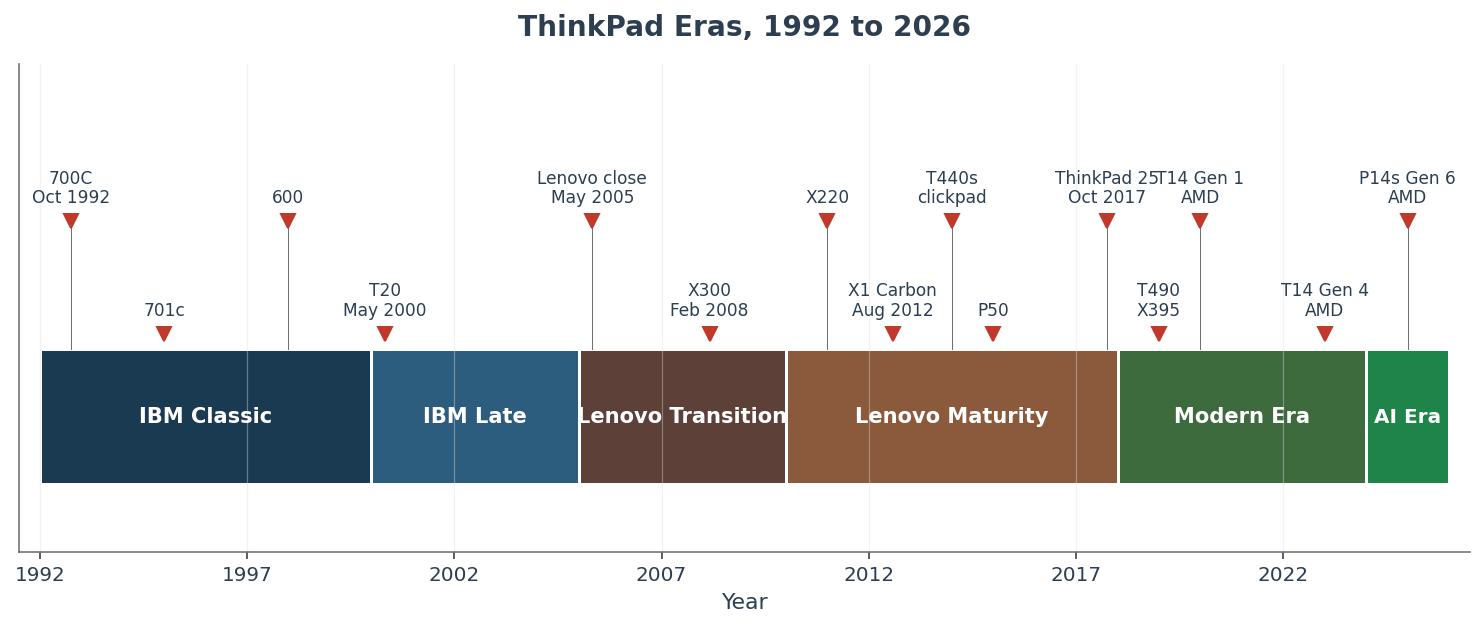
Era timeline data
| Era | Years | Key models |
|---|---|---|
| IBM Classic | 1992-2000 | 700C, 701c, 600, 770 |
| IBM Late | 2000-2005 | T20, T40, T43p, X20, X41 Tablet |
| Lenovo Transition | 2005-2010 | T60, T61, X300, W500 (2008) |
| Lenovo Maturity | 2010-2018 | X220, X1 (original 2011), X230, T430, X1 Carbon Gen 1, T440s, P50 |
| Modern Era | 2018-2024 | T490, T14 Gen 1-4, X1 Carbon Gen 6-11, X1 Nano |
| AI Workstation Era | 2024-2026 | T14 Gen 5-7, P14s Gen 6, X1 Carbon Gen 12-14 |
Throughout, the ThinkPad's uniqueness comes from specific design language and purpose across their product line. They've had a few outliers but in general you have the matte-black body, the red TrackPoint, the fantastic keyboard, the enterprise security focus, the dock that keeps working across CPU architectures, and everything follows from that. This post is heritage-first, not a 2026 buying recommendation.
Caveat, the ThinkPad is among the longest-running commercial laptop families and (as mentioned) us unusually visually continuous from the 1992 700C to the modern matte black TrackPoint ThinkPads. But there are other contenders like the Dell Latitude (1994 to present), Panasonic Toughbook (1990s to present), and Apple's PowerBook-to-MacBook lineage also span decades. I've used all of those models and there have been great machines produced by all of them. But there's something special about the ThinkPad and I has somewhat of a cult following. I am just an enthusiast and do not intend to present myself as the last word in ThinkPads, just a thankful fan. 👍
For me, a lot of that specialness is visual continuity: a 700C photo and a P14s Gen 7 photo are recognizably the same design idea. The other manufacturers have strayed far from their original designs and colors. I wrote an X220 long-term review in 2012 and still keep my Claude Code workstation running on ThinkPads. The "you should buy one" question lives elsewhere; the "why it has lasted" question lives here. Here's some of the history:
The Bento Box Origin Story (1992)
On October 5, 1992, IBM announced the ThinkPad 300, 700, and 700C as the inaugural ThinkPad clamshell-notebook lineup. (The IBM 2521 pen tablet, renamed 700T, had carried the ThinkPad name earlier in 1992; the 300/700/700C were the first clamshell notebooks.) The 700C was the marquee model: a 10.4-inch active-matrix color TFT in a matte-black case with an in-keyboard TrackPoint II at the keyboard's center, 25 MHz IBM 486SLC at launch (the 486SLC2-50 was a later option, not the shipping CPU). The launch TrackPoint cap was IBM Magenta, a corporate-color compromise; the deeper red came with subsequent updates. The lineup got its broader public outing at Fall Comdex November 1992. By the InfoWorld 1992 review, the color display was the headline feature: active-matrix color TFT was rare and expensive in 1992. IBM priced the 700C at approximately US$4,350.
TrackPoint color note added 2026-05-20
A helpful commenter identifying himself as former IBM/Lexmark engineer David Bruner adds a fascinating account that differs from the published Hill/Lenovo version. Bruner's detailed account, including a late-stage cap-material change, initial magenta production caps, customer complaints driven by an ad-vs-product color mismatch, and mailed red replacement caps, remains first-person testimony and is live in the comments at the end of the article.
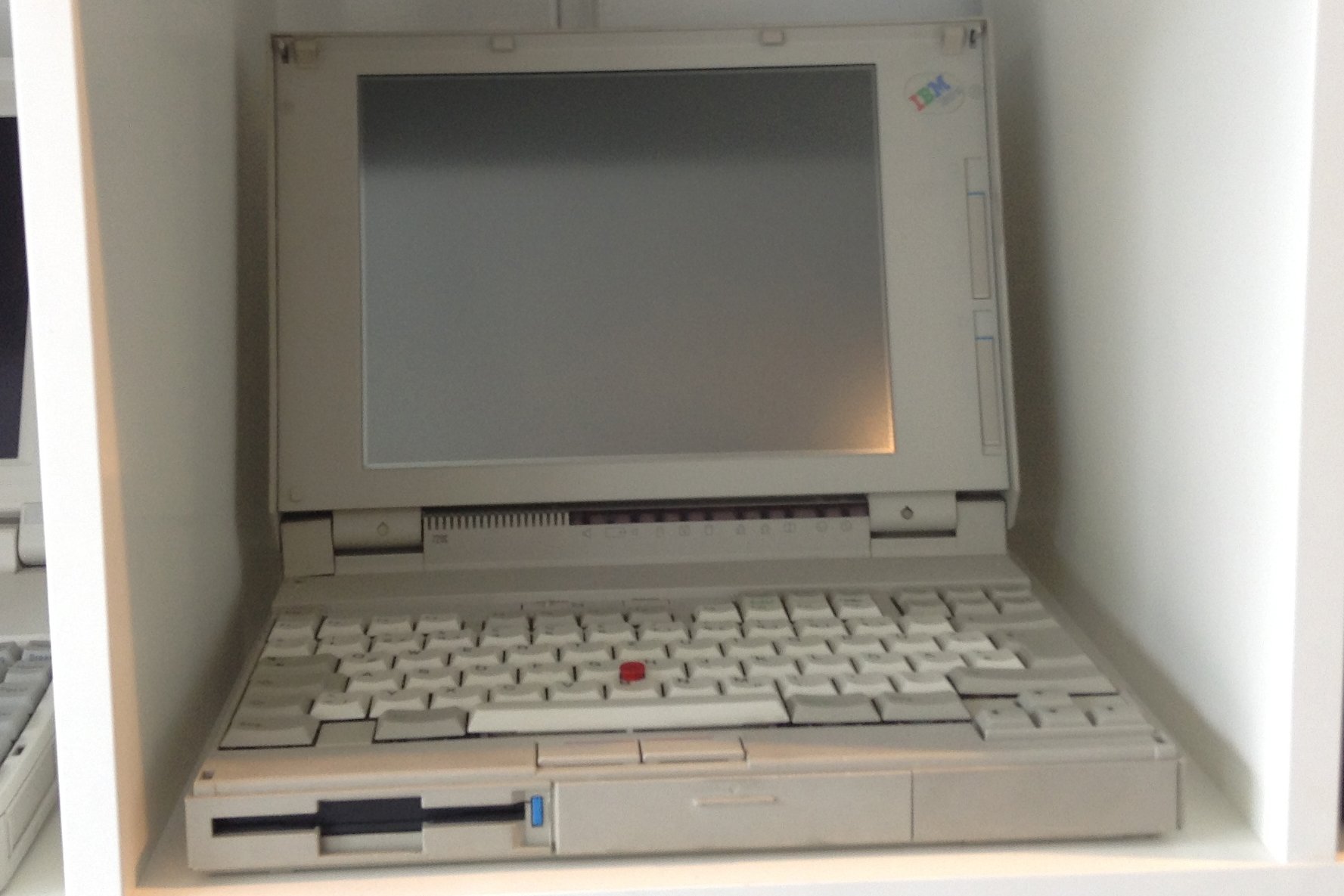
Distinguishing announced from shipped from first-reviewed matters here. October 5 1992 is the IBM announcement; Comdex November 1992 is the public outing; the contemporary InfoWorld coverage put the 700C on its 1992 cover with an 8.0-rated review, and PC Computing's 1993 Most Valuable Product followed (NOT PC Magazine; sister Ziff-Davis publications with separate awards). MoMA accessioned the 1995 701c in 1996 (object date 1995, accession 1996), giving the ThinkPad a permanent museum berth on industrial-design merit.
The Twelve Landmark ThinkPads, 1992 to 2025
| Year | Model | Why It Mattered | What Changed | What Stayed ThinkPad |
|---|---|---|---|---|
| 1992 | 700C | Origin. First clamshell. Active-matrix color TFT in matte black. | Notebook display economics. | Baseline. |
| 1995 | 701c | TrackWrite butterfly keyboard. MoMA collection. | Form-factor experimentation peak; screens outgrew it. | TrackPoint, matte black, IBM identity. |
| 1998 | 600 | Thin-and-light template. Magnesium-alloy chassis. Spiritual T-series ancestor. | Weight class about 2.44 kg in a corporate ThinkPad. | TrackPoint, ThinkLight, 7-row keyboard. |
| 2000 | T20 | First T-series. Titanium-clad launch alongside A20. | T-series arrives after the 600X / 770Z generation. | TrackPoint, ThinkLight, 7-row, matte black. |
| 2008 | X300 | The PC answer to MacBook Air. 1.33 kg. Removable battery, user-serviceable SSD, DVD. | ThinkPad enters ultrathin discourse. | TrackPoint, ThinkLight, 7-row, serviceability. |
| 2011 | X220 | Last 7-row classic in X-series. Sandy Bridge. IPS option. 16 GB DDR3. | IPS at ultraportable prices. | The whole formula. Enthusiast benchmark. |
| 2012 | X230 | First 6-row ThinkPad Precision Keyboard in X-series. Same chassis as X220. | The May 15 2012 keyboard cliff. | TrackPoint, ThinkLight (one more gen), chassis. |
| 2012 | X1 Carbon Gen 1 | Carbon-fiber-magnesium ultrabook. New halo line. | Soldered RAM begins on premium (8 GB DDR3L). | TrackPoint, matte black, security stack. |
| 2013 | T440s | Modern T-series template. Haswell ULV. 6-row plus clickpad. | Dedicated TrackPoint buttons dropped (restored T450 / X250 in 2015). | TrackPoint hardware, dock, matte black. |
| 2015 | P50 / P70 | W-to-P rebrand. Mobile workstation peak. Quadro plus Xeon. | P-series name takes over from W-series. | Heavy workstation chassis. |
| 2023 | T14 Gen 4 AMD | Mainstream modern T-series. Ryzen 7 PRO 7840U (Phoenix). 32 GB LPDDR5X soldered. | RAM soldered on baseline T-series; AMD becomes a mainstream T-series option. | TrackPoint, 16:10, enterprise security. |
| 2025 | P14s Gen 6 AMD | Modern P-series in T14 chassis. Ryzen AI 9 HX PRO 370. 96 GB DDR5 SODIMMs. Copilot+. | SODIMM in 14-inch business chassis becomes the outlier. | TrackPoint, 1.39 kg, dock, business support. |
Richard Sapper led the exterior design (the archive is Sapper's own). Kazuhiko Yamazaki (spelling is Yamazaki, not Yamasaki) was the lead industrial designer of notebooks at IBM's Yamato Development Lab, working with Sapper and Tom Hardy on the 700C. Arimasa Naitoh was the engineering lead; IBM names him in that engineering role, not as an exterior designer. The trans-Pacific collaboration ran Italy (Sapper) plus Japan (Yamazaki) plus US (Hardy) through Yamato. The name "ThinkPad" traces to Thomas J. Watson Sr.'s 1915 Think motto.
Sapper's exterior color rationale was that black "looks good in all kinds of interiors" and "ages really well." The matte-black case was a deliberate inversion of the beige and grey laptop norm of 1992.
Who built the ThinkPad: a quick design genealogy
| Person | Role |
|---|---|
| Richard Sapper | Industrial designer (exterior form, all-black palette, cigar-box framing). |
| Kazuhiko Yamazaki | Lead notebook industrial designer at IBM Yamato Development Lab. |
| Tom Hardy | IBM design chief through the 700C development era. |
| Arimasa Naitoh | Engineering lead, chief engineer of the original ThinkPad team. |
| David Hill | ThinkPad and PC design lead at IBM (1995-2005) and Lenovo (2005-2017); Lenovo Chief Design Officer and VP Experience Design (2009-2017). Personal archive: ThinkNext Design, and he is source of the 2006 magenta-vs-red TrackPoint blog post. |
| Ted Selker | Conceived the in-keyboard pointing device in 1984; refined at IBM Research (Yorktown era). |
| John Karidis | Mechanical designer of the 701c butterfly keyboard (TrackWrite); credited at MoMA with Sam Lucente, Robert Tennant, and Richard Sapper on the finished design. |
Bento or cigar box:
The "bento box" framing has at least three documented threads that do not all agree.
- Internal segmentation as bento. IBM's current history page attributes a bento-box framing (via David Hill) to internal compartments.
- Wooden prototype modeled on shoukadou bento. EDN's development history reports a Yamato wooden prototype modeled on the shoukadou (traditional black-lacquered Japanese lunch box).
- Cigar-box exterior simplicity. Sapper's own framing in the 2008 Olivares interview was "a black cigar box that on the outside shows nothing of what it is."
Fortune's 2013 retrospective collapses these into one Sapper quote. The IBM-attributed thread is about INTERNAL layout, not exterior form.
Three notebooks, October 1992
| IBM ThinkPad 700C | Compaq LTE Lite/4 | Toshiba T4500 | |
|---|---|---|---|
| Announced | October 5, 1992 | Early 1992 | Mid 1992 |
| CPU | 25 MHz IBM 486SLC (at launch) | 25 MHz Intel 386SX | 20 MHz Intel 386SX |
| Display | 10.4-inch active-matrix color TFT, 640x480 | 9.5-inch passive STN monochrome | 9.5-inch passive monochrome |
| RAM | 4 MB standard (expandable) | 4 MB standard | 4 MB standard |
| Storage | 80-200 MB HDD | 84 MB HDD | 80-120 MB HDD |
| Weight | 3.45 kg / 7.6 lb | about 3.0 kg | about 3.5 kg |
| Pointing | In-keyboard TrackPoint II | External serial mouse / trackball | External serial mouse / trackball |
| Approximate launch price | about US$4,350 | about US$3,000 | about US$2,500-3,000 |
The Compaq and Toshiba rows are sourced from secondary references for orientation. The 700C row is primary-sourced (IBM 1992 brochure via Wayback, The Register's 20th-birthday retrospective). Active-matrix color TFT was rare and expensive in 1992; the in-keyboard TrackPoint was uncommon at the price point. The 1992 debut answered "can it be done." The next twelve years were IBM answering "can it ship as a real corporate fleet."
IBM Gets the Formula Right (1993-2004)
The 1992 700C was the swing-for-the-fences debut. The 1995 701c with the butterfly keyboard was the last iconic clamshell-shape experiment of that era; later experiments (TransNote, X41 Tablet, ThinkPad Yoga, ThinkPad Twist) still happened but did not change the mainstream chassis shape. From 1998 onward, IBM stopped experimenting with the mainstream clamshell shape and started consolidating the formula.
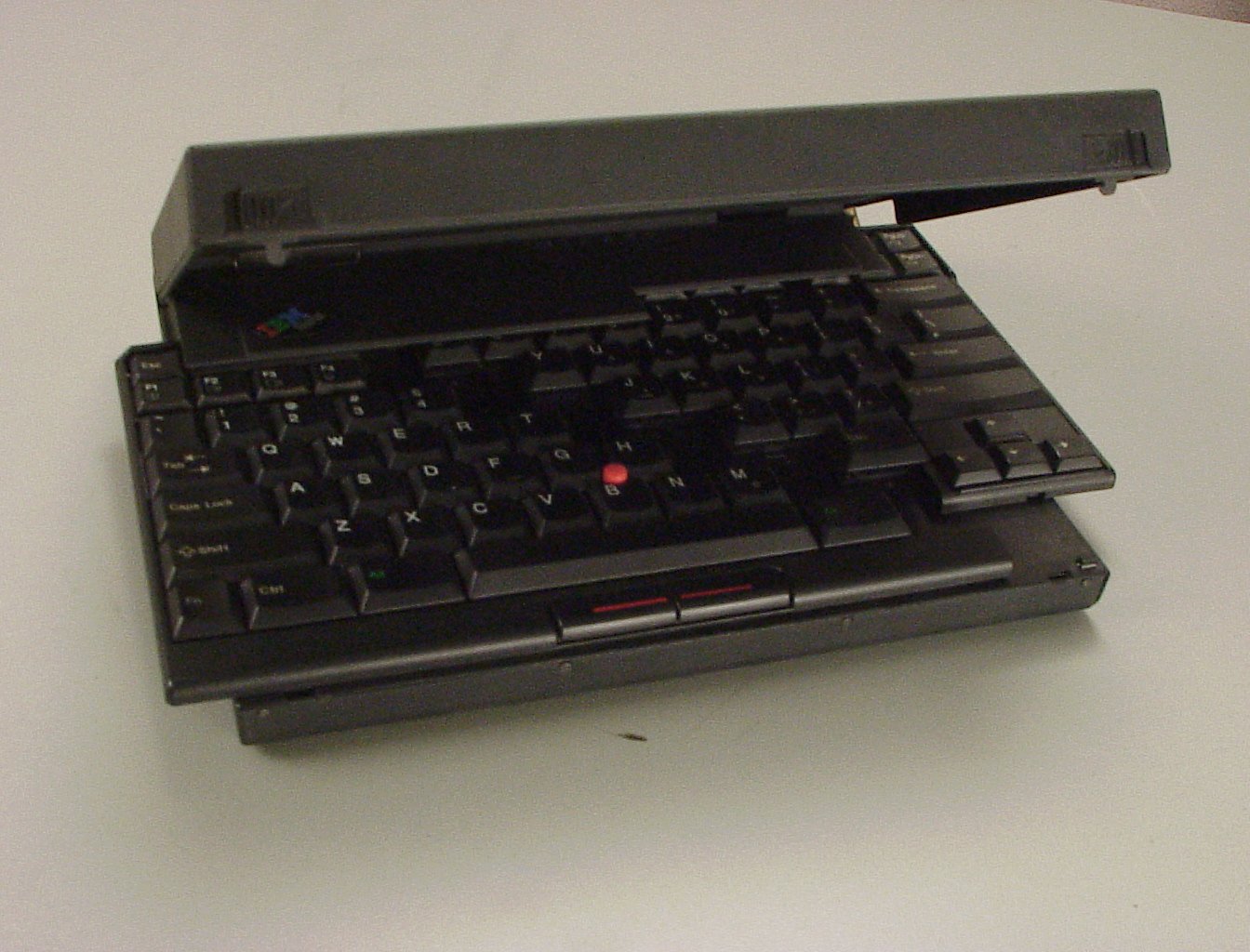
The 1995 ThinkPad 701c is the ThinkPad most often singled out by design press. John Karidis's TrackWrite mechanism unfolded the typing area to about 29.2 cm (11.5 inches) when the lid opened and contracted inside the chassis when closed. MoMA accessioned the design in 1996. Computerworld's January 2011 flashback tells the discontinuation story: screen sizes grew, and the butterfly's payoff (wide keyboard inside small footprint) disappeared once 12.1-inch and 13.3-inch displays became standard. One model year only. The 701c also appeared in James Bond Goldeneye (the movie), which as a teenager I found to be incredibly cool! 😉
The 1998 600 series is the chassis the rest of this decade builds on. The 500/560/570 subnotebooks had carried the thin-and-light flag through the mid-1990s, but the 600 set the template the T-series would inherit: magnesium-alloy chassis, 13.3-inch display, about 2.44 kg. Per Wikipedia and ThinkWiki, the 600 is also the start of the ThinkLight era (single LED above the display, IBM-patented, lighting the keyboard from above), though exact debut model and patent dates remain partially sourced.
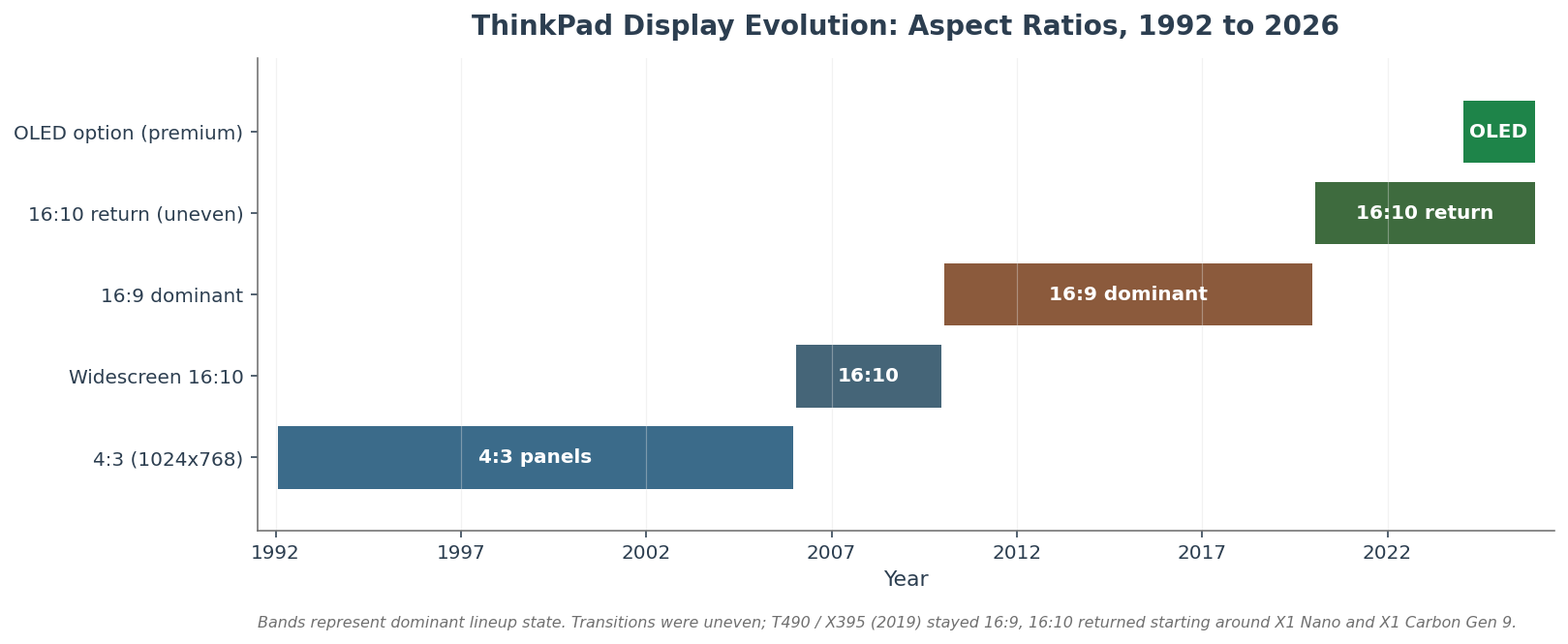
Display evolution band data
| Aspect band | Years | Dominant models |
|---|---|---|
| 4:3 (1024x768) | 1992-~2006 | 700C, 701c, 600, T20, T40, T43p, T60 |
| Widescreen 16:10 | ~2006-~2010 | T61, T400, X300, X301 |
| 16:9 dominant | ~2010-~2020 | T410, X220, X230, T430, T440s, T490 |
| 16:10 return (uneven) | ~2020-2026 | X1 Nano, X1 Carbon Gen 9+, T14 Gen 4 AMD, P14s Gen 6 |
| OLED option (premium) | ~2024-2026 | P14s Gen 6, X1 Carbon Gen 12-14 |
The 2000 launch is the formula's pivot. On May 1, 2000, Computerworld covered the titanium-clad ThinkPads: IBM introduced the T20 and A20 together as a new A/T-generation lineup that succeeded pieces of the older 600X/770Z-era ThinkPad family. The T-series with Pentium III 650-750 MHz SpeedStep CPUs is what Lenovo and IBM have positioned for corporate fleet purchasing for the next two-plus decades. Detailed market-share data against Dell Latitude and HP EliteBook is beyond scope here; the structural claim is that IBM and then Lenovo built and marketed the T-series as the fleet ThinkPad. The X20 launched in 2000 too, opening the ultraportable X-series lane next to the workhorse T-series. The T-series claim to "longest continuously shipped" lives in Wikipedia; the safer published wording is "among the longest-running."
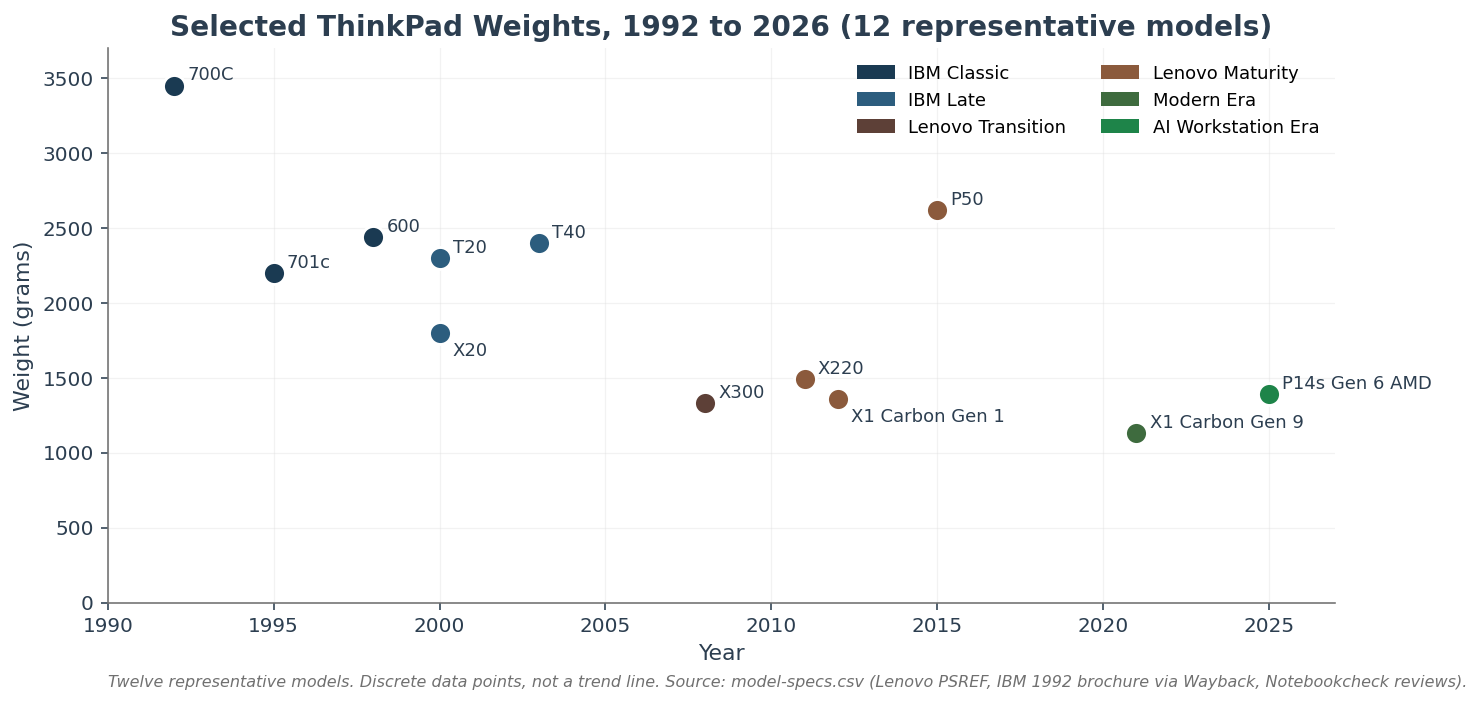
Weight data (12 representative models)
| Year | Model | Weight (g) |
|---|---|---|
| 1992 | 700C | 3450 |
| 1995 | 701c | 2200 |
| 1998 | 600 | 2440 |
| 2000 | T20 | 2300 |
| 2000 | X20 | 1800 |
| 2003 | T40 | 2400 |
| 2008 | X300 | 1330 |
| 2011 | X220 | 1490 |
| 2012 | X1 Carbon Gen 1 | 1360 |
| 2015 | P50 | 2620 |
| 2021 | X1 Carbon Gen 9 | 1130 |
| 2025 | P14s Gen 6 AMD | 1390 |
By 2002 the formula is recognizable: Pentium III then Pentium M, ATI Mobility graphics, magnesium chassis, red TrackPoint, 7-row keyboard, ThinkLight, IBM enterprise warranty. The T-series chronology through 2005 ran T20, T22, T23, T30, T40, T41, T42, T43p, the last IBM-branded T-series. The lid logo still said IBM.
Five years of IBM T-series
| T20 (2000) | T40 (2003) | T43p (2005) | |
|---|---|---|---|
| CPU class | Pentium III 650-750 MHz | Pentium M 1.3-1.7 GHz | Pentium M Dothan 2.0-2.26 GHz |
| RAM ceiling | 512 MB | 2 GB | 2 GB |
| Display | 14.1-inch 1024x768 | 14.1-inch 1024x768 | 15-inch up to 1600x1200 |
| Weight | about 2.3 kg | about 2.4 kg | about 2.6 kg |
| Distinguishing feature | First T-series; titanium-clad casing | Pentium M thin-and-light; Active Protection System | Last IBM-branded T-series; ATI Mobility FireGL workstation option |
The arc is what matters: the T20 to T43p stretch is when the T-series settled into the fleet ThinkPad role IBM (and then Lenovo) sold to corporate IT.
ThinkPad model family decoder
| Branch | Role | Start | Note |
|---|---|---|---|
| T-series | Corporate workhorse | T20, 2000 | The ThinkPad Lenovo and IBM positioned for corporate fleet purchasing. |
| X-series | Ultraportable | X20, 2000 | Road-warrior lane. |
| W-series to P-series | Mobile workstation | W500 (2008) to P50 / P70 (2015) | Quadro graphics, Xeon options; eventually thin-and-light P14s. |
| X1 (Carbon / Nano / Extreme / Yoga) | Premium / halo | X1 Carbon Gen 1, 2012 | New halo line distinct from the older 12.5-inch X-series. |
| Yoga | Convertible | ThinkPad Yoga, 2013-era | NOT the first ThinkPad convertible; X41 Tablet predates from the IBM era. |
| L-series / E-series (formerly Edge) | Budget / SMB / education | Edge series, 2010 | Consumer-styled dilution critique. |
| 700 / A / i / R / Z / SL / X41 Tablet (historical) | Various IBM-era and early-Lenovo branches | 1992-2010 | 700T pen-tablet (1992, the IBM 2521 renamed), TransNote (2001), A-series desktop-replacement (A20 onward, 2000), i-series, R-series, Z-series, SL-series. The X41 Tablet was an early convertible attempt. Largely defunct names; out of scope for this post's heritage-first arc but real product lines. |
This list is not exhaustive. The focus is on the T / X / W-P / X1 because those are the lanes that carried the matte-black design language continuously. The 700T, TransNote, A / R / i / Z / SL lines, and the various Tablet and Yoga experiments shipped real product but did not define the visual continuity the rest of this post tracks.
The chassis math was settled by the early T-series. The input device that made the chassis stick is older than any of them, and the next section reaches back to October 1992 to pick it up.
The Keyboard, TrackPoint, and Corporate Workhorse Culture
In 1992, IBM introduced TrackPoint II, an in-keyboard isometric pointing stick, on the 700 / 700C lineup. The mechanical idea was Ted Selker's, conceived in 1984 (before he joined IBM) while he was reading the Card and Moran HCI textbook. Selker filed the original isometric pointing-stick patent at his own expense, then joined IBM Research in the mid-1980s and refined the design with Joe Rutledge and the Yamato and PC-division testing teams.
The HCI motivation has a number attached: about three-quarters of a second each way, round trip, for the cost of taking your hand off home row, finding an external pointing device, and returning to home row. The figure traces to a 1984-era study cited in EDN's TrackPoint development history and Selker's Computer History Museum oral history. It is not a 2026 benchmark; it is the motivation Selker named for keeping pointing in the keyboard. The TrackPoint II refinement work was at IBM Research broadly (Yorktown era). NOT at IBM Almaden; Almaden was Selker's later IBM lab.
The HCI motivation, circa 1984
| Input action | Cost (approximate, 1984 HCI study context) |
|---|---|
| Hand leaves home row, moves to external pointing device, returns to home row | About 0.75 seconds each way (round trip) per Selker and EDN. |
| Hand stays on home row, uses in-keyboard pointing stick | Zero hand-off; pointing without leaving typing position. |
The TrackPoint has survived continuously on T-series and X-series ThinkPads from 1992 through 2026. The launch color of the TrackPoint cap has more than one account. The canonical Hill/Lenovo telling describes Sapper wanting red, IBM's standards group reserving red for the mainframe emergency power-off switch, and engineering tweaking toward red in early development. However, a former Lexmark engineer's comment below offers a fascinating production-side telling that differs. Regardless, the red cap has held across two corporate owners and is so iconic that many users feel a ThinkPad without the red nub is not really a ThinkPad at all!
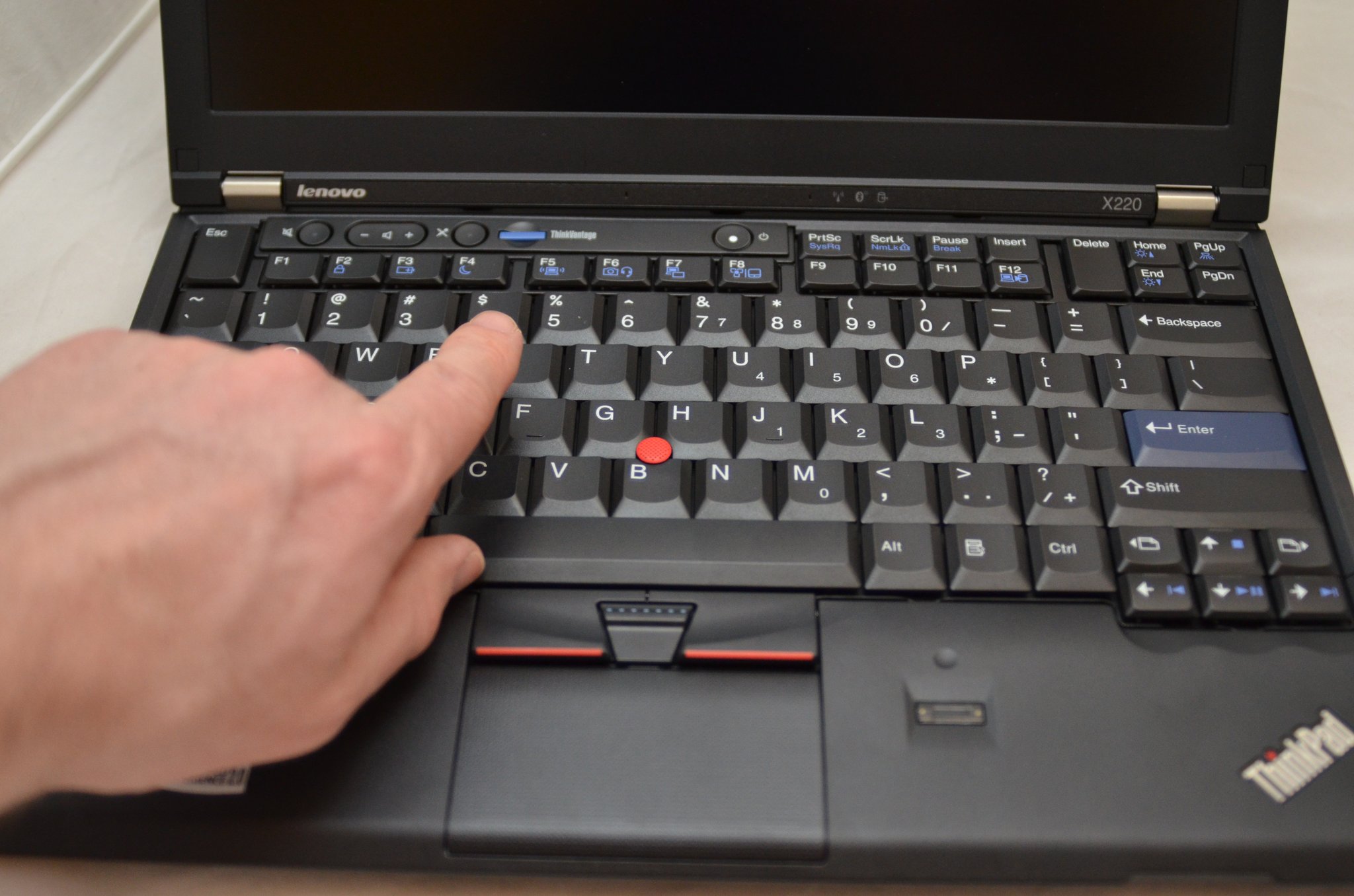
The 7-row classic keyboard was the standard layout from 1992 to 2012. It is the keyboard the enthusiast community talks about. Modern X230 mods that retrofit a 7-row layout onto an Ivy Bridge chassis are real, documented, and Instructables-grade reproducible. Lenovo replaced the 7-row layout with the 6-row chiclet "ThinkPad Precision Keyboard" on the T430, X230, and W530 in May 2012. The naming detail matters: "ThinkPad Precision Keyboard" is Lenovo's own name for the 2012 6-row layout, per the 2012 launch press release. "AccuType" is a separate Lenovo brand for Edge, IdeaPad, and Twist chiclet keyboards, and is not what the T430 / X230 / W530 ship with.
ThinkPad keyboard and input features across six eras
| Feature | IBM Classic | IBM Late | Lenovo Transition | Lenovo Maturity | Modern Era | AI Workstation Era |
|---|---|---|---|---|---|---|
| TrackPoint | present | present | present | present | present | present |
| ThinkLight (over-display LED) | partial (from 600 era, ~1998) | present | present | partial (phase-out 2012-2014) | absent | absent |
| 7-row classic keyboard | present | present | present | partial (ends May 15, 2012) | absent (except ThinkPad 25, 2017) | absent |
| 6-row ThinkPad Precision Keyboard | absent | absent | absent | present (from May 15, 2012) | present | present |
| Dedicated physical TrackPoint buttons | present | present | present | partial (T440 / T440s / X240 2014 dropped them; T450 / X250 2015 restored) | present | present |
| Backlit keys | absent | absent | partial | partial to present | present | present |
| Dedicated PageUp / PageDown | present | present | present | partial (consolidated mid-era; returned around T490 / X395, 2019) | present | present |
| Adaptive Keyboard (touch strip) | absent | absent | absent | partial (X1 Carbon Gen 2 only, 2014; dropped Gen 3, 2015) | absent | absent |
The other piece of the keyboard-and-input story is the ThinkLight: a single LED above the display, IBM-patented, that lit the keyboard from above. It ran from the 600 era (1998) through approximately 2012-2014, when backlit keys started replacing it on premium ThinkPads. The exact removal-by-model dates remain partially sourced via ThinkWiki; the rough arc is solid.
The corporate fleet story is the other half. TPM, vPro and AMD PRO, ThinkVantage utilities, Lenovo Premier Support (continuing IBM's Premier model), docking ecosystems that survive CPU-architecture transitions: a whole IT operational machine grew around the ThinkPad. The modern T14 and P14s still ship with TrackPoint as standard, dedicated physical buttons included, and corporate-fleet IT departments still buy them by the rack. Which is exactly what was at stake when IBM and Lenovo sat down to do a deal.
The IBM-to-Lenovo Transition (2005)
IBM and Lenovo announced the definitive PC-division sale agreement on December 7-8, 2004. Lenovo's own sources disagree on the dateline: the announcement page uses December 7 Armonk / Beijing dateline, and the May 2005 closing release back-references the agreement as announced December 8, 2004. So: announced December 7-8, 2004 (depending on dateline / time zone), and closed May 1, 2005. The headline price was about US$1.75 billion. IBM cited the long-running shift from low-margin PC hardware to services and software. NOTE: At the time the sale happened I was pretty bummed, I fully expected Lenovo to dilute the brand into mediocrity and abandon what made the ThinkPad so special. Thankfully I was wrong.
The stewardship promises were specific. Lenovo kept the ThinkPad name. Approximately 10,000 IBM employees were slated to join Lenovo per the December 7, 2004 announcement. The Yamato Development Lab continued under Lenovo as the ThinkPad engineering home (per IBM's history page; specific facility-by-facility continuity is partially sourced), and Lenovo retained David Hill, who had led ThinkPad and PC design at IBM since 1995. Hill continued under Lenovo as Executive Director of Worldwide Corporate Identity and Design from 2005, then Chief Design Officer and Vice President of Experience Design from 2009 through his June 30, 2017 retirement. He is now founder of ThinkNext Design. The first three Lenovo years (T60 / T61 generation, 2006-2007) were the last 4:3 mainstream T-series displays, Core 2 Duo CPUs, and visually almost identical to the T43p. Only the lid badge changed gradually.
The 2008 badge transition is the visible turning point. By approximately 2008, "IBM" stopped appearing on new-production ThinkPad lids; Lenovo became the corner identifier and "ThinkPad" itself was the badge, tilted to 45 degrees on the corner. Wikipedia covers the change; the exact transition date is partially-supported pending primary Lenovo confirmation.
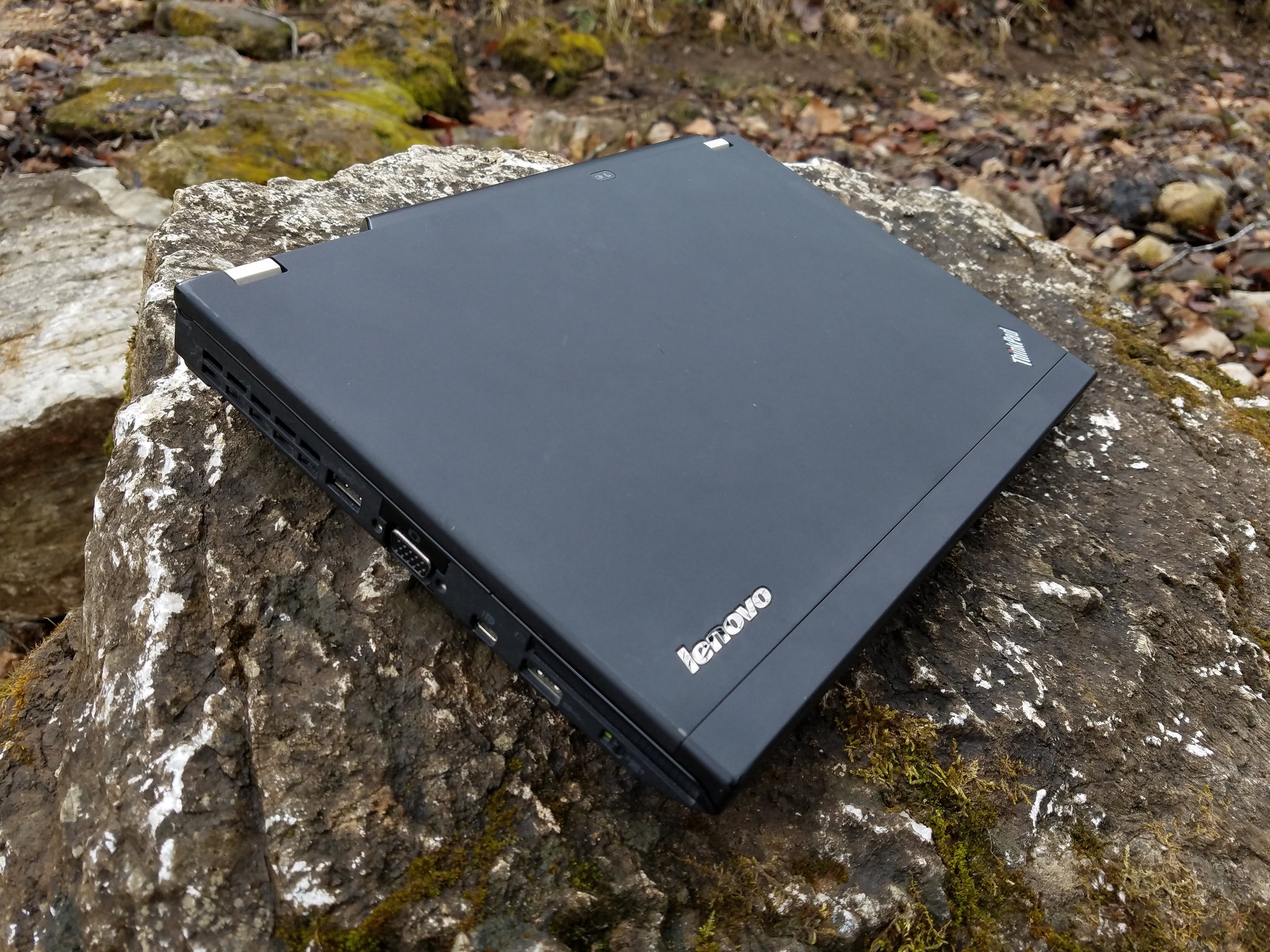
By 2010, Lenovo had crossed 60 million cumulative ThinkPad units. Five years in, the brand had survived the handoff at scale. Cumulative unit sales prove scale, not engineering continuity by themselves; the design-press treatment of the 2008 X300 (next section) is where the "Lenovo can swing for the fences and stay on-brand" claim earns more weight.
What stayed, what broke, what evolved
| Feature | IBM era | Lenovo early (2005-2012) | Lenovo modern (2012-2026) |
|---|---|---|---|
| Chassis DNA (matte-black wedge) | Established (1992). | Kept. | Kept. |
| Branding (lid badge) | "IBM ThinkPad" prominent. | Transition: IBM badge gradually retired (about 2008). | "Lenovo" plus tilted "ThinkPad" badge. |
| Keyboard | 7-row classic, 1992-2012. | 7-row continued until the May 15, 2012 cliff. | 6-row ThinkPad Precision Keyboard; ThinkPad 25 (2017) restored 7-row as a one-off. |
| TrackPoint | Introduced October 1992 with dedicated physical buttons. | Kept; dedicated buttons preserved through about 2014. | Kept; dedicated buttons dropped on T440 / T440s / X240 (2014), restored on T450 / X250 (2015). T-series mainstream still has them. |
| Repairability | High: SODIMM RAM, 2.5-inch storage bay, swappable battery. | High initially; X1 Carbon Gen 1 (2012) introduces soldered DDR3L. | Mixed. T14 Gen 4 AMD: 32 GB soldered LPDDR5X. P14s Gen 6 AMD: 96 GB DDR5 SODIMMs. |
| Soldered RAM | Not standard on premium models. | Becomes standard on premium ultraportables with X1 Carbon Gen 1 (2012, 8 GB DDR3L soldered); mainstream T-series held SODIMMs longer. | Standard on T14 / X1 LPDDR5X SKUs through Gen 6; P14s Gen 6 is the SODIMM outlier. The 2026 T14 Gen 7 Intel reverses the soldered-RAM direction with LPCAMM2 modular memory per Lenovo's MWC 2026 announcement. |
| Display aspect ratios | 4:3 mostly. | 4:3 to widescreen to 16:10 to 16:9. | 16:9 dominant 2010s; 16:10 returns unevenly starting X1 Nano / X1 Carbon Gen 9; OLED option on premium 2024-2026 SKUs. |
| Ports | Full-size legacy plus dock connector. | Same pattern; gradual USB-A / HDMI introductions. | USB-C plus Thunderbolt 4 or USB4, plus HDMI 2.1 on T14 / P14s. |
| Docking | Proprietary side-port docks. | Proprietary side-port (X220 / X230 era) and pogo-pin (T440 to T480 era). | USB-C and Thunderbolt docks. |
| Enterprise support | IBM Premier service; TPM 1.x; Active Protection System. | Lenovo Premier Support continues the IBM model; still TPM 1.2 baseline early. | TPM 2.0 plus vPro / AMD PRO; Copilot+ on modern SKUs. |
The skeptic's argument here is that Lenovo diluted the brand. The Edge line (2010), the Twist (2012), the T440 clickpad (2014), the X1 Carbon Gen 2 Adaptive Keyboard (2014), the battery whitelist: all real, and the Controversies and Misses sidebar in Section 8 catalogs them. The narrower claim here is that the 2005 to 2008 handoff itself was not the rupture. The 60-million milestone reads as commercial continuity rather than engineering proof; the X300 launch coverage in the next section is what made design-press observers say Lenovo was still building ThinkPads on purpose.

The X-Series and the Road Warrior ThinkPad
The first major design swing under Lenovo was not a continuation play. Three years after Lenovo closed the IBM PC division acquisition, the X300 launched as a brand-new ultraportable: thinner than any prior ThinkPad, with the formula intact.
Lenovo announced the ThinkPad X300 on February 26, 2008. 1.33 kg. 13.3-inch LED-backlit WXGA+ (1440x900). Removable battery. User-serviceable SSD. Integrated DVD burner. (Enthusiast lore in ThinkWiki names the development codename "Kodachi," a Japanese sword; Lenovo's own press release does not name the codename, so treat that as community color.) Walt Mossberg had just reviewed the original MacBook Air (announced January 15, 2008). Engadget on February 14, 2008 framed the X300 with "Secrets of the ThinkPad X300: What Walt Didn't Tell You" and the "PC answer to the MacBook Air" rhetoric stuck. The retail price was about US$2,700 base (community-sourced; Lenovo PR did not state retail).
The Notebookcheck March 2008 review has a very practical take: the X300 was thin and serviceable; it also had a large bezel for its panel and shorter battery life than traditional X-series machines. The tradeoff was real.
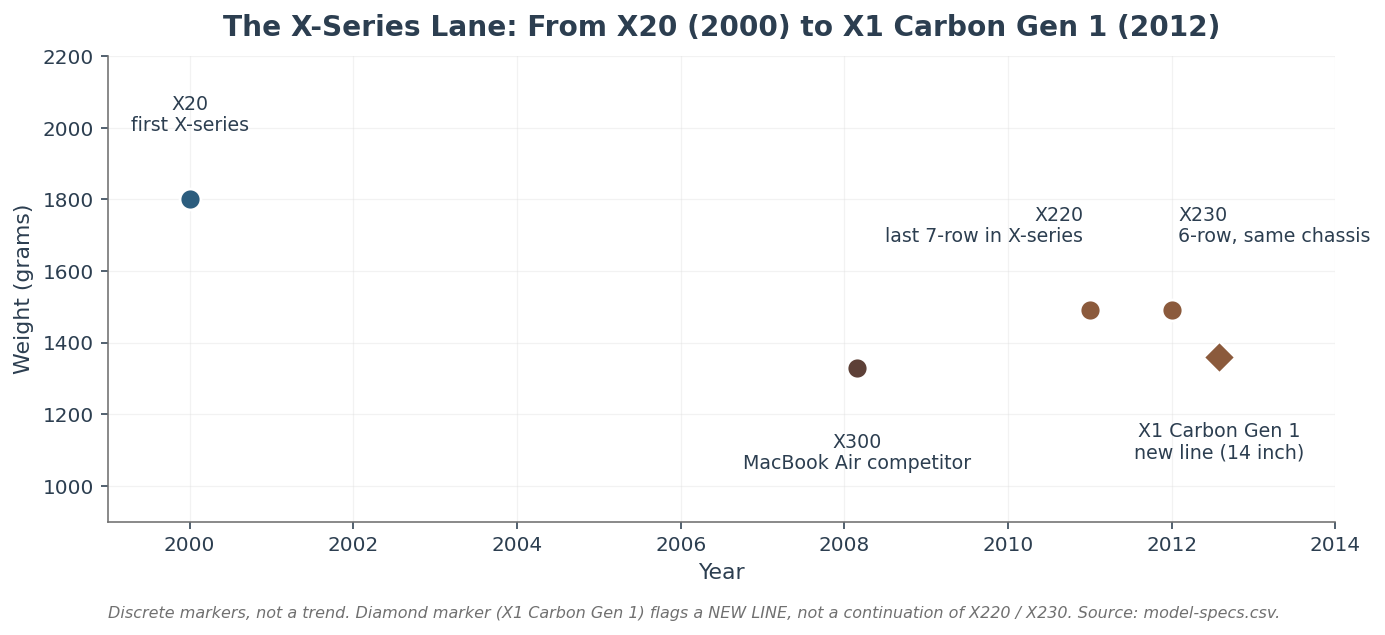
X-series lineage marker data
| Year | Model | Weight (g) |
|---|---|---|
| 2000 | X20 (first X-series) | 1800 |
| 2008 | X300 (MacBook Air competitor) | 1330 |
| 2011 | X220 (last 7-row in X-series) | 1490 |
| 2012 | X230 (6-row, same chassis as X220) | 1490 |
| 2012 | X1 Carbon Gen 1 (NEW LINE, 14-inch) | 1360 |
The X220 (2011) is the enthusiast benchmark. Sandy Bridge Core i3 / i5 / i7, 16 GB DDR3 ceiling via two SODIMM slots, last X-series to ship with the 7-row classic keyboard, optional IPS panel unusual at the 2011 price point. The IPS X220 in particular pulled a generation of enthusiasts in. I wrote it up as a long-term review in early 2012 and followed with the disassembly, service-manual mirror, and an eGPU-on-X220 ViDock experiment that has aged into a niche historical artifact.
Set the X220 against the Intel-defined Ultrabook category that arrived the same year. The first-wave Ultrabooks (ASUS Zenbook UX31 and Acer Aspire S3, both 2011) optimized for under-1.4 kg and 18 mm thickness with soldered memory, sealed batteries, and no docking story. The X220 made the opposite tradeoff: 1.49 kg, 27 mm thick, but two SODIMM slots up to 16 GB DDR3, a removable 9-cell battery, a dock connector, and a public service manual. Enthusiasts who wanted IPS plus SODIMMs plus a real dock in 2011 ended up at the X220 by elimination. The Dell Latitude E-series and HP EliteBook lines existed but did not pair IPS with the X220's keyboard, weight, and serviceability mix; the consumer Ultrabook class had no docking story at all. The cleanest 2011 choice for that exact spec profile was a ThinkPad. The X220 will forever have a special place in my heart, it was just an absolutely wonderful machine to work with.
February 2008: the X300 against its peers
| ThinkPad X300 | MacBook Air (original) | Dell Latitude E4200 | HP EliteBook 2530p | |
|---|---|---|---|---|
| Announced | February 26, 2008 | January 15, 2008 | August 2008 | August 2008 |
| Weight | 1.33 kg / 2.93 lb | 1.36 kg | 1.07 kg | 1.5 kg |
| Display | 13.3-inch LED-backlit WXGA+ (1440x900) | 13.3-inch LED 1280x800 | 12.1-inch 1280x800 | 12.1-inch 1280x800 |
| Battery | Removable | Not user-replaceable | Removable | Removable |
| Storage | User-serviceable SSD | Soldered SSD options | Configurable SSD | Configurable SSD / HDD |
| Optical drive | Integrated DVD burner | None (USB external) | None | Optional |
| Pointing | TrackPoint plus touchpad | Touchpad only | TrackPoint plus touchpad | TrackPoint plus touchpad |
| Approximate launch price | about US$2,700 (community-sourced) | about US$1,799 | about US$1,799 | about US$1,549 |
Competitor row specs and prices are editorial compression of contemporary reviews, vendor announcements, and retailer archives, not per-row PSREF-equivalent traceable sources. The X300 row is primary-sourced from the Lenovo February 26, 2008 release; the X300 launch price is community-sourced and was not stated in the Lenovo press release.
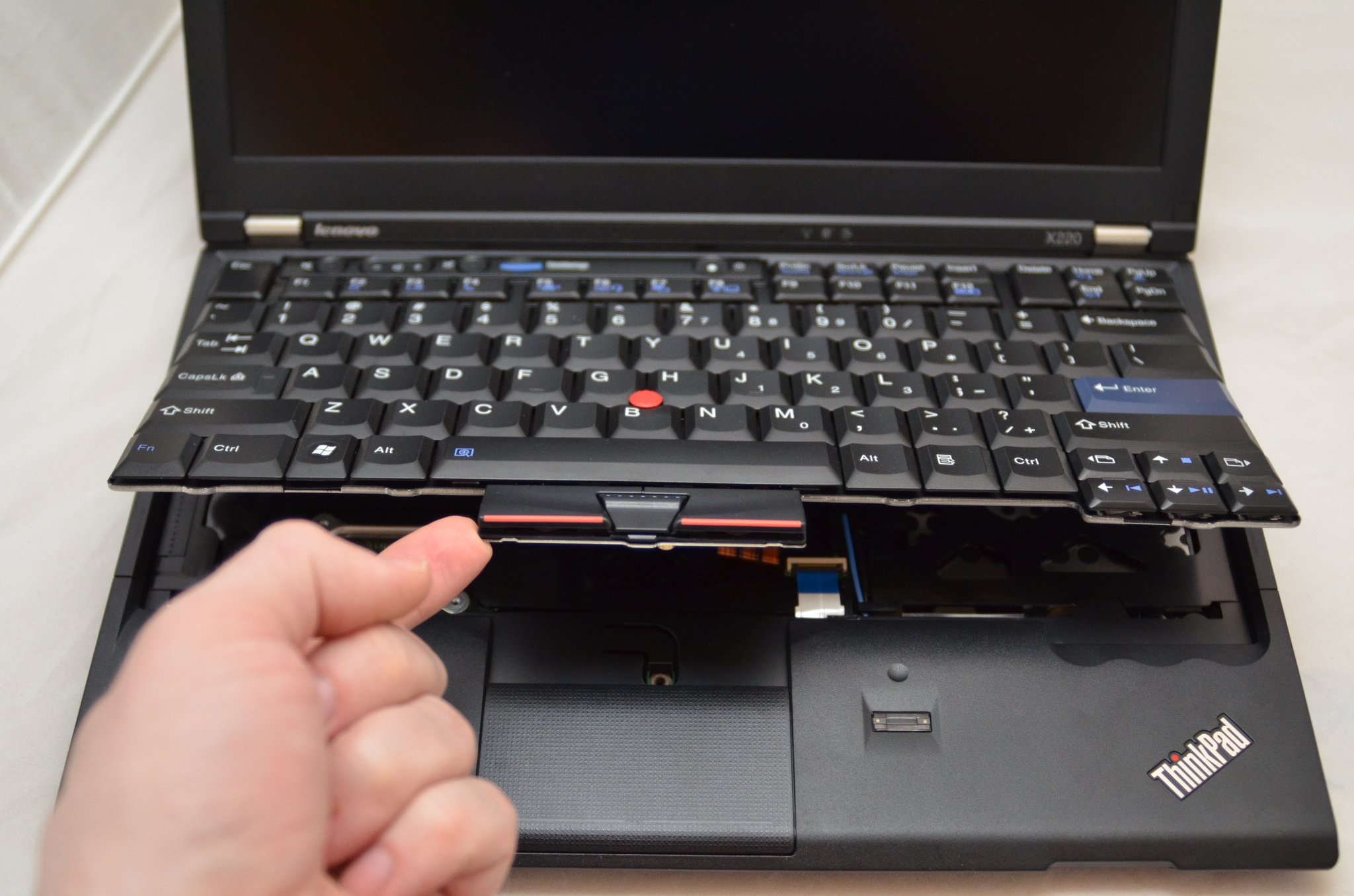
What X220 Expandability Looked Like in 2011
The X220 was the last 7-row X-series where "fix it yourself on a kitchen table" still held literally. The keyboard came out with a few Phillips screws. The motherboard sat under it. RAM, drive, dock connector, batteries, Wi-Fi card, and mSATA slot were all reachable. The photographs below are from my own X220 disassembly bench in December 2011, with then-current SSDs (Intel 310 mSATA, Crucial M4) and Windows 7. They are the X220's user-serviceability story in its actual era, not a 2026 reshoot.
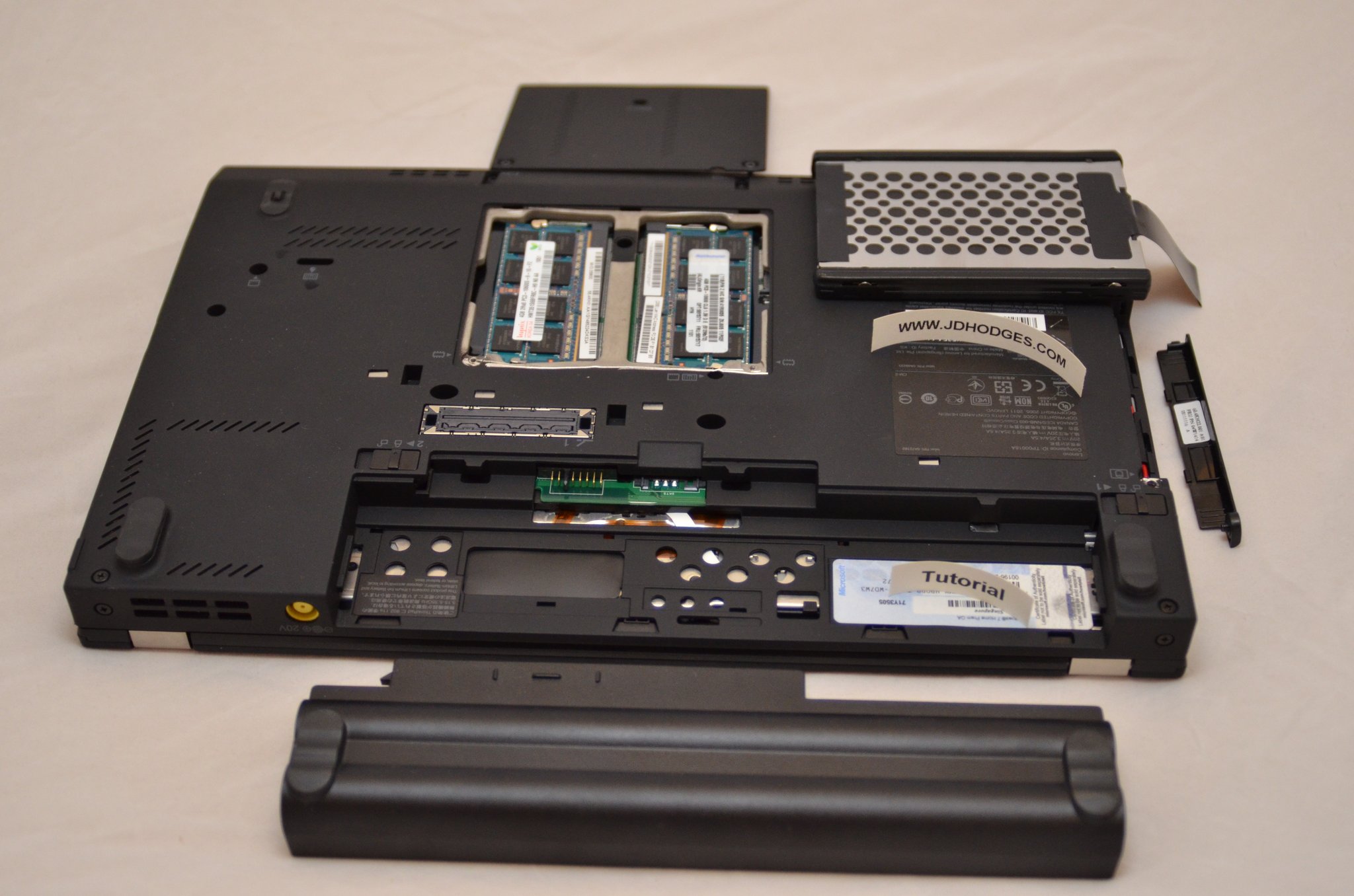
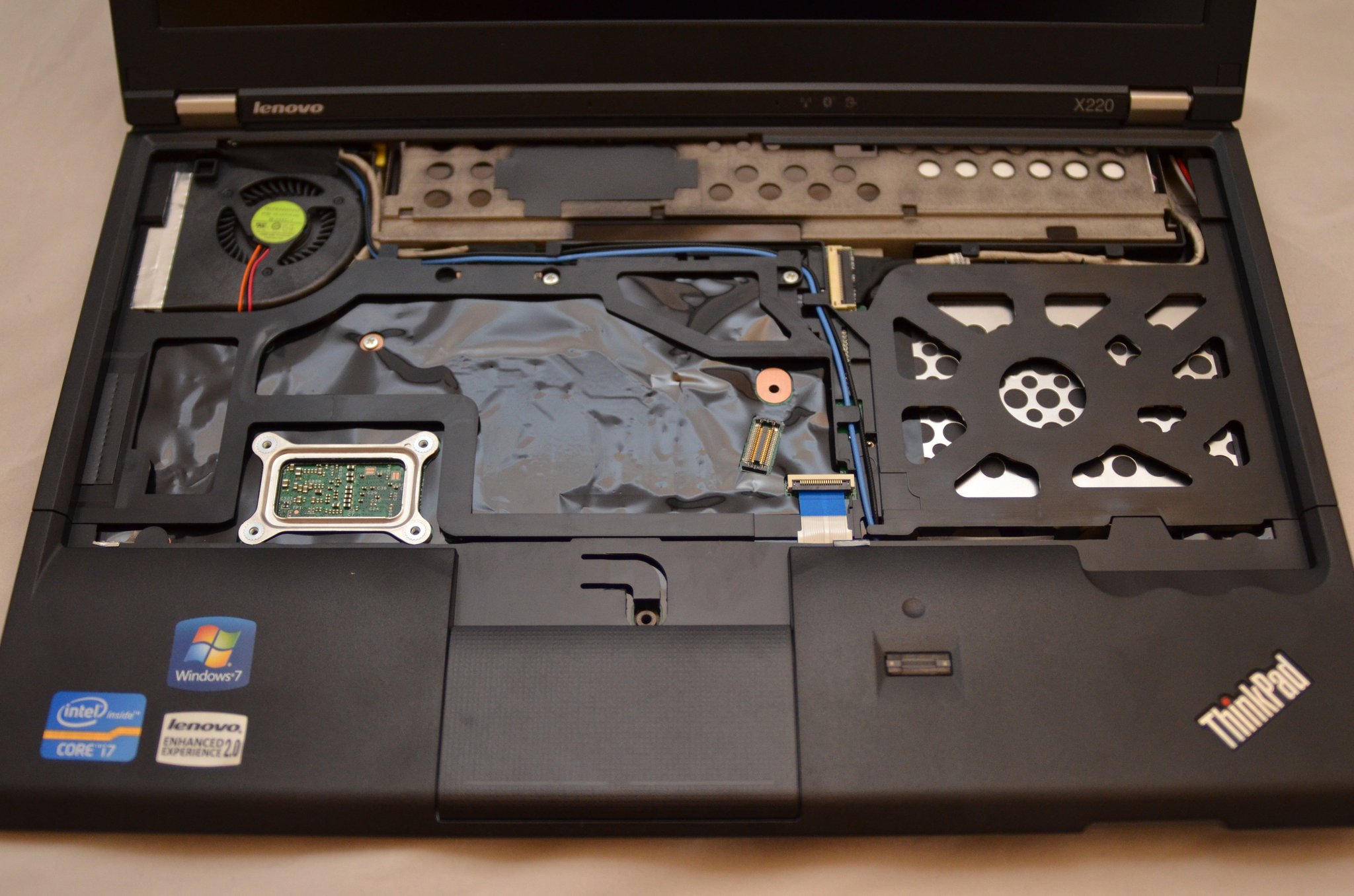
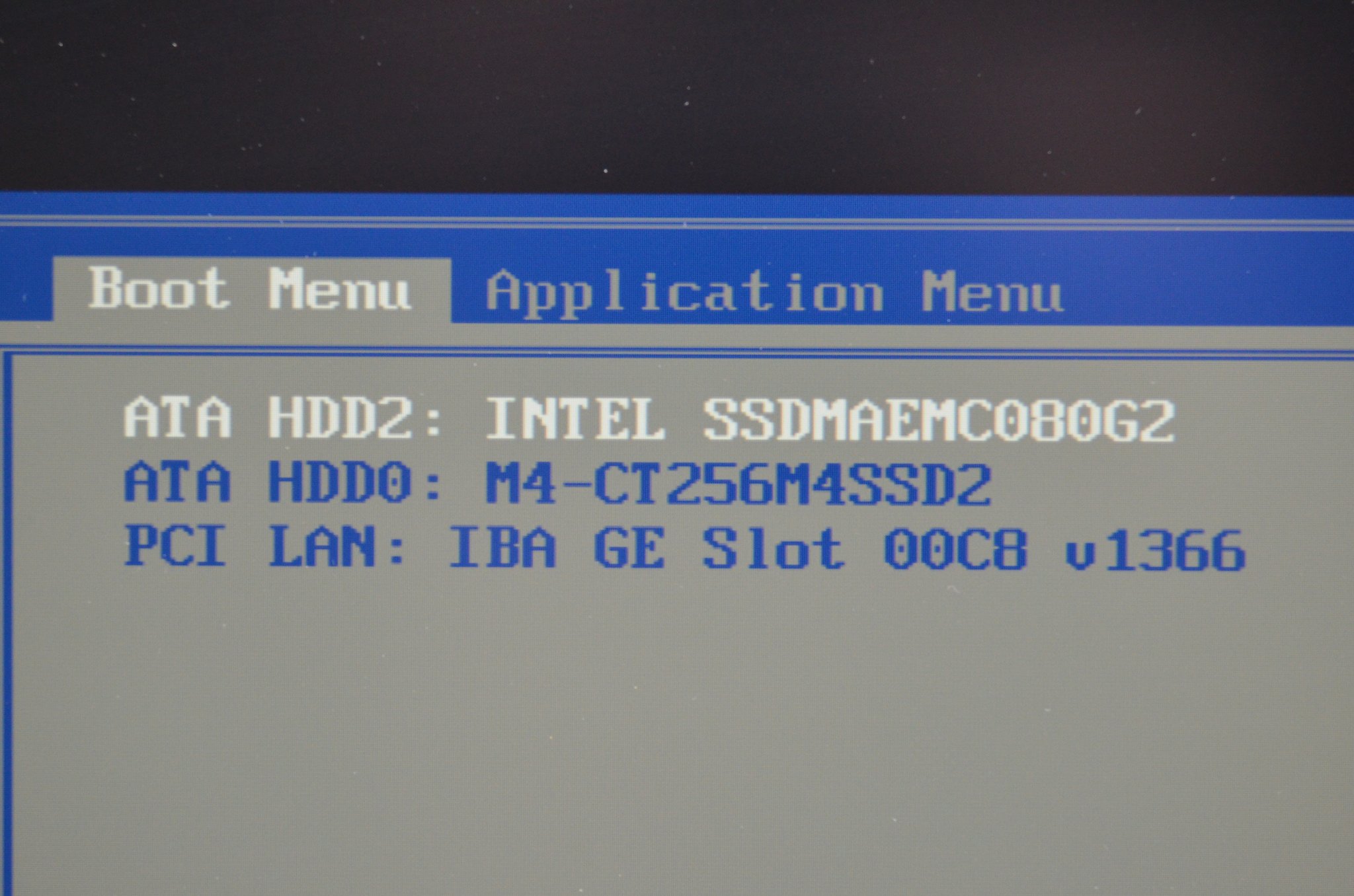
The point is not that this kind of repair is easy (which it was). The point is that it was possible on a 12.5-inch business ultraportable in 2011. Lenovo published the service manual openly. The community leaned into configurations most buyers never saw, including mSATA plus a 2.5-inch SSD as a practical two-drive setup. The X230 in 2012 carried the same chassis bones forward. The 2012 keyboard cliff replaced the layout, but the underneath stayed equally serviceable.
NOTE: Just like some vehicles are easy to work on and a joy to drive, the X220 and X230 were both. You can easily and quickly replace all the most common parts and the machines just felt SO GOOD.
The X230 (May 2012) shares the X220 chassis but ships with the new 6-row Precision Keyboard. Same Ivy Bridge generation that arrived alongside the T430. The 2012 keyboard cliff hits the X-series here. Enthusiast modders still retrofit X220 7-row keyboards onto X230 chassis to keep the layout going.
The X1 Carbon Gen 1 launched in August 2012, and it is the right place to draw a line. The X1 Carbon is a NEW LINE, not a continuation of the X220 / X230 12.5-inch X-series. 14-inch display, carbon-fiber-magnesium, 8 GB DDR3L soldered (no SODIMMs): the first soldered-only memory commitment on a premium ThinkPad ultraportable, and the repairability turning point for the X1 / premium-thin lane (mainstream T-series held SODIMMs longer; soldered LPDDR variants did not become standard on T14 until well into the Lenovo era). (MIL-STD-810G testing on the X1 Carbon arrived later, with Gen 2 in 2014; the Gen 1 PSREF does not list it.) The X-series 12.5-inch chassis fades after the X230; the X1 Carbon takes the premium ultraportable slot.
The Workstation Branch: W to P
Lenovo launched the W-series mobile workstation in 2008 with the W500 and continued through W520, W530, W540, and W541. The W520 (2011) is the IBM-era-style mobile-workstation peak: Sandy Bridge Core i7 or Xeon, NVIDIA Quadro discrete, 2.5 kg-plus, proprietary dock. The W-series was Lenovo's pitch to CAD, video, and scientific-computing buyers (Lenovo's W-series marketing positioned it that way; specific fleet-share data is not in the contemporary trade press I pulled). It was overkill for the average user but the right tool for power workflows that did not yet exist on lighter chassis. The W540 (2014) generation carries the same dedicated-TrackPoint-button controversy as the T440.
In 2015, Lenovo rebranded the line from W-series to P-series with the P50 and P70. Quadro graphics, Xeon CPU options, full mobile-workstation chassis.

CPU generation marker data
| Year | Model | CPU codename |
|---|---|---|
| 2008 | W500, X300 | Penryn / Penryn LV (Intel) |
| 2010 | T410 | Arrandale (Intel) |
| 2011 | X220, W520 | Sandy Bridge (Intel) |
| 2012 | X230, T430, X1 Carbon Gen 1 | Ivy Bridge / Ivy Bridge ULV (Intel) |
| 2013-2014 | T440s, X1 Carbon Gen 2 | Haswell ULV (Intel) |
| 2015 | P50 | Skylake H (Intel) |
| 2019 | T490 | Whiskey Lake (Intel) |
| 2019 | X395 | Zen+ Ryzen 3000 (AMD) |
| 2020 | T14 Gen 1 AMD | Renoir (AMD) |
| 2021 | X1 Carbon Gen 9 | Tiger Lake (Intel) |
| 2023 | T14 Gen 4 AMD | Phoenix Zen 4 (AMD) |
| 2025 | P14s Gen 6 AMD | Strix Point Zen 5 (AMD) |
The modern P-series splits into thin-and-light P14s / P15s / P16s plus the traditional heavy P-series (P1, P15, P16). The naming pairs screen size to model number. The P14s shares its chassis with the T14, which is why the modern P-series is no longer the 2.5-kg-plus behemoth it was in 2015.
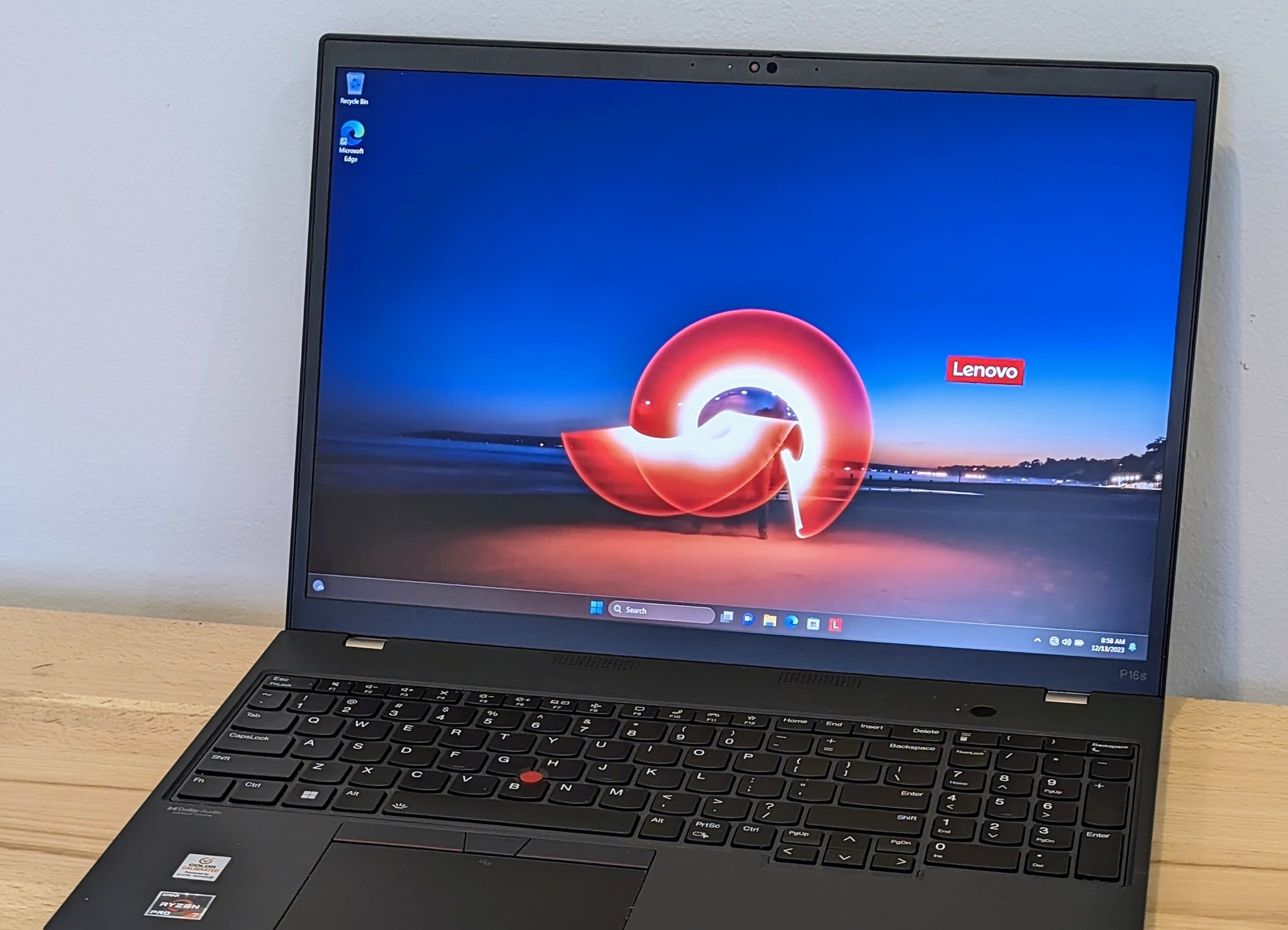
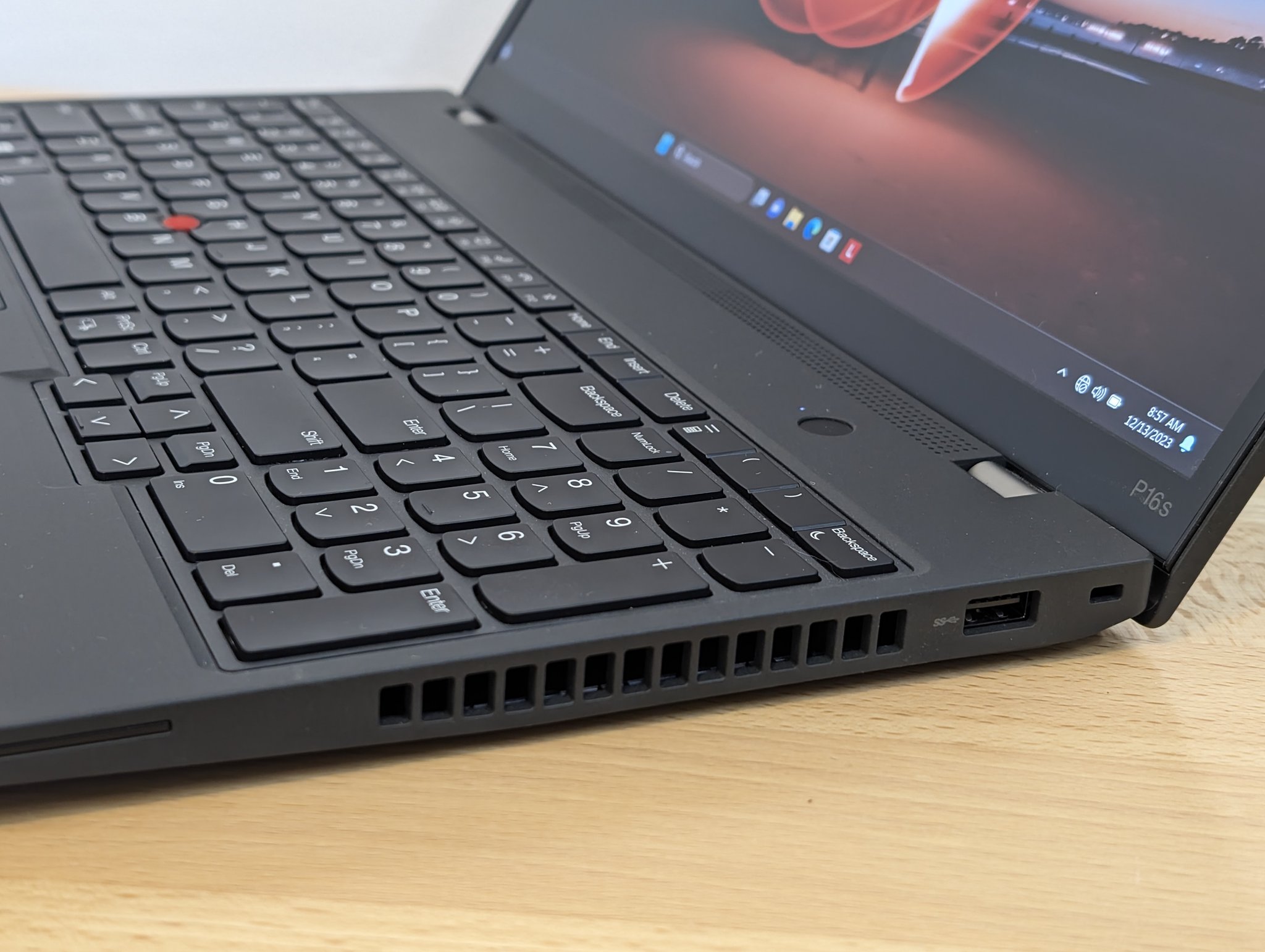
The P14s Gen 6 AMD (2025) is the rare 2026 14-inch business chassis that still ships with SODIMMs. Up to 96 GB DDR5-5600 via two slots per Lenovo's PSREF. The CPU is the Ryzen AI 9 HX PRO 370 ("Strix Point" per AMD's Ryzen AI 300-series documentation; the codename does not appear in Lenovo's PSREF). One technical clarification worth flagging for the ML reader: the P14s Gen 6 uses discrete DDR5 SODIMMs, not unified memory. "Unified memory" is Apple Silicon and AMD Strix Halo terminology and does not apply here.
The workstation arc: W520 (2011) to P50 (2015) to P14s Gen 6 (2025)
| W520 (2011) | P50 (2015) | P14s Gen 6 AMD (2025) | |
|---|---|---|---|
| Chassis class | Heavy mobile workstation | Heavy mobile workstation | Thin-and-light (T14 chassis) |
| Weight | about 2.5 kg | about 2.62 kg | about 1.39 kg |
| CPU | Intel Core i7 / Xeon (Sandy Bridge) | Intel Xeon E3 / Core i7 (Skylake H) | AMD Ryzen AI 9 HX PRO 370 (Strix Point per AMD docs) |
| GPU | NVIDIA Quadro discrete | NVIDIA Quadro M1000M / M2000M | AMD Radeon 890M integrated; up to about 80 overall TOPS aggregate AI per PSREF |
| RAM ceiling | 32 GB DDR3 ECC | 64 GB DDR4 ECC | 96 GB DDR5 SODIMMs (NOT unified memory) |
| Storage | 2.5-inch SATA plus mSATA | 2.5-inch SATA plus two M.2 slots | M.2 NVMe |
| Display | 15.6-inch up to 1920x1080 IPS option (16:9) | 15.6-inch up to 3840x2160 | 14.0-inch up to 2880x1800 OLED option |
| Dock | Proprietary dock connector | Proprietary dock | USB-C / Thunderbolt 4 / USB4 |
The W520 to P50 transition is continuous in identity. The P50 to P14s Gen 6 transition is a re-classification: "mobile workstation" no longer means 2.5 kg with Quadro discrete. In 2025 it can mean 1.39 kg, 96 GB SODIMMs, and NPU. Different machine, same job.
What Changed, What Did Not
Before the 2026 P14s can land as a real claim, the skeptic gets a reckoning. Three pivots define how Lenovo got from the 2005 handoff to the 2026 P14s, and the first one is the 2012 keyboard cliff.
On May 15, 2012, Lenovo announced the T430, X230, and W530 with the new 6-row "ThinkPad Precision Keyboard," replacing the 7-row layout that had been standard since 1992. Twenty years of keyboard continuity ended on a single press-release day. The marketing name is "ThinkPad Precision Keyboard," explicitly not "AccuType" (which is Lenovo's brand for Edge / IdeaPad / Twist chiclets). The pressure was real: 2012 was the Ultrabook year, chiclet (island-style) keyboards had taken over consumer laptops, and Lenovo wanted thinner chassis with under-key backlighting (which scissor-switch chiclets support more cleanly than full-travel 7-row keys). Laptop Mag's July 2012 Type-Off concluded the new chiclet was "a different keyboard, but not worse" for typing speed. The dedicated PageUp / PageDown keys also disappeared on this generation; they returned around the T490 / X395 generation in 2019. The cliff was real; to me the keyboard that replaced it still types better than most business laptops I have used in 2026, but it is not the 7-row.
Lenovo's other 2010s missteps (Edge, Twist, T440 clickpad, X1 Carbon Gen 2 Adaptive Keyboard, ThinkPad 25, battery whitelist) live in the Controversies and Misses sidebar below.
The display and repairability swings are the other two structural pivots. Display ratios moved from 4:3 through widescreen and 16:9-dominated 2010s back to 16:10 unevenly. The why is panel economics: the 2010s 16:9 era tracked TV-panel manufacturing scale (cheap 1366x768 and 1920x1080 from television lines), and the productivity-laptop backlash plus tall-content workflows (code, documents, Slack, Figma) pulled premium laptops back to 16:10 starting around X1 Nano and X1 Carbon Gen 9. The repairability swing was sharper, though uneven across lanes. Soldered memory on a premium ThinkPad ultraportable starts with the X1 Carbon Gen 1 in 2012 (8 GB DDR3L); mainstream T-series held user-replaceable SODIMMs years longer. The modern T14 Gen 4 AMD ships 32 GB soldered LPDDR5X. The P14s Gen 6 kept SODIMMs against that trend and is the outlier. Mixed, not monotonic.
What stayed: Matte-black chassis DNA, the red TrackPoint cap, the enterprise security stack (TPM 2.0, vPro and AMD PRO). The docking ecosystem evolved from proprietary side-port to pogo-pin to USB-C and Thunderbolt without breaking the "you can dock a ThinkPad" promise. The clamshell hinge that opens to 180 degrees on most SKUs. The formula bent in 2012; it did not break.
ThinkPad's biggest stumbles and what Lenovo learned
| Year | Stumble | What happened | What changed |
|---|---|---|---|
| 2010 | ThinkPad Edge launch | Consumer-styled budget tier; enthusiasts read it as brand dilution. | Eventually rebranded under L-series and E-series. |
| 2012 | ThinkPad Twist S230u | 12.5-inch convertible Ultrabook with a rotating hinge; mixed reception. | Discontinued; Lenovo's convertible direction shifted to Yoga. |
| 2014 | T440 / T440s / X240 clickpad | Dedicated TrackPoint buttons dropped; buttonless clickpad with TrackPoint buttons in the touchpad's top edge. | T450 / X250 (2015) restored physical buttons. |
| 2014 | X1 Carbon Gen 2 Adaptive Keyboard | Touch-sensitive function-row strip; mixed-to-negative reception (Laptop Mag negative; Engadget mixed-positive). | Lenovo dropped the adaptive strip in Gen 3 (2015). |
| 2017 | ThinkPad 25 Anniversary Edition | Limited-edition T470 chassis with restored 7-row keyboard; mixed reception ("souped-up T470" critique). | Limited run; no sequel. The 7-row keyboard project did not return to the mainstream lineup. |
| Long-running | Battery whitelist | Lenovo maintained a "battery whitelist" preventing unapproved third-party batteries from being used; widely criticized. | Relaxed approximately 2017. |
| Modern T-series | TrackPoint-omission experiments | Non-mainstream variants explored no-TrackPoint configurations (community-reported). | T14 Gen 4 AMD baseline still ships TrackPoint as standard. |
ThinkPads in the AI Workstation Era (2024-2026)
One question today is whether it can carry a local AI workload, another is can it handle a demanding normal workload with power to spare. The P14s with HX370 has 12 cores, 24 threads, up to 96GB RAM, and plenty of NVMe storage space. It can run large local models (albeit slowly) and it can power through intense conventional multithreaded workloads. By most definitions it is a very powerful machine and thankfully, Lenovo sometime offers some very compelling sales (that is when I bought mine).
By June 2025, Notebookcheck had reviewed the ThinkPad P14s Gen 6 AMD with the Ryzen AI 9 HX PRO 370 and called it the "most powerful AMD 14-inch ThinkPad" in their tested context. Lenovo's PSREF documents the CPU, the 96 GB DDR5 SODIMM ceiling, Copilot+ NPU eligibility (40-plus TOPS class), and "up to 80 overall TOPS for the platform." That places a modern 14-inch business ThinkPad on the local AI-workstation map and most definitely a good conventional workstation.
The 2024-2026 ThinkPad lineup at a glance: T14 Gen 4 through Gen 7 (mixed Intel Core Ultra and AMD Ryzen AI configurations), P14s Gen 6, X1 Carbon Gen 12 through Gen 14 (the Gen 14 Aura Edition from CES 2026), X1 Nano, T16, P16s, P16. Specific generation-by-generation CPU codenames (Lunar Lake, Strix Point, Phoenix) need their own per-generation PSREFs before naming. There is so much speculation I am stopping the future model discussion there, but rest assured the ThinkPad should continue to be powerful.
One more time coming back to the 96 GB SODIMM and local models, tokens per second are not in the dedicated GPU category, but then again most laptops cannot even run the model. For enthusiasts wanting to test large models ThinkPad can be a good value and there is a robust group of people starting to optimize for Halo Strix 128GB systems. The work put into ROCm (frequently for mini PCs competing with the DGX Spark and Mac Mini) thankfully trickles down to the HX 370 that can be specced in ThinkPads. The future looks bright as AMD inference speeds gradually improves via optimization and new releases (Medusa, Gorgon, etc).
Most premium 14-inch business and thin-and-light competitors in 2026 (MacBook Air, Dell XPS 14, HP EliteBook 1040, T14 LPDDR5X SKUs through Gen 6) ship with soldered LPDDR5X. The P14s Gen 6 ships discrete DDR5-5600 SODIMMs. (Framework Laptop 13 is the obvious modular-laptop counter-example; the P14s holds the slot of "modular memory in a Lenovo business-support chassis," not "modular memory at all.") For a developer running Llama 3.3 70B locally, the 96 GB ceiling is the difference between "runs" and "swaps." I documented the LLM benchmarks on this exact configuration. It earns its slot in the Claude Code workstation hub.
NOTE: an observant reader pointed out the T14 Gen 7 has 96GB LPCAMM2, and the Lenovo PDF specs bear that out:
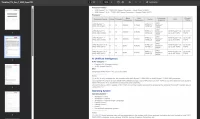
Some configuration options
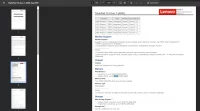
96GB LPCAMM2 Support
ThinkPad is not dominant in the 2026 AI-laptop conversation. The Apple Silicon competitor class leads on raw inference per watt, but developers continue to optimize for AMD as it offers a very value-oriented option for loading large models especially versus traditional Apple "arm and a leg" memory pricing. The modular-laptop class leads on repairability scores. The P14s holds its lane on different axes: 96 GB upgradable DDR5 SODIMMs, dedicated TrackPoint, 1.39 kg, business support contract. The cross-vendor head-to-head where the buy decision lives is discussed in this best laptop post. The 2026 ThinkPad is still serving a real need by offering good hardware in a very usable and attractive package, especially for those that want to run Windows or Linux.
What modern ThinkPad means in 2025-2026
| Spec | P14s Gen 6 AMD (2025) |
|---|---|
| Chassis weight | 1.39 kg |
| RAM ceiling | 96 GB DDR5-5600 SODIMMs (NOT unified memory) |
| RAM serviceability | DDR5 SODIMM, user-serviceable, two slots. Outlier in 2026 against LPDDR5X-soldered industry trend. |
| Display options | Up to 2880x1800 OLED |
| AI / NPU | Up to 80 overall TOPS aggregate per Lenovo PSREF; Copilot+ eligible. AMD codename "Strix Point" per AMD docs (not PSREF). |
| Pointing | TrackPoint plus touchpad, dedicated physical buttons |
| Security | TPM 2.0 plus AMD PRO plus business enterprise warranty options |
| Daily-driver reference | The T14 Gen 4 AMD (2023) is the mainstream stablemate: Ryzen 7 PRO 7840U Phoenix, 32 GB soldered LPDDR5X. Same chassis family; different RAM-serviceability tradeoff. |
When I am able to get my hands on a T14 Gen 7 I will also try to update this section as this looks like an excellent all around machine! (see note about 96GB LPCAMM2 support a few paragraphs above)
My ThinkPad Thread
Ten verified ThinkPads, going back to a college dorm in February 2001. Plus a 2007 to 2010 active-enthusiast band where SSD upgrade purchases and a Facebook IBM THINKPAD OWNERS group invite are the documented evidence of a machine I no longer have a receipt for. About 25 years of ThinkPad ownership, with a 2009 to 2011 stretch where a Dell Precision held the daily-driver slot before the X220 brought it back.
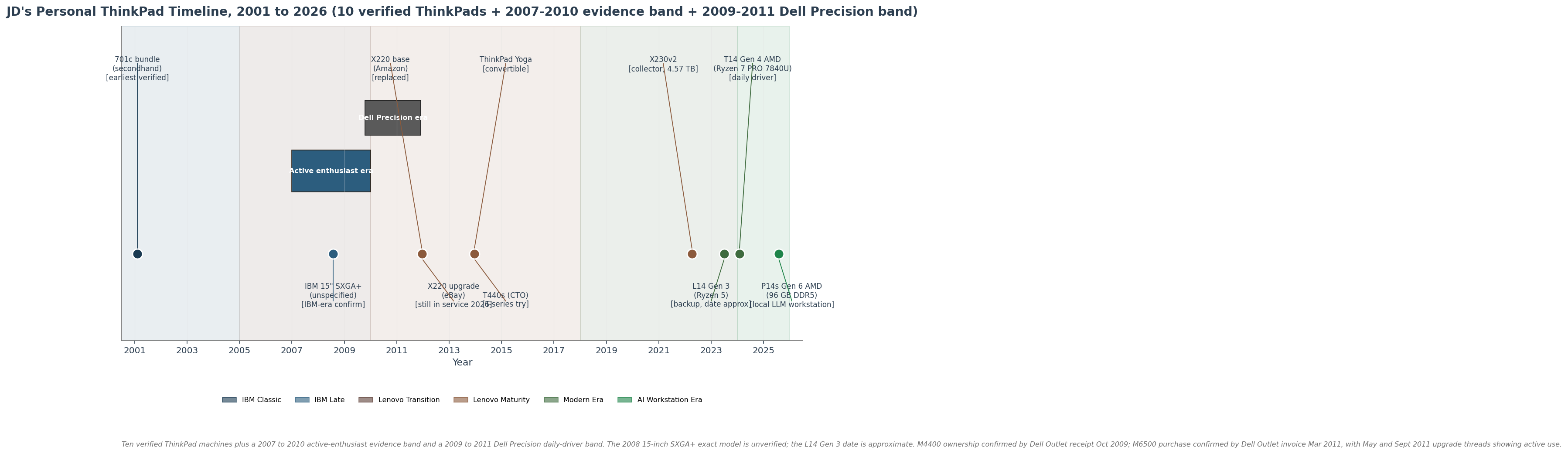
JD's personal ThinkPad timeline data (10 machines + 1 evidence band + 1 Dell Precision band)
| Year | Machine / role |
|---|---|
| Feb 2001 | ThinkPad 701c bundle (secondhand), earliest verified |
| Aug 2008 | IBM 15-inch SXGA+ R51 ThinkPad |
| 2007-2010 | Active enthusiast / SSD upgrade evidence band |
| 2009-2011 | Dell Precision M4400 / M6500 (non-ThinkPad daily-driver era before the X220; M4400 Oct 2009, M6500 Mar 2011) |
| Dec 16 2011 | X220 base (Amazon) |
| Dec 17 2011 | X220 upgrade (private eBay seller), still in service 2026 |
| Dec 2013 | ThinkPad Yoga (convertible) |
| Dec 2013 | T440s (Lenovo Direct CTO) |
| Apr 2022 | X230v2 (still in use, 4.57 TB SSD space when docked) |
| Jun 2024 | L14 Gen 3 (Ryzen 5, backup at remote office) |
| Jan 2024 | T14 Gen 4 AMD (machine type 21K3CTO1WW, Ryzen 7 PRO 7840U, Radeon 780M, daily driver) |
| Aug 2025 | P14s Gen 6 AMD (96 GB DDR5 SODIMMs, local LLM workstation) |
February 2001, Drury University, Springfield Missouri. I was in college. I had just won an eBay auction for a 1995 IBM ThinkPad 701c with the butterfly keyboard, docking station, port replicator, carrying case, CD-ROM-in-dock, the works. About 27 pounds in the listing, 36 packaged. It came through campus mail because I lived in the dorms. The 701c was already six years old when I got it. I was running jdhodges.com at the time (the domain has been mine since 1999). That is when ThinkPads started for me.
Between the 701c and the X220, I was frequently using other brand laptops and desktops but always keeping an eye on ThinkPads (which were frequently a little too expensive for me). eBay watching of T60, T60p, and X41 Tablet runs 2007 to 2009. In August 2008 I bought a 15-inch IBM ThinkPad on eBay with SXGA+ (1400x1050), 2 GB DDR, Centrino, ATI 7500, and an upgraded Intel 2915ABG. It was an R51 and it was quite lovely.
The Dell Precision stretch, late 2009 to late 2011. My primary laptop in those years was a Dell Precision, not a ThinkPad. The archive has a Dell Outlet M4400 order on October 8, 2009 with a Core 2 Duo P8600, 15.4-inch WXGA+, and a Quadro FX 770M, plus a PR02X dock and a backlit keyboard ordered over the following weeks. On March 17, 2011 I bought a Dell Outlet Precision M6500 with a Core i5-560M, 4 GB DDR3, 17-inch WUXGA RGB display, 500 GB 7200 rpm drive, backlit keyboard, and a 3-year onsite warranty; the graphics line item appears as NVIDIA N10E-GLM in the invoice. The Precisions were cheaper than a comparable ThinkPad mobile workstation for the spec, and I enjoyed their docking ecosystem. However, when I bought the X220 it was something of a unicorn for me and I love almost every aspect of it: IPS, the 7-row keyboard, real serviceability, and a dock connector, all in one small machine. The X220 in December 2011 had all four.
December 2011, the X220 double-buy. I bought a base X220 from a third-party Amazon seller on December 16, 2011, and a higher-spec used X220 from a private eBay seller the next day (shipping notice December 19). Sometimes I would source parts from one into another, or do various upgrades. I wrote it up as my X220 long-term review published January 4, 2012, and filled in the disassembly guide and service-manual mirror over the next two years. The resulting machine(s) still work and are surprisingly capable.
In December 2013, two more machines arrived: a CTO T440s via Lenovo Direct, and a ThinkPad Yoga (the convertible experiment; the Yoga Fn-key fix is the artifact). Both shipped with the 6-row Precision Keyboard.
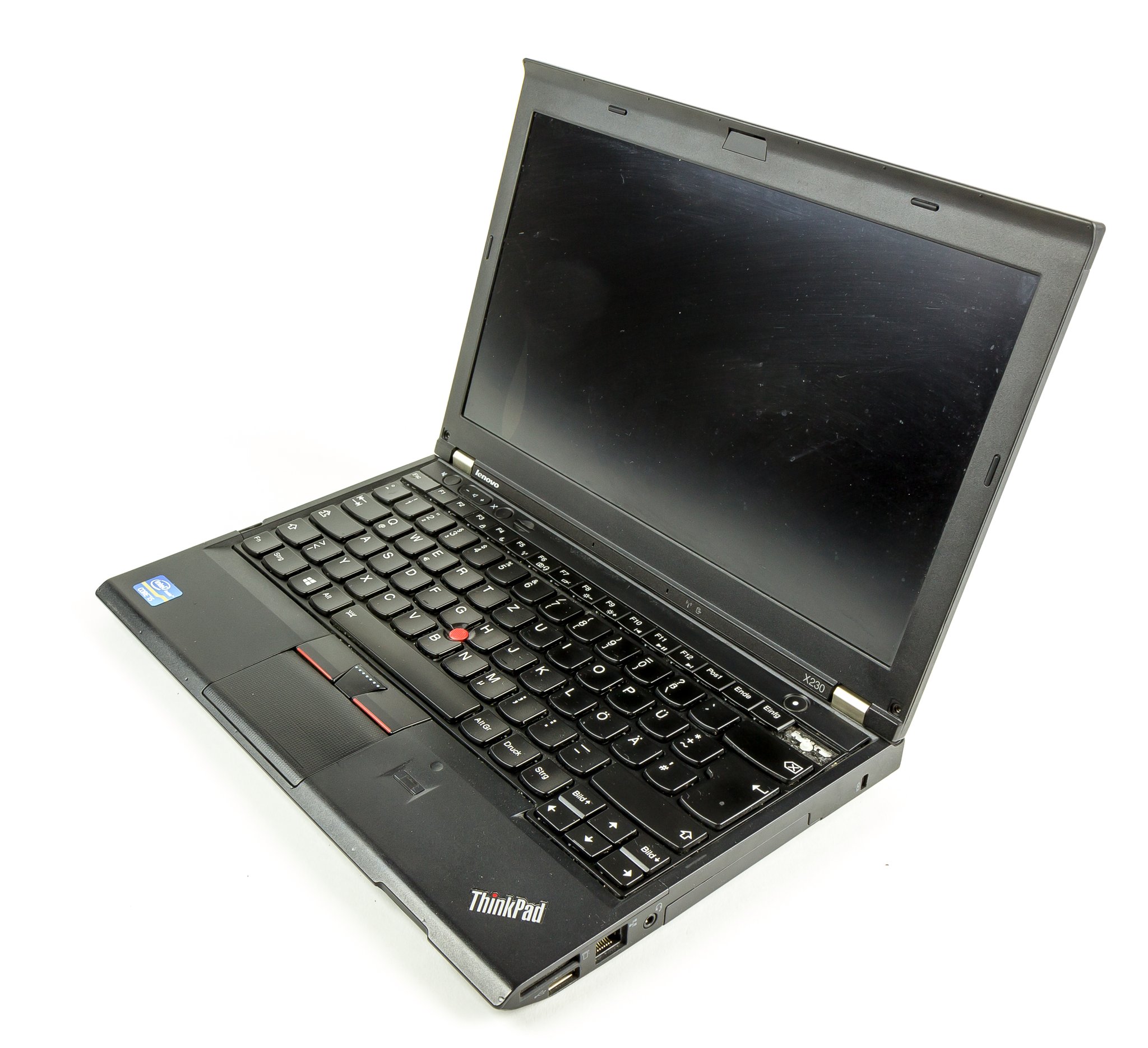
The X230v2 in 2026. I had a X230 you can read a bit about here. And in May 2026 I still daily use a docked X230 w/eSATA storage connected as well: i7-3520M at 2.90 GHz, 16 GB DDR3 (15.7 GB usable), Intel HD 4000, 4.57 TB total storage (4 TB Crucial MX500 plus 1 TB Samsung 850 PRO). That much storage in an OLD 12.5-inch ultraportable is pretty epic.
The 2026 lineup is AMD-only: a T14 Gen 4 AMD (machine type 21K3CTO1WW, Ryzen 7 PRO 7840U, Radeon 780M, 32 GB LPDDR5X) ordered via Lenovo Pro in late January 2024 as the primary; the L14 Gen 3 (Ryzen 5, 32 GB DDR4) as remote-office backup; the P14s Gen 6 AMD with 96 GB DDR5 SODIMMs as the local LLM workstation since August 2025. The X230v2 docks next to them and earns its keep. The X220 and the X230 are the two ThinkPads I have owned the longest; both are still around and usable in 2026. Same kind of machine the IT pro and the developer bought in 2003: matte black, TrackPoint, business support.
Bottom Line
A 1992 700C and a 2026 P14s Gen 6 are recognizably the same design idea. Across two corporate owners and 34 years (1992 to 2026), the matte-black wedge, the red TrackPoint nub, and the keyboard you can actually type on still look like a ThinkPad when the lid opens.
I have kept at least one ThinkPad in service since February 2001, and the daily-driver slot has mainly been on a ThinkPad since the X220 in December 2011. The reasons have not changed much, even though the machines have. That is the post.
Sources and Further Reading
The body above cites at the point of claim. This list is the bibliography, deduplicated and grouped by source class.
Primary sources
- IBM History: ThinkPad
- IBM History: Think
- Richard Sapper Design: ThinkPad 700C
- ThinkPad 701 Portable Computer (MoMA Collection)
- Oral History of Ted Selker (Computer History Museum)
- Ted Selker Personal Site
- 1992 IBM ThinkPad 700/700C Brochure (Wayback)
- InfoWorld 1992 (Wayback Google Books)
- Happy 25th Birthday ThinkPad (Lenovo press release)
- Lenovo ThinkPad Celebrates 15 Years of Innovation
- Lenovo Reaches 60 Million ThinkPad Laptops Sold (2010)
- Lenovo to Acquire IBM Personal Computing Division (2004)
- Lenovo Completes Acquisition of IBM's Personal Computing Division (May 1 2005)
- Lenovo Marks Decade of Success Since IBM PC Acquisition (2015)
- Road Warriors Get Ready: Lenovo Delivers No-Compromises Ultraportable ThinkPad X300 (2008)
- Lenovo Highlights 20 Years of Innovation with Premier ThinkPad X1 Carbon
- Lenovo Previews Next-Gen Business Ultrabook (2012 keyboard transition)
- Red Alert: Lenovo Pushes ThinkPad Brand to the Edge (ThinkPad Edge launch)
- ThinkPad T14 Gen 4 AMD Platform Specifications (Lenovo PSREF)
- ThinkPad P14s Gen 6 AMD Platform Specifications (Lenovo PSREF)
- Lenovo ThinkPad Notebooks 2012 (Withdrawn PSREF book)
- Lenovo ThinkPad X220 Laptop Specifications (ManualsLib mirror)
- Lenovo ThinkPad X1 Carbon (1st Gen) PSREF
- AMD Ryzen AI 300 Series (Strix Point) Product Page
Secondary sources and contemporary reviews
- 25 Years of ThinkPad, Part 1 (Notebookcheck)
- Lenovo ThinkPad X300 Review (Notebookcheck via Wayback)
- Lenovo ThinkPad X220 IPS Review (Notebookcheck via Wayback)
- Lenovo ThinkPad P14s Gen 6 AMD Review (Notebookcheck, Jun 22 2025)
- Lenovo ThinkPad 25 Review (Notebookcheck via Wayback)
- ThinkPad Type-Off: 2012 Keyboard Test (Laptop Mag)
- Lenovo ThinkPad X1 Carbon Review 2014 (Engadget)
- Lenovo ThinkPad X1 Carbon Review 2014 (Laptop Mag)
- Secrets of the ThinkPad X300 (Engadget, Feb 14 2008)
- Flashback: What Killed IBM's Butterfly (Computerworld)
- IBM Introduces Titanium-Clad ThinkPads (Computerworld, May 1 2000)
- Happy 20th Birthday IBM/Lenovo ThinkPad (The Register, 2012)
- Big Blue's Big Adventure (EDN ThinkPad development history)
- IBM ThinkPad 701C Butterfly Laptop (Domus)
- How IBM's ThinkPad Became a Design Icon (Fast Company)
- Lesser-Known Design Legend (Fast Company, Tom Hardy)
- Lenovo's ThinkPad: Inspired by a bento box (Fortune, 2013)
- Richard Sapper's Vision of the Future (Casual Optimist)
Community references (color use; never sole source for first, exact-date, or attribution claims)
- ThinkWiki: Category:Models
- ThinkWiki: ThinkPad History
- ThinkWiki: TrackPoint
- ThinkWiki: ThinkLight
- ThinkPad keyboard - Deskthority wiki
- Original List Prices of IBM (and Some Lenovo) Era ThinkPads (forum.thinkpads.com)
- T450 clickpad (with buttons) in T440/T440s/T440p (forum.thinkpads.com)
- ThinkPad Classic Keyboard Mod (Instructables)
- iFixit Laptop Repairability Scores
Photo credits
Three photos in this post are sourced from Wikimedia Commons under Creative Commons licenses (the 720C era marker, the 701 butterfly keyboard, and the X230 chassis stand-in). The remaining nine are my own: the X220 TrackPoint macro and disassembly series from December 2011, the Lenovo-era lid from January 2017, the ThinkPad-vs-Samsung comparison from January 2019, and two P16s Gen 1 shots from December 2023.
Wikimedia Commons (CC-BY-SA, attribution required; derivatives must be released under the same license):
- IBM ThinkPad 720C (1993 era marker for the 700C) by Johannes Maximilian, CC-BY-SA 3.0
- IBM ThinkPad 701 butterfly keyboard by Mikebabb, CC-BY-SA 3.0 / GFDL 1.2+
- ThinkPad X230 (generic chassis stand-in for JD's X230v2) by Raimond Spekking, CC-BY-SA 4.0
What's Unverified or Disputed in this History
Two documented threads of partial-sourcing or contradiction worth knowing about:
- Sapper's cigar-box framing vs the popularized bento-box shorthand. The "bento box" framing has at least three documented threads, and they do not all agree. IBM's current history page attributes a bento-box framing (via David Hill) to internal segmentation; EDN's development history attributes a Yamato wooden prototype to the shoukadou bento; Sapper's own framing was cigar-box exterior simplicity. Fortune's 2013 retrospective collapses these into a single Sapper quote. Treat as overlapping accounts, not one clean origin myth.
- TrackPoint inventor attribution. Sometimes contested in popular accounts; Selker's Computer History Museum oral history is the authoritative primary-source reference. Joe Rutledge and the Yamato and PC-division teams are co-credited on productization.
Love the article, way to go! ThinkPads forever!
Thanks Wayne! I’m glad you enjoyed the article, and it’s great to hear from a fellow ThinkPad fan! 🤩
Have a great day!
-J.D.
PS any favorite ThinkPad(s)?
In the AI workstation section it would probably be worth repeating how the T14 Gen 7 ships with LPCAMM2, the 96GB module is expected practically any day now, Lenovo posted a photo of an 96GB LPCAMM2 module back in February.
Thanks for commenting about the T14 Gen 7 and the upcoming 96GB LPCAMM2 module. I appreciate you bringing this to my attention and I’ve updated the post. 👍
I love my Gen 6 and the Gen 7 looks like a solid upgrade. ✅
Best regards,
-J.D.
JD,
Loved the article, brought back memories. I was on the engineering team which worked with Ted Selker to take the TrackPoint from prototype to production. One point of humorous clarification I can provide is related to the Trackpoint cap and click keys in front of the spacebar. Richard Sapper did want a high contrast single color against the black but the color he chose was “Magenta”. The area from the trackpoint down to the keys with colored lines was referred to as the “Sapper Triangle”, I don’t know who coined the term. In the late testing phases of pre-production, it was determined that the pointing stick cap material was “too slippery” which caused non-optimal performance. Ted Selker identified that “Butyl rubber” common in tires was the solution and indeed it did not become slippery. The problem was that production was near and it took time to correctly formulate and produce the butyl rubber in the correct Magenta color, so for final performance testing the caps were butyl rubber, but in a bold bright red color. Testing was successful and by the time production started the correct Magenta color caps were produced and production began. Unfortunately, one of the late test units was used to produce the iconic WSJ color ad for the new Thinkpad, with the bright red trackpoint cap very visible. Almost immediately after the Thinkpad started shipping (with the Magenta cap), complaints flooded in that their “Trackpoint cap” was the “wrong color”, not red. The response was so great, we were forced to ship replacement “Red caps” to the field, and production was reverted to be the red we know today. It was not the design choice, but the market reaction, that led to “Red”.
David, thank you SO MUCH for taking the time to comment! Sometimes it seems like
there are so many criticisms and negative comments it makes me wonder whether I
should spend time writing. Then like magic your comment showed up this morning
and it was so refreshing and cool. So THANK YOU again!
In my research there were a surprising number of conflicts in different sources,
and getting an engineering-team account of the TrackPoint nub/pointer material
and color story is EXACTLY the kind of first-hand source I was wishing I had. 🙏
I plan on updating the article with the October 1992 launch ad campaign that ran
in BYTE, PC Magazine, PC World, and I’m sure WSJ as you recounted. Such a cool
ad and the TrackPoint is clearly bright red 🔴 in every version, just like the
design we know and love today. This week I’m planning to reach out via email to
you with a couple questions about the production-engineering side.
Thanks again for reading and writing in, and also for putting in work on one of
my favorite tech devices ever 💪, long live the ThinkPad!
-J.D.
JD,
It was a pleasure to comment and I look forward to your questions. And looking at your references you can find the first ThinkPad promotional photo included on the Richard Sapper Design site with “Red” pointing stick and “Magenta Stripes” on the click keys. It was supposed to be Magenta – Magenta: https://richardsapperdesign.com/products/thinkpad-700c/
Best Regards,
David Bruner
PS The ThinkPad history link from IBM (https://www.ibm.com/history/thinkpad) describes Sapper as moving more and more to Red from Magenta, is incorrect. As mentioned, he wanted it to be Magenta and it was a sequence of mistakes that led to it being Red.
Thanks David! I really appreciate the production-side history, you answered my question (after having read different accounts). It’s fascinating to learn the sequence that led to the iconic ThinkPad red. ❤️
Have a great day, and thank you again for sharing your experience!!
-J.D.
To set the record straight, I was the design executive leader for ThinkPad from 1995-2017. This spans both IBM and Lenovo ownership of the now storied brand. You can read more about me here: https://www.thinknextdesign.com/
Thanks so much David! I’ve updated the article to properly credit your role and dates. Your 2006 post has been a wonderful reference for the ThinkPad’s design history, https://web.archive.org/web/20190101035151/http://blog.lenovo.com/en/blog/the-point-behind-this-blogs-design
I’m honored to have you post on my site! If you ever have any other corrections or suggestions I am more than happy to hear them.
Have a great day, and thank you again for taking the time to comment and for all that you contributed to the iconic ThinkPad line!
-J.D.