Add bluetooth to the Acer Aspire One 722
If you would like to add bluetooth to your AO722, there are a couple easy (and pretty cheap) options:
- #1 Compact USB bluetooth adapter
- These are about $20 with free shipping at Amazon and this particular model has 600 reviews and an average rating of 4.5 stars
- The dongle is small enough that you can just leave it plugged into a free USB port
- Installation consists of simply plugging the adapter into your USB and installing the driver, if you hit any snags here’s a tip:
- Amazon reviewer Mgamerz listed the following tip if you have an issue like the following: …when you go to Control Panel>Hardware and Sound, it totally locks up and shows nothing (Looks like its loading, but never finishes). You also can’t add any devices. This is because the “Bluetooth Support Service” is disabled. […] To enable it (and add devices/view any devices (wired/wireless)), go to start, type in ‘services.msc’ and open the result of the same name. Find “Bluetooth Support Service”. Right click it, go to properties, and set the startup type to “Automatic”, and click Apply/OK. Then right click the item again and click “Start”. Now your menus should load.
- #2 Combination wifi / bluetooth mini pci-express card
- If you are a little more adventurous, you can quickly replace your AO722’s existing wifi card with a higher-end combination card containing both wifi and bluetooth 🙂
- Look for model #BCM94313HMGB
Here is the location of the mini pci-e slot where you can swap in a wifi bluetooth combo card, just carefully disconnect the black and white antenna wires then reconnect once the new card is installed:
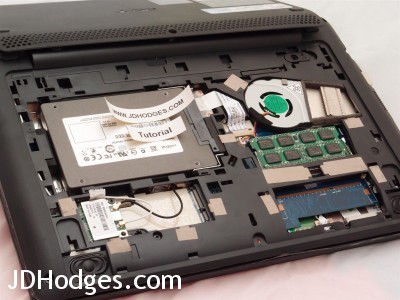
Nice and easy access to the memory and hard drive as well as the wifi card!
If you need some more help with replacing the card, here is my photo tutorial for accessing the AO722 internal components.
[end]
Top Search Terms:
- aspire one 722 bluetooth (31)
- acer aspire one 722 bluetooth (29)
- bluetooth acer aspire one 722 (16)
- acer ao722 bluetooth (15)
- bluetooth aspire one 722 (12)
- acer 722 bluetooth (9)
- http://www.jdhodges.com/blog/add-bluetooth-to-the-acer-aspire-one-722/ (7)
- ao722 bluetooth (7)
- bluetooth acer ao722 (5)
- acer one 722 bluetooth (4)
I would really like to add 3G/4G LTE capability. Has anyone done this?
Sorry for the late reply, Mac, and this may be outdated now. I have not tried adding LTE to the AO722 myself. My best guess is that a USB hotspot or tethering setup would be much simpler than trying to retrofit an internal WWAN card.
Hello Mr Hodges.
Are you sure that part number BCM94313HMGB will be suitable for the AO722?
Have you done the upgrade on yours?
Is there any whitelist in Acer bios about what model is ok?
Are two antenna ok for both Wifi and BT?
Do you have a link for suitable drivers?
Thanks.
Best regards.
Hi Xanxi,
Thank you for your comment and for your excellent questions.
#1 Yes, BCM94313HMGB is suitable for the AO722. You can find additional confirmation here (scroll down to the bluetooth section).
#2 I am not sure if there is a whitelist* for the mini pci-e port that is used for wifi
*you are rightly concerned since the AO722’s other mini pci-e port does have a whitelist that limits it to certain 3G cards etc… thankfully, regardless the BCM94313HMGB works in the ‘wifi’ mini pci-e slot 🙂
You can see a photo here (click for larger version) the left mini-pcie slot works with the BCM94313HMGB (and likely many other cards), the right mini pci-e slot only works with a very select group of 3G cards etc.
#3 Two antennas are sufficient, I routinely use combo bluetooth/wifi cards (including Intel 6235) and they work great 🙂
#4 I will try to upload the drivers this weekend, but you should be able to find download instructions at the previously linked URL.
Please let me know if you have any other questions 🙂
Best regards,
-JD
Thanks for your kind answer.
I’ve just ordered this card on Ebay.
I’m also going to upgrade the AO722 with 8GB and with a 1TB Seagate hybrid SSHD.
🙂
Hi Xanxi! Sorry that it has taken me so long to reply, I think that is a great choice. Have a great day!! 👍
-J.D.
Hi, I recently purchased a BCM94313HMGB card, but for the life of me I can’t get this to recognize Bluetooth. Do you know where I can get a Bluetooth driver for this card for Windows 10 (64-bit). The wireless works but there is no Bluetooth, even in device manager. I tried following the links above however they lead to dead places. I also tried purchasing an Intel 6235, however it just seems to lock up the machine when I install the card. Maybe I got a bad card?
Thanks!
DaveG, I have not tested that exact Broadcom card on Windows 10, but if Wi-Fi works and Bluetooth never even appears in Device Manager, my first guess is a compatibility or driver issue rather than just a missing download link. At that point, a tiny USB Bluetooth adapter may honestly be the easier path.
8 years later…hi there 🙂
I just re-discovered my old Aspire 722. Thanks to you it is now running with a SSD, 8GB of RAM and a WiFi/Bluetooth card…and *drumroll* altest Windows 11.
It turned out to be a great typwriter and surfing machine, but while youtube was flawless usign Windows 7 and and 8…it is not much enjoyment right now.
What I wondered is, the slot on the opposite of the WiFi Card…what would it be good for ?
Highest Regards,
Stan
Any chance to add a “Broadcom Crystal HD” ?
Any chance the old drivers might work using Windows 10 / 11 and actually boost youtube a bit ?
Stephen, I have not tried a Broadcom Crystal HD in that machine under Windows 10 or 11, so I cannot say for certain. My best guess is that modern browser and driver support would limit the benefit, even if you got the hardware recognized.
Stephen, glad to hear that little machine is still alive. I am not 100% sure on the opposite slot without looking at the exact board revision, but my best guess is that it was intended for a mini PCIe style expansion such as WWAN rather than something especially useful under Windows 11 today.