Tag Archives: m4

Every Apple CPU Compared: M1 Through M5 Max (All Variants)

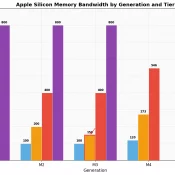
TL;DR: this page is meant to list every Apple Silicon chip from the M1 through the M5 Max, including all the lower-spec binned variants Apple buries in the fine print, with verified specs, practical buying advice, and a dedicated section on which chips can actually run local AI models. Inspired by the popular r/mac comparison table, expanded with official Apple sources, all binned variants, and honest flagging of estimated values. Bookmark it. I will keep it updated. The M5 Max

MacBook Neo Review: A18 Pro CPU, 8GB Reality, and the Thermal Wall

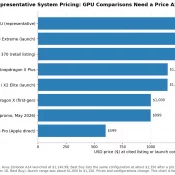
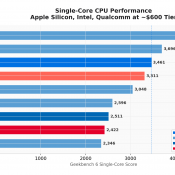
Disclosure: This post contains affiliate links. I have not been paid by Apple or anyone else to write this. I used Claude AI as a research and drafting assistant, then verified all benchmark data against the source results before publishing. The Short Verdict The MacBook Neo is the fastest single-core laptop you can buy for $599 or even lower at $499 educational pricing! It also drops to phone-class performance after about 60 seconds of sustained CPU load. Both of those

MacBook Neo Deep Dive: Benchmarks, Wafer Economics, and the 8GB Gamble

Preface: I’m not really a Mac guy. But I have deep respect for what Apple has done with their silicon, and I’ve been following their CPU journey since the Motorola 68k days through PowerPC, the Intel transition, and now their in-house Apple Silicon. What they’ve accomplished in the last five years is genuinely remarkable. Apple is one of the few original tech companies that has survived and thrived over the decades while still staying in the consumer tech space. As

Topaz Video AI 5 Mac Mini M4 benchmarks

Topaz Video AI v5.3.6 System Information OS: Mac v15.01 CPU: Apple M4 32 GB GPU: Apple M4 21.333 GB Processing Settings device: 0 vram: 1 instances: 1 Input Resolution: 1920×1080 Benchmark Results Artemis 1X: 07.97 fps 2X: 04.57 fps 4X: 01.57 fps Iris 1X: 13.16 fps 2X: 02.89 fps 4X: 00.92 fps Proteus 1X: 08.80 fps 2X: 05.25 fps 4X: 01.54 fps Gaia 1X: 02.36 fps 2X: 01.70 fps 4X: 01.19 fps Nyx 1X: 01.49 fps 2X: 01.28 fps Nyx

How to Reverse/Fix Scroll Wheel Direction on a Mac Mini M4 (and Pro)

If you’re new to a Mac Mini M4 or recently switched from a Windows PC, you might find the default scroll wheel direction on macOS a bit counterintuitive. Apple’s “Natural” scrolling mimics the motion of a touch screen, which may feel odd for traditional mouse users. Fortunately, reversing the scroll direction is quick and straightforward. Here’s how to do it: Step 1: Open System Settings Step 2: Navigate to Mouse or Trackpad Settings The next step depends on whether you’re