ACPI\SMO8810 Dell driver [SOLVED!]
Q. Hi, I just bought a Dell laptop and resinstalled Windows 7 on it. Now I have an unknown device ‘ACPI/SMO8810’. What driver can I download to fix it?
A.Here is the download link to solve your ACPI/SMO8810 Unknown Device issue:
[download id=”10495″ format=”1″], Dell dl link
NOTE: That is the accelerometer that is built into your laptop.
More details about free fall sensors:
That free-fall sensor is an accelerometer which can detect movement (i.e. downward acceleration or falling) and using that sensor your laptop can take steps to protect itself by parking the hard drive heads or other measure.
NOTE: The driver is specifically for your Dell laptop’s ST Microelectronics Free Fall Sensor that shows up as Unknown Device ACPI\SMO8810 🙂
Screenshot showing the unknown device:
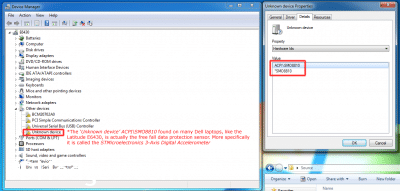
- The SMO8810 unknown device listing as shown in Device Manager and the properties page
The driver installation process:
It is very easy to install and only takes a few clicks once you have downloaded the correct driver 🙂
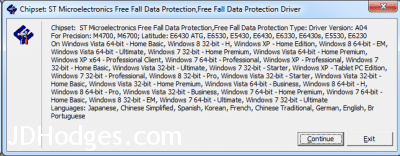
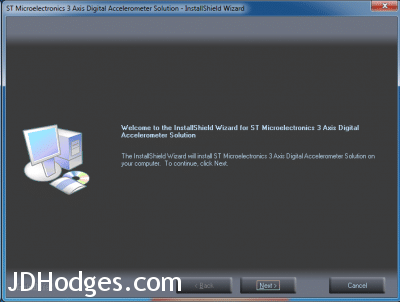
Device manager properties page after the correct driver has been installed:
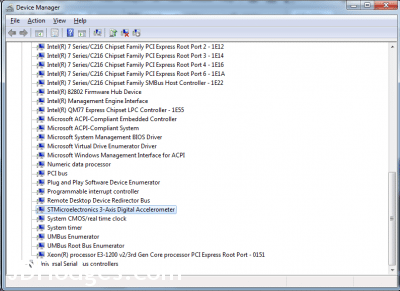
- Device manager showing the SMO8810 device after the correct driver has been installed!
IBM pioneered this technology in their ThinkPad line way back in 2003 and Dell has implemented it as well. Of course, it has applications beyond protection as even the Apple iPad/iPad 2/iPhones have an accelerometer which developers can use for games and other purposes!
PS I would like to thank you for your question, as I am a bit fan of the Latitude E series. You have a nice laptop!
Dell Laptops/Notebooks that use ACPI\SMO8810:
Precision M4700
Precision M6700
Latitude E6430 ATG
Latitude E6530
Latitude E5430
Latitude E6430
Latitude E6330
Latitude E6430s
Latitude E5530
Latitude E6230
(and others withs Hardware ID ACPISMO8800)
Dell Vostro 3360 and Dell Vostro 3460 (see this link)
Supported Operating systems (OS):
Windows Vista 64-bit – Home Basic
Windows 8 32-bit – H
Windows XP – Home Edition
Windows 8 64-bit – EM
Windows Vista 64-bit – Ultimate
Windows 7 32-bit – Home Premium
Windows Vista 64-bit – Home Premium
Windows XP x64 – Professional Client
Windows 7 64-bit – Professional
Windows XP – Professional
Windows 7 32-bit – Home Basic
Windows Vista 32-bit – Ultimate
Windows 7 32-bit – Starter
Windows XP – Tablet PC Edition
Windows 7 32-bit – Professional
Windows 8 32-bit – Pro
Windows Vista 32-bit – Starter
Windows Vista 32-bit – Home Basic
Windows Vista 32-bit – Home Premium
Windows Vista 64-bit – Business
Windows 8 64-bit – H
Windows 8 64-bit – Pro
Windows Vista 32-bit – Business
Windows 7 64-bit – Home Premium
Windows 7 64-bit – Home Basic
Windows 8 32-bit – EM
Windows 7 64-bit – Ultimate
Windows 7 32-bit – Ultimate
More info on this topic:
Code 28 on PCI bus
Driver functionality rated 5/5 stars (no problems and simple install)
[starreview tpl=16]
UPDATE from Kanika:
The driver worked just like you said and now our Dell Precision laptops are perfectly configured. Thank you!
Yours,
-Kanika
- acpi\smo8810 (4405)
- smo8810 (3322)
- acpi\ven_smo (1458)
- acpi\smo8810\1 (1126)
- acpi smo8810 (860)
- *smo8810 (756)
- acpi smo8810 dell driver (430)
- acpi smo8810 dell (414)
- smo8810 dell (366)
- smo8810 dell driver (356)
was looking for acpi/smo8810 for a clean windows 8 install on my dell you driver link did the trick,, thank you!!
Hi Dann,
Thank you for your comment. I am glad the driver worked for you!
Have a great week. 🙂
Best regards,
-JD
Thank you, that was exactly what I needed! I only like to download what is apparently required. I try not to download and install everything on the DELL drivers page for any given workstation/laptop. This was a great thread. Thank you
Hi Tim,
Thank you for your nice comment. It is definitely nice install only what is required for a nice fast machine and leave all the bloatware off 🙂 I am very glad this thread was helpful to you and I hope you enjoy your nicely configured Dell laptop!
Best regards,
-JD
This worked a treat. Almost wasted half a day day on Dell’s website trying to track it down. Great guide, well explained and fantastic information.
Hi Dan,
Thank you for your kind comment. I am really glad my page helped 🙂
Have a great week!
-JD
This did the job for E5530 Dell
Hi,
Thank you for your nice comment. I am glad the driver worked well on your E5530.
You have a very nice laptop, the E5530 is one of my favorite Dell laptop models and I use one a lot for work 🙂
Best regards,
-JD
Like aTTA said, it really did the job for my E5530! 🙂
Reinstall messed up my drivers, but now it’s all working. Using Win8.1 and so far, most hair is still on head 😉
Hi Propellerhuvud,
Thank you for your nice comment. I am really glad the drivers are working well on your E5530 🙂 Also, hope you are enjoying Windows 8.1 as I find it to be a nice upgrade from Win8!
Have a great week,
-JD
Hi Propellerhuvud,
Thank you for your comment and the confirmation that everything is working well on Windows 8.1
Have a great week and enjoy your nice E5530!
-JD
PS which LCD do you have on your E5530? I used one with the 1920×1080 display and found it be VERY nice! 🙂
Hi JD,
I have the 1920×1080 size for screen. It’s great to fit so much content on it, but being nearly 50 y/o getting focus on that high resolution isn’t all that easy. Still great value for money! 🙂
Enjoy your week too!
That’s awesome! Thanks for the additional info and enjoy that sharp screen 🙂
-JD
PS I am 33 and I also have to increase the DPI settings on high res laptop screens, so don’t feel bad! 😉
very very great, my issue has been solved.
thanks a lot!
Hi Roger,
Thank you for your nice comment, I am glad that the driver helped! Enjoy your nice laptop 🙂
Best regards,
-JD
If someone has the problem that cannot instal this driver I can help you. Just send me a email. I say it cause i had problems installing the driver but ot was because i had my windows updates off… the instalation shows me an error.. david.comyepiz.t AT gmail.com
Hi David,
Thank you for your kind offer of assistance.
Have a great week and enjoy your laptop 🙂
Best regards,
-JD
worked like a charm on Dell Latitude E6330.
thank you!
Hi reueld,
Thank you for the nice comment, I am very glad to hear that the driver works well on the E6330. 🙂
I have used the E6430 and E5530 before but never the E6630… I love that your model has a very compact size yet keeps the full docking capabilities etc. That is a very cool laptop that you have!
Question: how do you like the screen on the E6630?
Best regards and have a great week,
-JD
Thnx a lot! You saved my life :))
My pleasure Solltek! I hope you have been enjoying your laptop and have a great day 🙂
Best regards,
-J.D.
You are a star. Thanks
Thank you David, I am very happy my page helped 🙂
Have a great day!
-J.D.
Thanks JD, very helpful. As you know unfortunately even with the service tag, Dell cannot tell you a whole lot of what you need and don’t. Your tip helped!
Thank you for your comment CW. You are totally right, the service tag is helpful but not perfect for finding exactly what is needed! I am very glad my page helped 🙂
Have a great week and thanks again!
-J.D.
I am you most grateful. 🙂
Hi Jan,
You are very welcome! I am glad that the SMO8810 drivers helped 🙂
Best regards,
-J.D.
thanks for this article, this resolved my unknown device problem.
Thank you for your nice comment Tony. I am very happy that this helped you resolve your unknown device issue.
Have a great day!
-J.D.
I just completed downgrading Windows 8 to Windows 7 on a Dell M4800. Thank you for pointing me in the right direction. “Unknown Device” resolved.
Hi Norm,
Glad to hear your switch to Windows 7 has gone well and that my page was useful 🙂
How are you liking your M4800? They look like nice machines!
Best regards,
-J.D>
Thanks, helped for Dell XPS 14 L421x
Thanks for the comment ch0wnp0wn! Sorry for the extreme delay in replying, I hope your XPS 14 is still rockin’ it out 🙂
Best regards,
-J.D.
Now I solved my client laptop after stuck from yesterday.
Thank you.
Dear Tony,
I’m very glad I could help. Thanks for taking the time to comment and have a great day!!
Best regards,
-J.D.
Hi there… just wanted to drop a nod of appreciation for your site. I couldn’t figure out what in hell it was asking for until I googled the ACPI line… and like a boss you told me EXACTLY what I needed to know! Thank you very much…
Cheers,
– Kelley 🙂
Hi Kelley,
Thank you for your kind comment. Have a great day!! 👍😀
Best regards,
-J.D.
Also resolved my ‘unknown device’ issue. Thanks for putting me on the right path!
I found the following driver to work for my Latitude E5440 running Windows 8.1
ST Microelectronics Free Fall Data Protection
http://downloads.dell.com/FOLDER02267554M/1/Chipset_Driver_GY99K_WN_4.10.55_A00.EXE
Thanks for the great tip James!
Best regards,
-J.D.
thank you
No prob. Glad I could help!! 👍
Like everyone else, my online search to identify this “mystery device” brought me to your blog. Thanks much for helping to make my research a very brief endeavor!
We’re all pleased to learn what the device is and what driver it uses. But I’m a bit surprised, as I scrolled through the other comments, that there seems to be no discussion of WHETHER to install this driver. Most of us are probably pursuing a clean install. For me, that means avoiding anything I don’t use or need. Bloatware is shunned, obviously, but I also disable hardware I don’t use, and forgo their driver installation. Things like microphones and webcams and network adapters that won’t be used.
This device is an accelerometer. Okay, I get what that is. But is it actually needed in a laptop that mostly sits on my table or, occasionally, on my lap? I decided not, and just disabled it completely. I don’t think it makes much sense to load drivers, run services, or commit resources for idle hardware, just for the sake of a cleaner look in Device Manager.
So along with my thanks for your blog post, I guess I just wanted to add that point to the discussion: It’s good to know what all the installed devices are, and where to find the appropriate drivers. But the next step in a clean install is to decide which devices are appropriate or necessary in your own personal setup. I think for many of us, Dell’s accelerator in our stay-at-home laptops is of questionable utility.
Thanks! Surprisingly this is still affecting the latest Dell laptops. They all have the ST Free Fall Sensor installed, even if they come pre-configured with an SSD. Worthless sensor to a large portion of laptops today, but annoying to have that yellow exclamation staring at you from the device manager. The worst part is that even though this driver is branded as an ST product, its vendor code (Properties of device -> Details -> Siblings) still shows as 8086, which is Intel’s VEN number.
Hi John,
Thank you for your comment and for the info on the VEN number. It is certainly crazy that the free fall sensor is still in play after all these years, especially with the prevalence of SSDs (as you mentioned).
Which Dell(s) are you using?
I have been enjoying a few Dell’s lately:
Dell M6700 at work (love the screen and multi-drive capabilities)
Dell Inspiron 11 2-in-1 for home/kids (terrible trackpad, no backlit keyboard, but otherwise a great inexpensive machine)
Dell E5450 for travel, work at home (love this machine, wish it had dual SSD capability… the E5440 could apparently do both msata and SATA)
All of those laptops are utilizing SSDs and I hope to never go back to HDDs again 😉
Thanks again for commenting John and have a great Labor Day weekend!
Best regards,
-J.D.
Thanks! We use Dell laptops at my workplace, and I do IT support for them. We just got a small batch of 5 Dell Latitude E5450s, which have these free fall sensors. I started imaging them from a clean install of OEM Windows 7 Pro.
Thanks for posting this. It helped me solve the problem quickly.
Hi Neil,
Thank you for taking the time to comment. I am very glad the driver solved your problem!
Best regards,
-J.D.
Really, thank you verry much!
Hi BONGMA,
Thank you for your kind comment 🙂
Have a great week!
-J.D.
This worked perfectly for that last pesky exclamation point that needed to be cleared under drivers!! Thanks for the post!
Hi David,
Thank you for the kind words 🙂 I hope your laptop is still working well for you!
Best regards,
-J.D.
I installed this and it seemed to work for the most part, it went from unknown devices and installed what seems to be a lot of the system devices functionality, but its now shows error code (10) and the accelerometer now has the broken driver icon. im running the DELL 7537 inspiron 15…. thoughts? Also cant find the right driver for the INTEL series 8…… WINDOWS 7 pro 64 bit install
Sorry for the late reply, Will. If it changed from Unknown Device to the accelerometer with Code 10, the driver is at least partly identifying the hardware. The remaining problem sounds like either the wrong Dell package for that exact 7537 setup or a Windows 7 compatibility issue, so I would use your service tag on Dell’s site and compare the exact free-fall sensor driver there.
Thank you
Thank you! This fixes that one last remaining pesky “unknown driver” issue on my Dell E6230. I doubt I would ever have figured this one out on my own. So I’m very grateful to you for posting this information.
Thank you for your nice comment Jack 🙂 I’m very glad that this fixed your final “unknown driver” issue. Enjoy you nice Dell E6230!
Best regards,
-J.D.
Any update for this driver for systems now running Windows 10? Having trouble finding it for a Dell Precision M3800
Sorry for the late reply, Victoria. I have not tested a newer Windows 10 specific package for the M3800, but ACPISMO8810 is still the free-fall sensor or accelerometer family. My first stop would be Dell’s support page for the M3800 using the service tag, since those links tend to move over time.
Thanks. This damn E6530 was driving me crazy. For a nice fully loaded i7 Dell Latitude they sure don’t make reloading all these drivers as easy as they could have. And that driver detector thing was useless. I have been an IT Pro for 18 years so it isn’t like I don’t know how to do this. Thanks for your post. You should make the download link a little more obvious though. Thanks again.
Hi YoKoMo,
Thank you for your kind comment and suggestion 🙂
I am very glad the link was helpful and I hope you enjoy your nice Dell E6530!
Best regards,
-J.D.
thank you it works perfect!
I was searching for ST Microelectronics Free Fall Data Protection in Dell Drivers web page and downloaded and installed and works fine!!
Hi Sherman,
Thank you for your kind comment. I am very glad the driver install worked well for you 🙂
Best regards,
-J.D.
Had done a clean install of windows 7 home premium on my Dell E5430 but kept getting troubleshoot icon. Installed this driver and now is flawless. Thank you
Hi Wayne,
Thank you for your nice comment. Very glad to hear that your Dell E5430 is now flawless, that is a great feeling. Enjoy your nice laptop!
Best regards,
-J.D.
Many thanks JD! This had eluded me and Alienware support (haha) for quite some time on my 18 laptop. I put the driver link that I used in the website link for this post. Best, GD
You are very welcome Gabriel!
Also, thank you for your nice comment and the for the Dell driver link 🙂 Enjoy your nice Alienware 18 laptop!
Have a great weekend,
-J.D.
PS I put the driver link below in case it helps anyone else. Best, GD
http://www.dell.com/support/home/us/en/19/Drivers/DriversDetails?driverId=CWHJC&fileId=3498769690&osCode=WT64A&productCode=alienware-18&languageCode=en&categoryId=UT
Thank you J.D. the XPS 18 rocks !!! Greating from Rome Italy
Excellent! Keep rockin’ that sweet machine 🙂
Hi,
I’m Dell Inspiron 15 7537 user. Where can I find ACPI\SMO8810 driver for my loptop for windows 10 x64?
Thank You.
Sorry for the late reply, Frank. If your hardware ID is still ACPISMO8810 on Windows 10 x64, the right category to look for is the ST Microelectronics free-fall sensor driver. I would pull it from Dell using your 7537 service tag rather than trusting a generic mirror.
I’m running Windows 10 on a Inspiron 3147. The OS was corrupted and Microsoft remotely did a reinstall. I’ve not found all the needed drivers on the Dell webpage that pertains to my unit. Fortunately on this blog I’ve found two! In this particular thread I fixed the unknown hardware issue but now it status is,
“This device cannot start. (Code 10)
STATUS_DEVICE_POWER_FAILURE”
I use this unit daily and it messing up has been hard on me so any help would be appreciated.
Awesome blog. You seem like a very bright and helpful person!
Sorry for the late reply, Brently. Since the unknown hardware issue is gone but you now have Code 10 with STATUS_DEVICE_POWER_FAILURE, I do not think this is just a missing-driver problem anymore. My best guess would be a bad driver match or a deeper sensor or power-management issue after the reinstall.
Where is the driver to be downloaded? I am having this issue with an alienware 17r1
Sorry for the late reply, Allen. The original download was a Dell driver package for the ST Microelectronics free-fall sensor, but old Dell links have a habit of moving around. For an Alienware 17R1 I would use Dell’s support page and search by the exact hardware ID ACPISMO8810 or by your service tag.
Thank you muchly.
You are very welcome!
Have a GREAT weekend 🙂
Best regards,
-J.D.
Excellent info, solution worked 1st time… Thank you 🙂
Hi David. You are very welcome. Thanks for taking the time to comment and have a great weekend! 👍
Best regards,
-J.D.