Fix bad sound on Lenovo ThinkPad [SOLVED]
If you read my blog you probably know that I am a big ThinkPad fan. Lenovo has continued the classic IBM lineup and now there is a ThinkPad for almost any taste. My current favorite is the Lenovo ThinkPad T470. This 14″ beauty is nearly perfect for work and travel.
However, from the factory it does suffer from a (fixable) issue that seems to plague many modern ThinkPads… terrible sound!
Specifically, the sound is extremely echo prone… After listening to some music on the laptop my wife aptly said “it sounds like they are singing into a tin can”. Like terribly bad sound quality that is almost unbearable 🙁 Thankfully there is a simple fix that can drastically improve the sound quality problems 🙂
Here are the three necessary steps:
- Go to “Sound” in Windows Control Panel
- Select your speakers first, then “Properties”
- Check the box that says “Disable all sound effects” (then click OK)
And here are screenshots:
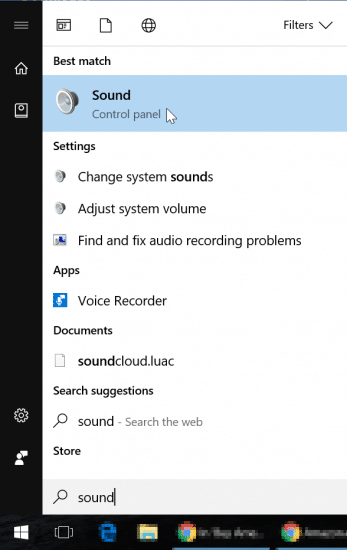
Open “Sound” in Control Panel
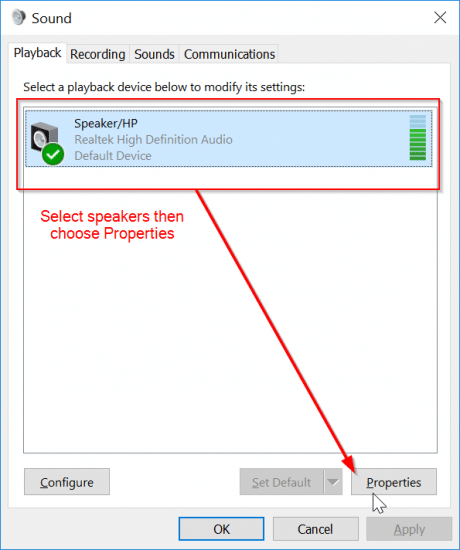
Click your speaker first, then Properties
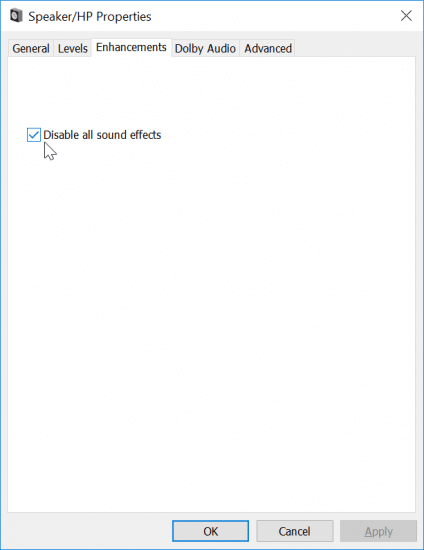
Navigate to the “Enhancements” tab, then check the “Disable all sound effects” box and click OK
Voila, after that your sound should be much better 🙂
NOTE: these steps are for Windows 10 Pro but they should apply to any version of Windows that utilizes a similar driver.
- https://www.jdhodges.com/blog/fix-audio-on-lenovo-thinkpad/ (10)
- lenovo x1 carbon headphone jack sound problems (7)
- fix sound on lenovo laptop (6)
- nu vot (6)
- lenovo speakers not loud enough (5)
- how to fix blurry sound on yoga lenovo laptop (4)
- lenovo thinkpad sound is off (4)
- adjust lenovo yoga sound from default (4)
- lenovo 330s bad sound (4)
- lenovo w540 audio issue (4)
I figured my laptop sound was just going to suck forever. Happy I googled it & thx 2 u for the super fix! xoxoxo
Hi Roxy,
Thank you for your nice comment. I am very glad that my sound tip helped fix your laptop’s sound issue 🙂 Have a great week and enjoy your better sounding laptop!
Best regards,
-J.D.
Thank you so much. Lenovo has not been any help on this issue. Now on my second X1 Platinum Yoga 13 because of this issue and both brand new units had the problem. Your solution fixed the issue. THANK YOU!!
yay, that was a quick and awesome fix.
the other one i used already was to fix blurry dialogs
https://forums.lenovo.com/t5/ThinkPad-T400-T500-and-newer-T/T460-Blurry-display-and-scaling-issues/m-p/3427816#M111900
https://youtu.be/3w6SaeuCJ_o
If you’re already comfortable with the registry, go to HKCU>Control Panel>Desktop and change the Win8 scaling key to “1” and add a new key “LogPixels” with a value 78 (which changes the windows default of 96 pixels to 120 pixels). You shouldn’t need all of the compatibility fix stuff after this.
what other fixes have you guys applied?
Hey Tom, thank you for the great tip!
Thanks for sharing and have an awesome week 🙂
Best regards,
-J.D.
Hi JD!
I just ordered a T470 yesterday! So glad you also love the
T470! I happened to chance on this post. WHAT A GODSEND!!!
Thank you so much!
Dear Eugene,
Thank you for your nice comment 🙂 I am very glad that my tip helped, and that you are enjoying your Lenovo T470!
Best regards,
-J.D.
You just saved my life bro! 😉
THANKS, been struggling with this one for a very long time.
Dear Vinc,
Thank you for your nice comment. I am very glad my tip helped!
Enjoy your awesome laptop and have a great week 🙂
Best regards,
-J.D.
SO much better! I have no idea why those terrible effects are default! Thanks for the instructions. I almost bought a new pair of headphones, but I’m glad I didn’t.
Hello, thank you for your nice comment! I am very glad my tip helped improve the sound quality of your Lenovo laptop. 🙂
Have a great week!
-J.D.
awesome, thank you for this information!
Dear Ryan,
Thank you for your comment. I am glad this tip helped improve the sound quality of your laptop 🙂
Have a GREAT week!
Best regards,
-J.D.
I dont have an enhancements tab. Every fix online refers to one, so i am getting nowhere…
Hi Kat,
I am sorry to hear that you are still having trouble with the sound on your laptop. May I suggest that you please check that the latest Lenovo sound drivers are installed. If you have the latest version, there should hopefully be an enhancement tab 🙂 Good luck and have a great week!
Best regards,
-J.D.
Hi J.D
I am having the same problem on my carbon x1 gen 6, I have the latest driver installed but cannot find this enhancement tab, not sure if that’s something to do with this model? Hope you can help as I am trying to do online interviews as the microphone problem is really killing me.
Thanks a million!
Dear Yolanda,
Thank you for your question. You may want to check any Windows 10 sound properties and see if there are any adjustments you can make there.
I am sorry to not be of more help! I actually recently had to return a ThinkPad X1 Carbon G6 because from the factory it had a bad soundcard, i.e. there was no sound device recognized in Windows and the system would not even beep on errors/startup prior to loading Windows 🙁 It is quite a shame as otherwise the idea of the X1 Carbon is nice. I ended up switching to a Samsung laptop and have been quite impressed.
Best regards and good luck!
-J.D.
Surp
Thanks for this!
I have a Lenovo T470 as my work laptop, and the sound through the headphone jack was terrible (though strangely not through the docking station), but this fixed it instantly.
Definitely the most helpful google I’ve done today!!
Dear Rich,
Thank you for your kind words. I am very glad that my tip helped fixed the sound on your T470 laptop!
Enjoy your nice laptop and have a GREAT week 🙂
Best regards,
-J.D.
It really worked, thank you so much! Much love for the help 🙂
Dear Swathi,
Thank you for your nice comment! I am very happy that my tip helped fix the sound on your Lenovo laptop 🙂
Best regards and have a GREAT week!
-J.D.
Thanks to the author.
Those who don’t have the enhancements tab and may have the Dolby sound – try toggling on/off button there. Helped for me. Good luck!
Dear Meyend,
Thank you for your nice comment and the Dolby tip!
Enjoy your nice ThinkPad and have a GREAT day. 🙂
Best regards,
-J.D.
awesome. thanks dude. it worked
Dear RC,
I am very glad it worked for you! Enjoy your ThinkPad with better sound and have a nice day. 🙂
Best regards,
-J.D.
Works like a charm, thank you man ! saved my time.
Hi Nasreddine, I’m glad that I could help. Thanks for the nice comment.
Have a great day!! 👍😀
I can’t believe I finally found the fix that worked! THANK YOU!!!!
No problem! Thanks for taking the time to comment and have a great day!!
Best regards,
-JD
I finally solved the F1 key led problem using this :
https://support.lenovo.com/it/it/downloads/ds031814
It works!
Hi Mairo. I am so glad you were able to fix the issue! Hope you have a great day 👍👍
Best regards,
J.D.
Thanks for this topic
it was useful.
Hi Mohammad. I’m glad that the was useful. Have a great day! 👍
Thank you! Now my music production will be up to speed again!
Glad I could help! 👍
Sir i am first time use thinkpad x230 but I have problems after plugin jack audio why speaker internal thinkpad no sound even though me switch sound output in windows to speaker internal
Nim, that sounds a little different from the tin-can sound-effects issue in my post. If the internal speakers stopped working only after using the audio jack, my best guess is the jack-sense switch is stuck, so I would try plugging and unplugging headphones a few times and then rebooting.
Thank you a lot, dude!
No problem! Thanks for the nice comment, I’m glad the tip helped.
Have a great weekend!! 👍😀
Volla it worked for me……i dont have enhacement tab, but there is a option under “advanced” tab – signal enhacements – ‘enable audio enhancements’
by default its checked so -> uncheck it
and it works like charm.
Hi Chand! Great job fixing the issue, I hope I was able to help. Have a great day!! 👍😀
Best regards,
J.D.
Thanks a lot, man. Simple and efficient.
Dear Lale,
I am very glad my post helped!
Best regards,
-J.D.
Hello, I just bought my T480s and I also have the same problem, the sound has like echoes and sound really bad. I could fix it by disabling Dolby Audio, but then I have another problem. Once I disable Dolby Audio, my overall volume is very low compared to my old laptop, even my smartphone at 60% is louder than my T480s… Any idea? Was your thinkpad volume also much lower with enhancement/Dolby Audio?
Chang, yes, disabling Dolby can reduce the apparent volume even while it improves the sound quality. On mine the tradeoff was worth it, but I do not have a perfect fix that keeps both the cleaner sound and the boosted loudness.
I had a very bad noise on my Lenovo Thinkpad E530 (probably from fan), so I checked your solution. Although it did not fix that issue, it boosted my laptop’s audio quality considerably. Thanks a bunch.
Dear Meb,
Thank you for your kind comment. I am very glad this tip helped improve the sound on your Lenovo laptop. 🙂
Stay safe and have a great week!
Best regards,
-J.D.
got Lenovo Ideapad 330S. I got this bad sound like a broken speakers when i try to play music or videos through internet. However, if i play a music in the storage or a downloaded movie the sound is fine. The bad sound is only when you play through internet. i tried the steps above but there is no “enhancements” option but rather “advanced”. I tried to turnoff the “enhance audio” option, the sound is till the same. Please help me. Thanks
Karlo, if local files sound fine and only internet audio sounds bad, then I do not think it is the exact same speaker-effects problem from my post. My best guess would be a browser, streaming, or codec issue, so I would test another browser before chasing the laptop speakers further.
Wow…for almost two years, I just thought that I have to accept the incredibly crappy sound output I was getting from my Thinkpad X1’s headphone jack! What on earth are they thinking to call this effect an enhancement? Anyway, thank you so much for this quick and easy fix which I discovered just by Googling for the issue. Now I do not have to use my phone anymore in case I want to listen to music while working.
Dear Baphomet,
I am so glad to hear that my tip was able to improve the sound on your ThinkPad X1! That is wonderful news and I hope you enjoy the better sounding music and movies, etc. 🙂
Have a GREAT weekend!
Best regards,
-J.D.
Thanks so much, was trying to turn my now redundant little Lenovo note book into a streamer using Tidal into a very expensive set of electrostatic speakers DAC and amp. The sound was as you describe. After checking with CD and turntable it was definitely my poor notebook. So I googled and there was your description of the exact same problem. It worked. Like night and day. Sure I could spend more money on a better dedicated streamer but for now the little thing is very musical, bless it. Thanks, I owe you one.
Dear Rachel,
Thank you for taking the time to comment and share your cool music setup! I am VERY glad that the tip was able to improve the sound your notebook. 🙂
Have a GREAT week and enjoy your music!
Best regards,
-J.D.
Thanks JD. This seems to have fixed the problem.
That is excellent news, RFD. Thanks for sharing and have a GREAT week!
Best regards,
-J.D.
oh boy, I heard the transition on the fly and it was like when the jack is only half-plugged and you push it to the bottom…
thanks mate!
Dear Cristian,
I am very glad to hear that this tip improved your sound quality!
Enjoy your laptop and have a GREAT week!
Best regards,
-J.D.
Thank You!
As an audiophile, I knew the sound was just not right, even though others told me it sounded fine the way it was.
Your tip made all the difference.
Thanks again,
Mark
Excellent Mark, that is awesome news! Enjoy your improved sound and have a GREAT week!
Best regards,
-J.D.
Worked on my Lenovo ThinkBook 14s Yoga (Windows 11).
Thanks so much.
Dear Andre,
I’m so glad that the tip helped fix the sound on your ThinkPad.👍👍
Have a great weekend!😀
I know this is an old thread, but Holy Sh*t! This is the first recommendation I’ve found that seems to have actually worked in fixing my “no bass” problem in my sound output. Thank you!
Excellent, Tim! I am very glad this tip still worked for you! 😀👍🔊
I had a problem with my beats Flex headphones when connected to my laptop, I tried your solution with Windows 10, not the same screenshots now but the same path. Thank you so much .. Black Coffee sounds much better now while working on my PPTs 😀
Dear Ahmed,
That is awesome news! I am very happy that this tip worked to improve your Windows 10 laptop sound 🙂
Enjoy and have a GREAT week!
-J.D.
Amazing J.D.;
Recovering from a wipeout and you absolutely helped me not have to replace my Lenovo T450s speakers. Had already watched the repl video…..and a little nervous as have never been inside a computer. This Win7 baby now performing better after 9 years of loving it…thanks to you.
Saludos!.
Hi Iris, saludos! I am so glad that I was able to help you. That is so great that you stuck with it and were able to fix the problem! 👍 Thank you for the very kind comment and have a great day! 😀
Best regards,
-J.D.
You are now my favourite person ever. This is so much better.
Hi Artur! I am so glad that I was able to help. Thank you so much for the kind comment and have a great day!!!
Best regards,
J.D.
Thank you!! I’m glad I found it. I thought I was going to live with this but I’m glad I solved it.
No problem! Glad that I was able to help 😀 Have a great day!!
Best regards,
J.D.
This was a delight to read. You show an impressive grasp on this subject! I specialize about Website Design and you can see my posts here at my blog Webemail24 Keep up the incredible work!
Hi Felix! Thank you for the kind comment, I am glad that you enjoyed ready my blog. Have a great day!! 😁👍
-J.D.