Does Dell Inspiron 17R SE have two hard drive bays? YES
The Dell Inspiron 17R SE (‘special edition’) laptop is a lovely machine. One of my favorite features is the two 2.5″ drive bays which are easily accessible:
-
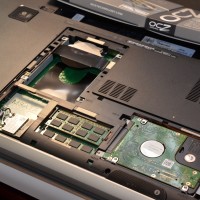
- One empty HDD bay, one mSATA port, and one filled HDD bay
-
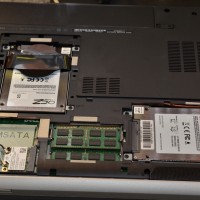
- Two SSDs installed (one upper left, one lower right)
-
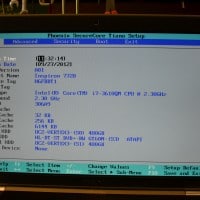
- Inspiron 17R Notebook SE (7720) BIOS listing both SSDs
So far RAID is not initially an option in the BIOS, but I think there is a workaround available and will be posting that soon…
Top Search Terms:
- dell inspiron 7720 (41)
- inspiron 17r se (30)
- dell inspiron 17r se (30)
- inspiron 17r special edition (22)
- dell inspiron 17r se-7720 (18)
- dell inspiron 17r special edition (17)
- dell inspiron 17r se 7720 (11)
- dell 17r se (10)
- inspiron 17r se bottom (9)
- dell inspiron 17r 7720 (8)
Thx 4 the nfo. Did urs come w/the extra hdd caddy?
Hi Docubob,
Yes, my 17R SE came with an extra hard drive caddy pre-installed (even though I purchased a single drive configuration). I thought this was quite nice of Dell as many manufacturers do not include the extra caddy.
NOTE: I did have to supply my own four screws to attach my SSD to the caddy…
Best regards,
-JD
So there can be a maximum of 3 drives.
Can you confirm which of these are SATA 3 and which are SATA 2 ?
Hey Aditya, I honestly don’t remember the specific SATA generation for each bay on that machine, and I wouldn’t want to give you a wrong answer since it matters for performance planning. Your best bet is to check the Dell service manual for the Inspiron 7720, which should have the full spec breakdown. The Dell support site (support.dell.com) usually has the technical specs document that lists interface speeds per bay.