Open multiple PDFs in seperate Foxit Reader windows
When doing taxes or any other task requiring document comparison, it can be very handy to view PDFs side-by-side. Unfortunately, many PDF readers today (including Foxit Reader) default to opening PDFs in tabs and you cannot ‘pull’ a tab out to make a new window.
However, there is a simple workaround: open multiple instances of Foxit Reader and then open (or drag/drop) your files to whichever Foxit window you want. 🙂 First though, you need to do is enable the ‘Allow Multiple Instances’ option in Preferences:
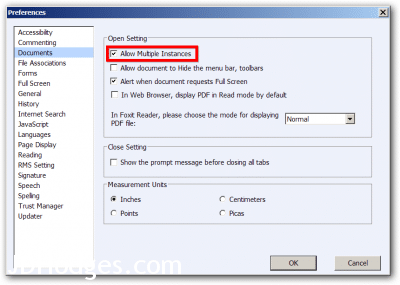
Check the ‘Allow Multiple Instances’ box
After that you should be good to go 🙂
Top Search Terms:
- foxit reader multiple windows (27)
- foxit reader open in new window (22)
- foxit multiple windows (22)
- foxit open in new window (21)
- foxit open multiple windows (16)
- foxit phantom pdf open in new window (11)
- foxit open pdf in new window (9)
- foxit pdf multiple windows (8)
- how to open foxit pdf in new window (8)
- foxit reader open pdf in new window (6)
Merci!
De rien! 🙂
In Ubuntu version I can’t find the documents tab under preferences. Does it exist somewhere else?
Sorry for the late reply, Goko. I have only used that exact setting path on the Windows build, so I am not sure the Ubuntu version exposes the same Documents tab at all. Foxit’s Linux version has often had a slimmer feature set.
Hi! This was super helpful – thank you.
However, now I seem to not be able to “drag & drop” any windows into each other not drag a tab into a new window… is this another capability I need to enable?
Thanks in advance!
Katherine, I do not think there is another hidden switch for tab dragging once you go with multiple instances. The workaround in the post was really about opening separate Foxit windows, not about making tabs merge and split like a browser.