Tag Archives: lenovo

Which X220 USB port is the USB 3.0 one? [SOLVED]

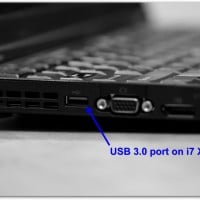
Q.Which X220 USB port is the USB 3.0 compatible? A. It is the ‘blue’* one, the rearmost USB port located on the left side of the laptop near the fan exhaust vent. You can see a photo of the port here: The other two ‘black’ ports are regular USB 2.0 ports. *Please note only the i7 X220’s have a USB 3.0 port, the i3 and i5 models do not 🙁 If you have an X220 i3 or i5 model and

Lenovo T440s Order

Quantity Part number Description Item price Line total 1 20AQCTO1WW ThinkPad T440s  $1,374.00  $1,374.00 Processor 4th Gen Intel Core i5-4200U Processor (3MB Cache, up to 2.60GHz) Operating System Genuine Windows 7 Professional 64 Operating System Language Windows 7 Professional 64 English Display T440s 14.0 FHD WWAN Graphics Intel HD Graphics 4400 Memory 4 GB DDR3L – SDRAM 1600MHz Base Keyboard Keyboard Backlit – US English Fingerprint Reader Fingerprint Reader, dock Hard drive 500GB Hard Disk Drive, 7200rpm Micro Hard Drive

Lenovo ThinkPad Yoga, Fn key fix w/function lock

Updated for 2023: The Lenovo ThinkPad Yoga defaults to having all the function (F1-F12) keys perform their alternate behavior (media controls, brightness, etc.) and not their traditional ‘function’ key behavior. For example, if you want to refresh a web page by pressing F5 you must simultaneously press and hold the Fn key, otherwise the key will function as ‘decrease brightness’ . What is even more annoying to me is trying to close a tab by pressing Ctrl+F4 (and it not

Lenovo Yoga 2 Pro display blanks when on battery?! [SOLVED]

Q. When I unplug my Lenovo Yoga 2 Pro from the wall the screen goes blank. When I plug it back in the screen comes on. Unplug it and it goes off again?! How do I fix this! -Terri A. Hi Terri, your display brightness may be set to zero for ‘battery’ mode. Please try pressing your brightness+ key (it looks like a little sun with a plus sign and it is shared with the F6 function key) and see

How to enable Lenovo ThinkPad Yoga backlit keyboard? [SOLVED!]

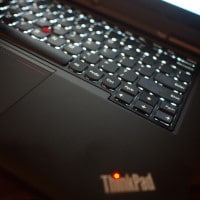
The Lenovo ThinkPad Yoga is available with a backlit keyboard, here are photos of mine: However, Lenovo makes the “on” button for the keyboard backlight a little hard to find… you have to press the Fn key + the Spacebar key to turn enable/disable the backlight. 🙂 Overall, a very nice machine with a rather cool keyboard! PS here are some other Lenovo laptops that use the same keyboard shortcut!!! Top Search Terms:lenovo yoga keyboard backlight (213)lenovo yoga 2 keyboard

Lenovo Yoga 2 Pro and ThinkPad Yoga max external resolution

I am getting ready to test the max external display resolution for my ThinkPad Yoga and my wife’s Yoga 2 Pro (the new version of the Yoga 13). I will test the OneLink dock as well. 🙂 Reports indicate that 2560×1600 and 2560×1440 are possible. http://forums.lenovo.com/t5/Idea-Windows-based-Tablets-and/Lenovo-Yoga-13-max-resolution-for-external-monitor/td-p/1248815 https://forums.lenovo.com/t5/Idea-Android-based-Tablets/External-Monitor-at-2560-x-1440/td-p/1063879 http://forums.lenovo.com/t5/ThinkPad-Edge-S-series/Thinkpad-Yoga-Insufficient-external-display-resolution-over-the/td-p/1334903   Top Search Terms:yoga 2 pro external monitor (21)lenovo yoga 2 pro external monitor (17)yoga 2 pro external monitor resolution (13)yoga 2 external monitor (11)yoga pro 2 external monitor (10)lenovo yoga 2

Connect Lenovo X240/X230/X220 to LCD TV via HDMI? [SOLVED]

If you have a Lenovo X240, X230, or X220 laptop and would like to connect it to a display using HDMI, you will need an adapter. Thankfully the adapters are very easy to use and are quite inexpensive (<$15). Here are the appropriate adapters for each laptop: Lenovo ThinkPad X240 and X230 Mini-DisplayPort to HDMI adapter: Gold Plated Premium Mini DisplayPort (or Thunderbolt) to HDMI Male to Male Cable, Black 6 fthttp://www.amazon.com/gp/product/B00APLJ58M?ie=UTF8&tag=pixensity-20&linkCode=as2&camp=1789&creative=390957&creativeASIN=B00APLJ58MCable Matters Mini DisplayPort | ThunderboltTM to HDMI® cable

Lenovo Lynx in-depth tablet review (frequently updated)

Lenovo IdeaTab Lynx K3011 Review To begin with, some photos of the Lynx compared to an iPad (retina display) and a Samsung Galaxy Note 2: (I used The Verge website as the primary test/display page for most of these photos, primarily because it is a  modern site ideal for pushing the limits on these types of mobile devices… the other site used is jdhodges.com as it presents a lighter usage scenario) Pros of the Lynx Compatible with legacy Windows (x86) applications i.e.

« Older Entries Recent Entries »