Category Archives: computer tips

Move media files into individual folders with the same name

If you ever decide to backup your DVDs or other media to ISO format, it can be handy to have them each in their own folder. However, if you decide to do this after you have already ripped all the ISOs to a single folder then it can be a time consuming task. I have written batch (.bat) files to automate this process in the past, but recently I discovered a very nice Windows program that can do it for

CamScanner OCR test

CamScanner is a rather nice scannerapp for phones and tablets. One of the most desirable features for me is the OCR capability. The OCR works well for basic documents with minimal formatting but alas, it is nowhere near as good as what Fujitsu has in the ScanSnap software (which embeds the OCRed text in the PDF and preserves excellent formatting). Here are the CamScanner results*: *Please note all text in the article is copyright WSJ and it is only posted

Fixed skewed pages in ScanSnap

I adore my Fujitsu ScanSnap ix500 scanner. It lets me scan 70+ pages with ease (simplex or duplex) all the while OCRing every shred of text and therefore saving me oodles of time. Fujitsu ScanSnap iX500 Scanner for PC and Machttp://www.amazon.com/gp/product/B00ATZ9QMOAwesome scanner which I really love. Easy to install and works seamlessly on my Windows 8 laptop. I use this all the time to scan and archive all the papers in my house and the… Read more However, today I

We’re sorry, but you are attempting this transaction during a restricted time period set by your wireless account

If you get an error message like this: We’re sorry, but you are attempting this transaction during a restricted time period set by your wireless account owner. http://redirect.ac.sl.attcompute.com/cgi-bin/redirect.cgi Then my suggestion is to restart your phone or reboot your wifi hotspot. That will likely resolve the issue for you 🙂 Top Search Terms:http://redirect.ac.sl.attcompute.com/cgi-bin/redirect.cgi (6)redirect.ac.sl.attcompute.com (3)http://redirect.ac.sl.attcompute.com/cgi-bin/redirect.cgi?msg=2 (2)we're sorry, but your message could not be delivered because you are in a restricted time period set by your wireless account owner. (2)redirect.ac.sl.attcompute.com/ (2)data

Disable Skype voicemail [SOLVED]

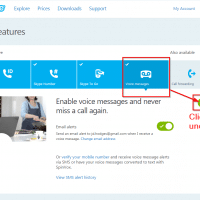
I use a Google Voice number in conjunction with Skype. It allows me to receive calls at home via satellite internet. However, when I miss a call I want Google to take the voicemail not Skype. Thankfully, the steps for disabling Skype voicemail are fairly easy. First, go to the following URL: https://secure.skype.com/account?page=voicemail Second, click to uncheck the voicemail setting: That is it, Skype voicemail is now disabled! 🙂 *PS you may have to disable this annual, as I believe certain

SQL Server: list all user defined functions in a database

Recently I inherited a database project where many of the functions were not listed nor documented. Thankfully, with the help of the always useful stackoverflow, I was able to find the following snippet for displaying all user functions: select name, definition, type_desc FROM sys.sql_modules m INNER JOIN sys.objects o ON m.object_id=o.object_id where type_desc like ‘%function%’ via sql server – SQL list of all the user defined functions in a database – Stack Overflow. Very cool! 🙂 Top Search Terms:list all

Turn off Facebook auto play videos [SOLVED]

It is super annoying to me when Facebook autoplays videos, plus it eats through my limited bandwidth. Thankfully, the auto-play ‘feature’ can be turned off! Here’s how to easily turn it off: #1 Go to https://www.facebook.com/settings?tab=videos #2 Turn it OFF Enjoy! :-0 Top Search Terms:facebook video won't play (1)how do you turn videos off in facebook (1)how to turn videos off on facebook (1)

How to set the time zone & time on Synology NAS DSM

Recently I needed to setup a scheduled shutdown task for my Synology DS 1813+ NAS. After I created the task, I wanted to check the time to make sure it would be triggered at the correct time. Turns out that my timezone had never been set correctly, so here is how I fixed it: Login to NAS via web brower -> Control Panel -> Regional Options -> Time Zome Just FYI here is the awesome NAS in question (though DSM

« Older Entries Recent Entries »