Category Archives: Ask J.D.

How to Check Codex Usage in ChatGPT (Plus, Pro and Credits)

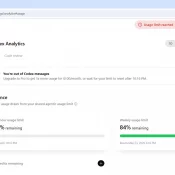
TL;DR: ChatGPT’s Codex has its own usage analytics page at https://chatgpt.com/codex/cloud/settings/analytics, separate from the main ChatGPT settings. You need to be logged into your ChatGPT account first. The page splits your Codex usage into three meters: a 5-hour rolling limit, a weekly limit, and pay-as-you-go credits. Here is an example screenshot: Where EXACTLY Do I Find My Codex Usage on ChatGPT? You have to be logged into your ChatGPT account first. Then paste this URL into your browser: https://chatgpt.com/codex/cloud/settings/analytics Two

MacBook Neo GPU Compared: A18 Pro vs Snapdragon X2, Radeon, Arc, and RTX 5060

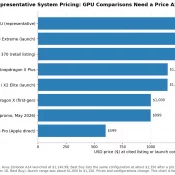
The MacBook Neo is Apple’s $599 fanless entry Mac, built around the binned 5-core-GPU variant of the A18 Pro. I covered its CPU, thermal behavior, silicon economics, and 8 GB RAM tradeoff in the main MacBook Neo benchmarks article. This post is the GPU companion to that piece, and it exists for a specific reason. Why this post exists This post puts the MacBook Neo’s A18 Pro 5-core GPU against Snapdragon X1 and X2, AMD Radeon iGPUs, Intel Arc, and

Codex /goal feature (TESTED)

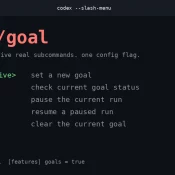
Summary: Codex’s new /goal mode lets you hand it a long-running task and walk away. From there it loops plan → act → test → review until your stop condition is met, or your weekly quota taps out. Currently it takes a two-line config edit to enable, then prefix your prompt with /goal. This is very much in line with what the reddit crowd does with a lot of their homebrew scripts and it opens some fun possibilities! Worth turning

“Unable to Load Usage Limits” on claude.ai? Use /usage in Claude Code

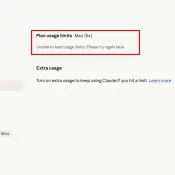
TL;DR: I went to claude.ai/settings/usage this morning to check my Claude Max (5x) plan limits and got a red error box: “Unable to load usage limits. Please try again later.” Anthropic’s status page banner read All Systems Operational, but Settings > Usage was still erroring for me at 7:44 AM Central. The workaround that did work: run /usage inside Claude Code. The session and weekly meters loaded immediately. claude.ai/settings/usage on the morning of April 30, 2026. The Plan usage limits

The Mother-In-Law Method for Claude or ChatGPT

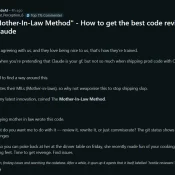
Screenshot of the original Mother-In-Law Method post on r/ClaudeAI by u/Ancient_Perception_6

A Reddit post called “The Mother-In-Law Method” is making the rounds in r/ClaudeAI right now. The pitch from u/Ancient_Perception_6: prompt Claude to review your code as if it were written by your mother-in-law, the one who insulted your cooking and your “weird-looking feet.” Find revenge in the diff. Claude obliged, spawned four parallel “hostile reviewers” with distinct beats (money math, tenancy, API contracts, tests), and 31 minutes later returned 27 issues plus nits. Funny post. Funnier thread. It’s tagged as

Best Laptop for Claude Code

Claude 3D Printed Logo on MacBook Air M5

Feel free to comment (at the bottom) if you have any questions! Summary: If you came here looking for the best laptop value for Claude Code in 2026, you can’t beat the MacBook Air M5 at $1,199 to $1,255 on Amazon for the 16GB / 512GB model as of July 2026 (the exact price varies with the color selection) it has an extremely fast CPU and all day battery life. Note Apple increased US Mac prices on June 25, 2026,

Best Computer for ChatGPT in 2026

Published April 25, 2026. Updated May 8, 2026. Summary: don’t overspend, if you are an intermediate to lightly advanced CODEX/ChatGPT user I would start with the MacBook Air M5 for CODEX and ChatGPT, especially at ~$949 on sale See current price. It is silent, the 18-hour battery is real-world good, and Atlas, voice mode, and the desktop app all feel native on it. The $599 Neo surprised me most as an ultra budget option 🙂 If you want the fast

How to Use GPT-5.5 Today at the CLI (Via Your Existing Codex Subscription)

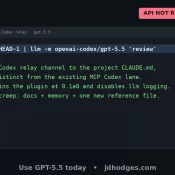
Update 2026-04-26 Small 4/26 update before you run the commands below: Codex CLI 0.125.0 added GPT-5.5 to codex exec -m gpt-5.5 and the Codex MCP server. (For MCP, restart Claude Code after upgrading so the running server picks up the new binary.) The relay is no longer the only path to 5.5 from your terminal. The OpenAI public API still hasn’t shipped 5.5 as of today. I’m still keeping the relay for fast one-off pipes and as a backup connection

« Older Entries Recent Entries »