Yoga 2 Pro SSD Upgrade [HOWTO]
Please see photos below, with these simple steps you can upgrade to a faster and higher-capacity mSATA drive.
NOTE: I used a Samsung 850 EVO 250GB SSD for the upgrade. This drive costs < $90 at Amazon with free shipping.
Performance has been exceptional and the 500GB and 1TB drives also work well with the Yoga 2 Pro. 🙂
TIP: Click any photo for a larger view.
-
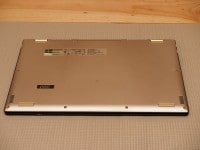
- Turn Yoga 2 Pro over and disconnect from power
-
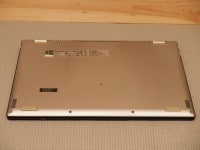
- Remove screws from underside of laptop
-
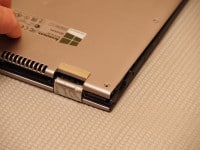
- Gently pry from the rear vent area near the hinges
-
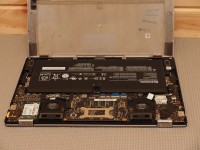
- Gently raise cover
-
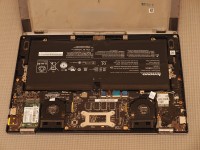
- Yoga 2 Pro motherboard
-
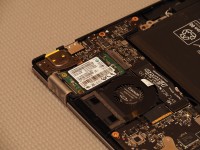
- mSATA SSD!
-
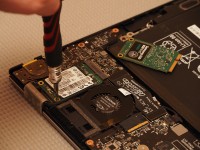
- Remove SSD retaining screw
-
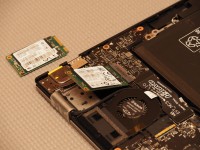
- SSD is removed/inserted at an angle, similar to memory
-
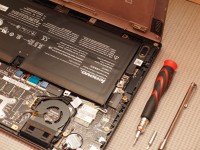
- View of fan, battery and tools
-
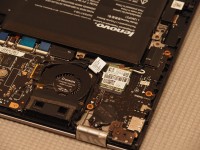
- Closeup of Yoga 2 Pro WiFi Card
-
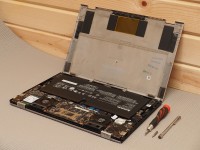
- 3/4 view of Yoga 2 Pro
-
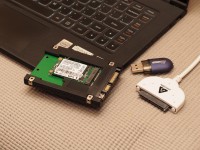
- Cloning old mSATA SSD via adapter
-
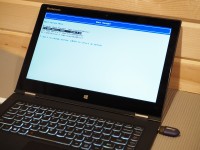
- Lenovo boot menu selection
Top Search Terms:
- yoga 2 pro ssd upgrade (3)
- yoga 2 pro ssd (2)
- lenovo yoga 2 ssd replacement (2)
- yoga 2 laptop ssd 250gb (1)
- what type of hard drive is in a yoga 2 pro (1)
- ssd lenovo yoga 2 pro (1)
- ssd 860 yoga pro 2 (1)
- lenovo yoga hard drive upgrade (1)
- yoga pro hard drive (1)
- lenovo yoga 2 pro hard drive (1)
JD.
I have a Lenovo Yoga 2 with a 512 SSD and want to upgrade to a 1 TB SSD.
Where do I buy the SSD that works along with the cloning adapter?
Also do I need to upgrade the Bios, I heard what your showing me in this post does not work?
Can you get me the part numbers
Sorry for the late reply, Robert. I did not list exact part numbers beyond the Samsung 850 EVO line I used, because those vendor numbers change. The key point from the post was that the Yoga 2 Pro handled the larger-capacity Samsung mSATA drives fine when I tested it.
JD.
I have a Lenovo Yoga 2 with a 512 SSD and want to upgrade to a 1 TB SSD.
Where do I buy the SSD that works along with the cloning adapter?
Also do I need to upgrade the Bios, I heard what your showing me in this post does not work?
Can you get me the part numbers
Sorry for the late reply, Robert. When I wrote the post, the same Samsung 850 EVO mSATA line was working well in larger capacities too, including 1TB. I did not need a special BIOS trick on mine, but I cannot promise every later firmware revision behaved the same.
Did you have to remove the battery prior to touching the SSD?
Sorry for the late reply, George. I always think it is safest to disconnect power before touching the SSD, and if the battery is easy to isolate that is even better. I do not recall that being the hard part of the job, but caution there is never a bad idea.
Hi JD,
I have a Yoga 2 Pro with a 256 GB SSD and would like to upgrade to 512 GB SSD. Do you have a Samsung model number for that drive (512 GB)?
Could you confirm that the new drive can also be added to the extra slot in the laptop?
Sorry for the late reply, Lan. I used the Samsung 850 EVO line in that post, but I did not keep a separate 512GB part number note. I also am not aware of a second extra SSD slot in the Yoga 2 Pro from this guide, so I would not count on adding another internal drive without confirming your exact board layout.