How to FORMAT my Dish network screen to NOT zoom for HD?
Q. I have a Dish receiver that makes all my HD channels look ugly. It says HD Zoom when I switch to one of those channels. Suggestion?
A. If you have an older Dish receiver and want to turn off (or turn on) zoom for HD channels, try pressing the asterisk * [format] button! This should allow you to cycle through the various options for HD channel presentation 🙂
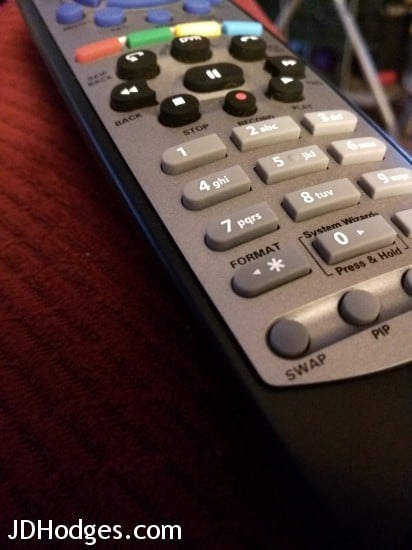
Press the * button to cycle through zoom/format modes
Top Search Terms:
- https://www.jdhodges.com/blog/how-to-format-my-dish-network-screen-to-not-zoom-for-hd/ (78)
- dish network hd zoom (5)
- dish zoomed in (4)
- dish format change (3)
- dish network turn off zoom (3)
- dish tv zoomed in (3)
- partial zoom on dish network (3)
- dish network zoom setting (3)
- dish hd zoom (3)
- dish turn off zoom (2)
I called dish help line, (bad idea). After calling and going threw their menu ( another bad idea ) and waiting for a little under a day and a half I finally got a real person ( I think ) then I discovered I had to hire an interpater to understand the guy. I knew this was going to be a three Jim Beam drink process. After figuring out what language and what planet he was from I finished my first Beam and coke.
Rather than take 40 minutes of your time, like you have nothing bettyer to do, I hung up and went to my laptop and quess what. typed in (How to fix ——–) Bingo one line to read problem fixed. Thank you!
Thank you for your comment, Dave.
I am very sorry to hear about your unfortunate Dish service experience 🙁 However, I am thrilled that my page helped solved your problem! 🙂
Have a great day Dave, and thank you again for taking the time to comment!
-J.D.
So what did you do ?
you, sir, are awesome!!!!! Quick fix!
Hi Mickie,
Thank you for your comment. I am glad this method worked for you!
Have a GREAT day 🙂
Best regards,
-J.D.
Thank you very much, it worked, took me two seconds to do it and your tip saved my Sunday. Not even husband knew how to do it
Thank you for your nice comment, Maria. I am glad that this post helped with your Dish device. 🙂
Have a GREAT week!
Best regards,
-J.D.
Curious if anyone knows how to do this with the Dish Network “Basic” remote? It doesn’t have a format button but somehow our picture is set to ZOOM.
Krista, I have not used the Basic remote myself, so I am not 100% sure where Dish hid that function on that one. If there is no * or Format button, my best guess is you will need to change the picture mode through the receiver menu or the TV’s own aspect or zoom control.
Bless you, thank you!
Hi K.A.Z.. I’m so glad that the tip helped. Thanks for the nice comment!
Have a great day!! 👍
-J.D.
Thank you SO much! I bought a new HD TV and could not figure out why we could not see scores on the lower right of the screen!
Glad I could help! Enjoy using your new TV.
Have a great day!! 👍
-J.D.
Answered my Dish question quickly thank you
Thank you for your nice comment, Jack. I am very glad I could help! 🙂
Have a great week!
-J.D.
Thank you!!!!
Glad I could help! 👍
Glad I could help!
Have a great day!! 👍😀
-J.D.
How do you make the dish program guide bigger letters
Pauline, I do not know a direct guide-font setting from this zoom post. If your receiver has one, it would likely be buried in accessibility or display settings rather than under the HD zoom format options.
How do you make the dish program guide bigger letters, bolder?
Pauline, I am not aware of a setting from this post that makes the Dish guide text larger or bolder. That sounds more like an accessibility option in the receiver menus, if your box supports it at all.
What if my remote doesn’t have a *?
I am trying to help my father in law get out of partial zoom mode with Dish but his remote (TV is LG) doesn’t have a * button.
Thanks.
Steven, I have not tested that exact remote, so I cannot say for certain. If there is no * button, I would look for a Format, Aspect, or Zoom control on either the Dish remote or the LG TV remote, because one of those is probably what is toggling the partial zoom mode.