Kindle for iPad, error fix by deregistering
My wife received the following error when trying to download and read a Kindle book on her 1st generation iPad:
Please remove the book from your device and redownload it from your archived items. If the problem peesists, try to deregister your application and register it again.
Here is step-by-step how to get things working!
-
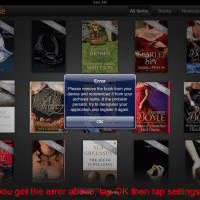
- Click the OK button to close the error, then click the settings icon in the lower right hand corner
-
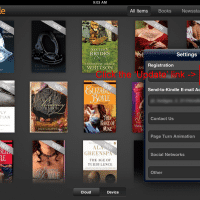
- Click the update links beside your Registration name
-
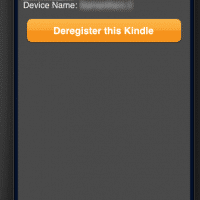
- Click the Deregister this Kindle button, then Register again & you should be good to go!
PS if this was useful to you, please let me know how you rate it on a scale of 1 to 5, thanks!
[starreview tpl=16]
Top Search Terms:
- ipad kindle download error (34)
- download error kindle ipad (26)
- kindle download error ipad (26)
- kindle download error (25)
- kindle ipad download error (24)
- kindle download error on ipad (18)
- download error on kindle for ipad (10)
- kindle for ipad download error (9)
- ipad kindle error please remove the book (7)
- kindle ipad error (7)
hi & thx for the tip, I could not figure out how to derigster my kindle. with your guide I got it fixed and now all works well. thx once more.
Thank you for your kind comment Anthony. I am very glad that my post was helpful to you!
Enjoy your iPad and the Kindle app 🙂
Best regards,
-JD
Thank you! I was getting a downloading error for a book i bought and i was so frustrated! I deleted the book, deleted the app, re-tried downloading a million times, powered off my iPad…. This finally worked!
Oh man, thank you so much, it worked!
Excellent Brian! I am glad it worked 🙂
Best regards,
-JD
After a frustrating 1/2 hour this worked. Thank you so much.
Hi Helen,
Thank you for your comment. I am very glad that my page helped!
Have a great week. 🙂
Best regards,
-JD
Thanks, I got the download error and this worked, some books I had to click a couple of times but got there in the end.
Hi Steve,
Thank you for your comment. I am really glad this tip worked for you!
Enjoy your nice iPad and Kindle combo 🙂
Best regards,
-JD
Thanks. It worked for us.
Hi Q&H,
Thanks for your nice comment, I am very glad this worked for you!
Best regards,
-JD
Oh you are brilliant!! So happy I found you – thank you very much!
Thank you kindly for your comment Linda. I am very glad this solution helped with your Kindle!
Have a great week and thank you again 🙂
-J.D.
thank you, worked a treat
Excellent Alison, I am very glad this tip worked for your Kindle! Have a great week 🙂
Best regards,
-J.D.
While this suggestion may be ok for people who have a few items on their Kindle, I had about 20 “collections”, and 100’s of items. When I deregistered and reregistered, guess what? The collections were GONE. There goes hours of work.
This suggestion to deregister/re-register is a common one. Indeed, I did not find any OTHER suggestions.
My problem was that somehow two instances of the same Atlantic magazine issue appeared in my library. No combination of removing or downloading (again) would cause either one of the two copies to be deleted, or to allow me to open and read this issue. There was literally nothing in the Kindle on iPad interface that allowed me to get past this issue. Every time I tried to open one of the two copies, I got the error above.
Why is the Kindle interface such a piece of garbage, frankly? If you have hundreds of books, and even as little as several subscriptions, there is no way to control the order of the items – you get issues of Forbes from 2014 near the front of your list, while recent editions of your Atlantic subscription are nowhere to be found.
One way to manage 100’s of items is to divide them into categories and to put them into folders. Why no folders interface? Why does Amazon allow people to wipe out their Collections? No knowledgeable Amazon moderator could have weighed in on this topic?