ScanSnap internal error occurred 0x1001 (s300, ix500, etc.) [SOLVED]
Are you getting a ScanSnap internal error occurred 0x1001 error message?
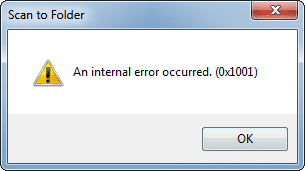
ScanSnap Error Message
After months of trouble free usage when saving to folder, I had that error pop-up 🙁
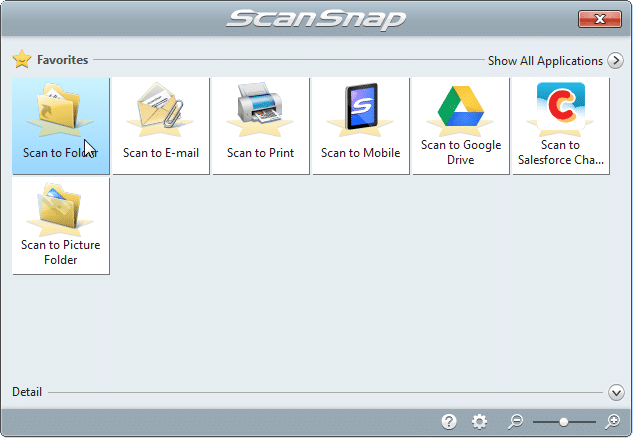
Save to Folder
Thankfully, I did the following steps and everything is back to normal:
How to fix the error
#1 Try to save to Google Drive or one of the other options and verify that you can complete the save (I was able to save to Google Drive) and this means the scanner is working properly
#2 Reboot your computer
#3 Right click on the ScanSnap icon in your taskbar and choose “ScanSnap Folder Settings”
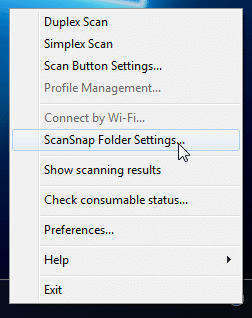
Choose ScanSnap Folder Settings
#4 Confirm the default Image Saving Folder and press OK
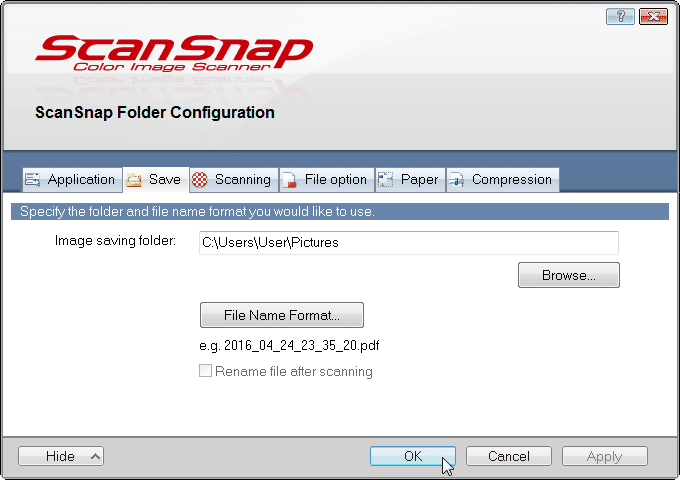
Confirm default folder (and verify it exists) then press OK
#5 Happily Scan 🙂
After those steps, I was able to scan to folder again with no problems. I hope these steps are helpful to you too 🙂
- scansnap internal error 0x1001 (7)
- scansnap an internal error occurred 0x1001 (5)
- scansnap error 0x1001 (4)
- error message 0x1002 (4)
- 0x1001 error (4)
- scan snap 300 an internal error occurred. (0x1001) (3)
- internal error (sd009) (2)
- fujitsu scanner ix500 scan to mail failed send operation was cancelled 0xc0000135 (2)
- 0x80210026 (2)
- an internal error occurred 0x1001 (2)
I’m having the 0x001a error when I scan to e-mail. This started immediately after a windows 10 update. This is on a scansnap ix500. It’s my office computer. Any help would be appreciated.
Sorry for the late reply, Timothy. Since yours is `0x001a` and only when scanning to email, I do not think it is necessarily the exact same folder-setting issue from my `0x1001` post. The first thing I would try is scanning to folder or another destination to see whether the scanner itself is still fine.
Yep, googledrive sync. Thanks!
Excellent, Eileen! I am very glad this tip helped you with your ScanSnap/Google Drive (Backup and Sync) issue. 🙂
Have a GREAT day!
Best regards,
-J.D.
Awesome, fix
Dear Cheryl,
I am very glad my tip helped fix your ScanSnap scanner. 🙂
Have a GREAT weekend!
Best regards,
J.D.
Yes! Thank you! This fixed the issue. I was being told to order a new scansnap for $400 when this one worked just fine before upgrading to Windows 10.
Excellent, Richard!
I am very glad that this tip worked for you 🙂 Enjoy your scanner!
Best regards,
-J.D.
My Scansnap s1500 just stopped working. Won’t even get to save before says ‘internal error 0X1001’. The taskbar light is active so normally it works…Tried changing the settings as per above but not solving it. Any other ideas are welcome.
Greg, if changing the folder settings did not help and it fails before it even gets to save, then my fix may not match your case. At that point I would suspect the ScanSnap software install or profile configuration more than the folder path alone.
I had to uninstall and then reinstall the manager software
Dear Paul,
Thank you for sharing your solution. I am glad you were able to resolve the issue!
Have a GREAT week and enjoy your scanner. 🙂
Best regards,
-J.D.
I had to move the temp scan folder away from one that google drive backed up
Thank you for sharing your tip, Paul. That sounds like a good solution if the problem persists!
Thanks again and have a GREAT week!
Best regards,
-J.D.