Disable Windows 10 download on Windows 7 [SOLVED]

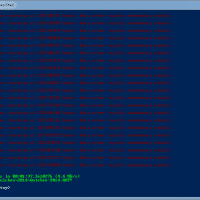
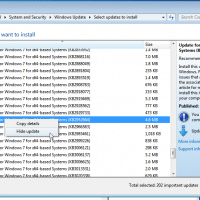
Microsoft made the somewhat odious choice to automatically download the Windows 10 installer onto Windows 7 systems 🙁 If you are an IT person installing (or reinstalling) Windows 7 Pro onto desktop business systems, you probably do not want multi-gigabyte downloads going on without any user intervention. Likewise, a pesky “upgrade” icon in the taskbar is a nuisance at best. Thankfully, on a clean install of Windows 7 (Pro or otherwise) if you disable the following two updates you should be

How to cancel CoventryOne insurance policy?

If you need to cancel your CoventryOne Insurance Policy, here is the Coventry number to call for instructions: 1-877-849-9690 Here is a screenshot from their FAQ: After calling that number, and after a few button-presses/voice-prompts, I was able to reach a person in the policy changes department. They were able to set a termination date for my policy right then (I did not have to submit it in writing). I also made sure to get a case number for the call

CHASE: We’re sorry we’re not receiving your deposit information

Recently while trying to quick deposit a check, I received the following error message from the Chase App: We’re sorry we’re not receiving your deposit information. After waiting 30 minutes I tried again and all was well 🙂 After some research it appears that this error occurs when part of Chase’s Quick Deposit system is down. Here’s hoping Chase implements a better error/status reporting system for this issue! For the time being, the best solution when this error occurs may just be

Windows 8.1 to Windows 10 upgrade stuck at 2% [SOLVED]

Problem: Windows 8.1 to Windows 10 upgrade stuck at 2% 🙁   Solution: Cancel installation (CTRL+ALT+DEL, taskmanger, kill install task) Open Windows Command Prompt (as administrator) and run: sfc /scannow A error will likely be detected and Windows will attempt to correct it. After the error is fixed, re-run the Windows 10 update 🙂 Top Search Terms:updating to windows 8 to 10 stuck on 2% (1)upgrade to windows 10 hang at 2% (1)windows 8 to 8.1 upgrade stuck at 2% (1)

Building my new gaming PC

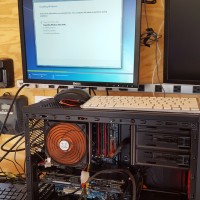
I built this bad boy gaming PC to play Battlefront with my friend Kevin. It has a i5-2500K CPU and a GTX 960 video card, 512GB SSD and 16GB of RAM. This was a photo taken in the garage while I was building the PC. It was using a super old temporary power supply without the video card being fully powered. Since then I have upgraded to a much nicer PSU. The cooler is recycled as is as many components

Best inexpensive bluetooth keyboard for Mac [SOLVED]

Q. I have the iMac 27″ which was a hand-me-down from my parents. It is a nice comptuer but they didn’t have the original keyboard for it anymore so I have just been using a random PC USB keyboard and it is okay buy not great. Any recommendations for a really good but really cheap bluetooth/wireless keyboard for my Mac? Yours, -Tracy (poor college student) A. Hi Tracy! I was in a similar situations recently and I think I know just

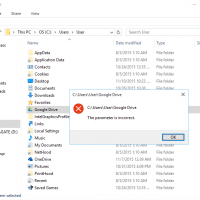
[SOLVED] Can’t pin folders to Quick Access (The parameter is incorrect.)

IMPORTANT NOTE: some commenters reported that while the method described below DOES restore the ability to add new items to the quick access area, it also removed their existing (old) quick access folders/shortcuts. Therefore, they had to re-add those items. I recommend backing up or taking note of what folders/shortcuts you have BEFORE carrying out this tip. 👍👍 Question. I am trying to pin my Google Drive folder to the new “Quick access” list in Windows 10 but it fails

Can’t be opened because it is from an unidentified developer mac

If you are using Mac OSX El Capitan, Yosemite, Mavericks or similar, you may encounter the following error: This is of course a very sad message if you know the app is from a reputable source 🙁 Thankfully, there is an easy fix! Step 1. Go to Finder Step 2. Locate the application you are trying to open In my instance it is Finder -> Applications -> VLC Step 3. Hold down the command button while you right click (option

« Older Entries Recent Entries »