Category Archives: Gadgets and Tech

Google Find My Phone (even if Device Unavailable)
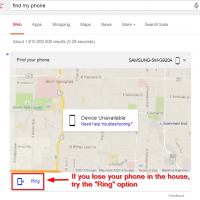
Google has been adding more action oriented features to their engine. One of the most useful is “find my phone”. If you have an Android phone you can try finding it here: https://www.google.com/search?q=find+my+phone Also, even if the map/screen says “Device Unavailable” you may still be able to “Ring” the phone… this will ring the phone for 5 minutes and this is exactly what I did this morning to find my phone (which was hiding in the covers) ;-). Top Search Terms:find


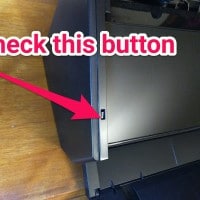
Olympus OM-D not showing live view [SOLVED]

If your Olympus micro four thirds camera ever refuses to show live view, you may need to press the following button: If you are having this problem, I hope this tip helps! 🙂 Top Search Terms:https://www.jdhodges.com/blog/olympus-omd-live-view-fix-solved/ (7)olympus no liveview (2)olympus camera live view (1)olympu live view not showing (1)olympis live view (1)my olympus camera isnt showing the menu on the screen (1)liveview olympus em 10 2 (1)liveview broken omd em5 (1)em10 live view (1)www.jdhodges.com (1)

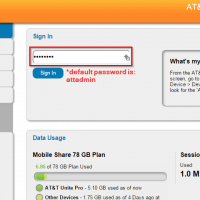
AT&T Unite Pro admin password login [SOLVED]

If you are trying to access the settings page on an AT&T Unite Pro wifi hotspot, you may need the following default password: attadmin 🙂 Top Search Terms:at (247)att unite pro admin (62)att unite att admin (54)att unite pro admin login (44)attunite admin login (29)attunite admin page (26)attunite/login (20)att unite pro login (18)attunite homepage (10)attunitepro (10)

Fix Fujitsu ScanSnap iX500 scanner power problem [SOLVED!]

Q. Hiya. I have a Fujitsu ScanSnap iX500 scanner for my Mac and it will not power on 🙁 I checked the power supply and it is a really expensive scanner, do you know how I could go about repairing it so it will power on again? -Shirley Barnes A. Hi Shirley! I know something you can try. I have the same ScanSnap ix500 for my PC and the scanner has a small button/switch that is normally recessed, but it

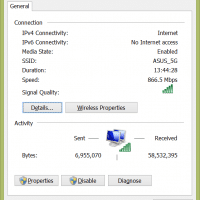
Fix Dell XPS 13 5GHz wifi speed issues [SOLVED]

When I first connected my Dell XPS 13 to my ASUS router I was quite impressed by the 893Mbps connection speed. However, a few days later and I could not even see the 5GHz wifi network. 🙁 I was stuck at 144Mbps and not loving it. After experimenting with the drivers, I determined that an automatic driver update had effectively disabled the 5GHz capability of the internal wifi card and that by reverting to the original (stock) Windows 8.1 driver

Samsung Galaxy S5 Active Camo (Green Color)

This is part of the bought & sold category of my website… Samsung Galaxy S5 Active Camo (Green) Color   Condition: Excellent, no scratches on screen and perfect working condition. The phone has always been in a case with a screen protector.   Cellular provider: AT&T. Guaranteed to activate and work on the AT&T network.   Reason for selling: This phone was purchased shortly before Christmas, however I recently bought a Nexus 6 and I am looking for a good home for this Samsung

Dell XPS 13 SSD upgrade to 512GB [2015]

2015/07 UPDATE: for my Dell XPS 13 (2015 infinity display) I completed the 512GB SSD upgrade about 4 months ago and I highly recommend the upgrade! Here are the new performance numbers: ———————————————————————– CrystalDiskMark 3.0.3 Shizuku Edition x64 (C) 2007-2013 hiyohiyo Crystal Dew World : http://crystalmark.info/ ———————————————————————– * MB/s = 1,000,000 byte/s [SATA/300 = 300,000,000 byte/s] Sequential Read : 481.072 MB/s Sequential Write : 436.664 MB/s Random Read 512KB : 329.971 MB/s Random Write 512KB : 392.295 MB/s Random Read 4KB (QD=1) :

« Older Entries Recent Entries »