Category Archives: Gadgets and Tech

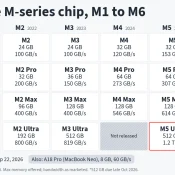
Every Apple CPU Compared: M1 Through M5 Max (All Variants)

TL;DR: this page is meant to list every Apple Silicon chip from the M1 through the M5 Max, including all the lower-spec binned variants Apple buries in the fine print, with verified specs, practical buying advice, and a dedicated section on which chips can actually run local AI models. Inspired by the popular r/mac comparison table, expanded with official Apple sources, all binned variants, and honest flagging of estimated values. Bookmark it. I will keep it updated. The M5 Max

Samsung Care+ Charge on Credit Card or Bank Statement: What It Is [SOLVED]

Short answer: Samsung Care+ is Samsung’s official device protection plan, similar to AppleCare. If you see a charge labeled “Samsung Care+” on your credit card or bank statement, it is a monthly subscription fee for coverage on one of your Samsung devices. The tricky part? The statement just says “Samsung Care+” with no mention of which device it covers. If you own multiple Samsung products, or if a family member added the plan, that $13 (or $3, $5, $8, $11)

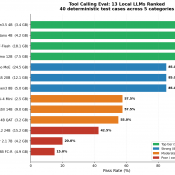
I Tested 13 Local LLMs on Tool Calling: March 2026

I built a deterministic eval harness and tested 13 local LLMs on tool calling (function calling) to find out which models work decently well for agentic tasks. The result that surprised me most: a 3.4 GB model scored higher than everything else I tested, including models five times its size. If you’re running a local AI stack with Open WebUI, LM Studio, or any OpenAI-compatible frontend, tool calling is one of the key features that enables agentic behavior. It lets

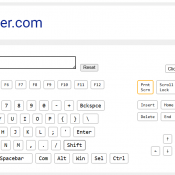
Corsair Galleon 100 SD: Left Shift Key Triggers Caps Lock (Fix Available)

I recently picked up the Corsair Galleon 100 SD, Corsair’s new mechanical gaming keyboard with integrated Stream Deck LCD keys. I covered the full setup and first impressions in my earlier review. On paper, it’s a compelling product: Cherry MX-style switches, per-key RGB, and Stream Deck functionality built right into the keyboard. In practice, mine shipped with a defect that made it nearly unusable for serious work. Update (April 7, 2026) Corsair has published public beta firmware v1.4.73 for the

How Do You Set Up the Corsair Galleon 100 SD Keyboard?

The Galleon 100 SD is Corsair’s mechanical keyboard with a built-in Elgato Stream Deck where the numpad would normally be. It’s a slick piece of hardware, but the setup involves a few steps that aren’t immediately obvious out of the box. Here’s what the process looked like for me. Step 1: Connect Both USB-C Cables This is the first thing that caught me off guard. The Galleon 100 SD requires two USB-C to USB-A cables, not one. Both plug into

MacBook Neo Review: A18 Pro CPU, 8GB Reality, and the Thermal Wall

Disclosure: This post contains affiliate links. I have not been paid by Apple or anyone else to write this. The Short Verdict The MacBook Neo is the fastest single-core laptop you can buy for $599 or even lower at $499 educational pricing! It also drops to phone-class performance after about 60 seconds of sustained CPU load. Both of those things are true at the same time, and thankfully even (Apple) phone class performance is still quite speedy. I ran 30

RTX 5080 vs. RTX 3090: Is It Time to Upgrade in 2026?

Is the Upgrade Actually Worth It? The internet loves a clean upgrade narrative: Old card bad, new card good, spend money. But the reality of the NVIDIA RTX 5080 era is messier and more interesting. If you are currently rocking an RTX 3090, you’re still packing serious heat. That card remains a 24GB monster. The big question: Is the 5080 a meaningful leap forward, or just high-end hardware FOMO? Let’s break down the data. Raw Gaming Performance: Faster, but is

ThinkPad P14s AI 9 XH PRO 370 w/96GB RAM & LLM benchmarks

Running Big LLMs on a Little Workstation: My Adventures with the ThinkPad P14s Gen 6 AMD I’ve been experimenting with large language models (LLMs) lately, and I wanted to see how far I could push things using a (relatively) inexpensive laptop. Enter the ThinkPad P14s Gen 6 AMD—a slim mobile workstation that set me back about $1,600. On paper it’s not exactly a “supercomputer,” but with the right configuration (and my go-to tool, LM Studio), it turns out this little

« Older Entries Recent Entries »