Category Archives: computer tips

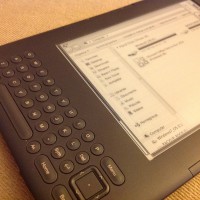
Use your e-reader as a display for your computer

Over at Pocketables (one of my fav tech sites) they posted a nice little article asking Why are ereaders still stand-alone only devices? It is a valid question and if the Pebble watch is any indication, there is a lot of pent up demand for ultra-long lived devices using e-ink displays. If Pocketable’s premise was e-ink is good for a lot more than just reading books, and that the current ereaders should do more… then this along those lines, here

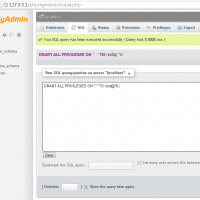
mysql error 1130 host is not allowed to connect to this mysql server

Question from Steve. Hello, I installed XAMPP on my Window sLaptop and then tried to access it via Navicat from my Desktop as root I get this error: mysql error number 1130 host STEVE-DESKTOP is not allowed to connect to this mysql server Can you please help me? Answer from JD. Sure Steve, I am happy to help! Your issue is caused by there being insufficient permissions in the MySQL users table, specifically your desktop machine does not have permissions

WildBlue US Government Recovery Act Program and Plans

If you are in the market for Exede or WildBlue Broadbrand, make sure to checkout the WidlBlue US Recovery act plan first: US Government Stimulus Program | Satellite Internet Service from Wild Bluehttp://get.wildblue.com/recovery-act-program.htmlThe limited time U.S. government Recovery Act Program is currently in effect, but funds are running out. Don’t miss out on this opportunity for discounted monthly rates, plus… WildBlue & the US Recovery Act | Low Cost Broadbandhttp://www.wildblue.com/options/recovery-actThis special program is available to rural unserved households under the

Differences between original WildBlue FAP & Broadband (Exede) FAP

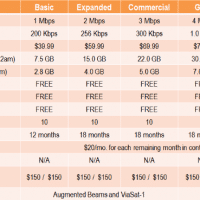
The orignal WildBlue services uses a rather unusual ‘rolling FAP’ that is pretty hard to explain. The new WildBlue broadband (Exede) uses a much simpler monthly usage reset date. Here are the policies for both old and new WildBlueas of 2012.06.28 followed by an explanation and example where appropriate. –JD Original or ‘old’ WildBlue Plans WildBlue Original Plans: After exceeding either of the usage thresholds, which vary by service package, the speed of your service will be slowed to 128 kbps download

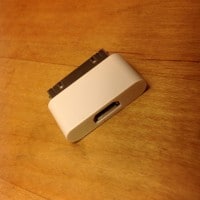
Micro-USB to 30-pin Apple connector adapter!

NOTE: now available from Amazon for about $6.99 with free Prime 2-day shipping, woot! PS if you don’t like the white color, they also have black… Here is a cool little adapter that lets you use all of your snazzy-nearly-universal Micro-USB cables and chargers with the also ubiquitous but generally proprietary Apple 30-pin dock connector 🙂 I’m adding this to my adapter cable bag so now that my iPod touch will be covered (as well as friends’ iPhones) I should be able

How to power on a server via IMPI

The following instructions are for a Supermicro mini-itx dual core Atom based machine with IPMI built in 🙂 Load the administrative interface by specifying the IPMI interface’s IP address and entering it in  your web browser Example: http://192.168.1.9/ Default login: User: ADMIN Password: ADMIN (both are in all caps) Go to Remote Control -> Power Control menu option Select Power On Server Click the Perform Action button The computer will then power on. 🙂 Top Search Terms:supermicro impi (6)howto power

How to recover missing SABnzbd queue

Occasionally SABnzbd may totally lose it queued downloads, if that happens you will likely seem something like this in the error logs: When Type Warning 2012-06-18 08:30:54,999 ERROR: Loading C:\Users\User\AppData\Local\sabnzbd\admin\queue9.sab failed 2012-06-18 08:30:54,999 ERROR: Loading C:\Users\User\AppData\Local\sabnzbd\admin\postproc1.sab failed 2012-06-18 08:30:54,874 ERROR: Loading C:\Users\User\AppData\Local\sabnzbd\admin\totals9.sab failed Thankfully, here is a simple solution that will normally recover your queue! Load the SABnzbd web interface Click the ‘Status‘ link near the top left of the screen Choose the ‘Queue repair’ tab Press the ‘Repair‘ button

Annoying AVG Free disk space requirement

Tonight I was installing AVG Free on a virtual machine running XP that was setup to only have 10GB of hard drive space. With all the various updates and programs installed there was only about 800MB free space left. Annoyingly AVG Free would not allow an install until 1GB of space was free. 🙁 If AVG actually needed a gigabyte of space that would be one thing. But guess how much space it actually uses? About 100MB. Yes, they are

« Older Entries Recent Entries »