Category Archives: Android tips

Samsung Galaxy Watch Stuck After Unlock Swipe? [SOLVED]

Q: My Samsung Galaxy Watch accepts the unlock swipe but then just freezes on the screen and won’t go any further. How do I fix this? A: This is a surprisingly common glitch where the watch acknowledges your input but the software hangs on the transition. The good news: a forced restart fixes it almost every time, and it will not erase any of your data. How to Force Restart a Samsung Galaxy Watch (Watch 4, 5, 6, 7, and

Tempered Glass Screen Protector – Finally, One That Works with the Pixel 9 Pro XL’s Fingerprint Reader!

If you own a Pixel 9 Pro XL, you already know the headache of finding a screen protector that doesn’t mess up the fingerprint reader. I’ve tried several, and with most of them, the sensor just refused to work—no matter what I did. I tried retraining my fingerprints, adjusting settings, enabling “increased sensitivity”—nothing worked. The phone just wouldn’t unlock. But this amFilm Tempered Glass Screen Protector? It just works. No frustration, no failed unlock attempts—just clean, smooth performance exactly how

SOOSPY wifi camera, default username and password

The default WiFi SSID is the same as what is printed on the QR code sticker. The default IP address is: 192.168.10.1 (connect to its wifi network and DHCP will give you an address like 192.168.10.10 The default username is: admin The default password is: [BLANK] (no password, do not enter password) More details and an old Amazon review: Decent clear picture and reasonably discreet as advertised. The BVCAM software for IOS did work, though can be mildly confusing what they

Something went wrong… when resetting Samsung phone [SOLVED]

Summary: make sure you are connected to the internet with a good data connection and that your phone’s date and time are up to date 👍👍 Details: I encountered an unusual issue recently while trying to factory reset my wife’s phone. Specifically, every time I would try to reset it or remove the Samsung account, it gave me an error “Something went wrong…” Finally I realized that my wife’s phone was not showing any internet access over the WIFI connection.

Pixel 8 Pro does NOT support HDMI/DisplayPort out over USB-C

I just tested my Google Pixel 8 Pro and sadly it does not (as of November 2nd 2023) support display out over USB-C. 🙁 👎 This is a bummer as I had hoped to use USB-C adapters/docks to output to HDMI for utilizing LCD TV’s for work while traveling. Therefore, I will be taking my S23 Ultra as a backup phone and it does nicely support display out (and Dex with touchpad emulation etc.) So, dear Google, please add this

Samsung Care large charge [SOLVED]

Everything is going according to plan but they DO put a large hold on your credit card ($990 in my case) and if you do not send in your old device within the allotted timeframe they will charge that full amount! So, please make sure you send in your old device! ✅✅ Related: If you are seeing a smaller recurring monthly charge from Samsung Care+ on your statement (like $3, $5, $8, or $13 per month), check out my guide

How to re-enable Hey Google on OnePlus 8 Pro [SOLVED]

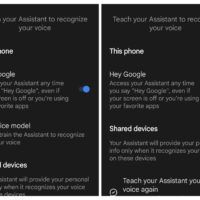
If your Google assistant no longer responds to the “Hey Google” wake command, give this a try: Open the “Google” app on your OnePlus phone At the bottom of the “Google” app, click the 3-dots “… More” and select “Settings” Select “Google Assistant” Select “Voice Match” Toggle the “Hey Google” slider to “On” Exit out of the app and voila, your phone should answer to “Hey Google” again! I hope this helps 👍😉

Google Photos crashes when saving edits on Samsung Note 10 (S10, S9, S8) [SOLVED]

Recently my wife unable to save photos after editing them in Google Photos. Specifically, the Google Photos app would crash immediately upon trying to save edits and this issue was occurring on a Samsung Note 10+. Checking with some friends, they were having similar issues on their S10 phones. After trying a number of adjustments (restarting, clearing cache, clearing data) I finally realized that the issue was due to motion photos. Specifically, during a recent software update, it seems that

« Older Entries