Tip: shock protection unnecessary if you have a SSD!
The Lenovo X220 ThinkPad, as well as many Dell & HP laptops, ship with a form of anti-shock protection enabled by default. This is great if your laptop has a conventional hard drive that can be easily damaged by a fall or drop. The laptop is smart enough to pause disk activity and ‘park’ the head (or other similar techniques) to prevent disk damage.
However, if your laptop is exclusively using a SSD (solid state drive) then that protection is not needed. Solid state drives have no moving parts and Lenovo’s “thinkvantage active protection” system as well as other manufacturers’ similar systems offers no benefits.
At best the shock protection will do nothing with your speedy new SSD. At worst, depending on how the protection is implemented, it could potentially slow down your SSD . Specifically if you’re using your laptop in a bumpy environment and the software tries to pause I/O (input output) activity you might encounter artificial stuttering. From a performance perspective, if you are solely using SSDs, to be safe you may want to disable active shock protection! 🙂
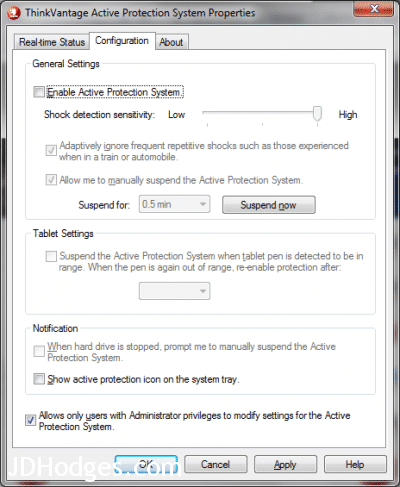
Here’s a screenshot showing the Active Protection System turned off (i.e. the box is not checked)
TODO: I will try to do some disk benchmarking with the active protection OFF, and then ON while jostling the laptop… it will be interesting to see if there are any differences!
- thinkvantage active protection system ssd (93)
- lenovo active protection system ssd (43)
- thinkvantage active protection ssd (31)
- thinkpad active protection system ssd (17)
- active protection system ssd (16)
- thinkpad active protection ssd (12)
- lenovo active protection ssd (12)
- thinkvantage active protection system and ssd (6)
- active protection ssd (6)
- ibm wireless thinkvantage turn off (5)
Just installed my Samsung 830-Series SSD, and it seems to be compatible with the anti-shock protection – no matter how much I shook the laptop it kept running and said “no shock detected”.
Turned it off just in case though, because as you say there is no benefit to keeping it on. (Unless perhaps if you switch back to a mechanical drive later.)
Thanks JD for your article.
I have installed a 256GB SSD MSATA as system disk in my X220T, and the data disk is a 500GB “hybrid” device (HD with 8GB flash) which still has moving parts.
I t appears that the protection SW defeats both devices and cannot manage them independently? Is there a way to tell the protection system I want to protect only my HD, not the SSD.
Thanks for any tips Any tips?
Hey Domi, sorry for the late reply! Unfortunately most of these active protection utilities treat all storage as a group and don’t offer per-device control. I’m not aware of a way to tell ThinkVantage APS or similar software to protect only the HDD and ignore the SSD. The practical workaround most people use is to disable the active protection entirely (since the HDD in a hybrid drive is less vulnerable than a pure spinning disk) or replace the hybrid drive with a second SSD to eliminate the concern altogether.