Using Parrot Zik headphones with Windows 7 / Win8 [solved]
Recently I tried pairing some Parrot Zik headphones with my Dell E6430 laptop. The pairing was quite easy but there was no sound when playing media files etc. 🙁
The solution for me was to:
- Disable the Parrot RFcomm service
- Specify that my ‘headset does not have an LCD’
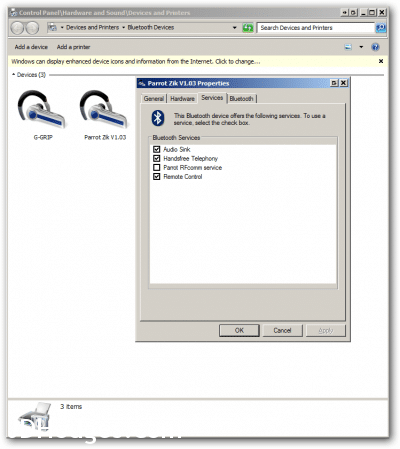
(Click for a larger version of the image)
After doing that, the headphones worked quite well with Windows! 🙂
It would have been nice if everything would have just worked right out of the box but overall I still rate the Zik/Windows compatibility as 4/5 stars because all functions that I need seem to work well (pause/play, forward/back [next/prev], volume up and volume down, etc.)
More info:
Windows 7 Bluetooth problem with Zik (Page 1) — Parrot Zik — Parrot UK Forumhttp://forum.parrot.com/english/viewtopic.php?id=12968There are three parts to the solution:1. Uninstall any Bluetooth software previously installed.2. Remove all previously installed references to Bluetooth devices in the Registry…

When I pair Parrot Zik with Windows 7 I get an error message: – Microsoft Communityhttp://answers.microsoft.com/en-us/windows/forum/windows_7-hardware/when-i-pair-parrot-zik-with-windows-7-i-get-an/2687c615-bc88-4e06-8413-509662109c18Original title: Bluetooth Headphones – Device driver was not successfully installed Hello, I paired Parrot Zik with Windows 7 Home Premium ASUS UX31E. I got error message: Bluetooth Handsfree – Ready
The Well-Tempered Computerhttp://thewelltemperedcomputer.com/HW/Parrot/Parrot.htmWhat happens if an ace designer and a Bluetooth car kit manufacturer joins forces? The Parrot Zik designed by Philippe Starck. Design is often about minimalism. Those elementary…
Top Search Terms:
- parrot zik windows (35)
- parrot zik windows 8 (34)
- parrot zik windows 7 (31)
- parrot zik windows 7 driver (20)
- parrot zik windows 8 driver (17)
- parrot zik windows driver (13)
- parrot zik driver windows 7 (11)
- parrot rfcomm service (11)
- parrot zik for windows (9)
- parrot zik drivers (9)
Struggling to get my new Zik’s to receive sound from my Dell E6520. They pair, but no sound. Laptop has Broadcom OEM bluetooth device.
Please expand your description on how you ‘fixed’ the issue.
1. Disable the Parrot RFcomm service —> what is the ‘service’?
2. Specify that my ‘headset does not have an LCD’ —> specify where?
Thank you very much. Very frustrating.
Hi Alan,
Thank you for your comment.
To access the settings that I described, please
#1
Right click on the blue and white Bluetooth logo in your Windows taskbar notification area (lower righthand portion of your screen).
-or-
Go to Control Panel -> Devices and Printers -> Bluetooth Devices
#2 After that you can view your paired Bluetooth devices. By right clicking on your Parrot Zik you will be able to access the properties of the device.
Then by navigating to the various tabs you can make the aforementioned adjustments (I added a screenshot to the original article to give you a better feel for where things are located).
Please let me know if you have any questions or if this worked for you Alan 🙂
Best regards,
-JD
2. Specify that my ‘headset does not have an LCD’ —> specify where?
I can’t find this option when double click on the device. Can you please show the screen? ( I only see the box to disable the RFcomm service)
Sorry for the late reply, Patrick. That setting was in the Broadcom Bluetooth software shown in the screenshot, not in a plain Windows dialog. If you do not see it, your Bluetooth stack is probably different from the one I was using.
Just wanted to say your tips got my Parrot ZIK headphones to work in Windows 8 (8.1) so just saying THANK YOU!!!
Hi Geof,
Thank you for your nice comment. I am very happy that you are able to use your nice Parrot headphones with Windows 8.1 🙂
Have a great weekend,
-J.D.
PS what kind of music do you like to listen to?
I am kind of an 80s nut, thanks dude!
Love it! 🙂
No go.. I can play a song, but if I change a song it disconnects, and I have to go to control, disconnect, connect again.. and will work again as long as I don’t change a song.
Sucks quite a bit – using Lenovo Carbon X-1 Thinkpad..
Thanks. I called Zik support and got your typical monkey with no IQ doing a websearch. Result = “we don’t support the device for windows.”
At least give help for getting your product to work. Of course people want their bluetooth headphones to work with their laptops. Anyways, Parrot support sucks but this site helped. Now I am listening to audio without the cord. As it should be!! Thanks.
Hi,
I have a question, do you succeed to use the microphone of the parrot zik on the PC ?
Best regards.
Sorry for the late reply, Moreno. I mainly confirmed audio playback, not heavy microphone use. I would not count on the mic side being as painless as the headphone audio on Windows.
Hi JD,
Great tip! I was considring getting my hands on the Parrot Ziks, and was wondering if you are able to use them to make skype calls, or google hangouts. Some people have brought up the issue in the past, but in the image above, I noticed “Handsfree telephony” as a selected option! Does it actually work?
All the best,
Bellamy
Sorry for the late reply, Bellamy. The handsfree telephony box did show up, but I mainly cared about getting normal audio playback working. I would not buy the Ziks specifically for flawless Skype or Hangouts use on Windows without testing first.
Thank yo so much… after struggling to get to the bottom of solving the bluetooth connectivity issue, I finally got it to work on my windows 8.1 !!!
No prob! Thanks for taking the time to comment. 👍
Have a great weekend!!
-J.D.
Hi guys,
Old topic, but I have a Zik 2, and had the same problem.
I solved it by also disabling “Handfree Telephony” ! (thx JDH for the lead ! :D)
Hi T,
Thank you for your comment. I am really glad you were able to get your Zik 2 headphones working!
Have a great week and enjoy those sweet headphones 🙂
-J.D.
Hi there, Just wanted to say thanks so much for this tip. It was driving me nuts not having the Zik’s working with Skyoe but this was simple fix and worked immediately. Awesome!
Hi Albert,
Thank you for your nice comment. I am very glad the tip worked well for you!
Best regards,
-J.D.
Oh, and I should have said they were Zik 2.0 and on Windows 7 (64 bit). Thanks again!
Hi, Can’t figure out how to get sound to work to my wife’s Parrot Ziks’ from an Acer Laptop. Not sure what the cure is.Help…!
Sorry for the late reply, Rich. The two key changes from the post were disabling the Parrot RFcomm service and setting the headset as not having an LCD. If you do not see those options, the Acer’s Bluetooth stack may be the bigger problem.
Well I have the 2.0’s and I’m on windows 10. I cant find a solution anywhere on the internet and to top it off it seems as if they headphones won’t connect to the app… 🙁 any suggestions?
Sorry for the late reply, Shoaib. My post was for the older Zik setup on Windows 7 and 8, so I am not sure how well it carries over to Zik 2.0 on Windows 10. If the app is failing too, that sounds broader than the simple Bluetooth setting fix from my post.
For me just the first part was enough.
Disable the Parrot RFcomm service – which I did in the properties.
Thanks a ton.
Hi Umangam
Thank you for your comment. I am very glad you were able to get your Parrot Zik headphones working with Windows 🙂
Were you using Windows 7,8 or 10?
Best regards,
-J.D.
Unfortunately, this tip did not work for me. Parrot Zik V1.10, Windows 7 Professional on a Dell M6800, tried all eight different combinations of enable/disable of “Handsfree Telephony”, “Parrot RFcomm service” and “Remote Control” (I figured I only needed Audio Sink).
Occasionally when doing enable/disable the headset will beep or blurb, as if it was connecting, but…
…I always get “Configuring Bluetooth Services” pop up, stay there for some 30 seconds, then ending in the same error – “Error connecting with headset. Please retry this operation”. The Zik has no problem connecting with iPhone and Android smartphone. It just doesn’t do Windows.
Quite frustrating, I’ll say.
Hello, I am attempting to pair my Parrot Zik 3 headset up with laptop but cannot locate the drivers. The Parrot support team was zero help, did anyone else have this issue and was able to resolve? Thanks!
Sorry for the late reply, Jennifer. I did not need a separate Parrot audio driver on my machine, just the Bluetooth pairing and the service setting changes in the post. If your laptop shows no usable services for the headset, I would look hard at the laptop’s Bluetooth driver first.
When I go to Services, I don’t see a thing there, looks like it can’t fetch the services available. Any idea why ?
Thanks!
Sorry for the late reply, Fred. If the Services tab is empty, Windows is not enumerating the headset correctly, so the fix in my post cannot really apply yet. I would remove the device, reinstall the Bluetooth driver, reboot, and pair again.
Hi all,
mic is not working on Windows 10 for me. Is it working for anyone?
Sorry for the late reply, Sebastian. I am not sure the mic side was ever as reliable as the audio playback side on Windows. The part I had working well was the headphone audio after the service changes.
I’m trying to connect my Parrot Zik, to the windows 7
but when I click properties of my Parrot Zik in devices and printers
I see Services section is empty, Hardware section as well, I don’t see any options over there
Please suggest what can I do, install some drivers or what?
thank you
Sorry for the late reply, SSR. If both Services and Hardware are empty, that points to a Bluetooth stack issue on the PC more than a Parrot setting. I would remove the headset, reinstall or update the Bluetooth driver, and pair it again before worrying about Parrot-specific drivers.
You just saved me so many restarts on my computer! Omg, feel love for you man!
No problem! Glad I could help 👍😂