Corsair Galleon 100 SD: Left Shift Key Triggers Caps Lock (Fix Available)
I recently picked up the Corsair Galleon 100 SD, Corsair’s new mechanical gaming keyboard with integrated Stream Deck LCD keys. I covered the full setup and first impressions in my earlier review. On paper, it’s a compelling product: Cherry MX-style switches, per-key RGB, and Stream Deck functionality built right into the keyboard. In practice, mine shipped with a defect that made it nearly unusable for serious work.
Update (April 7, 2026)
Corsair has published public beta firmware v1.4.73 for the Galleon 100 SD that targets the left Shift / Caps Lock defect described below. I updated from v1.3.70 to v1.4.73 on April 7, and so far, the bug appears to be fixed on my unit. Manual update steps and screenshots are in the Firmware Fix section below. Thanks to Paul B in the comments for flagging Corsair’s beta firmware page.
Firmware Fix (April 2026)
On April 6, 2026, reader Paul B posted in the comments that Corsair had quietly published a public beta firmware (v1.4.73) for the Galleon 100 SD. The release notes specifically mention the left Shift / Caps Lock issue.
This is a manual firmware update. Unlike the normal auto-detect flow in the Corsair Firmware Update Utility, you need to download the firmware file from Corsair’s support page and upload it yourself. Here is the process:
- Download the beta firmware
.binfile from Corsair’s Galleon 100 SD Beta Firmware page. - Go to the Corsair Firmware Update Utility in Chrome and connect your Galleon 100 SD.
- Click Manual Update (not the normal Update button).
- Select the downloaded
.binfile. - Click Update and wait. The process takes about 2 minutes and involves two steps: uploading the firmware, then flashing it to the device. Do not close the browser or unplug the keyboard.
- You should see a green “Update successful” confirmation when it is done.
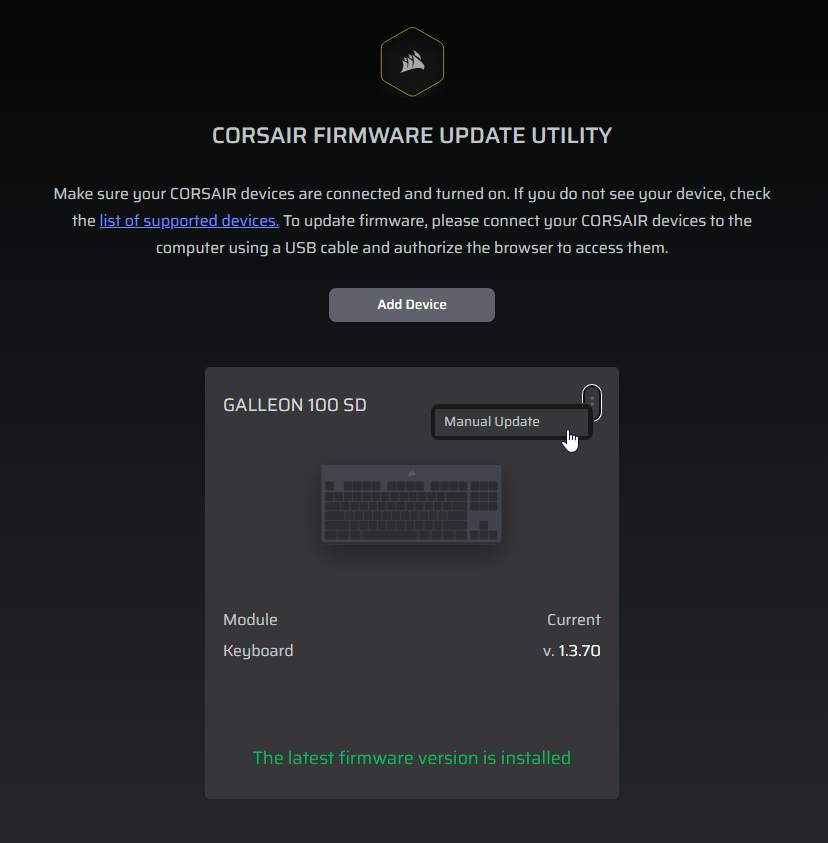
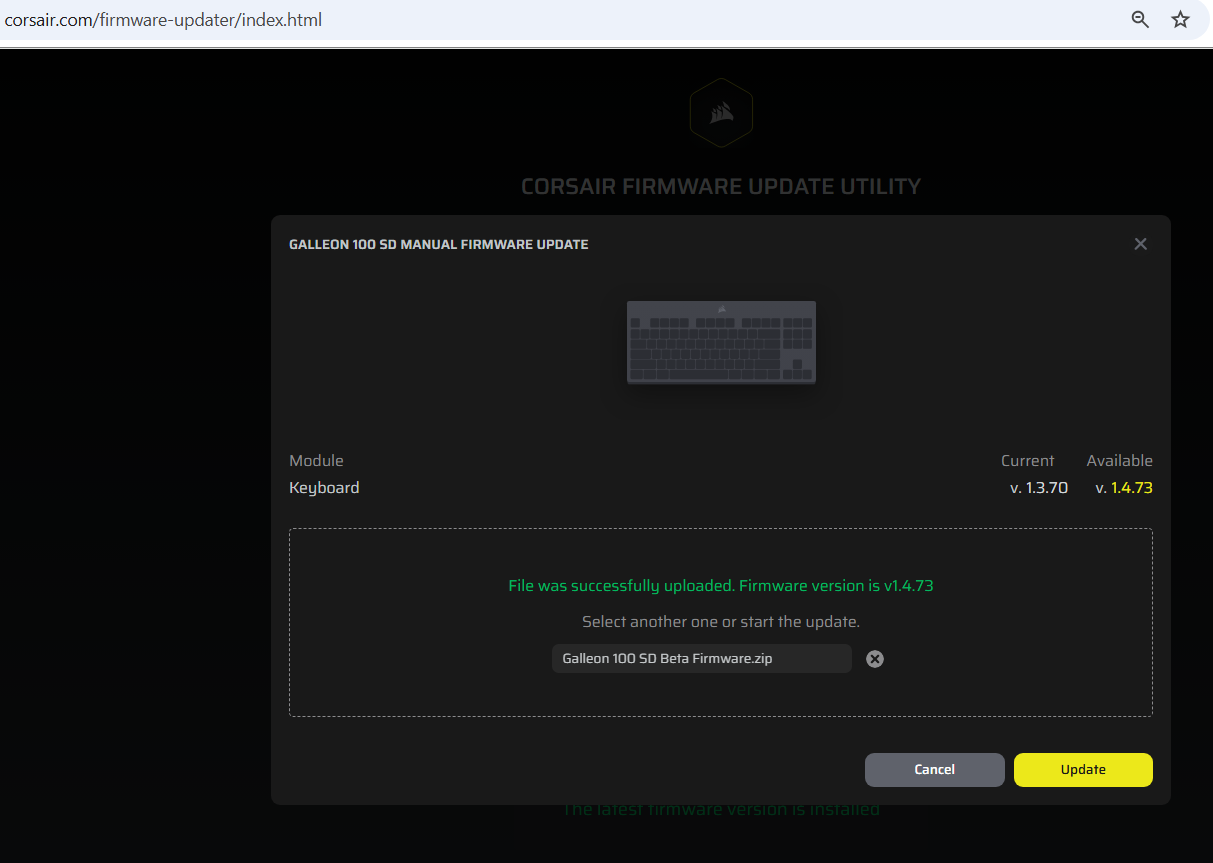
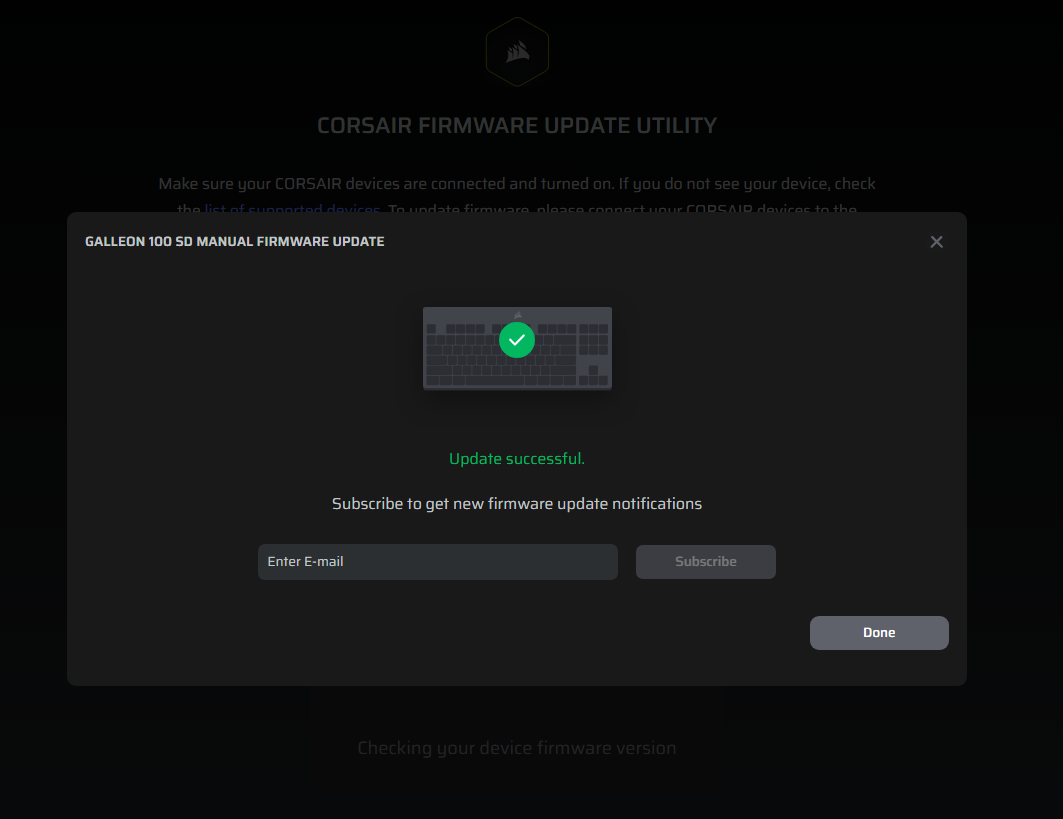
After installing the update, I tested the keyboard extensively and the left Shift / Caps Lock issue has not reappeared. This is on the same replacement unit that was still triggering the defect as recently as April 5. The firmware update appears to have resolved it.
Important notes:
- This is labeled as public beta firmware. Corsair has not promoted it to a stable release yet.
- My testing is limited to one unit over a short period. If the issue returns, I will update this post.
- If the firmware update does not fix the problem on your unit, the RMA / return path is still available.
The Problem
Most every time I pressed the left Shift key, Caps Lock would activate. You can imagine how quickly that derails any kind of productive typing, coding, or gaming. Tab and other keys in the row seem to also be somewhat affected.
What I Tried
Before filing a return, I wanted to rule out every possible software and driver explanation. Here’s everything I tested:
- Keyboard Tester — Pressing left Shift clearly showed Caps Lock firing alongside it. No ambiguity.
- Windows On-Screen Keyboard — Same result. The OS was receiving a Caps Lock signal every time left Shift was pressed.
- iCUE software — Updated to the latest version and reset the keyboard profile. No change.
- Disabled Caps Lock — Tried remapping Caps Lock to disabled/no action in key remapping. The defect persisted — Caps Lock still toggled on frequently on a left Shift press.
- Reassigned keys — Attempted various key reassignments. No lasting effect on the behavior.
- Full keyboard reset — Factory reset the keyboard to default settings. Still broken.
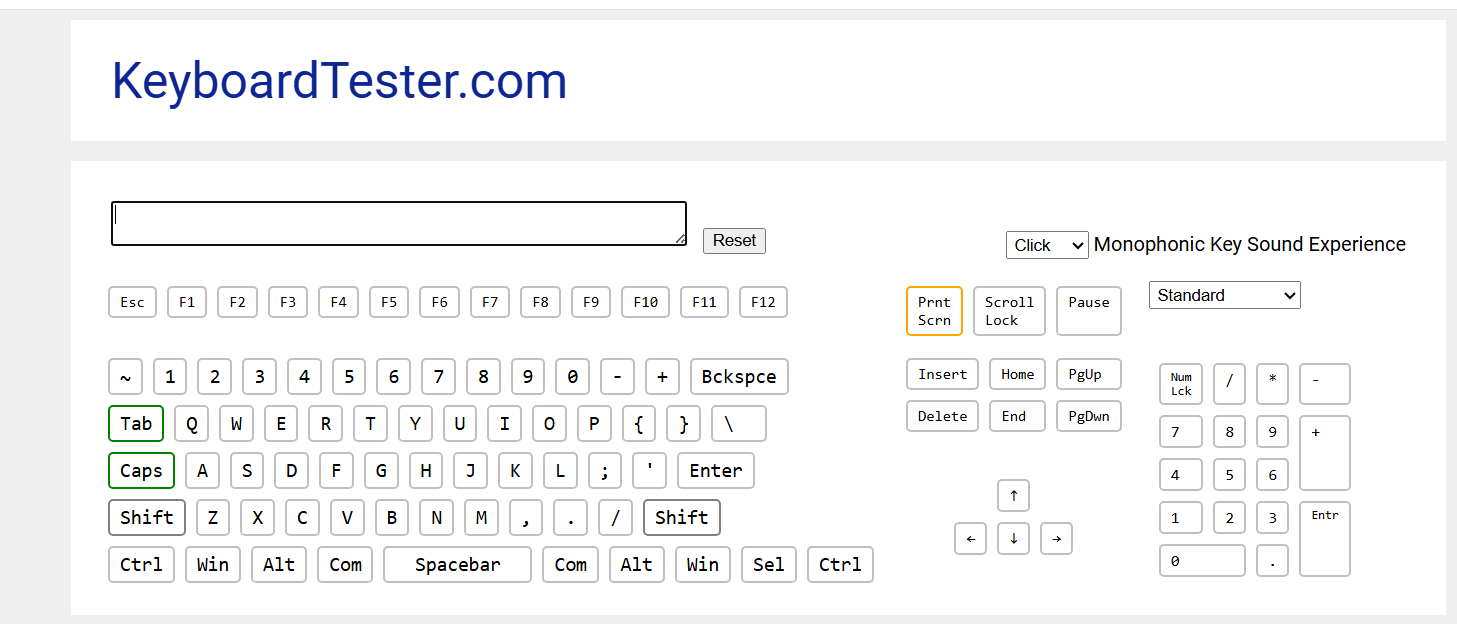
The screenshot above shows both Shift and Caps Lock registering simultaneously from a single left Shift press. This confirmed it’s a hardware-level issue, not a driver or configuration problem.
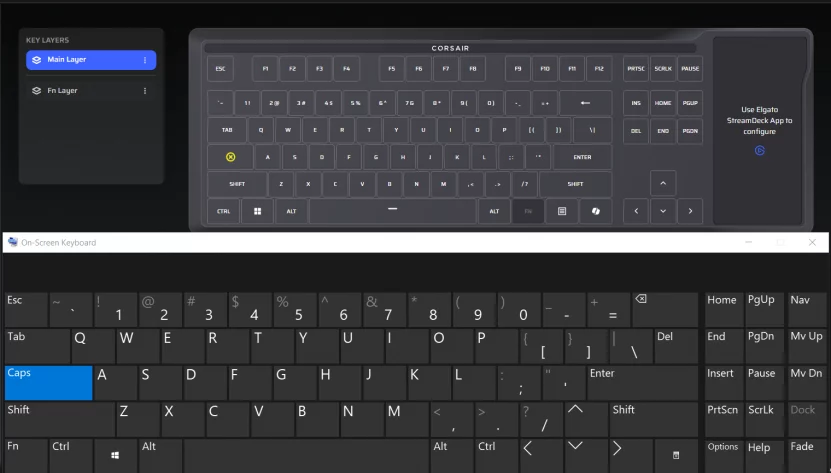
The CAPS key has been disabled, yet the CAPSLOCK has still been triggered (see on screen keyboard)
This is on my *replacement* keyboard
I’m Not the Only One
A quick search turned up other users on Reddit reporting the exact same behavior on the Galleon 100 SD. Left Shift triggering Caps Lock appears to be a defect affecting at least some units in this product line.
The Support Experience
Corsair’s and Elgato (since Corair owns them now) support process routes you through an AI chatbot:
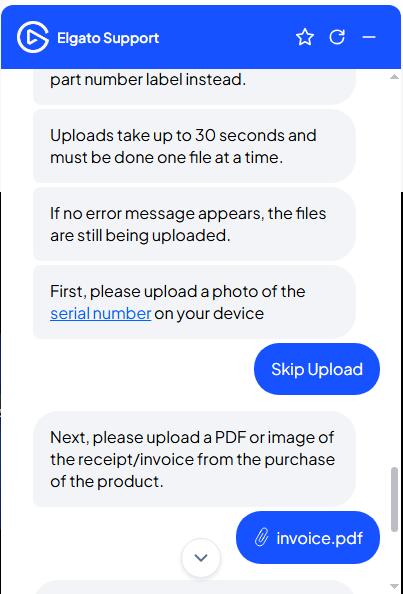
The bot correctly identified that the device likely needed a warranty exchange, but the flow required filling out a multi-step form inline in the chat window: name, contact info, shipping address, part number, serial number, photo uploads, and a copy of your invoice.
The photo upload process deserves special mention: uploads reportedly take up to 30 seconds per file, must be done one at a time, and the only confirmation that an upload is still in progress is the absence of an error message. Not exactly confidence-inspiring UX.
That said, the form did eventually go through and generate a support ticket. We’ll see how the replacement process goes.
Workaround: Disable Caps Lock Entirely in Windows
If you’re dealing with this issue and haven’t tried the firmware update yet, start there. If you need a temporary workaround while waiting, you can disable Caps Lock at the OS level. Note that this doesn’t fix the underlying defect; it just prevents Caps Lock from toggling.
Option A: Microsoft PowerToys (Easiest)
Install PowerToys from the Microsoft Store or GitHub. Open Settings, go to Keyboard Manager → Remap a key, and set Caps Lock to Disable. Done.
The catch: PowerToys has to be running for the remap to work, and it won’t apply at the Windows login screen.
Option B: Registry Scancode Map (System-Level)
For a system-level fix that works everywhere, including the login screen, with no background app required:
- Open Registry Editor and navigate to:
HKEY_LOCAL_MACHINESYSTEMCurrentControlSetControlKeyboard Layout - Create a new Binary Value named
Scancode Map - Set the value data to:
00 00 00 00 00 00 00 00 02 00 00 00 00 00 3A 00 00 00 00 00 - Reboot to apply.
This maps the Caps Lock scancode (0x3A) to nothing. To undo it later, just delete the Scancode Map value and reboot.
Alternative Keyboards Worth Considering
If you’re returning yours or just shopping for alternatives, here are a few solid options in the premium mechanical keyboard space:
- Corsair K100 RGB — Corsair’s own flagship. No Stream Deck integration, but rock-solid build quality and proven reliability.
- Razer BlackWidow V4 — Full-size with dedicated macro keys and Razer’s Synapse software for customization.
- SteelSeries Apex Pro — Magnetic switches with per-key actuation point adjustment and a built-in OLED display.
If the Stream Deck LCD keys are the main draw, consider pairing a standalone Stream Deck with a dedicated mechanical gaming keyboard. You get the same functionality without the single-point-of-failure risk.
Bottom Line
If your Galleon 100 SD has the left Shift / Caps Lock defect, try the beta firmware update (v1.4.73 first. It resolved the issue on my unit after weeks of frustration and a failed RMA replacement.
If the firmware update doesn’t fix it for you, Corsair’s warranty support is available. Return it or open a ticket. The workarounds above (PowerToys or Registry) can keep you productive in the meantime.
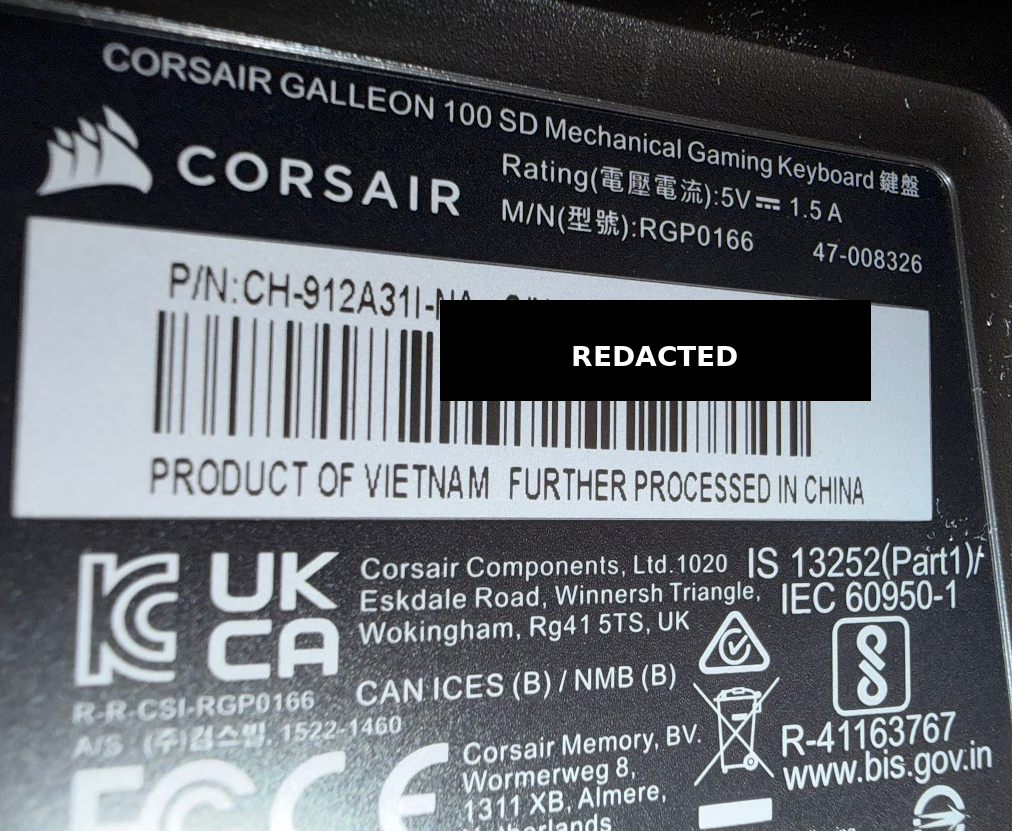
Part Number: CH-912A31I-NA
If you’ve tried the firmware update, drop a comment below and let others know whether it worked on your unit. The more data points we have, the better.
just received my RMA for the same issue payed $350 for the advanced rma the new replacement has the same exact issue
Ohh no! That is NOT good news 😢 I am so sorry to hear that about your Galleons!
I just RMAed mine yesterday (boxed it up and dropped it off at the UPS store with the label that Corsair provided). Crossing my fingers that the replacement works 🤞
What is your next step??
I REALLY hope that Corsair gets this under control b/c it is sadly very unacceptable for an EXPENSIVE keyboard! (especially for the replacement to fail as well)
Again, sorry for all the trouble you’ve had but thanks for warning me (and other readers),
-J.D.
i dont even know what the next step would be. im down $700 for a keyboard orig. purchase and now the advanced RMA. I reallly want this keyboard to work. mainly for the stream deck. doesn’t look like they have one that really compares to the galleon stream deck
For sure. I feel like at this point they should give you a free stream deck mini just for the hassle 🙁
I’m sure its a bummer for them as well having all these come back, but its crazy that all these passed QA since the issue is right out of the box.
I’ll definitely let you know what happens with my replacement.
Thanks for the update and I hope everything works out!
-J.D.
PS I purchased mine directly from Elgato (which is basically directly from Corsair b/c I guess they bought Elgato). And they DO use the same support system and the RMA process etc.
I had a different issue, apparently the copilot button can’t be remapped correctly (it’s the button that replaces right control on the keyboard layout) under the hood this key emits the Win + Shift + F23 keyevent combo.
After rebinding it to right control in the web hub app (corsair’s app intended for the Galleon 100 SD) it still emits the wrong keyevents in certain circumstances, like when holding right shift and hitting the newly bound right control key.
For me this still causes the left shift and windows/meta keys to fire erroneously.
If you get a chance to test this on your unit I would really appreciate that.
That’s a really interesting find, R.S. I hadn’t dug into the Copilot button behavior since I don’t use it as Right Control, but the fact that it emits Win+Shift+F23 under the hood and doesn’t fully rebind through the web hub app is concerning. Maybe suggests the remapping happens at the software layer while the underlying scancodes still bleed through in certain modifier combinations ?? which would explain why you’re getting phantom Left Shift and Windows/Meta key events. Or maybe it is some fluke like the apparent hardware issue I (and others) have experienced.
I’ll definitely try to reproduce this on my unit (once the replacement arrives) and update the post if I can confirm it. In the meantime, you might try intercepting the key at the OS level with PowerToys Keyboard Manager or AutoHotkey to see if a system-level remap overrides the firmware behavior more reliably than the web hub does. Thanks for the detailed report, this is exactly the kind of thing other buyers need to know about!
I think this could be a GREAT keyboard if all the bugs get ironed out.
Thanks for commenting!
Yep, trying to figure out if it’s a one off issue with my keyboard or maybe a more systemic firmware issue, I am currently using PowerToys keyboard manager and remapping the shortcut Win + Shift + F23 to Ctrl which kind of works with some caveats.
Looking forward to hearing if you are able to reproduce that on your end.
Thanks R.S. for sharing your workaround with PowerToys keyboard manager. I’m glad you’re finding a way to make it work, even if it’s not a perfect solution. I’ll keep an eye out for any similar issues on my end, but so far the firmware update to v1.4.75 seems to have fixed the left Shift / Caps Lock problem for me 🙏.
Have a great week!
-J.D.
Mine also has it. Its very annoying >.<
Sorry to hear you’re dealing with it too, JohanClarke. It really is frustrating,especially on a keyboard at this price point. Hopefully they will have this resolved ASAP, Im still awaiting my replacement. Thanks for commenting!
Just had to return mine, did a lot of looking around and seems that this defect is present in all corsair galleon 100 SD shipped out this March.
Not only was it a problem with shift and caps, but also caps and tab, tab and grave, grave and esc, w and 2, esc and = ( for some reason esc and =… haha, feels kind of crazy since they are the entire PCB apart). I thought it was just caps and shift so i disabled capslock in registry but genuinely who should have to disable an entire key on their keyboard just for it to partially function.
RMA replacement did nothing to fix it, and it is currently being shipped back for a return.
Super bummer! I loved the concept of a keyboard and SD in one- not to mention the SD part is like the streamdeck + but arguably a bit better since there is a larger screen, and less annoying function nobs…
Thanks for sharing your experience, and I am so sorry to hear that even your RMA replacement was a dud!
Like you said, some of those key issues are particularly bizarre since they are physically miles apart on the board. 🤯 It really is a shame because the integrated screen is such a great concept compared to a standalone unit. I completely agree that no one should have to mess with registry edits just to make a brand new keyboard behave.
My replacement keyboard shipped out yesterday, I am HOPING it is ok when it gets here.
The one silver lining for me that I have a little 6-key Stream Deck that a buddy bought me years ago, and the Galleon made me revisit all the cool options that Steam Deck offers (like live RAM usage, CPU usage etc) when I decked out my Gallenon 100 SD keys… (and then sadly had to return the keyboard). BUT I am finding a new love for my old Stream Deck and it is serving me really well. In the future I’ll probably just stick to reliable keyboard + separate reliable Stream Deck 🤷♂️
I haven’t seen any notices or stop sales about the Galleon 100 SD, but it seems like that is definitely something that should happen since so many people are experiencing the issues!
Thanks for visiting and please keep us posted on what you end up doing. I feel your pain!
-J.D.
Corsair just got back to me about the 2nd keyboard. they advised me to hold on to it and watch social media for a firmware update. lol. I feel like this is more of a hardware issue. i feel like i would be waiting for something that will never come. Just crazy to me that they would expect me to hold on to a $350 keyboard that doesn’t work instead of return it. still waiting on the one i bought off of ebay to see if that works.
That’s really frustrating, James. It certainly SEEMS like a hardware issue, but it would be really nice (for everyone) if it was firmware resolvable… Still a little disconcerting that Corsair is suggesting you hold on to a $350 keyboard that doesn’t work, and wait for a potential firmware update that may never come 🤔.
I hope the one you bought off eBay works out for you, and thanks for keeping us posted. My replacement should arrive soon and I am VERY hopeful that it works. 🙏
-J.D.
PS I also hope Corsair shares some public info about the issue and the cause(s).
I REALLY wanted to like this keyboard. It looks amazing and having a built in stream deck would add so much functionality. In fact, I wanted to like it SO much, that I tried to purchase it twice.
The first keyboard I received had an issue with one of the stream deck keys. It would not respond when pressed. Just one of the keys wouldnt work.
To Amazons credit, they shipped me out a new one and it arrived the next day. I tested the stream deck keys, and they all worked. GREAT! I thought I had a functioning keyboard!
That is until I started actually typing. Id write out a sentence and randomly all of my letters were capitalized. I thought maybe being a new keyboard, I was accidently hitting caps lock instead of shift. That is until I very puposly made sure caps lock was of, I pressed and held down shift, caps lock turned on, and I types a lowercase letter.
I googled for issues regaridng the shift key for this keyboard and found many other users complaining of the same issue. One person mentioned they could hold down the shift button and see the caps lock randomly turning on and off repeatedly. I tested and that was happening for me to.
Another user mentioned they noticed sometimes if they press tab, it will enter a tolde “`” I opened notepad and held down the tab button. Sure enough, between some of the tabs, it would place a random ` symbol.
Unfortunately I’ll have to give up on this keyboard, return it, and go with something else. Huge bummer. As I said, I really wanted it, but 2 out of 2 boards I received were defective.
Oh no, Brian, I’m so sorry to hear that you’ve had such a frustrating experience with the Corsair Galleon 100 SD 😞. It’s really disappointing that both keyboards you received had issues, especially since you were really looking forward to using the built-in Stream Deck feature. I can understand why you’d want to give up on it, especially with the random capitalization and tab issues you’ve been experiencing. Thanks for sharing your story, and I hope you find a better keyboard that meets your needs. 💯
PS I’m still waiting on my RMA replacement and crossing my fingers 🤞
Have a great week!
-J.D.
Hello, chalk up another keyboard with the shift/caps lock defect. I have until April 12th to return or RMA. Looking at how many folks are having the same issue, I’m likely going to return, especially since RMA replacements seem to be having the same problem. I’m holding out that there’s a magic fix this week coming up, but if not, then unfortunately I’m likely gonna return. 🙁 I want to love this keyboard, but I won’t pay for the ‘privilege’ of beta testing and troubleshooting for Corsair.
Please keep us posted when you get your replacement!
Thanks for the update, Paul! Sorry to hear that your Galleon has the issue as well 🙁
On bit of (potentially) good news, my RMA replacement came in and it is much better. I’m still thoroughly testing it, but so far only once have I noticed the dreaded capslock come on (and it’s so hard to tell b/c that key is pretty easy to tap accidentally. I have disabled CAPLOCKS via the kb config utility to see if capslock gets trigged (and it has ONE time so far and I have used the Windows on-screen-keyboard to turn the capslock back off) 😓 Well, make that twice. And the crazy thing is that it seemed to trigger from a key on the right hand side of the KB this time 🙁
I will definitely post if anything changes, but so far it seem much better but still afflicted 🙏 I am also reducing the KB polling rate to see if that helps 🤷♂️
Best regards,
-J.D.
PS the first kb it seemed like a physical defect, this one it truly seems like it could be software related. I am on the current latest firmware v.1.3.70
PSS and it just did it again even with the slower polling rate 😭
Well dang. Thanks for the update, however unfortunate. I’m going to hold on to it for the next week in the hopes that there’s a fix announced, whether it be hardware or software.
I’m thinking it’s gotta be at least partially hardware-related at this point. I’ve tried the keyboard on my main gaming PC, and older Surface Pro laptop, a portable gaming PC (ROG Ally), and even a Mac Mini. All had the issue (although seemingly a lot less prevalent on the Mac hardware?). But even if it is hardware, Corsair may be able to whip up a firmware that mitigates it. Time will tell.
In any case, barring any breakthroughs, mine is probably going to be returned. Tho I’ll likely repurchase when the issue is sorted.
Thanks again for the reply!
Same to you, good sir!
Crossing my fingers for a firmware update ASAP, but if not will be returning my RMAed one as well since it has the issue.
I appreciate you sharing your experiences and especially the tests with multiple machines!
Good news! I just made a post on Reddit, but it looks like there’s a beta firmware update that seems to have fixed the issue! I’ve only been using for about an hour now, but so far, so good!!
You can find it here on the Corsair help pages: https://help.corsair.com/hc/en-us/articles/45463989592721-Galleon-100-SD-Beta-Firmware
That is FANTASTIC news! I’ll be checking it out today and will definitely update this post if it works 👍👍 Thanks for the great news!
Paul, thank you for flagging this. I downloaded and installed the v1.4.75 beta firmware today and the left Shift / Caps Lock issue has not reappeared since the update. This is on my replacement unit that was still triggering the defect as recently as April 6th.
I have updated the post with a full walkthrough and screenshots of the manual firmware update process in case it helps others. Fingers crossed it holds up long term, but so far so good.
Awesome! Glad I could help! I just happened to come across the Corsair support blog post that I linked to. (You’d think they’d advertise it better… )
In any case, I’ve been trouble-free myself since the install. It’s only been a day, but it’s looking like the firmware thankfully resolved the issue.
Now back to customizing the Stream Deck keys! 🙂
Heck yeah! 💪💪
Same here, enjoying a trouble free keyboard (finally, lol)
Have a great night and thanks again!
THANK THE LORD!!!! and yes i actually pushed caps lock to write that. it was not “accidental” I am so happy that I can finally. stop worrying about the issues and enjoy this keyboard. Not going to lie it was a nightmare of an experience but FINALLY…….. My dream keyboard is fully functional.
Amen! 😉 I’m so glad to hear that the firmware update has resolved the issue for you! It’s great that you can now enjoy your dream keyboard without worrying about the left Shift key triggering Caps Lock (or any of the other weird key issues). Have a great week and enjoy that keyboard!
-J.D.
I’m here to say, I had that exact same issue and got the RMA keyboard in, only for it to have the exact same issue. I went into my email today to look for info on the return process for this one and saw an email about a firmware update. It updated to 1.4.73 and so far the issue has been fixed. I’ve typed this whole thing so far with a keyboard that had the issue yesterday, and so far it hasn’t reappeared. I’m hoping it stays that way. I found this article because I was looking for detailed release notes or something to confirm. Guess I can at least wait a few days before returning this one. I hope it’s fixed, I really don’t want to return this keyboard. The streamdeck is too fun. But hey, I got through this whole comment without issue.
Thanks for sharing your experience with the Corsair Galleon 100 SD! I’m glad to hear that the firmware update to 1.4.73 seems to have fixed the issue for you, and it’s great that you’ve been able to use the keyboard without any problems so far
Fingers crossed that the fix will be permanent for you 🤞.
(so far mine is going strong multiple days after the firmware update 💪)
Have a great week!
-J.D.
JD you are my GOAT FRFR. FIxed my issue.
Thanks David! I’m glad to hear that the fix worked for you😊. I appreciate your kind words and I’m happy that I could help, have a great day!
-J.D.
there is no 1.4.75 firmware at that link, just 1.4.73 which is same as releases
Hey Alex,
Thank you for the correction! You are correct, 1.4.73 is the proper firmware version. I had that .75 typo in there and it has been fixed now. 👍👍
Thanks again and have a great rest of the week!
-J.D.