Claude Code “Prompt Cache Has Likely Expired” (What It Means)
Summary: Claude Code’s “prompt cache has likely expired” notice means your session sat idle longer than the prompt cache lasts. As of Sep 2026, by default, that’s 1 hour on Pro or Max while you’re within your included usage, and 5 minutes if you’re using an API key, a cloud provider, or usage credits. Your conversation is still there, but your next message will likely re-process all of it once. That turn can be slower and cost you a LOT more than a normal one, either in usage or API charges. Keep going if you need the history, or run /clear if you’re switching to something new.
Verified on Claude Code 2.1.269 in VS Code, September 12, 2026.
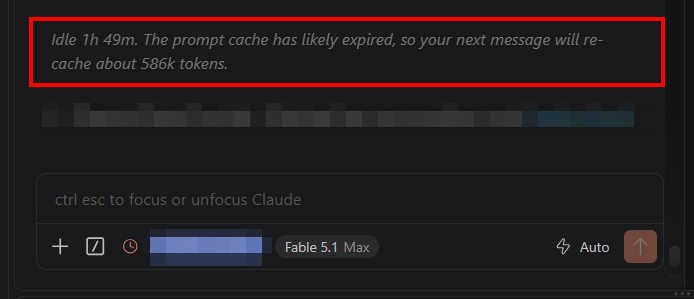
What exactly does “prompt cache has likely expired” mean?
Every turn, Claude Code deals with your whole conversation. Prompt caching lets the API reuse what it already processed, at a much cheaper rate rather than resending everything.
The notice shows up when you reopen a session in the panel after its cache timer has run out. The (in this case VS Code) extension can’t see Anthropic’s cache, so it keeps its own timer from your last request. That timer uses the cache lifetime the API reported. That’s why it says “likely.”
The token number is the input size of your last request, which is basically the whole conversation. My other session showed 282k after sitting for six days when I finally came back for it. If you want to see how big a session is, the /context command breaks it down.

Table: how long does Claude Code’s prompt cache last?
As of Sep 2026, the API only offers two cache lifetimes, 5 minutes or 1 hour. Here’s what Claude Code uses for your main conversation:
| How you’re using Claude Code | Default lifetime |
|---|---|
| Pro or Max, within included usage | 1 hour |
| Past plan limits, using usage credits | 5 minutes |
| API key or cloud provider | 5 minutes |
Every cache hit resets the timer, so it stays warm while you keep working. I checked three of my Max sessions from today: every cache write was a 1-hour write. So at “Idle 1h 49m,” I believe mine had been expired for about 49 minutes.
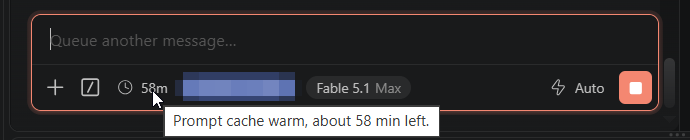
In VS Code, the little clock in the footer (left of the model name) counts down the minutes while the cache is warm. Once it expires, the clock turns red and the minutes disappear. In the terminal, /usage shows the same warm or cold status.
Does re-caching cost more?
Yes, a lot more. At Fable 5.1 if I were using API list prices, my 586k tokens would cost about $0.15 to re-read from a warm cache. Re-caching them after expiry runs about $11.72 at the 1-hour rate ($7.33 at the 5-minute rate). Ouch!!!! 😬 It’s a one-time hit (plus your new message and the reply), and then it’s cached again.
On Pro or Max there’s no per-token bill while you’re within your included usage, but the re-cache still counts against your usage limits. Resume a Pro or Max session that’s over 100,000 tokens and inactive for more than about an hour, and Claude Code says: “Resuming the full session will consume a substantial portion of your usage limits. We recommend resuming from a summary.”
What should I do when I see it?
- Just send your message only if you still need the full conversation and it’s not too spendy on usage or credits. You pay the re-cache once, then it’s warm again and you keep going.
- Run
/clearif you’re moving on to something unrelated. A fresh start costs nothing. Or write a quick handoff if you only need the highlights (that’s what I frequently do). - Run
/compactif you’ll keep working in this session for a while. Later turns carry a short summary instead of the full history. (more info below in the heads up)
/compact doesn’t dodge the big re-read on an expired cache. The summary request still has to process the whole history once, uncached, so the savings only show up on the turns after that.
How do I avoid it next time?
About to step away from a huge session? Run /compact while that footer clock is still warm. The docs say compacting on a warm cache costs a fraction of what the context size suggests.
On an API key, a cloud provider, or usage credits, as of now you can stretch the cache to an hour with "promptCacheTtl": "1h" in your Claude Code settings (or CLAUDE_CODE_PROMPT_CACHE_TTL=1h). The 1-hour writes cost 2x base input instead of 1.25x, so it only pays off if your breaks often run longer than 5 minutes but shorter than an hour.
Bottom Line
That 586k notice was a heads-up about usage, and my work was all still there but it would be pretty wasteful to continue. Next time for a session that big, I’d rather glance at the clock and compact before a break than eat the full re-cache when I get back. Hopefully this saves you a big re-cache or two!! 💰🙏
Note: if you have any tips/tricks/concerns, feel free to drop me a comment! I always appreciate feedback and tips from cool readers such as yourself! ✅
Sources and Further Reading
- Claude Code prompt caching docs
- Claude Code costs docs
- Claude Code sessions docs
- Claude API pricing docs
Information in this post was accurate when published on September 12, 2026 and was verified on Claude Code 2.1.269. Software changes fast, so if something here doesn’t match what you’re seeing, drop a comment and I’ll update it.