Tag Archives: anthropic

Claude Code /buddy How to Preview, Hatch, and Reroll Your Terminal Pet

TL;DR: Claude Code v2.1.89 added /buddy, a virtual pet companion in your terminal. Your buddy’s body is deterministically generated from your account, and the personality generates permanently the first time you hatch it. Preview yours first with npx any-buddy current, but install Bun before you do (if you don’t already have it) Is This an April Fools Joke? I first noticed /buddy the least trustworthy way possible, by seeing it appear in Claude Code’s slash-command autocomplete on April 1. 😜

Claude AI Usage Limits: What Changed and How to Make Them Last

TL;DR: Claude’s usage limits feel tighter in March 2026 because they are. The short version: Anthropic has more demand than GPU capacity right now. Millions of new users arrived as word got around about how good Claude is and especially after the OpenAI Pentagon boycott, the off-peak 2x promotion ends March 28, and multiple Max subscribers report usage meters jumping from under 50% to 100% on single prompts. Below: what the limits actually are, why they’re worse right now, and

MCP Server Token Costs in Claude Code: Full Breakdown

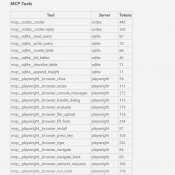
TL;DR: Every MCP server you connect to Claude Code silently costs tokens on every single message, even when idle. A typical 4-server setup runs about 7,000 tokens of overhead. Heavy setups with 5+ servers can burn 50,000+ tokens before you type your first prompt. Here’s the exact cost of every tool across four common MCP servers. Why MCP Servers Cost Tokens MCP (Model Context Protocol) servers let Claude Code interact with external tools: browse the web, query databases, send emails,

Claude Code /context Command: See Exactly Where Your Tokens Go

TL;DR: Type /context in Claude Code to see a full breakdown of where your context window tokens are being spent. It shows system overhead, MCP tools, memory files, conversation history, and free space. Use it to find bloated MCP servers, oversized CLAUDE.md files, and know when to run /compact. What Is /context? If you’ve ever had a Claude Code session start strong and then slowly degrade, the context window is probably the reason. Every message you send carries invisible overhead:

Claude Reached Its Tool-Use Limit for This Turn: What It Means and How to Fix It

TL;DR: This message means Claude hit its per-turn cap on tool calls (around 10-20 actions like web searches, file reads, or connected service requests). Click “Continue” and it picks up right where it left off. No work is lost. 👍 What Does “Claude Reached Its Tool-Use Limit” Mean? If you use Claude with any connected tools (Gmail, Google Drive, web search, MCP servers, code execution, etc.) you may have seen this banner pop up mid-conversation: “Claude reached its tool-use limit

How to Drag Files into Claude Code in VS Code (Paste with Context)

TL;DR: In the Claude Code VS Code extension, hold Shift while dragging a file from the Explorer panel into the Claude Code prompt box. This attaches the file as context so Claude can read and reference it directly. Without Shift, VS Code just opens the file in a new tab. Hold Shift and drag a file into the prompt. The “Hold Shift while dragging to drop files into Claude Code” tooltip confirms you’re doing it right. What Is Paste with

How to Change Claude Code Effort Levels in VS Code (/effort)

TL;DR: In the Claude Code VS Code extension, type /effort in the prompt box and press Enter to cycle through four reasoning levels: Low, Medium, High, and Max. Each level controls how deeply Claude thinks, how many tool calls it makes, and how many tokens it burns. On Windows, it’s just /effort, Enter, done. The effort level picker in Claude Code for VS Code. This shows Max with all four dots lit up. What Are Effort Levels? Effort levels control