Chuwi MiniBook X vs MacBook Neo: The $399 Laptop That Refuses to Throttle
Disclosure: I purchased this Chuwi MiniBook X with my own money (~$399 from Amazon). See also: my MacBook Neo review and full Neo benchmark analysis.
The $399 Laptop That Refuses to Throttle
In my MacBook Neo review, I wrote that after 60 seconds of sustained CPU load, the Neo “drops to phone-class performance that a $400 Windows laptop can match.” A reader could reasonably wonder: does a $400 Windows laptop actually deliver? I had a Chuwi MiniBook X on hand that I bought in December 2023 for less than $400 on Amazon, and it seemed like the perfect quick comparison project.
The answer is more interesting than a simple yes or no. The Chuwi obviously cannot touch the Neo’s burst performance. It never will and it’s not particularly close. But it can do something the Neo cannot: sustain its performance under load. After five minutes of all-core stress, the Chuwi’s Geekbench 6 score dropped ~9%. The Neo’s dropped ~87%. That is not a rounding error. That is a fundamentally different thermal architecture, and it changes which machine wins depending heavily on how long your workload runs. If you also throw in 4GB more RAM than the Neo and a surprisingly capable NVMe SSD, you get some surprising results. Read on for the details…
What Is the Chuwi MiniBook X?
The MiniBook X is a 10.5-inch 2-in-1 convertible with an Intel N100 processor, 12GB of LPDDR5 RAM, a 512GB NVMe SSD, and a 1920×1200 touchscreen. It weighs about two pounds, has a backlit keyboard, and runs Windows 11 Home. The particular model I have is now listed at about $399 from ChuwiDirect (I paid $390 in December 2023 on sale) and there is actually a successor out now that is even more compelling (N150 instead of N100) and can be purchased for $379 as of this writing. (the pricing may seem confusing, but that is Amazon for you… where sometimes older products are marked up by 3rd party sellers and new products can be quite inexpensive)
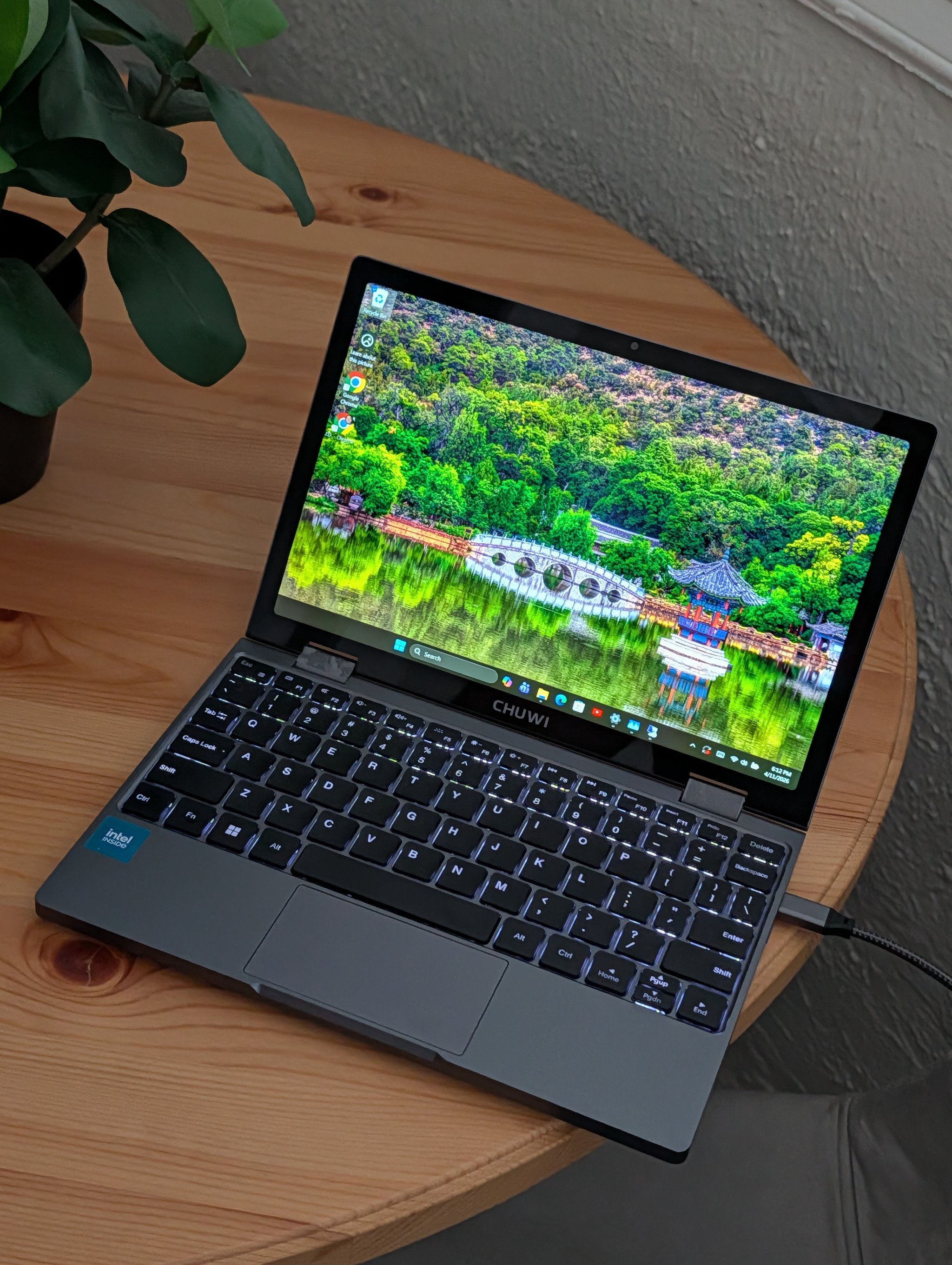
The Intel N100 is Alder Lake-N: four efficiency cores, no performance cores, no hyperthreading. Base clock 0.8 GHz, turbo up to 3.4 GHz, with a 6-watt TDP that can burst to 25 watts. It is one of the cheapest chips Intel offers for laptops. The entire point of this processor is to run cool enough that a passive or minimal cooling solution can handle it indefinitely.
| Spec | Chuwi MiniBook X | MacBook Neo |
|---|---|---|
| CPU | Intel N100 (4E cores) | Apple A18 Pro (2P+4E) |
| TDP | 6W (25W burst) | ~15W |
| RAM | 12 GB LPDDR5 | 8 GB LPDDR5 |
| Storage | 512 GB NVMe SSD | 256 GB NVMe SSD |
| Display | 10.5″ 1920×1200 IPS touch | 13.0″ 2408×1506 Retina |
| GPU | Intel UHD (24 EU) | Apple 5-core GPU |
| Cooling | Active (small fan + heat pipe) | Fanless (passive) |
| OS | Windows 11 Home | macOS 26 |
| Weight | ~2 lbs | ~3 lbs |
| Price (as tested) | ~$399 | $599 |
Since I bought this unit, (as mentioned above) Chuwi has released an updated MiniBook X with the Intel N150 (Twin Lake) and 16GB of RAM for $379.89 on Amazon. The N150 has a higher 3.6 GHz max turbo clock (up from 3.4 GHz on the N100) and offers a modest on-paper performance bump, and the extra 4GB of RAM is welcome. If the benchmark results here interest you, the current model is a meaningful upgrade at a slightly lower price and everything else should be the same.
A Note on the Chuwi CPU Scandal
Before we get to benchmarks, the elephant in the room. In March 2026, NotebookCheck discovered that Chuwi’s CoreBook X and CoreBook Plus laptops contained AMD Ryzen 5 5500U processors while advertising the newer Ryzen 5 7430U. The deception was sophisticated: modified firmware made the CPU report as the wrong chip in BIOS, Windows system information, and even CPU-Z. Only physically removing the cooler or using updated detection tools revealed the truth. AMD denied any involvement; Chuwi called it a “production error” and offered refunds through May 31, 2026.
I bought this unit in December 2023, well over two years before the scandal broke. Given the CPU spoofing, I am not sure I would trust Chuwi again for new purchases. That is genuinely poor behavior and worth considering before giving them your money.
This MiniBook X uses an Intel N100, a completely different platform from the affected AMD models. To verify: the CPUID reports GenuineIntel Family 6 Model 190 Stepping 0 with ProcessorId BFEBFBFF000B06E0, matching the documented N100 silicon signature. The Geekbench 6 scores (single-core average 1,135) land at the 38th percentile of all published N100 results, consistent with where a legitimate N100 in a small chassis should sit. The Task Manager Performance tab confirms Intel N100, 4 cores, 4 threads, 0.80 GHz base clock, 6 MB L3 cache.

I am certainly satisfied this is a real N100. That said, the scandal is a legitimate trust issue for the Chuwi brand. If you are considering any Chuwi product with an AMD chip, verify the hardware independently before trusting the spec sheet. I found nothing untoward about this unit, but “trust but verify” is the right posture for this company right now.
CPU Performance: Burst vs. Sustained
This is the section that matters most, and it requires two separate conversations. The first: how fast is each chip when it has thermal headroom? The second: how fast is each chip after it has been working for a while?
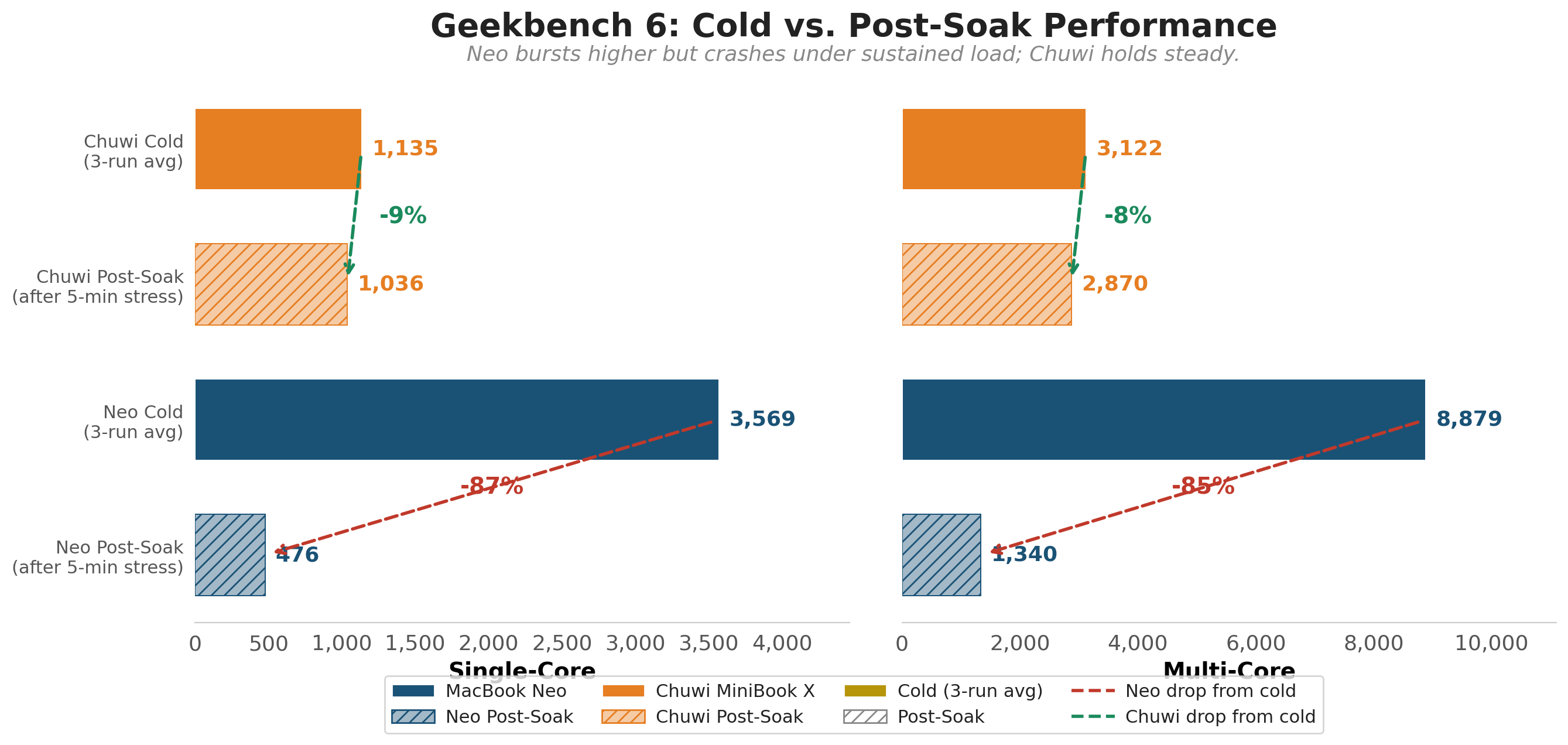
I ran Geekbench 6 on both machines under two conditions: cold (idle, at ambient temperature) and hot (after sustained stress testing that included 5-minute all-core load, native C benchmarks, and storage tests). The Neo was tested with GB6 6.6.0 on macOS; the Chuwi with GB6 6.4.0 on Windows. Minor version differences in GB6 should not materially affect scores.
| Condition | Neo SC | Neo MC | Chuwi SC | Chuwi MC |
|---|---|---|---|---|
| Cold (3-run average) | 3,569 | 8,879 | 1,135 | 3,122 |
| Post-soak (after 5-min stress) | 476 | 1,340 | 1,036 | 2,870 |
| Drop from cold | -87% | -85% | -9% | -8% |
Cold, the Neo wins by 3.1x single-core and 2.8x multi-core. The A18 Pro’s performance cores are genuinely that fast when they have thermal headroom. No N100 will ever match that burst speed.
After five minutes of sustained load, the numbers invert. The Chuwi’s post-soak single-core (1,036) is 2.2 times the Neo’s post-soak score (476). The N100 barely noticed the stress test. It lost 9% of its cold performance. The Neo lost 87%.
The Neo’s cold scores are three back-to-back runs with a 7-point SC variance. The Chuwi’s three cold runs showed more spread (1,071 / 1,154 / 1,180), which is typical for an Intel chip that boosts opportunistically within a thermal envelope. All eight results (three cold + one hot per machine) are published on the Geekbench Browser for independent verification. (Chuwi cold 1, cold 2, cold 3, post-soak)
The practical question is: how long do your tasks typically run? If your workloads complete in under a minute, the Neo’s burst advantage is real and substantial. If they run longer, the Chuwi’s thermal stability means it delivers more total work over time.
The Thermal Story: Why 6 Watts Changes Everything
To understand why these two machines behave so differently under load, you need to understand their thermal budgets.
The Neo’s A18 Pro has a ~15W power budget in a fanless aluminum chassis. When it boosts, it generates more heat than the chassis can dissipate. The chip hits 105°C at the die within about 60 seconds and starts aggressively throttling clocks to survive. I documented this in detail in my Neo review: CPU utilization crashed from 577% to 207% in 15 seconds once the thermal wall hit.
The Chuwi’s N100 has a 6W sustained TDP (burstable to 25W). The MiniBook X uses active cooling: a small fan, heat pipe, and heatsink keep the chip cool during sustained loads. At 6 watts of sustained heat output, even a small fan can handle the load comfortably. During my 5-minute all-core stress test, the CPU reported 100% utilization on all four cores for the entire duration. The Geekbench 6 score taken afterward dropped only 9% from cold, and a native C prime sieve benchmark actually ran slightly faster hot than cold (55ms vs 60ms), suggesting the chip was already warmed to its boost frequency. I did not have access to die temperature or clock frequency logs on Windows, so I cannot confirm whether the clocks held steady, but the minimal GB6 degradation suggests the cooling system kept thermals well in check.
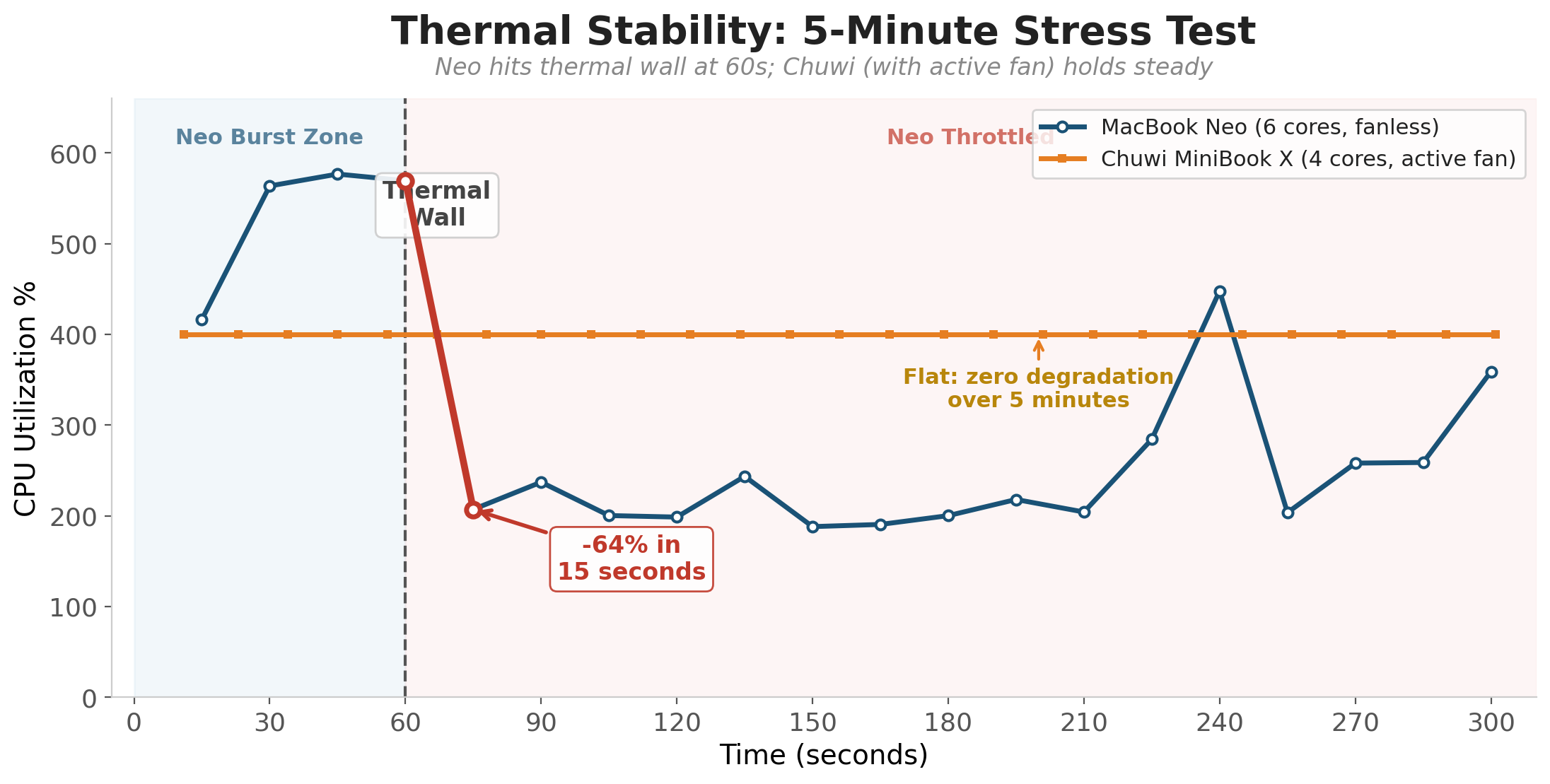
The spikes for the Neo at the end of this Thermal Stability test are mainly related to tasks ending and subsequent and a lag before other tasks start, you’re looking at consistently throttled performance if your task is continuous without breaks.
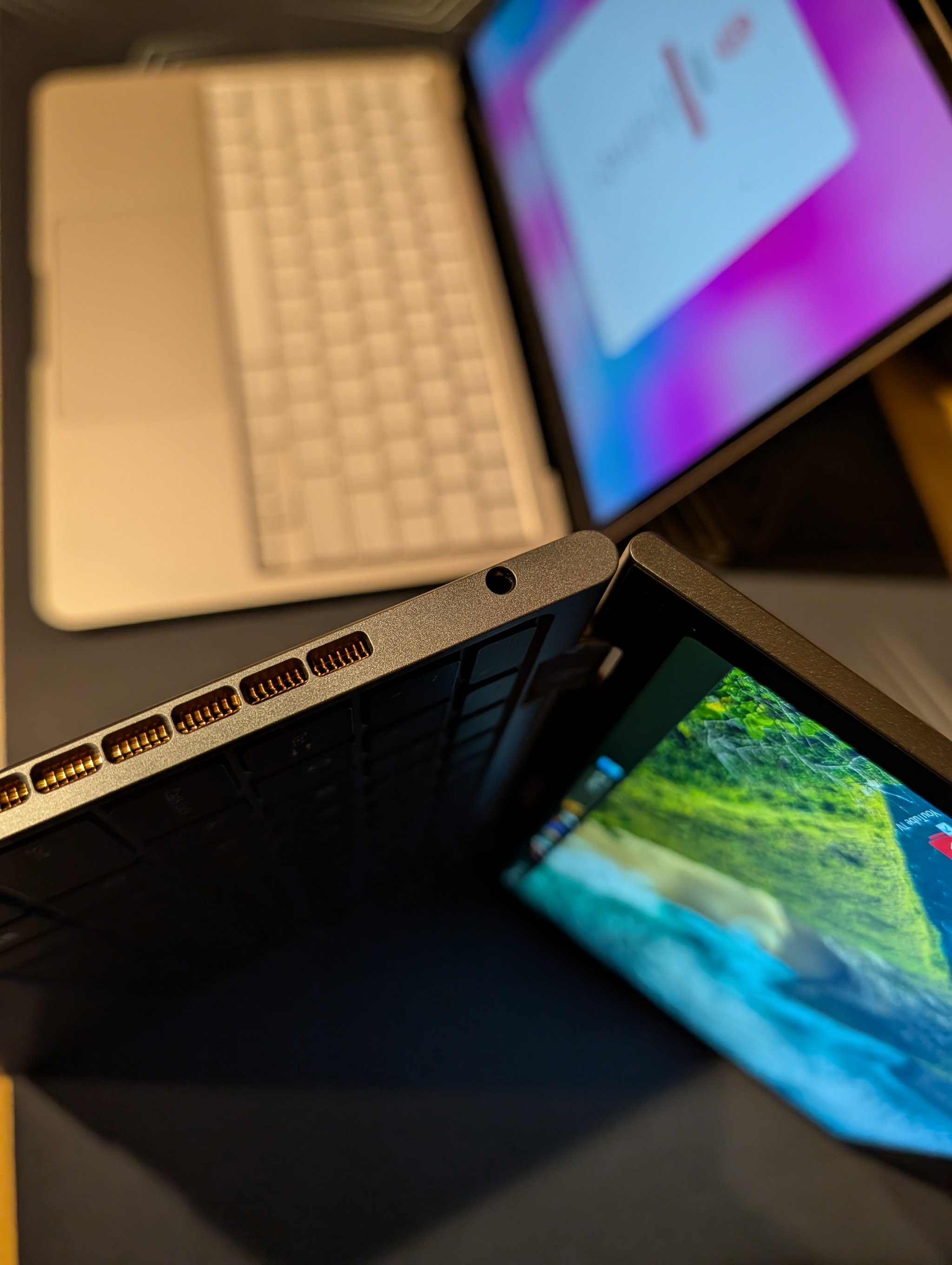
Headphone jack! 👆💪
| Thermal Metric | Neo (A18 Pro) | Chuwi (N100) |
|---|---|---|
| TDP (sustained) | ~15W | 6W |
| Time to thermal wall | ~60 seconds | Not reached in 5-min test (active fan) |
| GB6 SC drop after 5-min soak | -87% | -9% |
| C sieve: cold vs. hot | 18.8ms → 124ms (6.6x slower) | 60ms → 55ms (no degradation) |
This comparison is not entirely apples-to-apples on cooling. The Neo is completely fanless; the Chuwi has a small internal fan. Apple made a deliberate choice: put the fastest chip possible into a silent, fanless chassis and accept that sustained performance will be limited by thermals. The result is a machine that feels astonishingly fast for interactive use (where burst speed is all that matters) but struggles with sustained workloads. The N100, aided by active cooling, makes the opposite trade: modest burst speed, but consistent performance through sustained workloads. Neither approach is wrong. They optimize for different priorities: silence and burst speed vs. sustained throughput.
You can find people out there adding additional cooling and thermal transfer capability to improve the Neo CPU performance by preventing throttling. It works really well, but you average user is unlikely to do so. I also doubt Apple will improve it much in future versions, otherwise they might completely cannibalize sales of their more expensive laptops.
Storage: The Surprise Blowout
I expected the Neo’s Apple SSD to dominate. It did not. The Chuwi’s AirDisk 512GB NVMe SSD outperformed it in every category, often by wide margins.
| Storage Test | Neo | Chuwi | Ratio |
|---|---|---|---|
| Sequential Read | 1,515 MB/s | 3,570 MB/s | 2.4x |
| Sequential Write | 913 MB/s | 1,670 MB/s | 1.8x |
| Random 4K Read | 8,041 IOPS | 53,200 IOPS | 6.6x |
| Random 4K Write | 5,149 IOPS | 46,800 IOPS | 9.1x |
| Mixed 70/30 4K Read | 2,866 IOPS | 31,900 IOPS | 11.1x |
Important caveat: these fio results are not a pure SSD-to-SSD comparison. The Neo ran fio on macOS with APFS using a synchronous I/O engine (which caps effective queue depth at 1 regardless of the iodepth setting); the Chuwi ran fio on Windows with NTFS using the windowsaio asynchronous engine. Different operating systems, filesystems, and I/O stacks significantly affect measured performance, especially for random I/O. These are fio-through-each-OS-stack results, not raw flash performance numbers. The real-world storage experience on each machine will depend heavily on the application, file sizes, and access patterns.
The Neo’s relatively weak random I/O was one of the findings in my original review: at 8,041 read IOPS, it trails M-series Mac SSDs (which regularly post 30,000-50,000 IOPS) by a wide margin. Apple chose a cost-optimized SSD for the $599 price point.
Video Encoding: Where Sustained Performance Pays Off
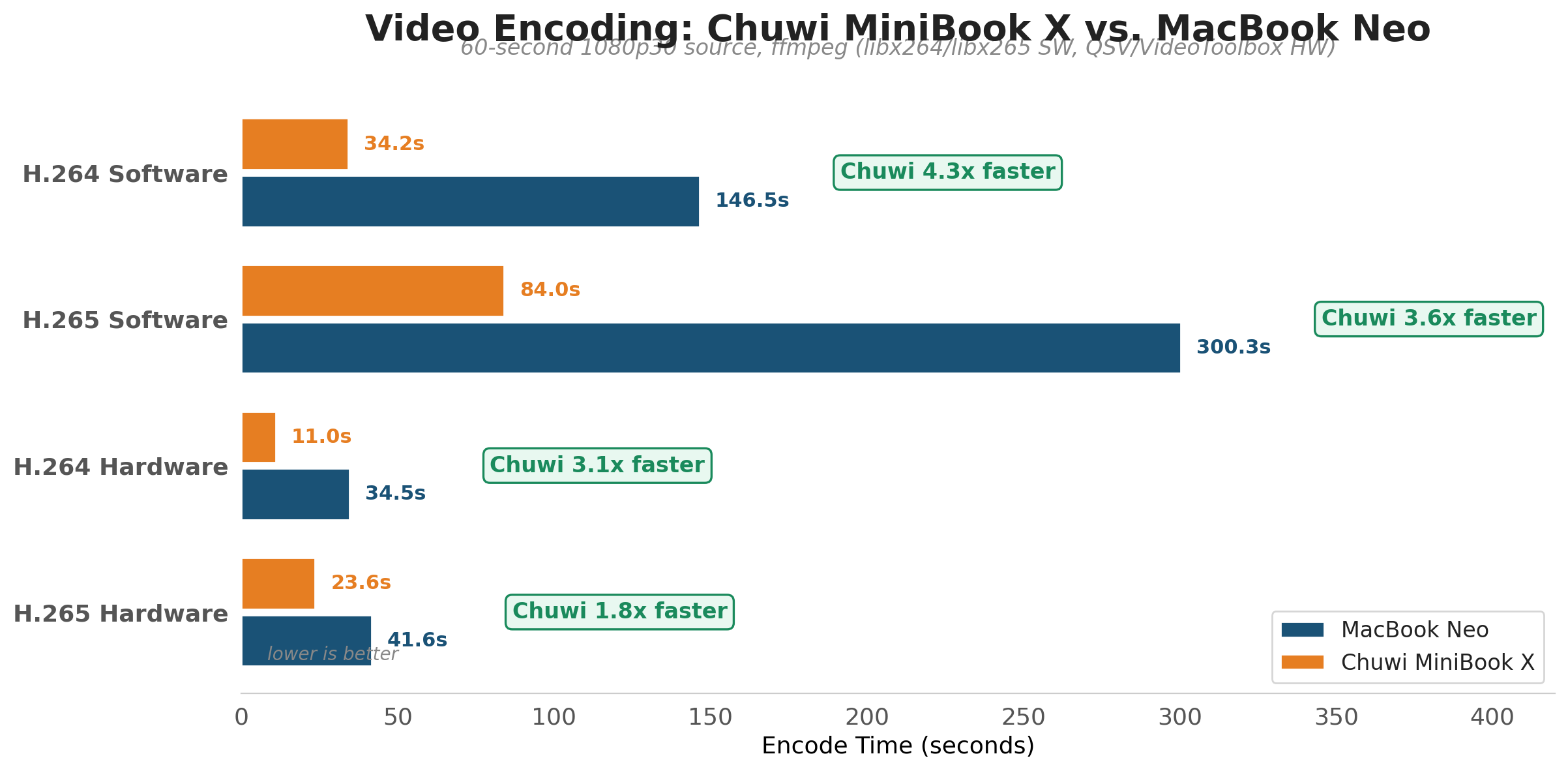
Software video encoding is one of the best sustained workload tests. A 60-second 1080p30 encode using libx264 or libx265 runs long enough to push past the Neo’s thermal wall. The Chuwi has a clear advantage here.
| Encode Task | Neo | Chuwi | Speedup |
|---|---|---|---|
| H.264 Software (libx264) | 146s | 34.2s | 4.3x |
| H.265 Software (libx265) | 300s | 84s | 3.6x |
| H.264 Hardware | 34.5s (VideoToolbox) | 11.0s (Quick Sync) | 3.1x |
| H.265 Hardware | 41.6s (VideoToolbox) | 23.6s (Quick Sync) | 1.8x |
The software encode results are the clearest illustration of the thermal story. The Neo has a faster CPU on paper, but software encoding runs long enough to trigger the thermal wall. The Chuwi’s N100 maintains its throughput throughout the entire encode. By the time H.264 finishes, the Neo has spent most of the encode in a throttled state while the Chuwi maintained consistent performance the entire time.
Hardware encoding tells a more nuanced story. Intel Quick Sync on the N100 beats Apple VideoToolbox on the A18 Pro, but the gap narrows with H.265 (1.8x vs. 3.1x for H.264). Different hardware encoder architectures and output quality characteristics make this comparison less clean than the software encode numbers. Both machines produce usable output; the Chuwi just finishes first.
GPU: The Neo’s Clear Win
This is the one category where the MacBook Neo has no competition from the Chuwi.
| GPU Benchmark | Neo | Chuwi |
|---|---|---|
| Geekbench 6 GPU | 31,275 (Metal) | 3,326 (OpenCL) |
The Neo’s 5-core Apple GPU scores 9.4x higher. Different APIs (Metal vs. OpenCL) make the number imprecise, but the gap is directionally enormous. For GPU-accelerated tasks (photo editing, light gaming, machine learning inference), the Neo is in a different league. The N100’s Intel UHD Graphics with 24 execution units is functional but not competitive.
Can Both Run Claude Code?
Yes. I installed Claude Code on both machines and profiled startup time. The Neo is faster, but the Chuwi is usable.
| Claude Code Metric | Neo | Chuwi |
|---|---|---|
| Version tested | 2.1.92 | 2.1.101 |
| Cold startup | 52ms | 1,403ms |
| Warm startup (avg of 5) | 52ms | 167ms |
| RSS memory | ~1 GB | Not measured* |
The key difference: on the Neo, with Claude Code in the background, Geekbench dropped 80% on single-core (from 3,569 to 709). The cause is likely a combination of CPU contention, memory pressure on the 8GB system, and thermal effects from the additional workload. The Chuwi’s 12GB of RAM gives it more breathing room for background processes, though I did not run the same “GB6 with Claude active” test on the Chuwi before it went offline. The Chuwi’s active cooling and lower thermal ceiling suggest it would hold up better under combined load, but that remains an untested hypothesis for now.
Additional Benchmarks
| Test | Neo | Chuwi | Notes |
|---|---|---|---|
| 7-Zip (MIPS total) | 2,458 | 17,948 | Neo was thermally throttled |
| OpenSSL RSA-2048 sign/s | 504 | 325 | Neo wins (burst task) |
| C sieve 10M primes | 18.8ms | 60ms | Cold; Neo 3.2x faster |
| Matrix 512×512 GFLOPS | 15.9 | 10.3 | Cold; Neo 1.5x faster |
| Memory pressure | 8GB, 0 swapouts | 10GB alloc, 382MB swap | Both handle full RAM well |
The 7-Zip result deserves context. That 7.3x gap (17,948 vs. 2,458 MIPS) does not mean the N100 is 7x faster than the A18 Pro. The Neo’s 7-Zip score was captured during a warm state after prior benchmarks had already heated the chassis. Under pristine cold conditions, the gap would narrow substantially. The tools also differ: the Chuwi ran 7-Zip 24.08 (native Windows x64), while the Neo ran p7zip 17.05 (macOS port), which may affect scores independently of hardware. The N100’s advantage in multi-threaded sustained tasks is real, but the magnitude depends on the Neo’s thermal state and the tool versions used.
What the Numbers Miss: Living With Each Machine
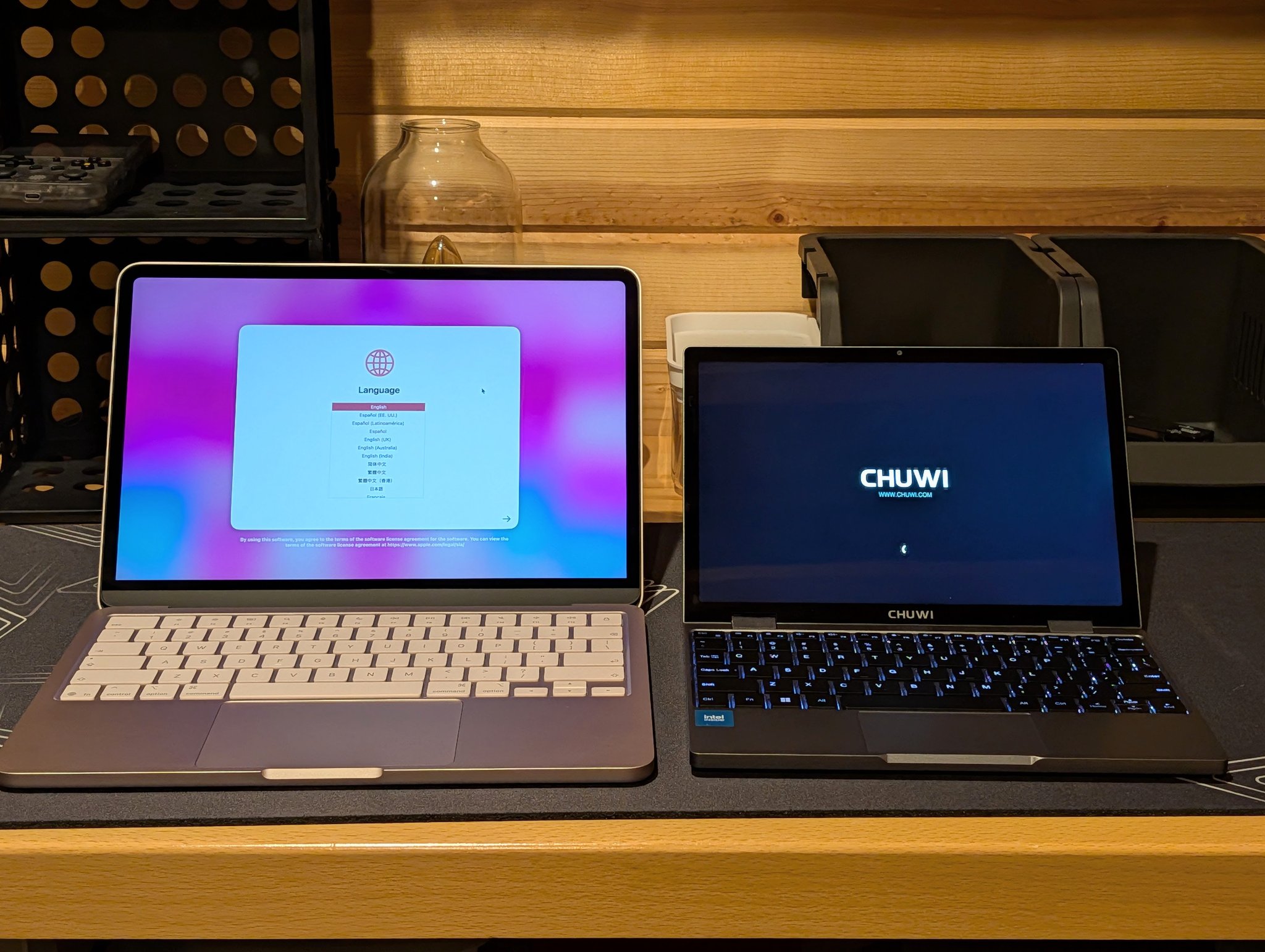
Benchmarks do not capture everything. A few observations from daily use that matter as much as the numbers:
Display: The Neo’s 13-inch Retina display is noticeably better: 2408×1506 at 500 nits, sRGB accurate, with Apple’s font rendering. The Chuwi’s 10.5-inch 1920×1200 IPS panel is surprisingly good for the price. Crisp, bright, but just a touch on the small size (pun intended, see below for touchscreen info). If you stare at a screen for hours, the Neo’s display size alone might justify the price premium.
Keyboard: The Neo has a full-size MacBook keyboard and a high-quality trackpad. The Chuwi has a decent backlit keyboard for its form factor (which the base Neo lacks), but I found myself mistyping more frequently on the small keyboard. It is surprisingly usable for a 10-inch compact travel device, but the Neo is definitely better for long writing sessions or extended typing.
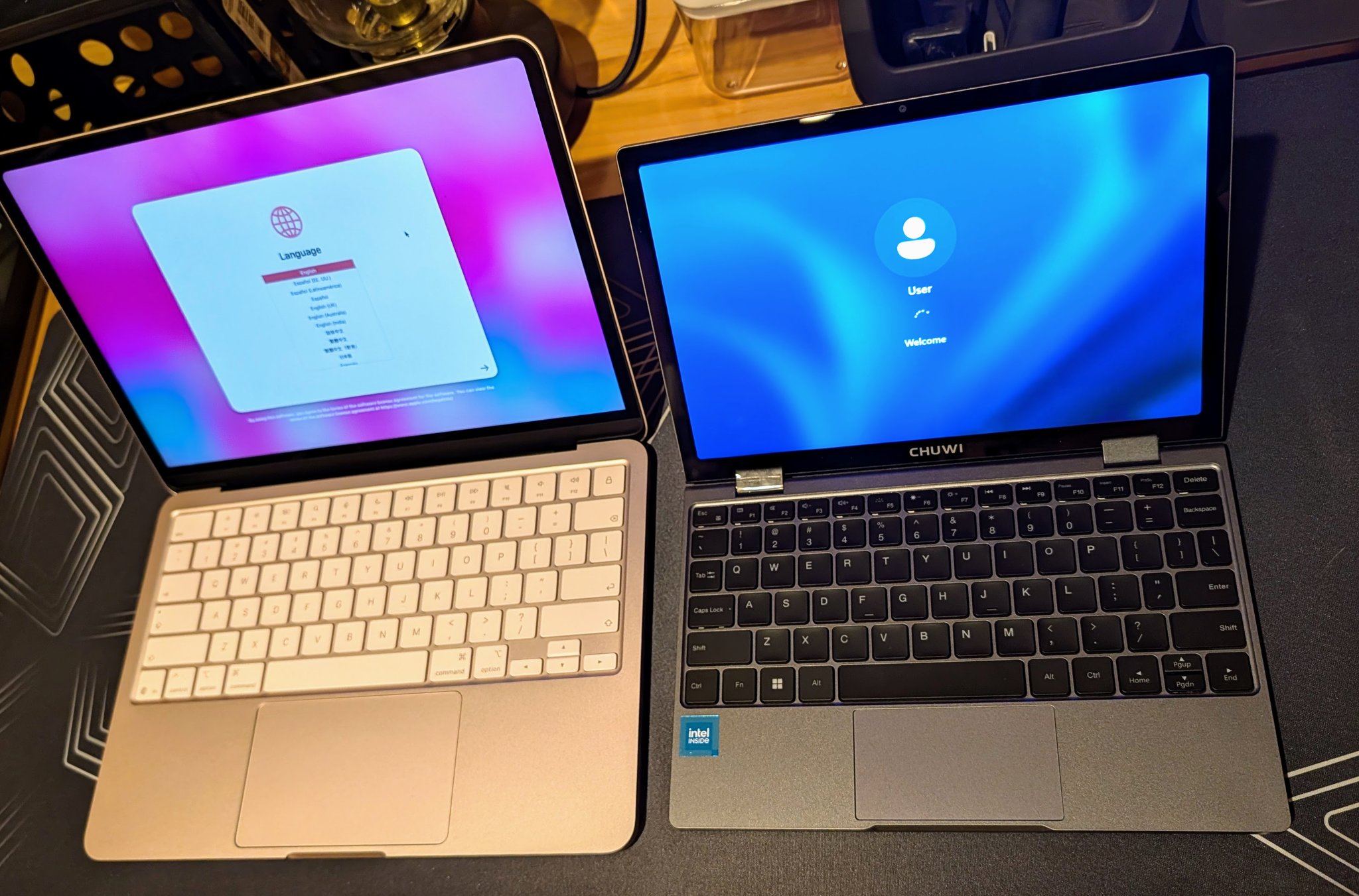
Touchscreen: The Chuwi has one. The Neo does not. In convertible mode, the Chuwi works as a chunky tablet. The 2-in-1 hinge is solid. If touchscreen matters to your workflow, this is a genuine advantage.
Build quality: The Neo has Apple’s signature build quality: aluminum unibody, tight tolerances, premium feel. The Chuwi has a plastic keyboard deck, metal bottom, and a decent hinge. It is adequate but not premium. I’d rate build quality 7/10 for the Chuwi and 9/10 for the Neo.
Battery: Apple rates the Neo at up to 16 hours of video streaming. XDA’s review of the MiniBook X notes 4-6 hours of real-world use. The Neo’s lower sustained power draw under thermal management likely contributes to its battery life advantage.
Ecosystem: macOS vs. Windows is a personal preference, but Apple’s tight hardware-software integration (unified memory, hardware codecs, Handoff, AirDrop, Apple Intelligence) adds value beyond what shows up in benchmarks. If you are in the Apple ecosystem, the Neo’s premium buys integration that commodity hardware cannot match.
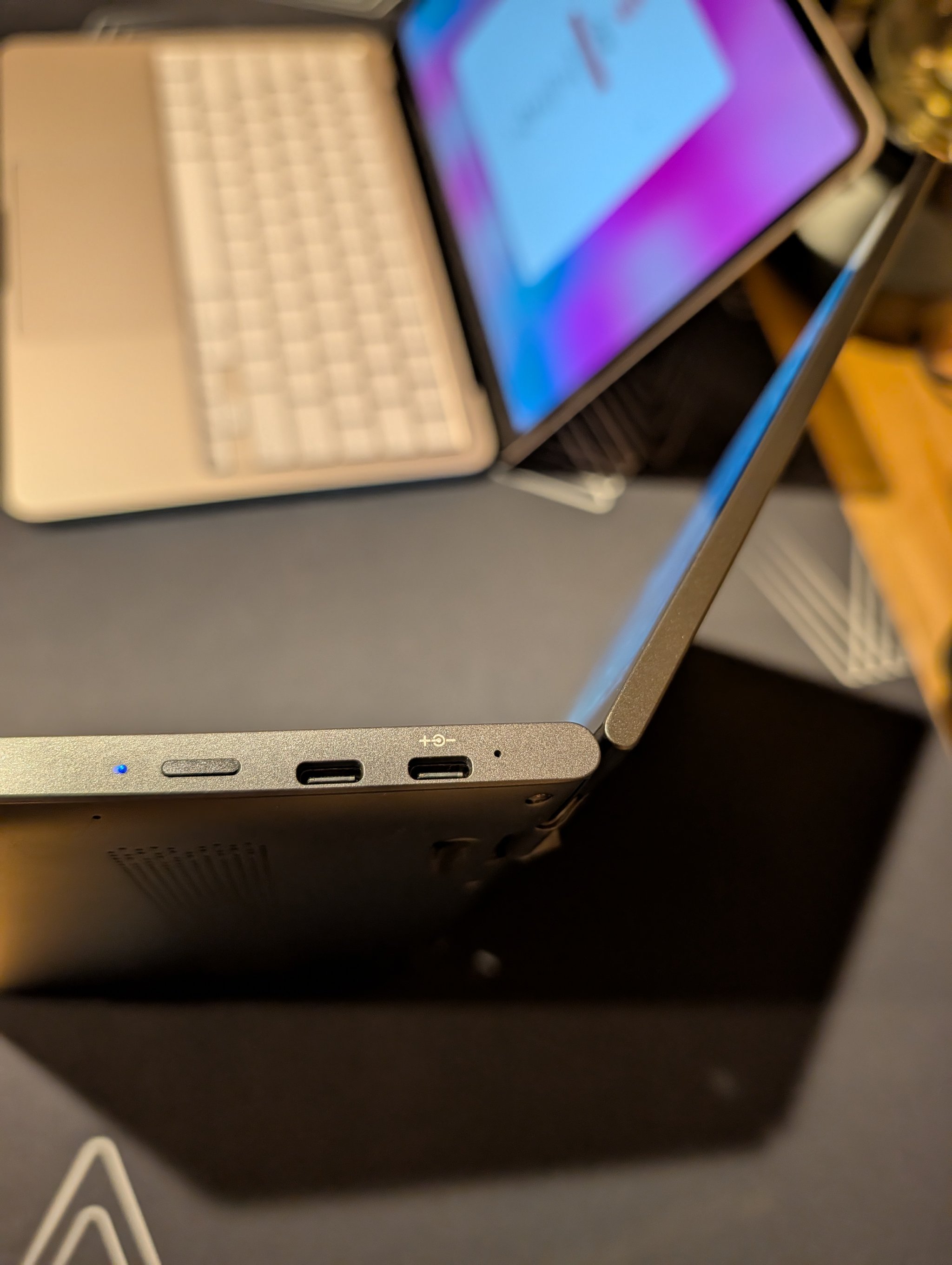
Ports: The Chuwi has two USB-C ports, the forward one of which can charge the laptop. It also has a headphone jack on the left hand side of the machine. I would have loved to see an SD or microSD slot, USB-A, or HDMI as well.
The Verdict: Different Machines for Different Jobs
The Chuwi MiniBook X does not replace the MacBook Neo. It occupies a different niche entirely.
The Neo is the better computer for most people. Its burst CPU speed makes every interactive task feel instant. The display is gorgeous. The trackpad is peerless. Battery life is exceptional. macOS on Apple Silicon remains a remarkably polished computing experience. For a student, a knowledge worker, or anyone whose tasks complete in under a minute, the Neo delivers a premium experience at a mid-range price.
The Chuwi is the more capable computer for sustained workloads in a pocketable form factor. If you need a tiny cheap machine that can encode video, run sustained compute tasks, or handle extended CPU-bound work without falling off a thermal cliff, the N100’s unthrottled consistency is genuinely useful. It is also a compelling secondary device: a machine you throw in a bag for travel, remote work, or bench testing that does not need to be your primary computer. It is extremely compact and surprisingly capable. There is a perception that budget Windows laptops are all terrible, but this <$400 machine is quite decent.
I have a soft spot for compact computing devices. Back in the day I had a VAIO 505 and a Toshiba Libretto, and the MiniBook X carries on that tradition of tiny but surprisingly capable machines.
The broader lesson is not “buy a Chuwi instead of a Mac.” It is that benchmark headlines can be misleading when they only show burst performance. A 3,569 single-core score that drops to 476 under load tells a different story than a 1,135 score that stays at 1,036. If you are evaluating any laptop, whether it costs $399 or $599 or $1,099, ask the question reviewers rarely answer: what happens to these numbers after five minutes?
Full Benchmark Data
Key benchmark results for both machines are published on the Geekbench Browser for independent verification:
- Chuwi MiniBook X: GB6 CPU (cold 1, cold 2, cold 3, post-soak) | GPU OpenCL
- MacBook Neo: GB6 CPU (pristine 1, pristine 2, pristine 3, post-soak) | GPU Metal
Chuwi testing conducted April 10-11, 2026 with Windows power mode set to Performance. Neo benchmarks from April 7-8, 2026 on macOS.