Unable to open kernel device ‘\\.\VMCIDev\VMX’: The operation completed successfully.
If you encounter the following error message:
Unable to open kernel device ‘\.\VMCIDev\VMX’: The operation completed successfully. Did you reboot after installing VMware Workstation? Module ‘DevicePowerOn’ power on failed. Failed to start the virtual machine.
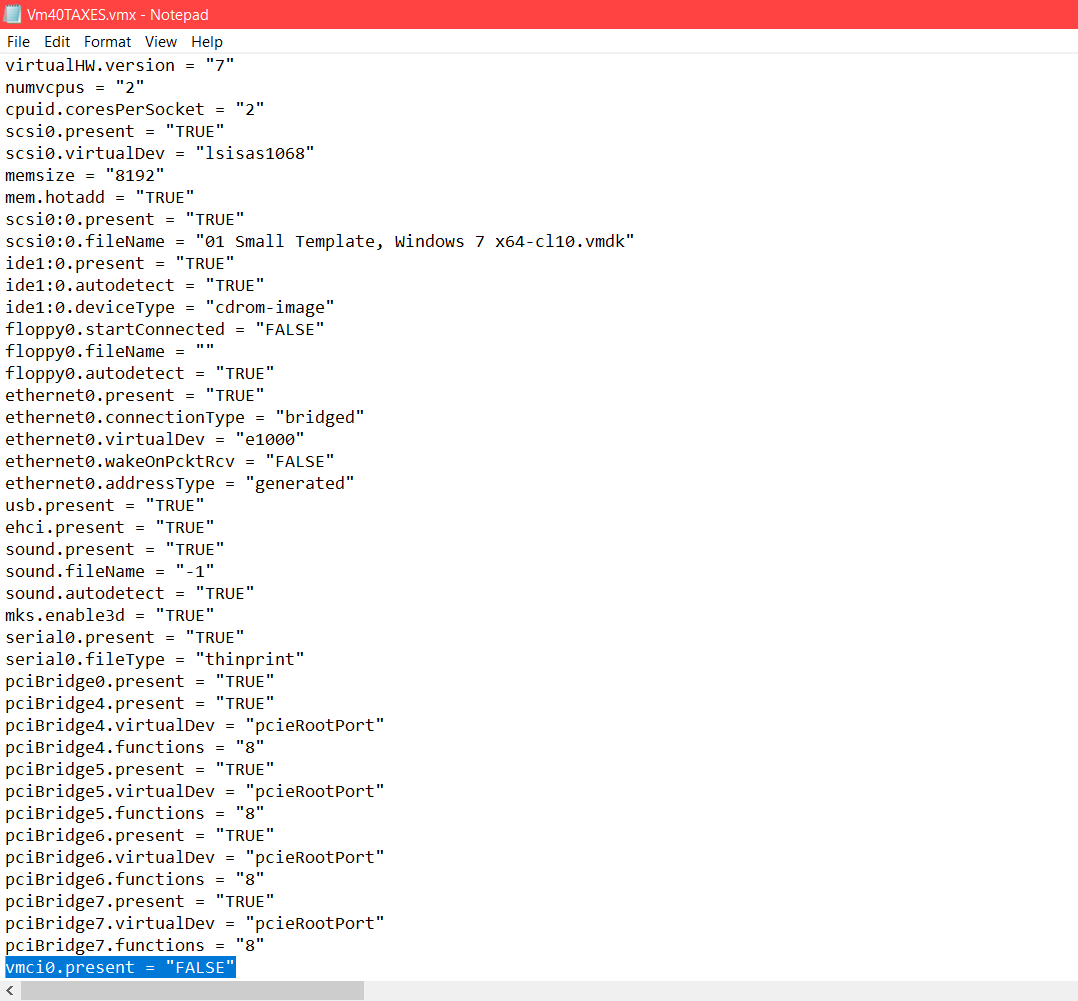
You may want to try editing the VMX file for your virtual machine and changing this variable from true to false:
vmci0.present = "false"
(it was the located on the last line in my VMX)
After making this change, I was able to successfully boot my VM in VMWare Workstation Pro 16 👍
Top Search Terms:
- unable to open kernal device (1)
uh i added this line to my vmx file and now its worse it says that the file is corrupted
Very nice. Solved this issue right away!
Dear User,
I’m glad the tip solved the problem quickly! Thank you for the nice comment. Enjoy your weekend! 😀
Why does this work?
Hey there, setting vmci0.present to ‘false’ disables the VMware VMCI (Virtual Machine Communication Interface) device. When the VMCI driver is missing or mismatched between VMware Workstation and the VM’s stored config, it causes that error even though the error message unhelpfully says ‘The operation completed successfully.’ Disabling the virtual device entirely sidesteps the driver conflict and lets the VM boot normally.