Tag Archives: nvidia

My RTX 5090 Renders 5x Faster. Here’s Why I Still Use a Cheap 4060 in the render fleet.

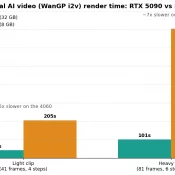
Bar chart comparing WanGP image to video render time per clip on RTX 5090 versus RTX 4060. Light clip 42 seconds versus 205 seconds, heavy clip 101 seconds versus 703 seconds.

Summary: I generate image-to-video (i2v) clips for a software project on a small consumer level GPU fleet: a flagship RTX 5090 and a cheap, always on RTX 4060. On a controlled raw render test the 5090 is about 5x faster per clip. But in a real overnight run where the two cards carried very different loads, their completion rates were only about 1.6x apart, and the 4060 finished a 74-clip batch in a reasonable 4.6 hours. Also, at the end
Getting Z-Image-Turbo Working in RuinedFooocus (AI)

Getting Z-Image-Turbo Working in RuinedFooocus (The Settings That Actually Matter) If you’ve been following AI image generation tech, you’ve probably heard about Z-Image-Turbo: a 6 billion parameter model from Alibaba’s Tongyi MAI team that’s been making waves. It generates photorealistic images with impressive prompt adherence, runs on consumer GPUs with ~10-16GB VRAM, and does it all in just 8 steps. Pretty wild stuff! 🔥 I’ve been testing it in RuinedFooocus and wanted to share some tips because, spoiler alert, the

RTX 5080 vs. RTX 3090: Is It Time to Upgrade in 2026?

Is the Upgrade Actually Worth It? The internet loves a clean upgrade narrative: Old card bad, new card good, spend money. But the reality of the NVIDIA RTX 5080 era is messier and more interesting. If you are currently rocking an RTX 3090, you’re still packing serious heat. That card remains a 24GB monster. The big question: Is the 5080 a meaningful leap forward, or just high-end hardware FOMO? Let’s break down the data. Raw Gaming Performance: Faster, but is

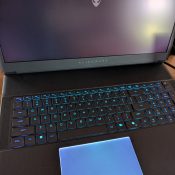
Alienware / RTX 5090 Laptop — Quick Spec Dump (Reference)

I lucked into a super deal on this laptop (in-store only) about three months before RAM prices started getting crazy, and my wife was awesome enough to pick it up for me at Micro Center while she was in the city. 🙌 So far it’s been an absolute beast: coding, compiling, LLMs, image generation, and basically anything else I’ve thrown at it without breaking a sweat. It lives on my desk most of the time, but it’s pretty great being

[SOLVED] NVIDIA Shield TV controller won’t power on

The NVIDIA Shield TV has been one of my favorite tech items over the past couple years. It reliably performs a variety of tasks and has truly passed the test of time. However, I did have a recent issue: My shield controller stopped working 🙁 It would not power on, despite being charger 🙁 Thankfully, the fix was very simple: Press and hold the power button on the remote until it powers on (for me it took about 30 seconds)

Best Ethereum mining GPU [Sep 20th, 2016]

Currently, as of September 20th 2016, the best GPU for mining Ethereum is the AMD RX 480. The criteria are cost, hashrate (in MH/s) and power usage. My current top pick is the Sapphire Radeon NITRO+ RX 480 8GB model with 1342 Mhz core clock speed, for approx 27-29MH/s. At current rates this $279 card should mine about $750 USD of Ethereum a year. 4GB or 8GB? 4GB models of the RX 480 offer a lower initial cost, but resale value

Building my new gaming PC

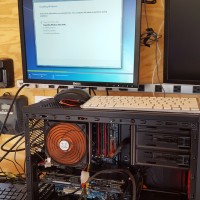
I built this bad boy gaming PC to play Battlefront with my friend Kevin. It has a i5-2500K CPU and a GTX 960 video card, 512GB SSD and 16GB of RAM. This was a photo taken in the garage while I was building the PC. It was using a super old temporary power supply without the video card being fully powered. Since then I have upgraded to a much nicer PSU. The cooler is recycled as is as many components

HP 23xi black border when using HDMI [SOLVED]

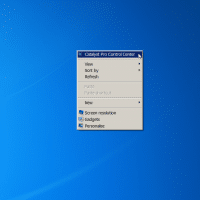
If you connect your HP 23xi display to a PC with a ATI or NVIDIA video card you may encounter a black border around the edge of the screen. Thankfully, there is an easy fix! For ATI/AMD, change scaling options: Right Click on Desktop Select “Catalyst Pro Control Center” Advanced -> ATI Catalyst Control Center -> Graphics -> Desktops & Displays Please select a display. (Click the black downaward arrow in the corner of the display graphic) -> Configure Scaling

« Older Entries