Tag Archives: macbook

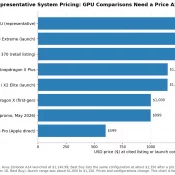
MacBook Neo GPU Compared: A18 Pro vs Snapdragon X2, Radeon, Arc, and RTX 5060

The MacBook Neo is Apple’s $599 fanless entry Mac, built around the binned 5-core-GPU variant of the A18 Pro. I covered its CPU, thermal behavior, silicon economics, and 8 GB RAM tradeoff in the main MacBook Neo benchmarks article. This post is the GPU companion to that piece, and it exists for a specific reason. Why this post exists This post puts the MacBook Neo’s A18 Pro 5-core GPU against Snapdragon X1 and X2, AMD Radeon iGPUs, Intel Arc, and

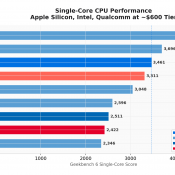
MacBook Neo Deep Dive: Benchmarks, Wafer Economics, and the 8GB Gamble

Update, May 26th and May 14th, 2026 with additional CPU benchmarks and GPU benchmarks. The short version is unchanged: the MacBook Neo is VERY fast for bursty everyday use but fairly limited for sustained, memory-heavy, or pro workloads.  If you don’t have an interest in the computer industry and its history, you can probably skip everything else below. Otherwise, read on! Availability Heads Up (late May) Due to high demand, Apple has been periodically backordered on MacBook Neos lately, but

DisplayPort MST Monitors: Daisy Chainable Monitor List (2026)

Here is a current (as of ) list of daisy-chainable monitors that support DisplayPort MST, USB-C, or Thunderbolt daisy chaining. I’ve maintained this list since 2019, and it has helped thousands of readers set up multi-monitor workstations with a single cable chain. Every monitor below has been verified to support daisy chaining when configured properly. Editor’s Choice: Top Daisy Chain Monitors in 2026 If you’re short on time, here are my top picks across five categories. Each one is currently

New MacBook vs Dell XPS 13 Infinity Display

Apple just announced their new 12″ Macbook and personally I am going to be keeping my Dell XPS 13 “infinity display” laptop. Reasons: Extra screen size for similar footprint Higher resolutions available Speaker quality (Apple might surprise here, but judging by their phones and tablets I do not hold out much hope) SD card reader Better battery life USB ports that can be used even when the laptop is charging Easily upgradeable SSD $500 cheaper (with Dell coupons) Areas where the

Connect Lenovo X240/X230/X220 to LCD TV via HDMI? [SOLVED]

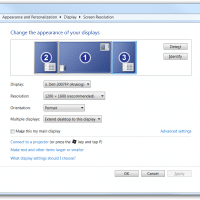
If you have a Lenovo X240, X230, or X220 laptop and would like to connect it to a display using HDMI, you will need an adapter. Thankfully the adapters are very easy to use and are quite inexpensive (<$15). Here are the appropriate adapters for each laptop: Lenovo ThinkPad X240 and X230 Mini-DisplayPort to HDMI adapter: Gold Plated Premium Mini DisplayPort (or Thunderbolt) to HDMI Male to Male Cable, Black 6 fthttp://www.amazon.com/gp/product/B00APLJ58M?ie=UTF8&tag=pixensity-20&linkCode=as2&camp=1789&creative=390957&creativeASIN=B00APLJ58MCable Matters Mini DisplayPort | ThunderboltTM to HDMI® cable

Better two-finger scrolling for Windows! (like 2011 MacBooks and MacBook Air)

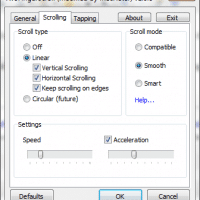
On Windows, missing the MacBook’s nice two finger scrolling… After returning a MacBook Air 11.6″ to Apple, I was surprised that I only really missed the very nice two finger scrolling. Some of the other Apple multitouch gestures were nice, but it was the really the smooth two finger scrolling on that nice trackpad that was so VERY handy and I missed the convenience! My Dell laptops have multitouch capable touchpads that support two finger scrolling. Unfortunately by default they