MacBook Neo GPU Compared: A18 Pro vs Snapdragon X2, Radeon, Arc, and RTX 5060
The MacBook Neo is Apple’s $599 fanless entry Mac, built around the binned 5-core-GPU variant of the A18 Pro. I covered its CPU, thermal behavior, silicon economics, and 8 GB RAM tradeoff in the main MacBook Neo benchmarks article. This post is the GPU companion to that piece, and it exists for a specific reason.
Why this post exists This post puts the MacBook Neo’s A18 Pro 5-core GPU against Snapdragon X1 and X2, AMD Radeon iGPUs, Intel Arc, and a RTX 5060 laptop reference, with explicit notes on each benchmark. I am not a professional reviewer but this is my best effort as a hardware enthusiast.
Apple context: Geekbench 6 Metal
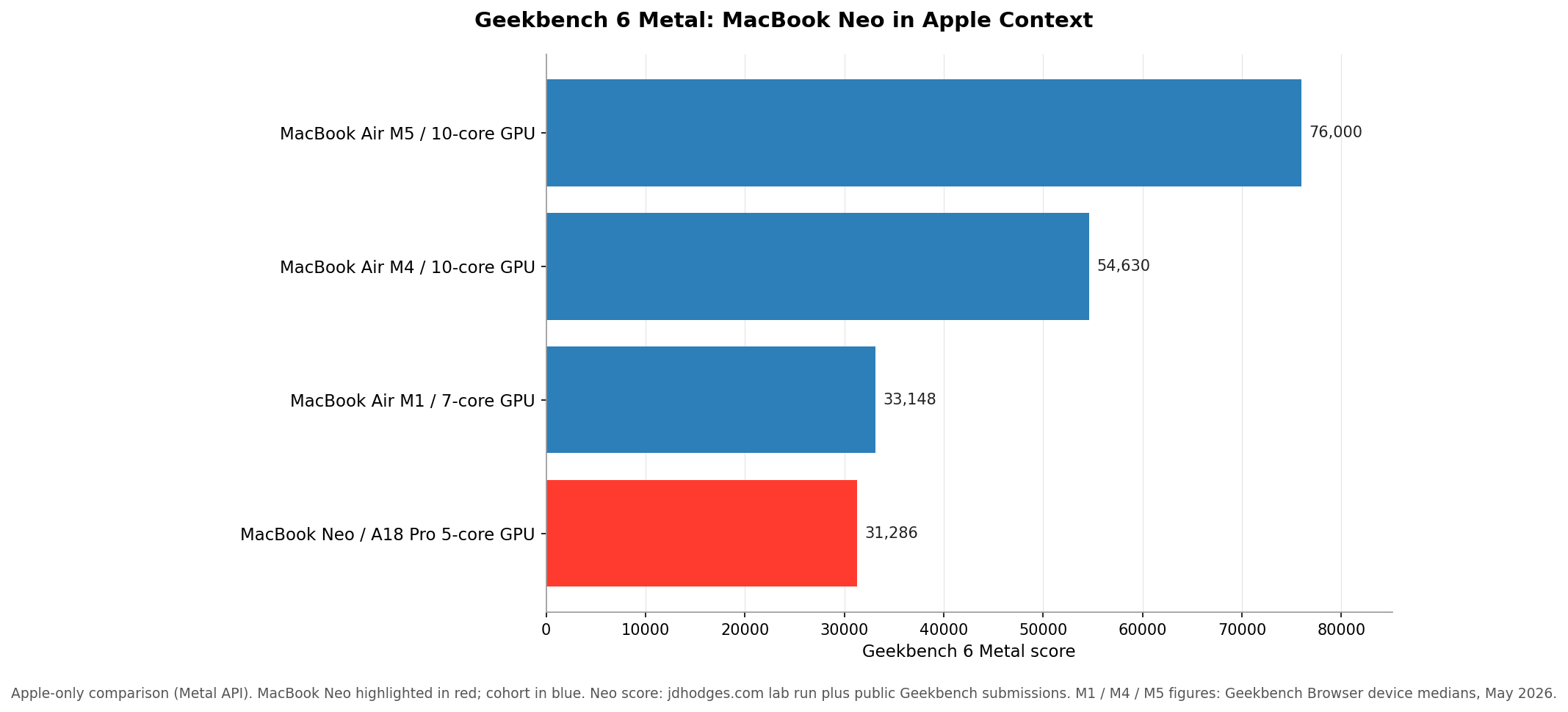
On Apple’s own API the Neo lands at M1-Air-tier graphics. The M4 Air is 75% higher and the M5 Air is roughly 2.4 times faster. For a $599 fanless MacBook, M1 tier is fair but not exceptional. For anyone considering this as a replacement for an M4 Air or M5 Air, the GPU delta is the largest single argument against.
Cross-platform GPU tiering: 3DMark Steel Nomad Light
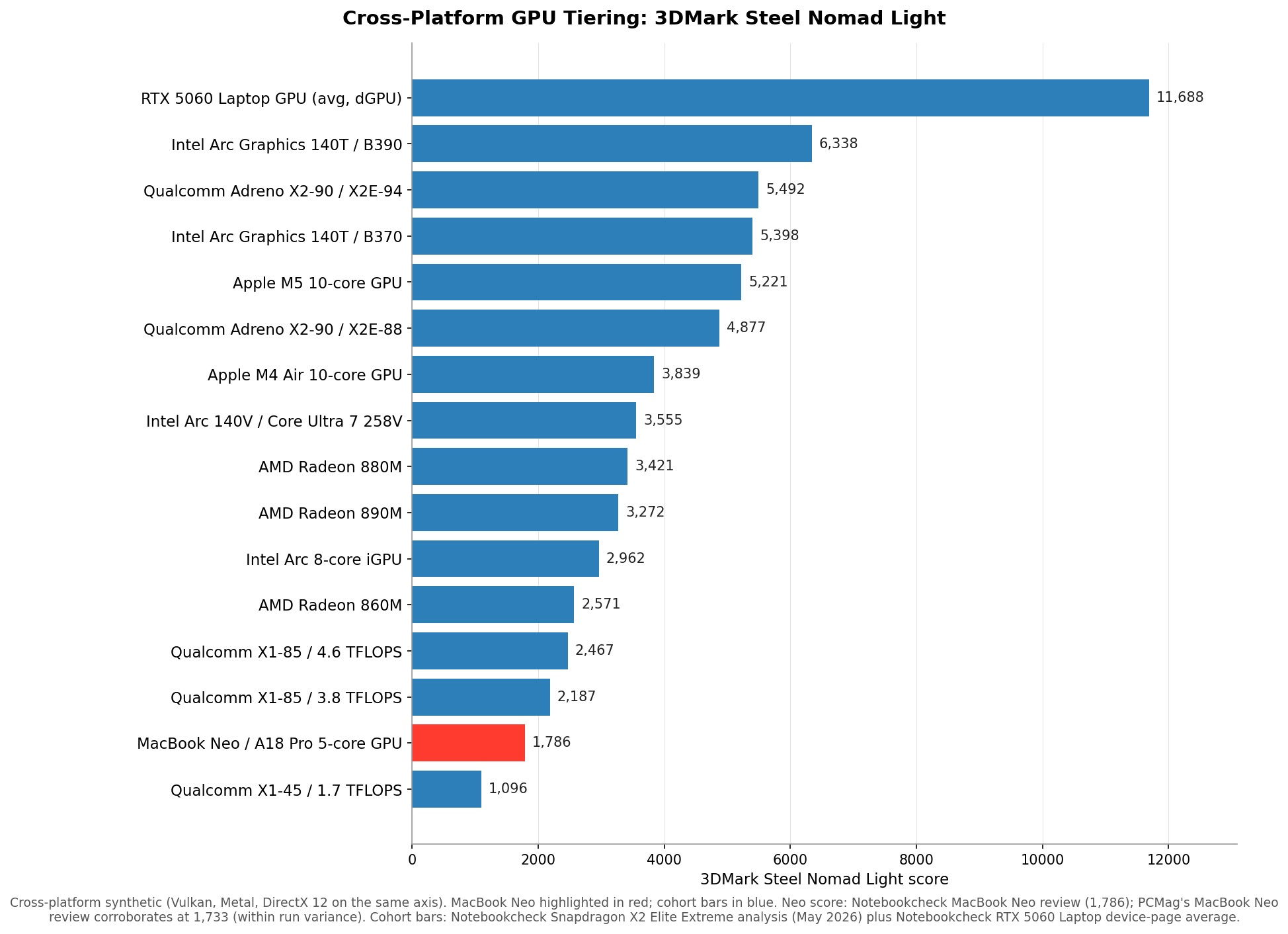
This is where the broader landscape shows up. Intel’s newer Panther Lake Arc 140T/B390 is the strongest iGPU on this chart at 6,338. The Snapdragon X2 Elite Extreme (X2E-94) is the strongest ARM-Windows iGPU at 5,492, ahead of AMD Radeon 890M and Intel Arc 140V (Lunar Lake) by significant margins. The Snapdragon X2 Elite (X2E-88) trails the Elite Extreme by about 13% but still leads Radeon 890M and Arc 140V. AMD and Intel Lunar Lake cluster in the 3,000-3,500 range. First-generation Snapdragon X with the Adreno X1 tops out below 2,500 even at the 4.6 TFLOPS bin. The RTX 5060 Laptop is in a different category entirely, about 84% ahead of the strongest iGPU on this chart. The MacBook Neo lands at 1,786 on Notebookcheck’s measurement (PCMag’s screenshot puts it at 1,733; the 3% gap is run variance). That positions the Neo’s A18 Pro 5-core GPU below the M4 Air’s 3,839 and between the two lowest Qualcomm Snapdragon X1 results in the chart, which is the right place for a fanless $599 Mac with a binned phone-grade GPU. It is well below the strongest ARM-Windows iGPU shipping today and not close to a discrete laptop GPU.
Real game snapshot: Cyberpunk 2077, Neo presets alongside the 1080p high cohort

Left: PCMag tested the MacBook Neo at three Cyberpunk configurations: 1080p / 1200p Ultra native (9 fps), 1440p / 1600p Ultra native (5 fps), and the game’s in-game “For This Mac” auto preset (52 fps, which uses MetalFX upscaling).
Right: the existing Notebookcheck Snapdragon X2 Elite Extreme analysis cohort at 1080p High native (no DLSS, FSR, or XeSS). Notebookcheck’s MacBook Neo review also tested the Neo at four native presets (24.2 / 19.3 / 13.8 / 11.3 fps) and four MetalFX Auto presets (33.1 / 28.5 / 17 / 15.4 fps); those numbers sit in body text rather than on the chart because the preset axes do not align with this cohort. Use as a comparative snapshot, not a universal gaming ranking; drivers, TDP, RAM, and translation layers all move the numbers between titles.
The right panel is the “is it a gaming machine” picture for the comparison cohort. None of the integrated GPUs clear a 60 fps 1080p-high target without upscaling. Intel’s Panther Lake Arc 140T B370 and B390 lead the chart and pull ahead of the Snapdragon X2 entries; the X2 Elite Extreme at 43 fps is the strongest Snapdragon. Compared to Steel Nomad Light, the rank order shifts toward Intel here, which reflects how much driver maturity and the DirectX 12 code path affect real games on this hardware.
The left panel is the Neo. PCMag’s review puts the MacBook Neo at 9 fps at 1080p / 1200p Ultra and 5 fps at 1440p / 1600p Ultra running natively (no upscaling), and 52 fps at the game’s “For This Mac” auto preset which leans on MetalFX upscaling. Notebookcheck’s MacBook Neo review took a four-preset ladder approach and reported 24.2 / 19.3 / 13.8 / 11.3 fps native, then 33.1 / 28.5 / 17 / 15.4 fps with MetalFX Auto, going from the lightest preset to the heaviest.The Neo barely runs Cyberpunk, but it is comfortable only at light presets or with MetalFX upscaling helping out. The right preset hits the playable range; the wrong preset is single-digit fps.
None of the integrated GPUs in the cohort on the right clear 60 fps at 1080p High native either, so a discrete GPU (RTX 5060 Laptop class or above) is still the practical entry point for native-resolution high-preset 1080p gaming.
3DMark Wild Life Extreme

Wild Life Extreme reshuffles the iGPU order in a way that is worth noting. The Apple-vs-Snapdragon comparison is much tighter here than on Steel Nomad Light. The M5 Air 8-core (9,617) and the Snapdragon X2 Elite X2E-88 (9,826) end up within 2% of each other, which is roughly the right way to compare a $1,000 M5 Air 8-core configuration with a $1,149 Asus Zenbook A14. Intel’s Arc 140T B390 (13,160) leads the iGPU pack on this chart, ahead of the M5 10-core (12,059), M5 Air 10-core (11,498), and Snapdragon X2 Elite Extreme (11,479). The RTX 5060 Laptop is about 63% ahead of the strongest iGPU here. AMD’s Radeon 890M comes in lower than its Steel Nomad Light position relative to the same competitors, which is the architecture-favoritism the chart caption warns about rather than a universal AMD weakness.
The MacBook Neo lands at 3,999 on Notebookcheck’s measurement (PCMag’s screenshot puts it at 3,947; the 1.3% gap is run variance). That puts the Neo’s A18 Pro 5-core GPU at less than half of the M4 Air’s 8,735, below the AMD Radeon 860M’s 5,772, and well below the Snapdragon X2 Elite Extreme’s 11,479.
Where the money goes: representative system pricing
| Price | Row |
|---|---|
| $599 | MacBook Neo (A18 Pro, fanless 8GB) Apple direct |
| $899 | Surface Laptop 13″ (Snapdragon X Plus) Microsoft direct |
| $999 | HP Omen 16″ RTX 5060 Best Buy Q2 promo |
| $999 | Samsung Galaxy Book4 Edge 16″ Samsung/Best Buy current |
| $1,099 | HP EliteBook 845 G11 (Ryzen 7 8840U) — Amazon base, 32GB configs $1,600-1,700 |
| $1,349 | Asus Zenbook A14 (X2 Elite) — Best Buy current |
| $1,699.99 | Asus Zenbook A16 (X2 Elite Extreme, 48GB/1TB) — Best Buy current |
Representative US retail prices, checked May 14, 2026.
Entry RTX 5060 laptops have dipped to around $999 with Q2 promos (and sometimes dip quite a bit lower), the Samsung Galaxy Book4 Edge first-gen Snapdragon X is around $1,000 and you can find a lot of fast machines in the $1k-$2k price range.
If you are a heavy gamer, the Neo is not for you! If you are on a budget and don’t game, the Neo is compelling from a CPU standpoint and it is fine for basic GPU tasks but definitely not the right choice for strenuous modern gaming.
Bottom line on graphics
The Neo’s GPU is okay for a fanless $599 Mac and not class-leading outside that price tier. That’s the same answer the CPU section in the main Neo benchmarks post gave, but the GPU situation is a bit more limiting b/c the CPU is actually quite proficient at single core bursty work, where the GPU never really excels versus any competitors. The Neo is the a capable machine for web work, light photo editing, casual app development, screen recording, and the kind of Mac-native creative apps that lean on Metal. It is not the right machine for gaming, 3D, sustained video encoding, or anything that needs a discrete GPU.
If you want the strongest ARM-Windows iGPU shipping today, the Snapdragon X2 Elite Extreme is in front and the Snapdragon X2 Elite is close behind, at $1,149 to $1,599. If you want the x86 path with longer-established Windows drivers and broader native game support, AMD Radeon 700/800-series and Intel Arc 130V/140V are the middle ground, typically in the $1,200 to $1,700 range depending on chassis and configuration. Intel’s newer Panther Lake Arc 140T/B390 leads the synthetic charts, while both B370 and B390 pull ahead of Snapdragon X2 in Cyberpunk; pricing for Panther Lake laptops in May 2026 sits at the upper end of that x86 range. If you actually want a 1080p gaming laptop, an RTX 5060 Laptop at around $999 (or maybe considerably less on sale?) to $1,200 is the practical entry point and is a different product category from anything else on this chart. None of these are competing with the Neo on price; they are competing with what you would buy instead of a Neo if your workload pushes you up tier.
I do have a Snapdragon laptop on hand (Samsung Galaxy Book4 Edge, first-gen Snapdragon X), and a follow-up post running locally measured benchmarks on it is on my near term todo list. There’s an Alien 18 with 5090 that is on an entirely different planet of GPU performance but that’s all for future posts.
Thanks for reading and if you have anything to add, feel free to comment below!
Related
- MacBook Neo Deep Dive: Benchmarks, Wafer Economics, and the 8GB Gamble, the main benchmarks article (CPU + thermal + silicon economics + 8 GB RAM analysis).