Tag Archives: laptop

Display dimming problem Dell notebooks

I am doing some research on a display dimming problem on my Dell Latitude E6430. Specifically, when using the laptop in a dim/dark environment, the display brightness sometimes varies with a sort of brightness-fluctuation. It can be quite annoying as it is almost like flickering. Perhaps the most frustrating aspect is that it is hard to replicate so troubleshooting can be difficult!  🙁 Other people have similar issues: XPS 15 screen auto brightness – Laptop General Hardware Forum – Laptop – Dell Communityhttp://en.community.dell.com/support-forums/laptop/f/3518/p/19452913/20123083.aspxHi.

BCM20702A0 HP drivers for Windows 7 & 8

Q.I have a new HP laptop that I did a clean install of Windows on but now it has an ‘Unknown Device’ BCM20702A0 🙁 I saw you have similar drivers listed for other brands, do you know what driver I should use to fix it for my HP laptop? A. Here is the HP driver that should solve your BCM20702A0 Unknown Device issue: [local mirror in progress], HP dl page Win 7 [or direct], HP dl page Win 8 [or direct] Supports both  32-bit and 64-bit Windows 🙂 HP BCM20702A0

Windows 8 swipe from left problem on touchpad / laptop [solved]

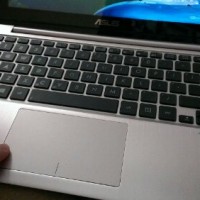
Q. I have a brand new Asus laptop with all the latest drivers but one thing is DRIVING ME CRAZY! When I am dragging something around using the trackpad or even just scrolling sideways sometimes my laptop randomly switches apps 🙁 I am running Windows 8 and any help is appreciated!!! –Ambra D A. Thank you for your question Ambra, I believe I know what is happening and how to solve your problem: Your trackpad is inadvertently triggering the Windows 8 ‘swipe from

ACPI TOS6205 drivers for Windows 7 [solved]

Q. Hello JD H, I have an issue, I installed win 7 (32 bit) on my Toshiba Satellite P300 and there is this unknown device (ACPI\TOS6205) I cannot find the right driver! Please can you assist me to get the driver? Abdul M. A. Here is the download link for the bluetooth driver that should fix your ACPI TOS6205 Unknown Device issue: [download id=”10491″ format=”1″], Toshiba dl link UPDATE from Abdul M. That was the right driver and I thank you for fixing my Toshiba Satellite

Dell Inspiron 17R SE 7720 RAID setup?

My Inspiron 17R has no RAID option in the BIOS. I believe to access the Intel RAID settings it is necessary to have a mSATA drive installed (which I do not have installed at this time).  When a mSATA drive is installed it seems that the acceleration option (mSATA SSD caching) may be enabled in the BIOS, after which you can also do some RAID stuff. I ordered a nice mSATA drive to install in my 17R to see if

Does Dell Inspiron 17R SE have two hard drive bays? YES

The Dell Inspiron 17R SE (‘special edition’) laptop is a lovely machine. One of my favorite features is the two 2.5″ drive bays which are easily accessible: So far RAID is not initially an option in the BIOS, but I think there is a workaround available and will be posting that soon… Top Search Terms:dell inspiron 7720 (41)inspiron 17r se (30)dell inspiron 17r se (30)inspiron 17r special edition (22)dell inspiron 17r se-7720 (18)dell inspiron 17r special edition (17)dell inspiron 17r

Upgrade ASUS N56VM/N56VZ SSD & RAM

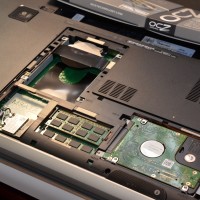
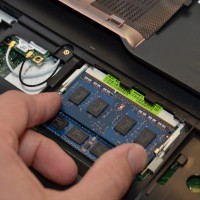
If you have a nice ASUS N56VM or N56VZ series laptop you may be wondering how to upgrade it for maximum performance. So here is a photo tutorial on how to upgrade the RAM on these particular ASUS laptops. You can also see get a feel for how to remove the hard drive & upgrade to an SSD as well as seeing the location of the wifi card. NOTE: A number of people have asked what memory and SSD I

Toshiba Satellite F01N unknown device / pci simple communication controller [driver download]

Q. Hello, I have toshiba satellite c850 fo1n “unknown device and pci simple communication controller” not working can you help out? A. Sure! If your device manager is showing a yellow question mark for unknown device F01n as well as the simple communications controller on the Satellite C850, that problem should be solved by the following driver download: [download id=”10485″ format=”1″] (Intel Chipset Utility for Toshiba Satellite laptops, both 32 bit x86 and 64 bit x64) NOTE: this driver may also work

« Older Entries Recent Entries »