Tag Archives: ai

How I Used AI to Help Research Used Cars (and Saved $5,000 Over Carvana)

We recently bought a used 2025 Chevrolet Blazer EV RS AWD for $29,500 from a dealer in Muskogee, Oklahoma. It came loaded with heated and ventilated seats, Super Cruise, a head-up display, leather interior, and the RS sport package. The two Carvana listings we started with? $34,180 and $35,280 delivered for a much lower trim. That’s ~$5,000+ savings for a few hours research. Here is how we used Claude Code and Codex (AI coding tools from Anthropic and OpenAI) to

Claude AI Usage Limits: What Changed and How to Make Them Last

TL;DR: Claude’s usage limits feel tighter in March 2026 because they are. The short version: Anthropic has more demand than GPU capacity right now. Millions of new users arrived as word got around about how good Claude is and especially after the OpenAI Pentagon boycott, the off-peak 2x promotion ends March 28, and multiple Max subscribers report usage meters jumping from under 50% to 100% on single prompts. Below: what the limits actually are, why they’re worse right now, and

Claude Project Instructions: Examples & Templates (2026)

TL;DR: Claude project instructions tell Claude how to behave inside a specific project. Here’s a starter template you can paste right now: Customize the bracketed parts for your workflow. That template covers 80% of what most people need. The rest of this post gives you more examples and explains when project instructions are the right tool vs. profile preferences. If you’re looking for Claude’s account-wide custom instructions (the ones that apply to every conversation), that’s a different feature. I have

I Tested 13 Local LLMs on Tool Calling: March 2026

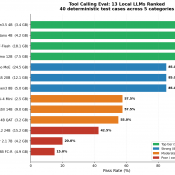
I built a deterministic eval harness and tested 13 local LLMs on tool calling (function calling) to find out which models work decently well for agentic tasks. The result that surprised me most: a 3.4 GB model scored higher than everything else I tested, including models five times its size. If you’re running a local AI stack with Open WebUI, LM Studio, or any OpenAI-compatible frontend, tool calling is one of the key features that enables agentic behavior. It lets

How 25,000 Junk Folders Were Breaking My AI Doc Organizer (Garbage In, Garbage Out)

How 25,000 Junk Folders Were Silently Breaking My AI Document Organizer (Garbage In, Garbage Out) Thousands of (somewhat) zombie Quicken folders taken care of via compressing them into one 7z archive: Details: My AI File Organizer Was Fighting 25,000 Phantom Folders (And Losing 😜) For a while, my automated document filer was misbehaving. Scan an insurance card — it suggests filing it in a folder called Q-Final. Scan a bank statement — it wants to put it in Attach. The

Claude AI Custom Instructions: A Real Example That Actually Works

TL;DR: Here’s a custom Claude instruction that works well for most people: *Just a note about the “unlimited resources“, Claude tends to UNDER estimate what it is capable of, and maybe even what you are capable of. Like when it estimates a task will take 4-10 hours or multiple days of sessions and then proceeds to knock it out in a few minutes. SO, sometimes it helps to be a bit aspirational in your instructions. 💪💪 Why this works: Claude

Best Computer for Claude Code in 2026

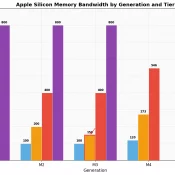
Updated May 11th, 2026. Originally published February 6, 2026. TL;DR: If you are looking for the best computer for Claude Code in 2026, my short answer is the MacBook Air M5 (currently $150 off on Amazon). Most people do not need a monster workstation. The AI heavy lifting runs in the cloud. Your machine handles file I/O, builds, test suites, and your dev environment. Cheapest Mac that works: the $599 MacBook Neo. Windows: a ThinkPad with 32GB of RAM. Desktop

Getting Z-Image-Turbo Working in RuinedFooocus (AI)

Getting Z-Image-Turbo Working in RuinedFooocus (The Settings That Actually Matter) If you’ve been following AI image generation tech, you’ve probably heard about Z-Image-Turbo: a 6 billion parameter model from Alibaba’s Tongyi MAI team that’s been making waves. It generates photorealistic images with impressive prompt adherence, runs on consumer GPUs with ~10-16GB VRAM, and does it all in just 8 steps. Pretty wild stuff! 🔥 I’ve been testing it in RuinedFooocus and wanted to share some tips because, spoiler alert, the

« Older Entries Recent Entries »