Show passwords in FileZilla [Portable]
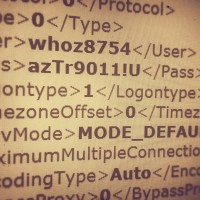
Recently I needed to regain access to a client’s FTP site where the password had been lost. Resetting the password was going to be problematic so instead we recovered the password by accessing FileZilla’s saved password list: For Portable FileZilla: FileZillaPortable\Data\settings\sitemanager.xml For regular FileZilla it should be similar to: %APPDATA%\filezilla\sitemanager.xml Open the sitemanager.xml file and browse to the Pass listing for the particular site that you need access to: This instructions are for Windows. I hope they are helpful to you 🙂


Online PHP code editors

Here are some rather interesting PHP code editors that run entirely online. They can be particularly helpful if you need to be able to develop from any machine anywhere (as long as you have an internet connection). 🙂 Online Code Editor – Codeanywherehttps://codeanywhere.net/Codeanywhere is compatible on all major browsers so you can work from the one you like, also if you on your mobile you can download the native mobile apps for iOS and Andriod. PhpFiddle – PHP/MySQL online IDE and execution

Olympus OM-D not showing live view [SOLVED]

If your Olympus micro four thirds camera ever refuses to show live view, you may need to press the following button: If you are having this problem, I hope this tip helps! 🙂 Top Search Terms:https://www.jdhodges.com/blog/olympus-omd-live-view-fix-solved/ (7)olympus no liveview (2)olympus camera live view (1)olympu live view not showing (1)olympis live view (1)my olympus camera isnt showing the menu on the screen (1)liveview olympus em 10 2 (1)liveview broken omd em5 (1)em10 live view (1)www.jdhodges.com (1)

Downloading and extracting WordPress via command line

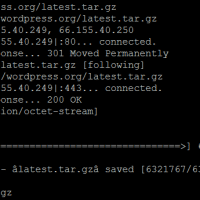
# wget http://wordpress.org/latest.tar.gz –2015-05-04 10:44:46– http://wordpress.org/latest.tar.gz Resolving wordpress.org… 66.155.40.249, 66.155.40.250 Connecting to wordpress.org|66.155.40.249|:80… connected. HTTP request sent, awaiting response… 301 Moved Permanently Location: https://wordpress.org/latest.tar.gz [following] –2015-05-04 10:44:46– https://wordpress.org/latest.tar.gz Connecting to wordpress.org|66.155.40.249|:443… connected. HTTP request sent, awaiting response… 200 OK Length: 6321767 (6.0M) [application/octet-stream] Saving to: âlatest.tar.gzâ 100%[==========================================================>] 6,321,767 6.63MB/s in 0.9s 2015-05-04 10:44:47 (6.63 MB/s) – âlatest.tar.gzâ saved [6321767/6321767] # tar xfz latest.tar.gz 🙂

HP 23xi black border when using HDMI [SOLVED]

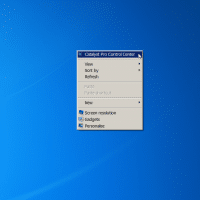
If you connect your HP 23xi display to a PC with a ATI or NVIDIA video card you may encounter a black border around the edge of the screen. Thankfully, there is an easy fix! For ATI/AMD, change scaling options: Right Click on Desktop Select “Catalyst Pro Control Center” Advanced -> ATI Catalyst Control Center -> Graphics -> Desktops & Displays Please select a display. (Click the black downaward arrow in the corner of the display graphic) -> Configure Scaling

LG G2 muffled call quality issues [SOLVED]

QUESTION: I bought the G2 at Amazon on sale and everyone I talk to on the phone complaints that they can hear themselves if the volume is turned up. I also have some sporadic muffled call issues and want it to be louder without affecting the person on the other end. Are these issues defects? I hope there is a fix because I love the rest of this phone and do not want to return it! -Nicole S. ANSWER: You

Open PDF files in different Foxit Reader windows (not tabs) [SOLVED]

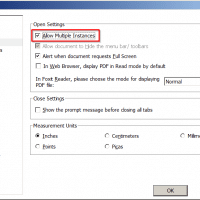
Foxit is a very nice PDF reader, however, a few versions back they made a change that is limiting for multiple monitor users. Specifically, PDFs open in separate Foxit tabs rather than their own windows. This can make it tough to compare two documents side-by-side etc. Thankfully, there is an easy fix to allow multiple Foxit PDF windows: File -> Preferences -> Documents -> Check the “Allow Multiple Instances” box -> Click OK That is all there is to it!

« Older Entries Recent Entries »