Category Archives: Software Tips

BIOS/UEFI boot menu for Yoga? [SOLVED]
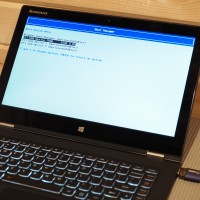
Lenovo doesn’t make it very clear which key to press for the boot device selection menu ๐Ÿ™ Thankfully, holding Fn+F12 during boot will show you the boot menu! ๐Ÿ™‚ Applies to: Lenovo Yoga 2 Pro and many other Lenovo Yoga, IdeaPad & Thinkpad devices ๐Ÿ™‚ Top Search Terms:access bios lenovo yoga 2 (3)yoga 730 boot menu (3)lenovo yoga 2 boot menu (2)lenovo yoga boot menu key (2)yoga 2 bios key (2)nu vot (2)yogs 2 pro enter bios (1)enter bios on
Enable mod_rewrite on TurnKey Linux Apache2

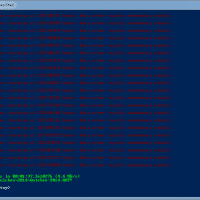
How to enable mod_rewrite on TurnKey Linux:ย a2enmod rewrite root@lamp ~# a2enmod rewrite Enabling module rewrite. To activate the new configuration, you need to run: service apache2 restart root@lamp ~# service apache2 restart [….] Restarting web server: apache2apache2: Could not reliably determine the server’s fully qualified domain name, using 127.0.1.1 for ServerName … waiting .apache2: Could not reliably determine the server’s fully qualified domain name, using 127.0.1.1 for ServerName . ok root@lamp ~# ๐Ÿ™‚ [end]     Top Search Terms:apache enable

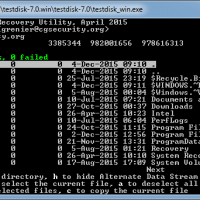
Recover files from lost GPT disk NTFS partition [SOLVED] {FREE}

Recently my Dell work laptop failed to resume after sleeping. It still recognized the internal 2.5″ SSD boot drive but it said it was not bootable. I believe the problem was caused by Windows 10. After removing the drive and connecting to another computer for diagnostics, I was able to determine that no partitions/GPT disk structure was being picked up by Windows. ๐Ÿ™ Thankfully after trying a ton of recovery options, I was finally able to recover all my files

Recover/copy a corrupt Quicken file [SOLVED]

If you ever have a problem in Quicken where you cannot backup your QDF data file, and you cannot even copy your QDF data file, then you may want to try the following. This allowed me to save my mom’s Quicken data after nothing else worked (i.e. validate/repair did not work) and all the other solutions I found online did not work. This particular problem was caused by bad blocks on a failing SSD, but it could have just as

Disable Windows 10 download on Windows 7 [SOLVED]

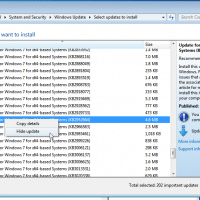
Microsoft made the somewhat odious choice to automatically download the Windows 10 installer onto Windows 7 systems ๐Ÿ™ If you are an IT person installing (or reinstalling) Windows 7 Pro onto desktop business systems, you probably do not want multi-gigabyte downloads going on without any user intervention. Likewise, a pesky “upgrade” icon in the taskbar is a nuisance at best. Thankfully, on a clean install of Windows 7 (Pro or otherwise) if you disableย the following two updates you should be

Windows 8.1 to Windows 10 upgrade stuck at 2% [SOLVED]

Problem: Windows 8.1 to Windows 10 upgrade stuckย at 2% ๐Ÿ™   Solution: Cancel installation (CTRL+ALT+DEL, taskmanger, kill install task) Open Windows Command Prompt (as administrator) and run: sfc /scannow A error will likely be detected andย Windows will attempt to correct it. After the error is fixed, re-run the Windows 10 update ๐Ÿ™‚ Top Search Terms:updating to windows 8 to 10 stuck on 2% (1)upgrade to windows 10 hang at 2% (1)windows 8 to 8.1 upgrade stuck at 2% (1)

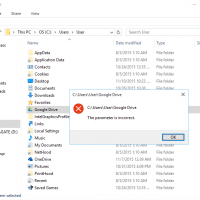
[SOLVED] Can’t pin folders to Quick Access (The parameter is incorrect.)

IMPORTANT NOTE: some commenters reported that while the method described below DOES restore the ability to add new items to the quick access area, it also removed their existing (old) quick access folders/shortcuts. Therefore, they had to re-add those items. I recommend backing up or taking note of what folders/shortcuts you have BEFORE carrying out this tip. ๐Ÿ‘๐Ÿ‘ Question. I am trying to pin my Google Drive folder to the new “Quick access” list in Windows 10 but it fails

Can’t be opened because it is from an unidentified developer mac

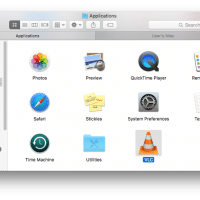
If you are using Mac OSX El Capitan, Yosemite, Mavericks or similar, you may encounter the following error: This is of course a very sad message if you know the app is from a reputable source ๐Ÿ™ Thankfully, there is an easy fix! Step 1. Go to Finder Step 2. Locate the application you are trying to open In my instance it is Finder -> Applications -> VLC Step 3. Hold down the command button while you right click (option

« Older Entries Recent Entries »