Category Archives: Software Tips

Safely install ImgBurn without OpenCandy malware
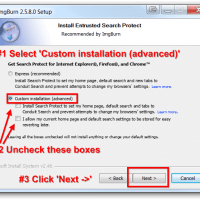
Without a doubt ImgBurn is an awesome ISO creation too. However, at some point in the past they started bundling OpenCandy with ImgBurn. OpenCandy is an adware application that many people feel falls within the definition of malware or spyware.  This is obviously quite a bummer! From some of the licensing text and the way the options are presented during installation it seems like OpenCandy installation is inevitable. 🙁 However, if you are willing to check some options and uncheck some

Combine SSD or HDD boot and data partitions on Windows 8

*NOTE: I highly recommend backing up your data and creating restore media before trying ANY of these methods, just in case something goes awry! Today Antony asked the following question: Now that the ssd is successfully installed, my drive is divided into two, in My Computer ihave the Local disk that has the OS inside of it, and i have another drive that has the rest of my free space from the SSD, is there a way to combine the

Google Gmail Auto Responder date selection

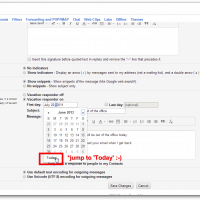
Yesterday I was setting up my Gmail vacation responder (Gmail -> Settings -> General -> Vacation Responder) and the date started at July 20th, 2011! Apparently it had been 3 years since I last used the feature 🙂 At first glance I thought I was going to have to click the >> Month button about 30 times. :-(Thankfully after a while I eventually discovered the ‘Today’ link at the bottom of the calendar. Of course clicking THAT link will jump

Adjust XBMC OpenELEC volume via keyboard? [+/-]

It took me a bit of key pressing to finally figure out how to control the volume on my fresh OpenELEC XBMC installation via keyboard. Eventually, I found that a default OpenELEC XBMC installation uses the + and – keys (plus and minus keys) to adjust the volume UP and volume DOWN. Hopefully this tip will save you some time and allow you to enjoy the perfect volume for your movies and TV shows 🙂 PS after my trial and error

Data truncated for column ‘status’ at row 1 [SOLVED]

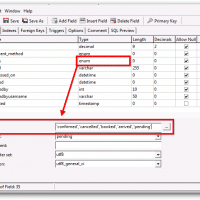
Recently I encountered the following error: Data truncated for column ‘status’ at row 1 This was specifically in a PHP based web hotel/reservations app that uses MySQL for the database backend. When trying to add a new dropdown option value of ‘departed’, the form submission would always fail with the aforementioned error. Thankfully, the solution was easy once I checked the table/field definitions. The column ‘status’ was of type enum and thus needed to have the ‘departed’ value specifically enumerated in

Enable remote MySQL access (root non-local access)

Often one of the first tasks after setting up a MySQL server is to enable connections from other IP addresses. Here are a some articles that discuss how to setup a user that can access a MySQL database remotely (non-locally). Between the two of them you will have all the info you need to create user accounts for remote MySQL db access 🙂 If you are in a testing environment you can also enable non-local root access for all databases

Windows Update error 80072f8f [SOLVED]

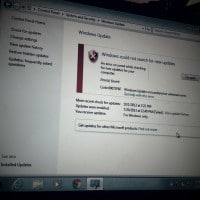
If you get a Windows Update “error 80072f8f” when you try to Check for Updates, you may need to adjust your computer’s date and time settings! The 80072f8f error generally happens when there is a large discrepancy between your system clock and the Windows Update service…. so when that happens you will get the error and be prevented from receiving updates. 🙁 Thankfully, as mentioned earlier, the fix is generally very easy as you just need to update your computer’s date/time

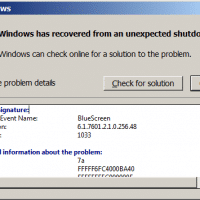
Windows has recovered from an unexpected shutdown

Problem signature: Problem Event Name: BlueScreen OS Version: 6.1.7601.2.1.0.256.48 Locale ID: 1033 Additional information about the problem: BCCode: 7a BCP1: FFFFF6FC4000BA40 BCP2: FFFFFFFFC000000E BCP3: 00000001FBF93860 BCP4: FFFFF88001748758 OS Version: 6_1_7601 Service Pack: 1_0 Product: 256_1 Files that help describe the problem: C:\Windows\Minidump\020414-8096-01.dmp C:\Users\User\AppData\Local\Temp\WER-21325-0.sysdata.xml Read our privacy statement online: http://go.microsoft.com/fwlink/?linkid=104288&clcid=0x0409 If the online privacy statement is not available, please read our privacy statement offline: C:\Windows\system32\en-US\erofflps.txt Top Search Terms:blue screen os version 6.1.7601.2.1.0.256.48 locale 1033 (1)http://go.microsoft.com/fwlink/?linkid=248686 (1)mac unexpected shutdown (1)solve offline windows

« Older Entries Recent Entries »