Category Archives: computer tips

Best (low cost) digital signage solution w/remote centralized management

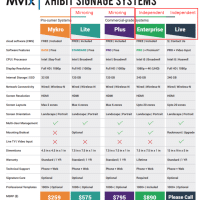
Recently I was tasked with recommending a digital signage solution for a client. Specifically, they needed centralized maintenance and control of approximately 20-30 signs covering 10-12 locations. Another paramount goal was cost effectiveness via no recurring/subscriptions costs. Here is my digital signage recommendation: Specific unit recommendation: Mvix Xhibit Myrko   Mvix Xhibit Myrko   http://direct.mvixusa.com/product/xhibit-mykro-digital-signage $259 single time cost to purchase device No additional license cost, no subscription fees Remote management Single HDMI output My recommendation is for one of the

Drawbacks of Mvix Amazon Fire TV app

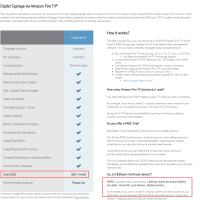
As best I can tell, for digital signage there are two main drawbacks to the Mvix Amazon Fire TV app solution:   #1 Monthly fee They charge a $30 per month fee per account. However, that does cover all the devices/displays that are in use (it is NOT a per unit fee). For more details: http://signagecreator.com/pricing (click the “Amazon Fire TV” button for that pricing, or see my attached screenshot) #2 Performance or content limitations I am  also worried about the

How to set time on Amcrest IP camera [SOLVED]

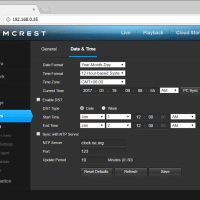
Amcrest makes a variety of IP based security cameras. Overall the camera do a good job at a reasonable price. However, occasionally after setting up a new camera there can be issues with an incorrect timestamp date/time. The issue is easily resolved via the following configuration screen: Therefore, if your Amcrest wifi/Ethernet camera is showing an incorrect date/time, here are the steps to manually update the date and time: Open the camera’s local IP address in a web browser: #1

UniFi UAP LR Review

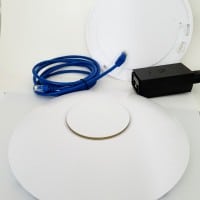
Ubiquiti UAP-LR Specs: CPU: Atheros AR7241 Broadcom BCM4706 Switch: In AR7241 Broadcom BCM53125 RAM: 8MB 256 MB Hynix H5PS1G63JFR (x2) Flash 8MB 16 MB Winbond 25Q128FVFG 2.4 GHz Radio Atheros AR9287 + Anadigics AWL6153 Pwr Amp (x2) I utilize these WiFi access points in a variety of hotel and resort installations. Overall performance and reliability have been excellent. Once initially configured they have served their purpose with minaimal maintenance and no fiddling required. BONUS: The centralized interface for monitoring access points

X230 ThinkPad vs 2016 MacBook Pro

The new 2016/2017 MacBook Pro is a fine looking piece of machinery. It packs a legitimately high-end display into a svelte package and it also offer excellent battery life. For a graphic designer or individual that deals with an exclusively Apple ecosystem it is a splendid update to a historically solid line of machnes. However, for an attorney and IT professional dealing with legacy applications and a variety of real world situations, there are some major drawbacks to Apple’s mobile workstation.

Best Ethereum mining GPU [Sep 20th, 2016]

Currently, as of September 20th 2016, the best GPU for mining Ethereum is the AMD RX 480. The criteria are cost, hashrate (in MH/s) and power usage. My current top pick is the Sapphire Radeon NITRO+ RX 480 8GB model with 1342 Mhz core clock speed, for approx 27-29MH/s. At current rates this $279 card should mine about $750 USD of Ethereum a year. 4GB or 8GB? 4GB models of the RX 480 offer a lower initial cost, but resale value

Lenovo X230 Memory Upgrade to 16GB [HOWTO] [VIDEO]

[Scroll to the bottom for a quick video of the upgrade process!] The Lenovo X230 (and its predecessor the X220) are absurdly easy to upgrade. Here is the X230 memory upgrade process: Power off laptop (fully OFF, not hibernate) Remove battery Remove two screws from memory access panel Remove existing RAM by releasing retention clips Securely install new upgrade RAM Replace cover & screws Replace battery and power ON! For the upgrade, I chose Crucial’s excellent 16GB DDR3 RAM kit

Lenovo X230 RAM/SSD Upgrades, IPS LCD installation

My X220 ThinkPad has finally started getting long in the tooth. Therefore, a replacement is in order. 🙂 After perusing all the latest and greatest laptops of 2016 (XPS 13, XPS 15, ASUS, HP, etc.) I settled on the Lenovo X230 ThinkPad. An incremental upgrade for sure, but one that has left me satisfied and feeling like I am good for another year or two at the least. The price was right and the upgrade-ability of these models is superb.

« Older Entries Recent Entries »