Category Archives: computer tips

ML300 silent fanless NUC case by LogicSupply
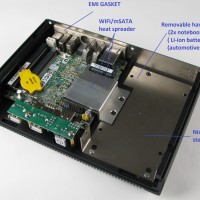
One of the most exciting enhancements for the Intel NUC is going fanless. Silence is golden and so is the reliability of no moving parts 🙂 LogicSupply is preparing to release the ML300 case for the Intel NUC motherboard(s). Here are some photos, make sure to click through to see the full res versions… To be updated with additional info… Top Search Terms:nuc case (10)intel nuc i7 fanless case released (2)fanless case for intel nuc i7 (2)fanless nuc (2)fanless intel
UPDATED Dell Wireless 380 bluetooth drivers [SOLVED]

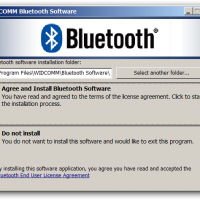
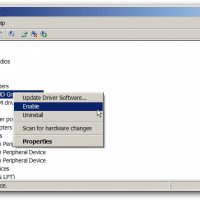
I have been having some difficulty connecting bluetooth headsets (Parrot Zik & an SB2 headset) to my Dell E5530 which has a Dell Wireless 380 bluetooth card installed. Thankfully, the following driver update resolved my issues: (dl link, supports both 32-bit x86 and 64-bit x64 Windows 7, 250MB download) 🙂 Here are screenshots of the driver installation process:    Top Search Terms:dell wireless 380 (4)dell 380 bluetooth driver (3)dell wireless 380 bluetooth application (3)dell wireless 380bluetooth® 4.0 (3)wireless 380 dell

Intel Isis Pro 5200 (Crystalwell) review roundup

News and reviews on Intel’s latest and greatest graphics solution have been quite hard to find 🙁 By latest and great I am of course referring to the Intel ‘Isis Pro 5200’ Crystalwell Haswell based GPU /CPU combination. So to make info a bit easier to find, this page will serve as a review roundup and will be updated as new reviews come out: Isis Pro 5200 Review Listing (in roughly chronological order) Intel Iris Pro 5200 Graphics Review: Core

Bummer! Haswell may run hot & require delid for better cooling

This initial news from FanlessTech is quite a bummer: On LGA 1150, Intel is using thermal paste between the silicon die and the heat spreader, no soldering like Sandy Bridge and previous generations. We are seriously worried about passive cooling now. So disappointing. via FanlessTech: The Haswell disappointment. 🙁 Looks like the word of the day is delid… as that seems to be what is necessary to really push Haswell temps down 🙁 And here are more details: Haswell Temp

Intel’s latest NUC: i5 CPU, USB 3.0 and three display outputs!

Thanks to KW for the heads up about the latest Intel NUC! The new NUC  motherboard’s model # is D53427RKE, and while it is not Haswell, it DOES have some nice improvements over the original NUCs: +now includes USB 3.0 (1 port) +includes THREE display outputs and fully supports TRIPLE MONITORS! (1) HDMI, (2) Mini-DisplayPort +upgraded to an i5 CPU +retains Gigabit Ethernet support I am certain the Haswell NUCs will arrive soon… but until then, this certainly contains most

Alienware 14 1080p vs. Asus G46VW 1600×900 recommendation

Ahh, the allure of a nicely portable yet rugged gaming system… 14″ sounds like a nice sweet spot between portability and decent screen size doesn’t it?! Two of the top machines in that arena are the Alienware 14 and the ASUS G46VW. Here are my initial thoughts: +The Alienware 14 when kitted out with the 1080p matte display is nearly a perfect mobile gaming machine 🙂 However, it is going to run around $1,499 to get a correspondingly good video

Connect Lenovo X240/X230/X220 to LCD TV via HDMI? [SOLVED]

If you have a Lenovo X240, X230, or X220 laptop and would like to connect it to a display using HDMI, you will need an adapter. Thankfully the adapters are very easy to use and are quite inexpensive (<$15). Here are the appropriate adapters for each laptop: Lenovo ThinkPad X240 and X230 Mini-DisplayPort to HDMI adapter: Gold Plated Premium Mini DisplayPort (or Thunderbolt) to HDMI Male to Male Cable, Black 6 fthttp://www.amazon.com/gp/product/B00APLJ58M?ie=UTF8&tag=pixensity-20&linkCode=as2&camp=1789&creative=390957&creativeASIN=B00APLJ58MCable Matters Mini DisplayPort | ThunderboltTM to HDMI® cable

Dell laptop brightness adjustment stuck [SOLVED]

Q. My Dell Inspiron 1520 screen brightness adjustment sometimes get stuck after I suspend/resume a few times. When I try to adjust the screen brightness by holding the Fn key and then press the up/down arrows nothing happens at all and it is really annoying as I have to reboot to get it to work again. 🙁 Can you suggest a way that I can fix it without having to reboot? –Hank Chambers A. Yes, I have had a similar issue with

« Older Entries Recent Entries »