Category Archives: computer tips

Dell Inspiron 11 3000 SSD upgrade
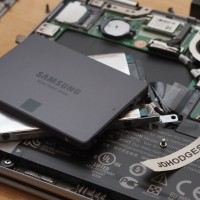
The Dell Inspiron 11 3000 series is a lovely laptop at a very nice price (~$350 USD). One of the few drawbacks is the slow HDD. Thankfully, that is easily remedied with an SSD upgrade! SSD Upgrade The photos below show how I upgraded my Inspiron 11 3147 with a 7mm Samsung 1TB SSD. Of course the same steps will work for smaller capacity SSDs [128GB, 256GB, 512GB] as well 🙂 Memory Upgrade While you have the machine open, you
ACPI\SMO8810 Windows 8.1 Dell Latitude driver download [SOLVED!]

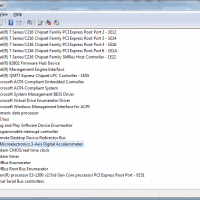
If you have a Dell Latitude running Windows 8.1 with an Unknown Device ACPI/SMO8810, this is the driver download link you need: ST Microelectronics Free Fall Data Protection This applies to all of these Dell laptops: Latitude E5440 (Late 2013) Latitude E7440 (Mid 2013) Latitude E7240 (Mid 2013) Latitude E5540 (Late 2013) Latitude E7450 (Late 2014) Latitude E5250/5250 (Late 2014) Latitude E5550/5550 (Late 2014) Latitude E5450/5450 (Late 2014) And it is backwards compatible for the following OSes: MS Windows 7 32-bit

Disable/enable laptop trackpad [SOLVED]

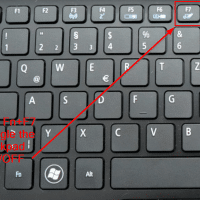
If your laptop trackpad is too finicky to use reliably, you may want to disable it! While a trackpad can sometimes be disabled via the BIOS/UEFI or the Windows Device Mananger, there is often another simpler method: A simple Fn key + F7 (or other similar key) combination is often available to disable the trackpad on Acer laptops, Dell laptops and many more. The keyboard pictured above is an Acer AO725 laptop. This can also be handy if you are

Setup GoDaddy POP/SMTP email instructions [without JAVA!]

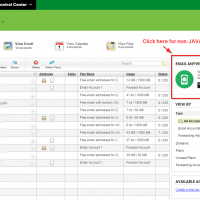
GoDaddy’s automated email setup control app on requires the JAVA runtime, which can be a major pain to have installed on your computer. To get around this, simply use their alternative setup info option: EMAIL ANYWHERE/ANYTIME This will show you the setup instructions for your device, I generally choose ‘Android’ as it shows you all the POP/SMTP info that you need and it works well for other devices. You can even have them email you the instructions to another email account or print

Show passwords in FileZilla [Portable]

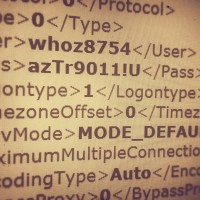
Recently I needed to regain access to a client’s FTP site where the password had been lost. Resetting the password was going to be problematic so instead we recovered the password by accessing FileZilla’s saved password list: For Portable FileZilla: FileZillaPortable\Data\settings\sitemanager.xml For regular FileZilla it should be similar to: %APPDATA%\filezilla\sitemanager.xml Open the sitemanager.xml file and browse to the Pass listing for the particular site that you need access to: This instructions are for Windows. I hope they are helpful to you 🙂

HP 23xi black border when using HDMI [SOLVED]

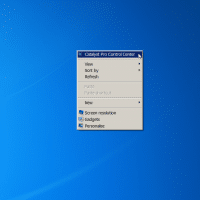
If you connect your HP 23xi display to a PC with a ATI or NVIDIA video card you may encounter a black border around the edge of the screen. Thankfully, there is an easy fix! For ATI/AMD, change scaling options: Right Click on Desktop Select “Catalyst Pro Control Center” Advanced -> ATI Catalyst Control Center -> Graphics -> Desktops & Displays Please select a display. (Click the black downaward arrow in the corner of the display graphic) -> Configure Scaling

Open PDF files in different Foxit Reader windows (not tabs) [SOLVED]

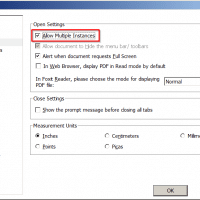
Foxit is a very nice PDF reader, however, a few versions back they made a change that is limiting for multiple monitor users. Specifically, PDFs open in separate Foxit tabs rather than their own windows. This can make it tough to compare two documents side-by-side etc. Thankfully, there is an easy fix to allow multiple Foxit PDF windows: File -> Preferences -> Documents -> Check the “Allow Multiple Instances” box -> Click OK That is all there is to it!

Format FAT32 on 64GB, 128GB, 256GB USB flash drives on Windows

Need to format a > 32GB USB flash drive as FAT32 but Windows won’t let you? No problem, here is a free and safe utility that you can use to format your thumbdrive:   (dl website) More details and background: Recently I needed to format a 64GB USB flash drive as FAT32. This was for use in a Chevrolet vehicle that requires FAT32 and 32K cluster sizes in order to read from high capacity USB flash drive. I ordered a

« Older Entries Recent Entries »