What does a yellow light on my Amazon Alexa Echo mean?! [SOLVED]
Question: What does a blinking yellow light on my Amazon Alexa Echo mean?
Answer: If your Alexa device starts showing a pulsing yellow light, it means that a message or notification* is waiting for you. To hear your notifications you can say things like: “Alexa, play my messages” or “Alexa, what did I miss?” 🙂
*NOTE: if you have not enabled messaging, it could be the new package notification feature… you can also check your notifications by saying “Alexa, what are my notifications?”
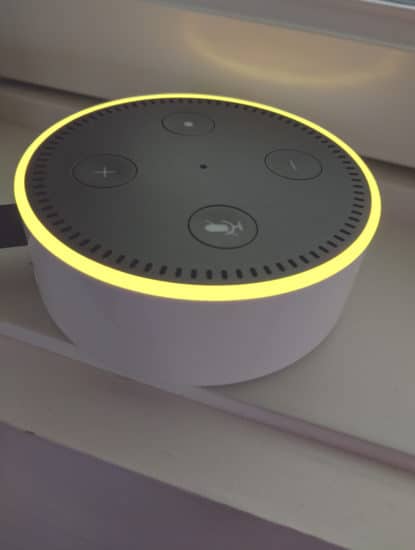
The Yellow Ring! 🙂
Top Search Terms:
- alexa flashing yellow (73)
- why is alexa flashing yellow (52)
- alexa yellow light (32)
- alexa yellow ring blinking (30)
- alexa blinking yellow (26)
- why does alexa flash yellow (25)
- alexa flashing yellow ring (24)
- alexa glowing yellow (18)
- yellow light on alexa (18)
- why is my alexa flashing yellow (18)
Thank you, I looked on Amazon, could not find the answer.
Hi Pam,
Thank you for your comment. I am very glad that my article helped with your notification light 🙂
Enjoy your Alexa and have a great week!
Best regards,
-J.D.
I also thank you for your article, I had the flashing yellow light and also could not find the answer.
No problem! Glad that I could help 👍
How do I turn on my yellow Alexa notifications
Paul, you normally do not manually turn the yellow light on. It shows up when Amazon or Alexa has a notification waiting, usually a delivery, message, reminder, or announcement.
This has been bugging me all mornin. Thx and now I know what the dang yello light means!
No problem! Thanks for taking the time to comment. Have a great weekend! 👍
Best regards,
-J.D.
Thanks, yellow light was driving us crazy, kept on asking her for my messages, but notifications worked.
Hi Kathy. Thanks for taking the time to comment. Glad I could help!
Have a great day and weekend,
-J.D.
With the help of Alexa app, you can send or receive messages. When there is an incoming message that Echo device gives pulse yellow light, So Yellow light ring means, you have a notification from Amazon Alexa app.
Thanks for the tip, Dyer!
Best regards,
-J.D.
Thank you. At first I thought, now what’s the problem..lol
Nice feature, just don’t remember activating this skill.
Hi Ed,
Thank you for your comment. I am glad this answered your question 🙂
Enjoy your Alexa and have a GREAT weekend!
Best regards,
-J.D.
Hi! My Alexa yellow light has been flashing. I ask to read my notifications. She responds “you have one new notification” but doesn’t read anything, just continues gashing yellow. I’ve asked several times, unplugged, replugged in .. still flashing yellow. ???
Diana, a yellow ring can be a package alert or another notification even when Alexa says there is just one item. I would check the Alexa app for notifications and delivery updates, then ask Alexa to read or clear them again.
Thank you worked a treat
Excellent, James!
Thank you for commenting and have a GREAT week!
-J.D.
Thank u sm It worked. At first it made me wonder.Then I followed as per ur inst.
Hi Sharmilla,
I am glad my post helped you! Enjoy your Amazon Echo and have a GREAT day 🙂
Best regards,
-J.D.
Thank you so much for your post. Now my alexa back to normal lol
No problem! Glad I could help.
Have a great weekend!
-J.D.
Do you know why Amazon and Alexa don’t seem to talk to each other? I checked the notification I had (answer to a question I asked) and even replied to it, yet all my devices continued to glow yellow. I had to eventually tell Alexa to delete all notifications before it stopped. Anyway to have Alexa stop glowing after I checked a notification online or through the app?
Earl, from what I saw, checking a notification in the app or online did not always clear the yellow light on the Echo itself. Saying the notification command by voice, or deleting the notifications entirely, was the more reliable fix.
Thanks for your help. I definitely will keep you in my “Who to Ask” about my Amazon Echo Dot.
Happy Thanksgiving to you.
Hi Lannie,
Thank you for your kind comment. I am very glad these steps worked for you! Have a great day!! 👍😀
Best regards,
-J.D.
HOW DO YOU STOP THIS CRAP FROM HAPPENING???? I DON’T WANT A STUPID YELLOW LIGHT FLASHING! I DO NOT NEED ANY STUPID TEXT MESSAGES OR TOLD A PACKAGE HAS BEEN DELIVERED! NEVER WANTED IT, NEVER ASKED FOR IT!!!!
Hi John John,
Thank you for your question! To turn off the Yellow light:
#1 Open the Alexa app on your phone
#2 Go to the menu (the three horizontal lines icon) and select Settings.
#3 Select Notifications.
#4 Select a feature to view notifications options for different categories
#5 Toggle all notification options to OFF.
Thanks and have a great day!
-J.D.
Mine is off and it still lights yellow. When I tell it to play my messages, Alexa says the feature is disabled.
Clay, if messages are disabled but the light still comes on, it is often a package or other app-level notification instead. I would check the Alexa app for delivery alerts, reminders, or announcements and clear those.
does my alexa have a nightlight mode?
Rm, the yellow light is not a nightlight mode, it is a notification indicator. Some Echo models do have separate display or night settings in the Alexa app, but that is a different feature.
Thank you! I was thinking that Alexa was becoming self aware.
Jon, thank you for your comment! It made me laugh 🙂
Have a great week and enjoy your Echo.
Best regards,
-J.D.
I am trying to stop the yellow flashing as well. I tried the suggestion above and when I select notifications it brings me to Help & Feedback where I can go no further. What now?
Margie, if the app path changed, the simplest test is still to ask the device directly for its notifications and then clear them. The yellow light is usually tied to messages, deliveries, reminders, or announcements.
Informative, the yellow ring popped up after having Alexa for a few days and found your blog. Thanks!
Excellent, Tim! I am happy that my blog helped you with your new Alexa device 🙂
Have a GREAT weekend and thank you for visiting my site!
Best regards,
-J.D.
I asked Alexa about the blinking yellow light, shouldn’t Alexa have been able to answer that question? Lol
Dear Anne,
Thank you for your insightful (and funny) comment!
Yes, I certainly wish Alexa could fulfill some of the more straightforward requests. The same goes for Siri and Google Assistant, they really need a bit more capability in managing the device(s) via voice. 🙂
Best regards,
-J.D.
Thank you so much. I couldn’t figure out how to get rid of the yellow ring. I sincerely appreciate it!
Dear Tony,
You are very welcome! Thank you for your nice comment and have a GREAT week 🙂
Best regards,
-J.D.
Strange. I asked Alexa herself what the yellow circle meant. She didn’t know.
Yes indeed, it seems like companies are missing out on an opportunity. I wish they would take the time to add more device capabilities to their voice command list. The example you provided is a great one. I also wish an Echo speaker could tell you its device name, as sometimes I have a hard time remembering which Echo is named what when I move them around.
Thank you for commenting and have a great day 🙂
Best regards,
-J.D.
the yellow ring on my echo was displayed. The package was on my porch. How do I let Alexa know she can turn off the yellow light now. I told her to stop, then cancel. neither worked.
Mike, the yellow light does not turn off just because the package arrived, it turns off when the notification is cleared. I would ask Alexa to read your notifications or delete them.
Yesterday as I repeatedly noticed my Alexa device pulsating the yellow light, I began to wonder whether it might be listening and recording conversations. At one point, I unplugged it, but when I plugged it back in it continued the yellow light. Then I asked my computer to tell me what was happening. Asking the right question of Alexa solved my problem. Many Thanks!
Excellent, Dennis! I am very glad you were able to find the right answer. 🙂 Have a great day!
Best regards,
-J.D.
What kind of notifications does Alexa send? Can you give us some examples?
Billy, common examples are package delivery alerts, reminders, messages, announcements, and answers to things you asked Alexa. In my case, package notifications were the usual reason.
I came home and saw the yellow light blinking. I asked for notifications and Alexa answered with this: “.My, the Internet country code top-level domain (ccTLD) for Malaysia.” I never asked that question.
Also, the light kept blinking yellow. I asked again for my notifications. Again, Alexa answered with “.My, the Internet country code top-level domain (ccTLD) for Malaysia.”
And again.
Never stopped.
I unplugged Alexa. Amazon has gone mad.
Mine is still pulsing yellow.
I’ve tried everything to stop yellow pulsing on my echo in fact all 3 devices are pulsating yellow. I have no notifications on. Still cant get it to stop please HELP
Rita, if all three devices are still pulsing yellow, it sounds like the notification is stuck at the account level rather than on one Echo. I would ask one device to read or delete all notifications, then check the Alexa app for delivery notifications and reminders.
Thanks for the answer My wife thought she’d broken it..lol
Thank you for your comment, Mike! I am very glad that your Alexa is back to normal now. 🙂
Have a GREAT week!
Best regards,
-J.D.
Job well done thank you.
Excellent, Angie! I am very glad that I could help with your Alexa issue.
Have a GREAT week!
Best regards,
-J.D.
Thank you asked the right question and Alexa sorted it for me.
Thank you for your comment, John. I am very glad that my blog entry helped you with Alexa. 🙂
Have a GREAT week!
Best regards,
-J.D.
turned notifications off still pulsing yellow
Thanks for your guidance notes. No sooner had I established what the yellow flashing ring was when the Amazon delivery driver I was expecting appeared as if by magic.
👍 🧙♂️
Very cool, Kevin! Enjoy your delivery and have a GREAT weekend. 🙂
Best regards,
-J.D.
You solved my yellow light problem. Many thanks.
No problem! Have a great day!
Best regards,
-J.D.
Thanks J.D. – this helped solve our issue with Alexa.
Thank you for your nice comment. 🙂 I am very glad this tip worked to fix the time on your Alexa!
Best regards and have a great day!
-JD
Thank you for your nice comment. 🙂 I am very glad this tip worked to fix your Alexa!
Best regards and have a great day!
-J.D.
Thank you for the help, JD! Turns out, Amazon was letting me know it was time to order cat food. Just a simple message that was well intended, the cat appreciated it anyway.
Hi Randy! Sorry for the late reply, so glad that I was able to help. Hope you and the cat are having a great day!! 👍😺
Best regards,
-J.D.
thanks, I just enabled communication yesterday, wasn’t familiar with this indicator, and trying to ask my Echo didn’t help (“what does your yellow indicator mean” “sorry, I’m not sure”…). I figured it was probably something to do with the communication feature and was probably some sort of alert, but beyond that, well, Google is your friend 🙂
I have a FireTV cube with Alexa built in. I installed 5 days ago now Alexa does not respond. The box flashes yellow over and over. I have tried the phone method you recommended. I have asked questions about notifications, etc. and nothing.
Bill, if Alexa is not responding at all, the yellow flash may not be the whole problem. I would restart the Cube, make sure it is online and the mic is working, and then check the Alexa app because that sounds broader than a simple pending notification.
Mine blinks the yellow light on echo dot 3.
and i dont remember turning on this feature!
How do i turn it off ?
Qwertyuiop, the yellow light is just Alexa telling you a notification is waiting. To turn it off, ask for your notifications, then clear them, and if you do not want package alerts you can disable those in the Alexa app.