How to hide old Android devices in Google Play / Android Market? [ANSWERED]
Q. Aloha, I have a number of Android devices now and some I have sold too. Whenever I download apps or do stuff in Google Play-used to be Android Market-I find that my old unused Android phones/tablets are still showing up 🙁 It is getting cluttered and it bothers me. Do you know I can remove or get rid of those old devices in the Google Play site? Mahalo in advance. -Charlie S.
A. Hi Charlie, great question!
I think I can be of some help. Please see the steps below to hide/remove an unused Android device from the Google Play menus.
Best regards,
-JD
PS enjoy those beautiful Hawaiian islands, I am a big fan of them!
How to hide unused Android devices in the Google Play app market
-
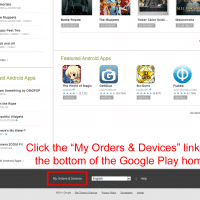
- Scroll to the bottom of the Google Play home page and click the “My Orders & Devices” link
-
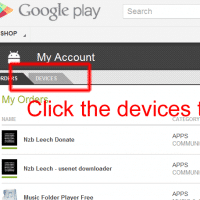
- Click the “Devices” tab
-
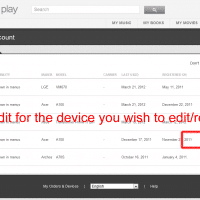
- Click “Edit” for the device you want to remove
-
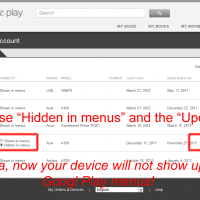
- Choose “Hidden in menus” then click “Update”
[end]
Top Search Terms:
- remove device from google play (76)
- google play remove device (47)
- remove device from android market (43)
- how to remove a device from google play (42)
- how to remove device from google play (37)
- delete device from google play (24)
- how to remove devices from google play (24)
- how to delete device from google play (20)
- how to change device in google play (19)
- remove devices from google play (18)
God that’s great!!
Hi Acme,
Thank you for your comment.
I am glad the instructions were helpful 🙂
Best regards,
-JD
Yes, it works well for a while, but there’s a bug in Google Market that means that your previously hidden devices will re-appear after a few days/weeks. (It’s just happened to me again..)
Hi JCB,
Thank you for your comment.
Now that you mention it, I think that one of my devices may have reappeared as well. Bummer 🙁
Best regards,
-JD
The problem is this only works for a few weeks then they all reappear. Seems a very sneaky way for Google to gather information about what devices you own. I want a “delete device from account” button.
The title clearly says remove, not hide. Please change the title.
I too wish to remove/delete old devices.
Thank you for your comment Hiney. The title has been updated.
Best regards,
-JD
Thank you so much for this helpful post! The images were perfect for me to easily make the tweaks I needed.
This is a surprisingly hidden away options page… Everyone should know this. =)
Thank you for your kind words DoctorFu 🙂 I am glad it was helpful!
Best regards,
-JD
Thanks!
Thank you for your comment. You are very welcome Uriar 🙂
Best regards,
-JD
i had a problem with google play…the problem is…every time i have a new phone android i link with google play…the problem is i can’t remove the device every time i add anew phone device at google play…do google play had any solution how can i remove the device…pls help because at this time i had a 6 device list at google play device…thank you hope you all can explain it …
Hi diedy126,
Thank you for your comment and your excellent question!
Yes, you can remove devices and here is photo tutorial on the process:
http://www.jdhodges.com/2012/03/remove-android-devices-google-play-android-app-market/
(on that page make sure to click the thumbnails for larger screenshots that fully show the steps)
I hope this help!
Best regards,
-JD
PS sorry I thought you had commented on a different post. If the steps above don’t work then I don’t know anything else to try, sorry 🙁
Best regards,
-JD
i really dont understand why we just cant delete a device, my tablet was stolen and i would just like to remove all traces of it but i still have to see the tablet show up in my google marked. how fustrating!
I want to remove a device that i never used but think somebody used my account (the EX). help i do not want it to access any account info.
Hey Cindy, sorry for the late reply! The most important step here is to change your Google account password immediately if you think someone else has accessed it, since removing a device from Google Play doesn’t revoke their access to your account. After changing the password, go to myaccount.google.com > Security > Your Devices and remove any devices you don’t recognize. Then you can hide or remove the device from Play as the post describes.