Cancel a GoDaddy domain registration and get a refund
UPDATE: New 2019 instructions for GoDaddy refunds 🙂
Old info from 2009:
Yesterday I needed to know how to cancel an inadvertently renewed domain registration on GoDaddy. Here are the instructions I received from GoDaddy:
| Discussion Notes |
|---|
| Support Staff Response |
| Dear Jay D Hodges,Thank you for contacting Online Support. We would be happy to request a refund for your order. However, we will need you to first cancel the item(s) in question within 45 days of the renewal date. Once canceled, please reply to this email and we will submit your refund request. Please note: Cancellation and refund of certain services will also cancel any free services associated with it.To cancel any item in your account, please use the following instructions:First, log into your customer account:• Go to our homepage. • Log in at the top of the page using your account username (which may be the same as your customer number) and password.If you have trouble logging in, our Account Retrieval System may help you. You can use this to retrieve your customer number and/or reset your customer account password. You can find this system by selecting ‘Click Here’ next to ‘Forgot Your Password?’ on the ‘My Account’ login page. Once logged in, follow the steps below to cancel: • Select ‘Payments and Renewing Items’ from the ‘My Renewals & Upgrades’ menu. Please let us know if we can assist you in any way. Regards, |
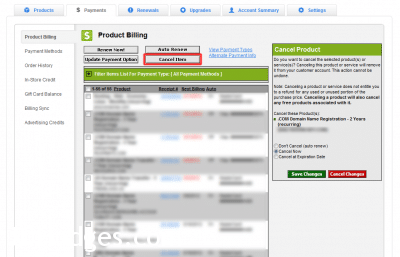
Checkbox domains to cancel, press ‘Cancel Item” button, confirm
Here is my original request for help from Godaddy:
Hello,
The following domain names under my account were automatically renewed: (list of domain names)
I did not want to renew these domain names. May I please cancel the renewal of those domains?
Thank you for your help, […]
- godaddy refund (116)
- godaddy cancel renewal (37)
- godaddy domain refund (28)
- go daddy refund (27)
- godaddy cancel domain refund (23)
- how to get a refund from godaddy (20)
- refund godaddy (20)
- godaddy refund domain (19)
- godaddy cancel domain renewal (15)
- cancel godaddy (15)
I have 100 domains on Godaddy and i can say that this company is very reputable.:-;
Hi Evelyn,
Thank you for your comment. I agree, generally, GoDaddy has been a reliable domain registrar over the years 🙂
Best regards,
-J.D.
Ok not to counter react what you have written but I thought you may like to know that they have slightly changed it a little… You now do all the steps that you mentioned here, but then you have to accept a confirmation email to fully cancel your account Thought you might like to know… Also I wanted to know if I could possibly email you about a website question before I attempt to start my own… Thanks again…..
Thank you for your comment. Feel free to email me if you have a website question. I’m not sure if I’ll be able to help, but I’m happy to try :-).
that what i received, i registered a homepage only several hours, why i want cancel it?because i reveived a homepage without “www”.fellowing text showed after cancel button clicked, can you tell me what i can do to refund my money.
“This account change requires your confirmation. Please read on.
Are you sure you wish to cancel the product(s) or service(s) listed below? This action cannot be undone.
Note: Canceling a product or service will cancel any free products associated with it and does not entitle you to a refund of any kind.
Cancel these product(s):”
Sorry for the late reply, Peter! That warning message from GoDaddy saying cancellation doesn’t entitle you to a refund is scary but not always accurate for brand-new registrations. The key is to cancel within the refund window (5 days at the time) and then contact support via live chat or phone and specifically ask for a refund. The instructions in the post outline that process. If you’re past the window unfortunately there’s not much you can do.
i just cancelled my domain “hagaretube.com” but i didn’t get any email or question. can u help me how i to get refund.
Sorry for the late reply, Elias! After canceling a domain on GoDaddy you typically need to contact their support via live chat or phone and explicitly request the refund. Just canceling the domain in the account portal doesn’t automatically trigger the refund. The refund request has to go through their billing team within the refund window.