Olympus OM-D not showing live view [SOLVED]
If your Olympus micro four thirds camera ever refuses to show live view, you may need to press the following button:
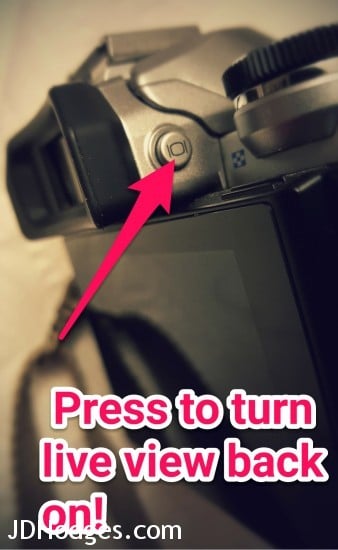
The button is located on the right side of the viewfidner
If you are having this problem, I hope this tip helps! 🙂
Top Search Terms:
- https://www.jdhodges.com/blog/olympus-omd-live-view-fix-solved/ (7)
- olympus no liveview (2)
- olympus camera live view (1)
- olympu live view not showing (1)
- olympis live view (1)
- my olympus camera isnt showing the menu on the screen (1)
- liveview olympus em 10 2 (1)
- liveview broken omd em5 (1)
- em10 live view (1)
- www.jdhodges.com (1)
Thx for this! I thought my Olympus was broken when the live view was always black but your tip fixed it. Thx again!
Hi Sampson,
Thank you for your nice comment! I am very happy this tip was helpful to you. Enjoy your nice Olympus camera 🙂
Best regards,
-J.D.
AHA!! Thanks! I usually have a myset linked to that button but after a firmware update months ago I lost all my settings – AND my live view! It was driving me nutty! I am eternally indebted to you 🙂
Hi Ester,
Thank you for your kind words. I am very glad that my tip helped!
Have a GREAT weekend and thank you for visiting my site! 🙂
Best regards,
-J.D.
Thank you very much! You saved my day!
Dear Alec,
Thank you for your nice comment! I am very glad that my tip helped. 🙂
Enjoy your OM-D and have a GREAT day!
Best regards,
-J.D.
Thanks! I was about ready to lose my mind when this happened to me. Such a simple fix! Much appreciated.
No problem! Thanks for the nice comment. Have a great day!! 👍
And it’s as simple as that!
Thank you!!!
One would think that Olympus, or any of the many other tutorials on Live View and the Super Control Panel would mention that important little detail.
Hi Don. I’m so glad that the tip helped. Thanks for the nice comment.
Have a great day!! 👍
Thank you for this post.
Dear Jason,
You are very welcome. 🙂 Enjoy your Olympus Micro Four Thirds camera and have a GREAT weekend!
Best regards,
-J.D.
Thank you! I never even spotted that button before when I was trying figure out what went wrong.
Dear Christopher,
Thank you for your comment. I am very glad that my post helped, it is certainly a very innocuous little button!
Have a GREAT week!
Best regards,
-J.D.
Hi, I’m having a similar issue with my e450. Live view worked perfectly until I changed the lens.. now it’s doesn’t “preview” the shot. After taking a pic I can view what it took and all menu items. I did press the [o] button and still nothing. Tried a reset, nothing. What else can I try? Thanks!
Jesse, I have not tested that exact E-450 behavior, so I cannot say for sure it is the same issue. Since it started right after changing lenses, I would first re-seat the lens, clean the contacts gently, and check whether there is another EVF or LCD toggle involved.
Your small tips actually answers my question. Thanks heaps!!
Hi Mike. I’m so glad that the tips helped and that I was able to help you! Have a great day!! 👍😀
Still helpful in 2021! Thanks
I’m glad I could help! Have a great weekend!! 👍😀
Hi my EM5 II after pressing that button. Live view will not come back up. Would you know how? ✨🙏🏻🙏🏻
Ong, my best guess is that the same viewfinder or live-view toggle got switched again rather than the camera dying. If pressing that button once did not bring it back, try cycling it again and checking whether the eye sensor or EVF mode is taking over.