How 25,000 Junk Folders Were Breaking My AI Doc Organizer (Garbage In, Garbage Out)
How 25,000 Junk Folders Were Silently Breaking My AI Document Organizer (Garbage In, Garbage Out)
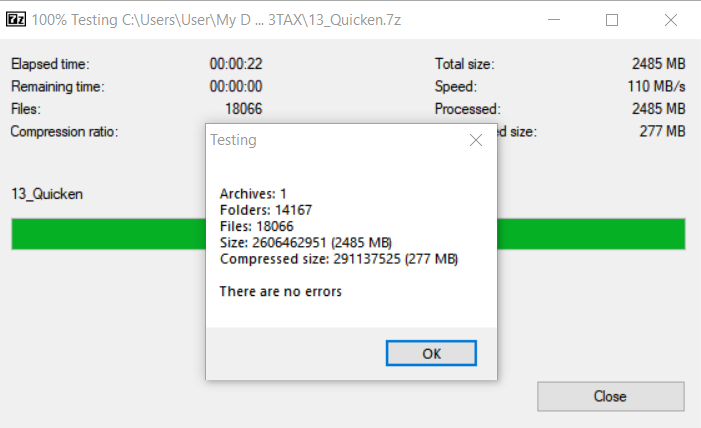
Thousands of (somewhat) zombie Quicken folders taken care of via compressing them into one 7z archive:
Details: My AI File Organizer Was Fighting 25,000 Phantom Folders (And Losing 😜)
For a while, my automated document filer was misbehaving. Scan an insurance card — it suggests filing it in a folder called Q-Final. Scan a bank statement — it wants to put it in Attach. The AI seemed confident in suggestions that made no sense.
I upgraded the model. Tweaked the prompts. Built a scoring re-ranker. It got better, but the weirdness never fully went away…
The Actual Problem
I’m building a tool called ScanFiler. It watches a folder for scanned documents, uses a local AI to figure out what they are, and suggests where to file them — routing an insurance EOB to the right insurer subfolder, a mortgage statement to the right loan folder, and so on. To do that, it builds an index of every folder in my document archive so it knows what filing destinations exist.
During a routine debugging session, I asked it to report on exactly what it had indexed.
Total folders in index: 26,159
TAX-related folders:    25,256
TAX % of total:         96.5%
Ninety-six and a half percent of my entire folder index was old outdated tax folders. The AI wasn’t being dumb — it was doing its best work inside a library where 96% of the shelves were labeled with hex codes.
How 25,000 Folders Got There
Buried inside Taxes/JAY/ were 16 old working directories spanning tax years 2000 through 2015 — 00TAX through 15TAX. Each contained the usual mix: Quicken data, TurboTax backups, scanned receipts, install ISOs from whatever software was current that year.
Quicken has a particular quirk: when you attach a document to a transaction, it creates a dedicated folder for that attachment (at least in the old days and versions). One folder per receipt. If you’re the kind of person who scans every receipt for 15 years, those folders compound.
Here’s what the breakdown looked like:
| Year Folder | Subdirectories |
|---|---|
| 00TAX | 4 |
| 01TAX | 7 |
| 02TAX | 137 |
| … | … |
| 09TAX | 1,790 |
| 10TAX | 1,567 |
| 11TAX | 2,084 |
| 12TAX | 3,891 |
| 13TAX | 14,193 |
| … | … |
Total: 25,100 directories. 37,892 files.
2013 was apparently a banner year for receipts. That single folder contained 14,193 subdirectories — mostly hex-named attachment folders like 00018000 and 00017E30, each holding one scanned image, nested four levels deep inside 13_Quicken/Q-Final/BACKUP/Attach/.
The folder names Q-Final, T-During, Attach, VmIcons, BACKUP — those were the Quicken structure names bleeding into my filing index. Competing against perfectly reasonable destinations like Insurance/Health and dental/Ambetter and Security Bank of the Ozarks Statements.
The most painful detail: there was already a folder in there called !NEW TAX FOLDER (Use only this). Past me knew these were obsolete. Past me even left a note. Present me had forgotten completely.
The Fix Was Two Lines of Config
The indexer now has a skip list — folder names it ignores during the directory walk:
index_skip_folders:
  - "00TAX"
  - "01TAX"
  # ... through 15TAX
  - "~TAX90s"
  - "JD Quicken Copy - Deletable"
After a reindex: 26,159 folders dropped to 1,088.
The actual AI model didn’t change at all. The classification quality improved immediately.
And Then I Cleaned Up For Real
The folders themselves were consuming 16.8 GB of storage — not enormous, but 25,000 directories create real overhead in sync times, backups, and filesystem metadata. I compressed each year’s Quicken folder into a 7z archive (non-solid mode, so any corruption only damages individual files rather than the whole thing), verified with 7-Zip’s built-in integrity check, then deleted the originals.
The compression numbers were genuinely satisfying. The 13TAX Quicken folder — 2,485 MB of receipt images spread across 14,167 folders and 18,066 files — compressed to 277 MB. 89% reduction. Scanned receipts, it turns out, compress beautifully.
The archives now live in a single _ARCHIVED_QUICKEN/ folder. Still accessible if I ever need a 2013 receipt for some reason. Just no longer poisoning my filing index.
What I Took Away From This
Garbage in, garbage out. It’s one of the oldest rules in computing, and AI doesn’t get an exemption. I spent real time improving the classifier — scoring heuristics, a re-ranker, a model upgrade. All useful work. But the single biggest improvement came from removing garbage from the index. No model, no matter how capable, can reliably find the right answer when it’s buried under 25,000 wrong candidates.
Old file structures follow you. These Quicken folders were created between 2000 and 2015. They got copied from machine to machine, eventually landing in cloud storage, quietly growing through sync. Nobody was using them. Nobody knew they were causing problems. They were just there.
Follow your own breadcrumbs. !NEW TAX FOLDER (Use only this) was a message to myself. If you’ve ever created a folder with “use only this” in the name, it probably means there’s a cleanup job you started and never finished. Worth five minutes to find out.
ScanFiler is a personal project — a Flask app running on my local server that routes scanned documents to the right place using a local LLM. The debugging session that found this problem was done with Claude Code and QWEN 3.5 has been useful as a local LM for categorizing data.
TAGS:
AI document organizer ScanFiler Quicken attachment folders garbage in garbage out local LLM AI file classification document management 7-Zip compression folder index bloat Claude Code Qwen 3.5 receipt scanning TurboTax backup cleanup AI model accuracy home server automation file organization LLM prompt engineering scanned documents CIFS mount Flask app off-grid tech self-hosted AI